
Securing your Ubuntu 26.04 system starts at the most fundamental level: how privilege escalation is handled. With Ubuntu 26.04 Resolute Raccoon, Canonical has made a significant change by shipping sudo-rs as the default sudo implementation. This Rust-based rewrite of the classic sudo utility aims to deliver the same functionality with improved memory safety and a reduced attack surface. In this article, we explore what sudo-rs ubuntu 26.04 brings to the table, how it differs from the traditional C-based sudo, and how to switch between implementations if needed.
Table of Contents
In this tutorial you will learn:
- What sudo-rs is and why Ubuntu adopted it
- How to verify your sudo-rs installation
- Key behavioral differences from traditional sudo
- Current compatibility limitations of sudo-rs
- How to switch between sudo-rs and the original sudo
Software Requirements
| Category | Requirements, Conventions or Software Version Used |
|---|---|
| System | Ubuntu 26.04 Resolute Raccoon |
| Software | sudo-rs (default), sudo (optional alternative) |
| Other | Privileged access to your Linux system as root or via the sudo command. |
| Conventions | # – requires given linux commands to be executed with root privileges either directly as a root user or by use of sudo command$ – requires given linux commands to be executed as a regular non-privileged user |
| Step | Command/Action |
|---|---|
| 1. Check current sudo implementation | sudo --version |
| 2. Switch to traditional sudo | sudo update-alternatives --set sudo /usr/bin/sudo.ws |
| 3. Switch back to sudo-rs | sudo update-alternatives --auto sudo |
What Is sudo-rs?
sudo-rs is a reimplementation of the traditional sudo utility, written from scratch in Rust by the Trifecta Tech Foundation. The package also includes Rust-based su and visudo implementations. The project’s primary goal is to improve the security of one of the most critical components in any Linux system: the privilege escalation mechanism.
The original sudo, written in C, has been a cornerstone of Unix-like systems for decades. However, its C codebase has historically been a source of memory safety vulnerabilities, including buffer overflows and use-after-free bugs. By rewriting sudo in Rust, sudo-rs eliminates entire categories of these vulnerabilities at the language level.
Canonical began integrating sudo-rs into Ubuntu starting with the 24.10 release cycle, and by Ubuntu 26.04, it ships as the default sudo provider. Consequently, when you run sudo on a fresh Ubuntu 26.04 installation, you are already using sudo-rs without any manual configuration required.
DID YOU KNOW
sudo-rs is not merely a wrapper around the original sudo. It is a complete ground-up rewrite that parses sudoers files independently and implements its own policy engine. The project aims for full compatibility with the most commonly used features of traditional sudo.
Checking Your sudo-rs Installation on Ubuntu 26.04
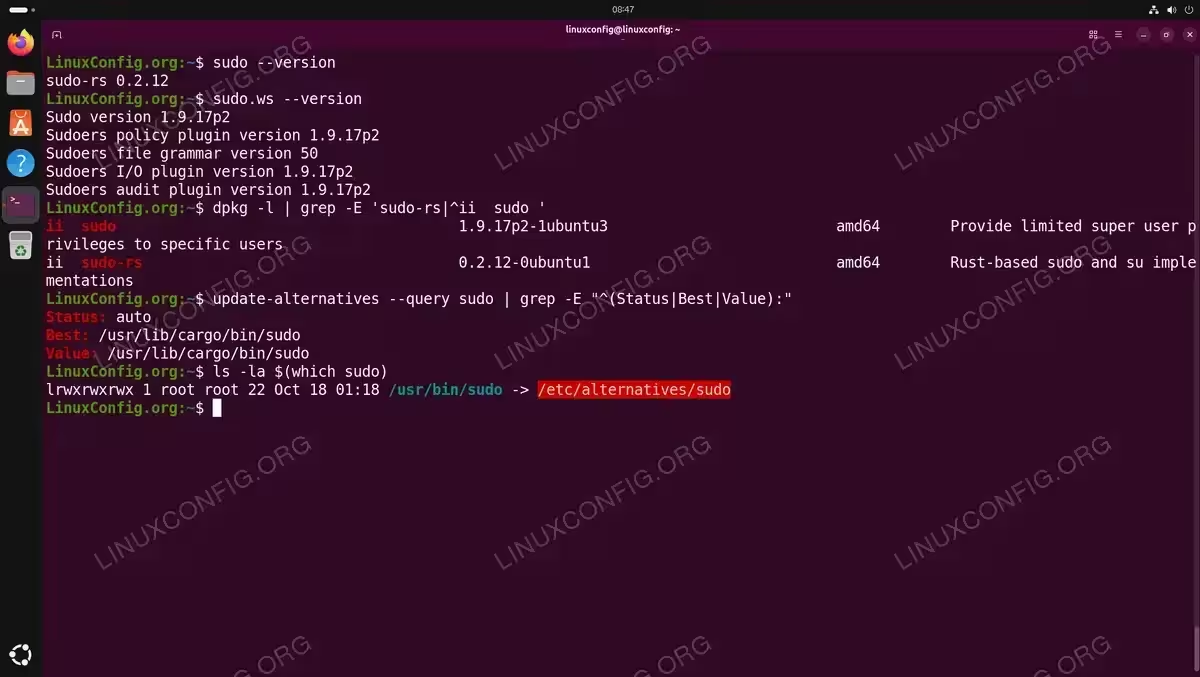
To confirm which sudo implementation is active on your Ubuntu 26.04 system, start by checking the version output:
$ sudo --version
If sudo-rs is active, the output is a single line identifying sudo-rs and its version number. In contrast, the traditional sudo displays a multi-line string beginning with Sudo version:
$ sudo.ws --version
Additionally, you can verify the installed packages directly using dpkg:
$ dpkg -l | grep -E 'sudo-rs|^ii sudo '
Note that both packages can be installed simultaneously on Ubuntu 26.04. The system uses the APT alternatives mechanism to determine which one is active. You can inspect this with:
$ update-alternatives --query sudo | grep -E "^(Status|Best|Value):"
The sudo-rs binary at /usr/lib/cargo/bin/sudo has a higher priority (50) than the traditional sudo at /usr/bin/sudo.ws (priority 40), so it wins in auto mode. Furthermore, you can verify the symlink chain:
$ ls -la $(which sudo)
DID YOU KNOW
Because both packages coexist, you can invoke either implementation directly at any time. Use sudo (or sudo-rs) for the Rust version and sudo.ws for the traditional C version. The same applies to visudo and visudo.ws.
Key Behavioral Differences Between sudo-rs and Traditional sudo
While sudo-rs aims for compatibility with the original sudo, our testing on Ubuntu 26.04 revealed several concrete behavioral differences. The following comparison table summarizes the key findings:
| Feature | sudo-rs | Traditional sudo |
|---|---|---|
| Password prompt | [sudo: authenticate] Password: |
[sudo] password for linuxconfig: |
| Password feedback | Asterisks (**********) |
Blank (no visual feedback) |
SUDO_TTY variable |
Not set | Set (e.g. /dev/pts/0) |
MAIL variable |
Not set | Set (e.g. /var/mail/root) |
| Timestamp storage | /run/sudo-rs/ |
/var/lib/sudo/ |
Password Prompt and Feedback
The most immediately visible change is twofold. First, sudo-rs displays a different prompt format: [sudo: authenticate] Password: instead of the traditional [sudo] password for username:. Second, sudo-rs shows asterisks as you type your password by default, whereas traditional sudo provides no visual feedback at all. This pwfeedback behavior is built into sudo-rs by default, making the experience more intuitive for new users.
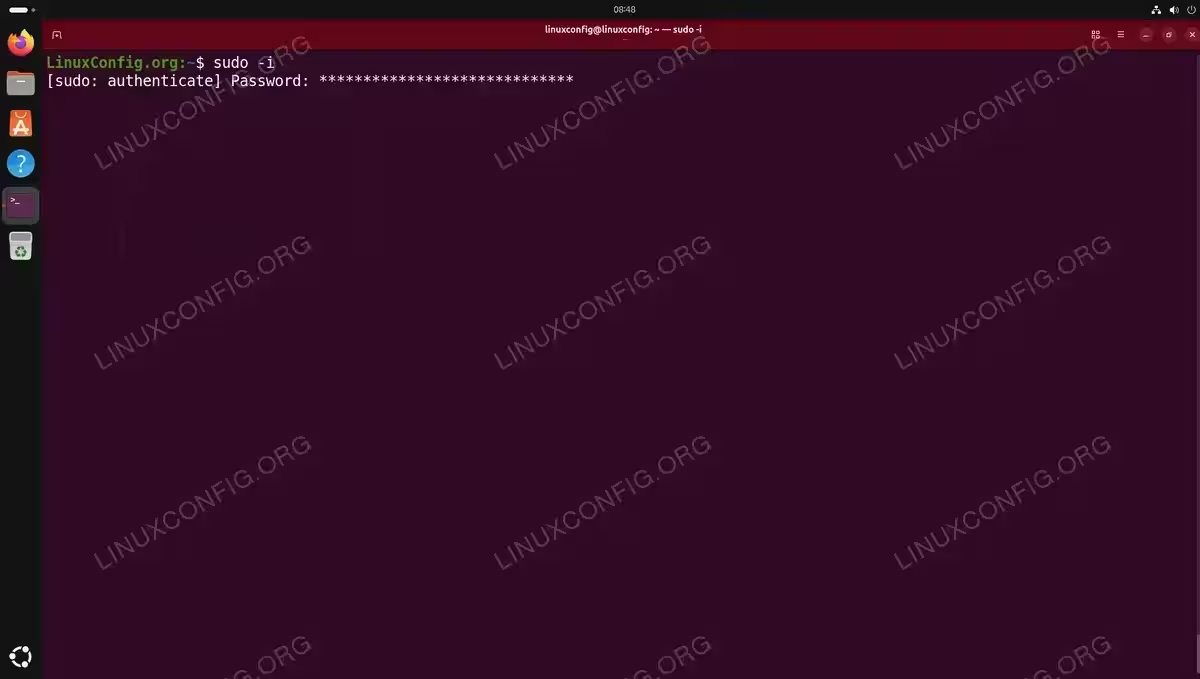
If you prefer the traditional silent behavior, you can disable this by adding the following line to your sudoers configuration using visudo:
$ sudo visudo
Then add:
Defaults !pwfeedbackEnvironment Variable Differences
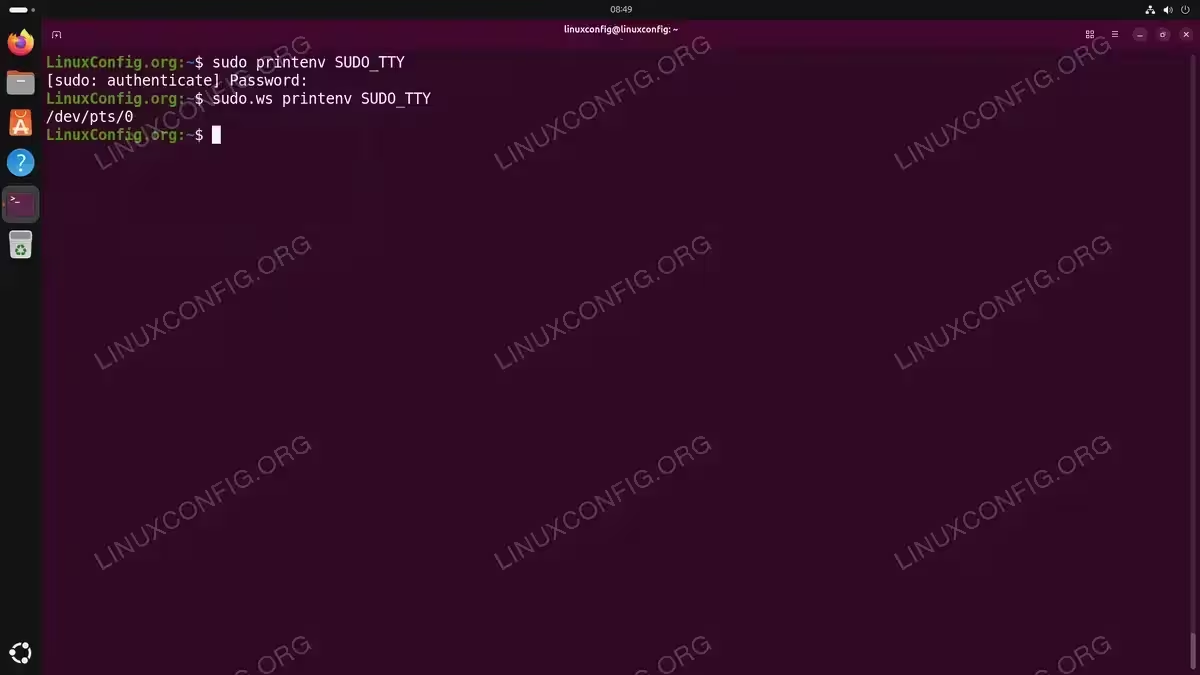
Our testing confirmed that sudo-rs does not set two environment variables that traditional sudo provides: SUDO_TTY and MAIL. All other standard sudo variables (SUDO_USER, SUDO_UID, SUDO_GID, SUDO_HOME, SUDO_COMMAND) are set identically by both implementations.
You can verify this yourself:
$ sudo printenv SUDO_TTY
(no output)
$ sudo.ws printenv SUDO_TTY
/dev/pts/0
IMPORTANT
If your scripts or applications rely on the SUDO_TTY or MAIL environment variables, they may break under sudo-rs. Test critical automation scripts after upgrading to Ubuntu 26.04, and consider switching to the traditional sudo if these variables are essential to your workflow.
Timestamp Storage
sudo-rs stores its authentication timestamps in /run/sudo-rs/, completely separate from the traditional sudo’s /var/lib/sudo/ directory. This means that invalidating timestamps with sudo -k in one implementation does not affect the other. If both packages are installed and you switch between them, each maintains its own credential cache independently.
Logging Behavior
sudo-rs logs authentication events to the system journal, similar to the original. Nevertheless, the log format and level of detail may differ slightly. You can inspect sudo-related log entries using:
$ journalctl -e | grep sudo
sudo-rs Compatibility and Limitations
Although sudo-rs covers the vast majority of common use cases, there are some limitations and differences worth noting on Ubuntu 26.04.
The su Command Is Not Replaced
Despite the package name (“sudo and su implementations”), the system’s su command on Ubuntu 26.04 remains the traditional version from util-linux:
$ su --version
However, sudo-rs does provide its own Rust-based su implementation, available as su-rs:
$ su-rs --version
Unlike sudo, there is no alternatives entry for su, so su-rs must be called explicitly. Note that su-rs requires a root password to be set (Ubuntu does not set one by default), so you would need to run sudo passwd root before using it.
Unsupported Sudoers Directives
As of the sudo-rs version shipped with Ubuntu 26.04, some advanced sudoers directives are not supported. These include certain options related to SELinux roles, some Defaults settings, and specific PAM session configurations. If sudo-rs encounters an unsupported directive in your sudoers file, it will typically log a warning and ignore the directive rather than failing outright.
Additionally, the sudo-rs visudo only validates /etc/sudoers itself, while the traditional visudo.ws also checks files in /etc/sudoers.d/:
$ sudo visudo -c
/etc/sudoers: parsed OK

$ sudo visudo.ws -c
/etc/sudoers: parsed OK
/etc/sudoers.d/README: parsed OK
Plugin System
Traditional sudo supports a plugin architecture that allows third-party extensions for logging, approval workflows, and I/O capture. sudo-rs does not currently implement this plugin system. If your environment depends on sudo plugins (for example, for centralized audit logging), you may need to continue using the traditional sudo implementation.
Command-Line Flag Compatibility
Our testing confirmed that all commonly used flags work identically between both implementations: -l, -i, -s, -E, -S, -A, -n, -k, -K, and --preserve-env all produced the same behavior. One minor difference is that sudo-rs -V exits with code 0, while sudo.ws -V exits with code 1.
IMPORTANT
If you manage servers with complex sudoers policies, test your configurations thoroughly with sudo-rs before relying on it in production. You can always switch back to the traditional sudo package if you encounter incompatibilities.
Switching Between sudo-rs and Traditional sudo
Ubuntu 26.04 makes it straightforward to switch between sudo-rs and the traditional sudo implementation. Both packages use the APT alternatives system with sudo as the master link controlling sudo, sudoedit, and visudo simultaneously.
Understanding the Alternatives System
On a default Ubuntu 26.04 system, both packages are already installed. The alternatives system selects the active one based on priority:
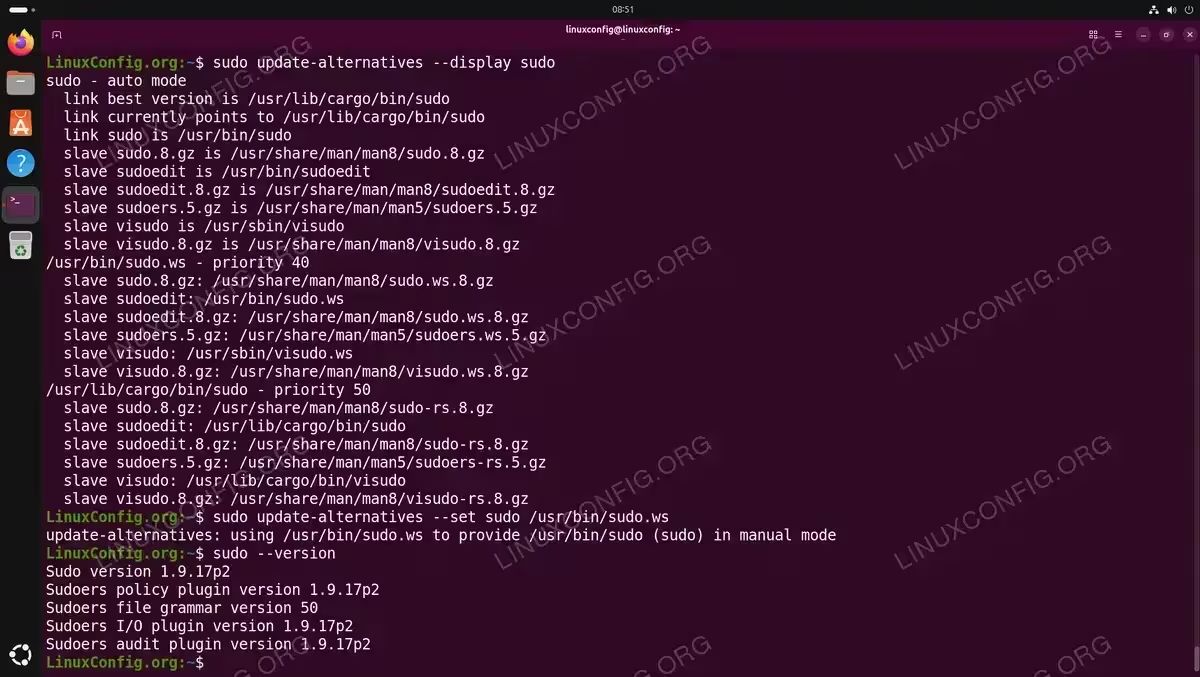
$ sudo update-alternatives --display sudo
Since sudo-rs has a higher priority (50 vs 40), it is selected automatically. You can override this by manually setting the active alternative.
Switching to Traditional sudo
To switch to the original C-based sudo, use update-alternatives:
$ sudo update-alternatives --set sudo /usr/bin/sudo.ws
Verify the switch was successful:
$ sudo --version
The output should now display the traditional Sudo version string.
Alternatively, you can invoke the traditional sudo directly at any time without switching the default:
$ sudo.ws --version
Switching Back to sudo-rs
To return to the Rust-based implementation, either set it explicitly or restore auto mode:
$ sudo update-alternatives --set sudo /usr/lib/cargo/bin/sudo
Or restore automatic priority-based selection:
$ sudo update-alternatives --auto sudo
Confirm the change:
$ sudo --version
IMPORTANT
Your sudoers configuration files (/etc/sudoers and files in /etc/sudoers.d/) are preserved when switching between implementations. Both packages read the same configuration files. However, remember that sudo-rs may silently ignore directives it does not support, so test your sudo configuration after switching.
[IMAGE PLACEHOLDER: Terminal showing the process of switching from sudo-rs to traditional sudo and back]
Conclusion
Ubuntu 26.04’s adoption of sudo-rs as the default privilege escalation tool represents a meaningful step toward improved system security through memory-safe software. Our testing confirmed that for the vast majority of users and administrators, the transition is seamless: all commonly used flags work identically, and standard sudoers configurations are parsed correctly. The practical differences boil down to cosmetic changes (a different prompt format and password asterisks), two missing environment variables (SUDO_TTY and MAIL), and the absence of the plugin system. Moreover, the fact that both implementations coexist on the same system and can be invoked directly or switched via update-alternatives ensures that users with advanced requirements always have a fallback path. As sudo-rs continues to mature, the remaining gaps will narrow further, making it a solid foundation for Ubuntu’s security model going forward.
Frequently Asked Questions
- Is sudo-rs a drop-in replacement for sudo on Ubuntu 26.04? For most use cases, yes. sudo-rs reads the same
/etc/sudoersand/etc/sudoers.d/configuration files and all commonly used flags (-i,-s,-E,-S,-A,-n,--preserve-env) work identically. However, sudo-rs does not set theSUDO_TTYandMAILenvironment variables, and does not support the plugin system, so complex setups should be tested. - Why does my password show asterisks when I type it with sudo on Ubuntu 26.04? This is a default behavior of sudo-rs, which enables the
pwfeedbackoption out of the box. Traditional sudo shows no characters while typing. You can disable this by addingDefaults !pwfeedbackto your sudoers file usingvisudo. - Why does the sudo prompt look different on Ubuntu 26.04? sudo-rs uses a different prompt format:
[sudo: authenticate] Password:instead of the traditional[sudo] password for username:. This is a cosmetic difference and does not affect functionality. - Can I use both sudo-rs and traditional sudo at the same time? Both packages are installed by default on Ubuntu 26.04. While only one can be the active
sudocommand (controlled byupdate-alternatives), you can always invoke the traditional version directly assudo.wsand the Rust version assudo-rsregardless of which is currently set as the default. - Does sudo-rs also replace the su command? No. The system’s
sucommand remains fromutil-linux. sudo-rs provides a Rust-based alternative available assu-rs, but it is not the default and must be called explicitly. Usingsu-rsrequires a root password to be set first withsudo passwd root. - Where can I report bugs or check the status of sudo-rs? The sudo-rs project is developed by the Trifecta Tech Foundation and hosted on GitHub. You can file issues, check supported features, and follow the project’s development roadmap there.