
John the Ripper is one of the most powerful password cracking tools available on Linux systems. It remains so popular because it is relatively simple to use, it supports many different types of password hashes, and will brute force almost any type of password.
In this tutorial, you will see how to install John the Ripper on various major Linux distributions, and get started with using the program to crack passwords via Linux commands. You will also learn the fundamentals of hashing algorithms, using word lists for brute force cracking attempts, and best practices to make sure that your passwords are difficult for attackers to obtain.
WARNING!
You should only use John the Ripper and attempt password cracking for testing purposes, and against password hashes that belong to you. Breaching account security and obtaining passwords to another person’s account can land you in hot water with the law, so use the program on your own system, solely to educate yourself about cybersecurity, and to test the efficacy of your own account passwords.
In this tutorial you will learn:
- How to install John the Ripper on major Linux distributions
- What is John the Ripper used for and how’s it work?
- How are password hashes obtained?
- What are word lists used for?
- What is the brute force method?
- List of password hashing methods
- How to crack Linux account password with John the Ripper
- How to crack encrypted zip archives with John the Ripper
| Category | Requirements, Conventions or Software Version Used |
|---|---|
| System | Any Linux distro (preferably Kali Linux for its additional tools and word lists) |
| Software | John the Ripper |
| Other | Privileged access to your Linux system as root or via the sudo command. |
| Conventions |
# – requires given linux commands to be executed with root privileges either directly as a root user or by use of sudo command$ – requires given linux commands to be executed as a regular non-privileged user |
Video
Installing John the Ripper
Most Linux distributions do not come with John the Ripper installed by default. However, security based and penetration testing distros like Kali Linux and Parrot OS will already have the tool installed.
You can use the appropriate command below to install John the Ripper with your system’s package manager.
To install John the Ripper on Ubuntu, Debian, and Linux Mint:
$ sudo apt update
$ sudo apt install john
To install John the Ripper on Fedora, CentOS, AlmaLinux, Rocky Linux, and Red Hat:
$ sudo dnf install john
To install John the Ripper on Arch Linux and Manjaro Linux:
$ sudo pacman -S john
Getting Started With John the Ripper
Now that John the Ripper is installed, we are ready to start using it. But first, let’s cover some of the basics of how the program works. It is better to have some understanding of how John the Ripper performs password cracking, and how passwords are exposed and vulnerable in the first place, before diving straight into running John.
How does John the Ripper work?
At this point, you surely understand that John the Ripper is used to crack passwords. But, how does that work exactly?
We will be using John the Ripper to attempt to crack passwords via password hashes. During a penetration test, a security expert will try to obtain password hashes, which can then be fed to John for crack attempts.
Obtaining password hashes
Password hashes can be obtained in a number of ways. It all depends on the operating system in question, or the program, or the protocol being used. For example, Linux stores password hashes for system accounts in the
/etc/shadow file. We can run John against these password hashes to try and crack passwords for users on the system. Zip files are another example of password cracking via a hash. The zip2john utility can detect the password hash of a protected zip file for John to then crack.
Another common way of obtaining password hashes is through packet sniffing, particularly on less secure and legacy protocols like HTTP, FTP, and Telnet. These protocols are known to transmit password hashes in clear text, so the hashes are easy to capture on devices which sit between two end points.
DID YOU KNOW?
Password hashes are not encrypted passwords. Every password yields a unique hash, and the hashes are designed so they can’t be reverse engineered. Instead of cracking the password directly, John the Ripper will hash thousands (or millions, or more, depending on the password complexity) of strings and compare those hashes against a password hash. If the two hashes match, then John knows what your password is.
Word lists and brute forcing
John relies on word lists and brute forcing methods in order to obtain a password. Word lists are simply text files with a string of text on each line. Typically, the most effective word lists will have the most commonly found passwords near the top. Anybody can make a word list, and a lot of them can be found online. They often have tens of thousands of lines, or even millions in some cases. One of the very popular word lists is called rockyou.txt. Let’s take a look at the first 10 lines of the file:
$ zcat /usr/share/wordlists/rockyou.txt.gz | head -10
123456
12345
123456789
password
iloveyou
princess
1234567
rockyou
12345678
abc123
The strings above are some of the most commonly found passwords. When putting John to work on a hash file, and supplying rockyou as the word list to use, it would crack these passwords in the blink of an eye, since it tries these simple and common passwords first.
NOTE
Even with all the advancements in technology over the last 10 years, and the campaigns to make users more conscious of account security, simple and predictable passwords like those shown above are still extremely common, including inside of enterprise environments.
John the Ripper comes with its own word list by default, typically located at /usr/share/john/password.lst. It should get downloaded automatically when you install John. More dedicated hackers will typically employ a variety of word lists. Kali Linux comes with dozens of them, and they can be found by running:
$ locate wordlist
Brute forcing is what John will resort to when it is done trying every password from the supplied word list. With this method, John will simply generate random strings in the hopes that one will eventually work. It is much less effective than using a word list, but it is a common tactic resorted to when trying to crack a very secure password.
Note that brute force attacks take an immense amount of computational power. It will also take a lot of time, depending on the hardware and complexity of the password. Advanced systems with beefy hardware will be able to attempt more password combinations in a shorter time span, increasing the chances that a cracked password is found. Cybersecurity companies will often have “super computers” with a dozen or more video cards dedicated solely to the task of brute forcing passwords with John the Ripper.
Hashing methods
Various software will use different hashing algorithms to generate password hashes. Some common algorithms you have likely heard of are MD5, SHA-256, SHA-512, HMAC, and many others. In addition, there are various implementations of these algorithms, which will also result in unique hashes compared to other implementations of the same algorithm.
John the Ripper is developed to handle dozens of different hasing methods and implementations. A lot of times, we do not even need to know the hashing method being used for a password, as John can identify it and apply the proper cracking process without our help. But, this is not always the case. It helps to know what kind of hashing method you are dealing with, so you can tell John what to use. You will see an example of that below.
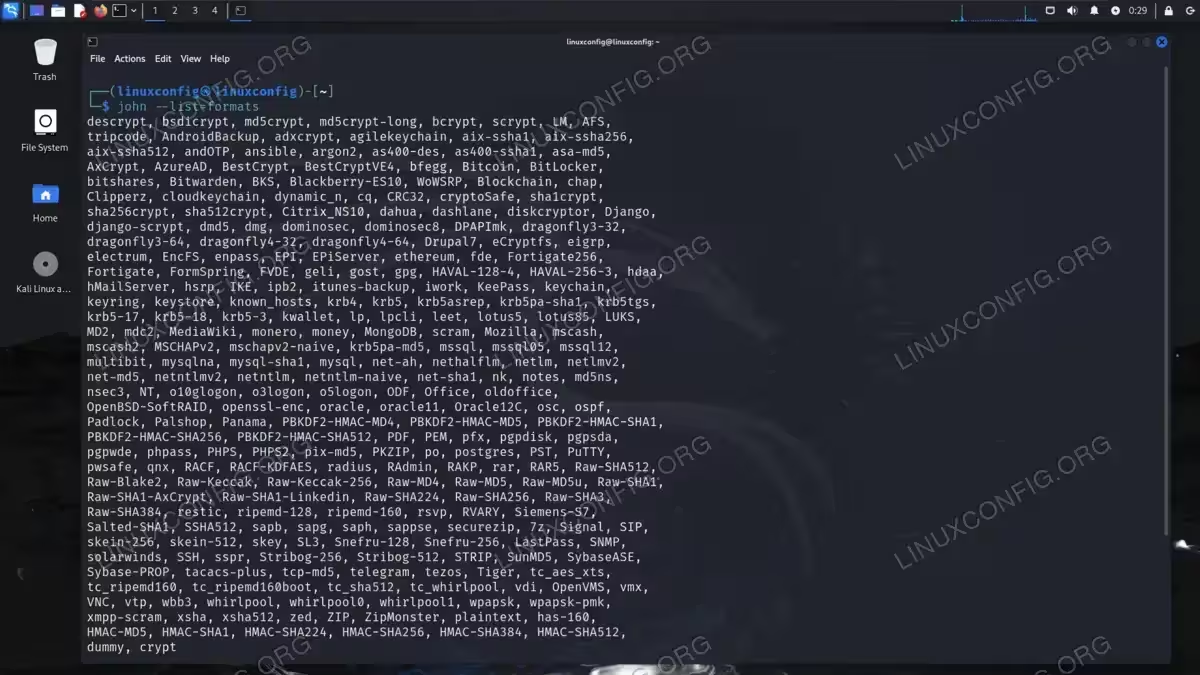
You can see what hashing methods John can handle by using the --list=formats option:
$ john --list=formats
How to Crack a Password With John the Ripper
Now that we have a fundamental understanding of password cracking and John the Ripper, let’s get our hands dirty! There are a multitude of scenarios in which we can employ John, but we will cover two cases that you can use right now on your own Linux system.
First, let’s see how to run John the Ripper on our system’s /etc/shadow file, which contains the password hashes for users on the local system. Then, we will see how to run John the Ripper on an encrypted .zip file.
Cracking /etc/shadow
- Portions of the password hashes for accounts on a Linux system exist in both the
/etc/passwdand/etc/shadowfiles. John comes with theunshadowtool, which allows us to combine these two files into a format which we can attempt to crack. Use the command below to generate a new filehashes.outfrom these two files.$ sudo unshadow /etc/passwd /etc/shadow > hashes.out
- The hash file is ready. Now we can run John on the file to see if it finds a password. This file uses the
crypthashing method, which we should specify so that John knows how to crack it.$ john --format=crypt hashes.out
- Now we wait. If John finds a password, you will see output like that below:
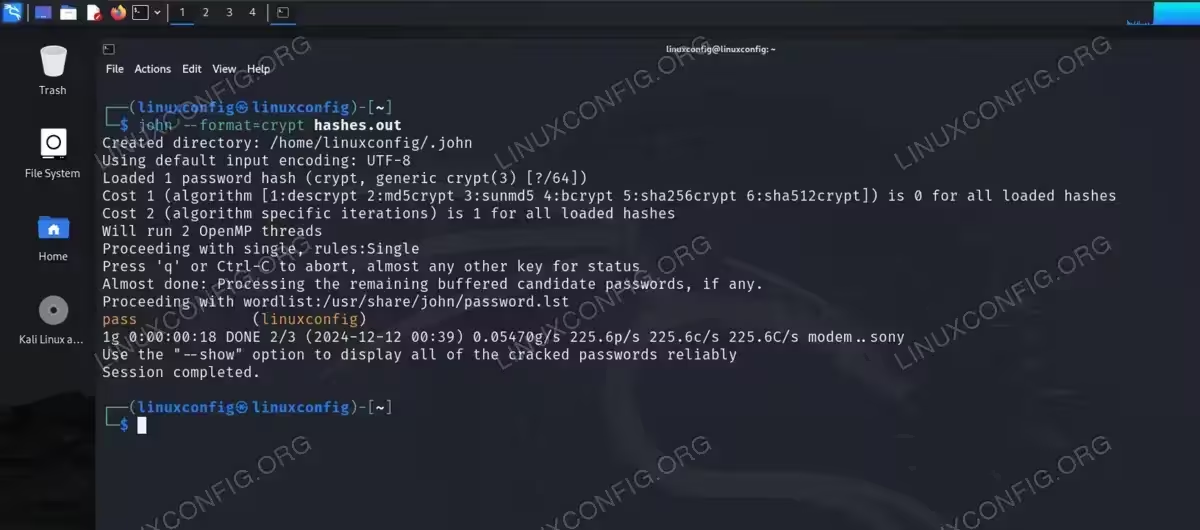
John has successfully cracked our password Relevant files will be stored in the current directory’s
.johnfile.$ ls .john john.log john.pot
The
john.potfile contains the cracked password(s). In case you need to refer back to them and have lost the previous console output.$ cat .john/john.pot
- If no password is found, you can either let John resort to brute forcing, or try supplying a different word list:
$ john --format=crypt --wordlist=/usr/share/wordlists/rockyou.txt hashes.out
NOTE
It is also possible to supply rules with the--rulesoption to John, which allows it to read a configuration file that tells John what rules to apply to each string in the word list. For example, we can configure John to try adding numbers 0-9 to each string. This is outside the scope of our introductory tutorial and would only be used in advanced scenarios by penetration testers with high-end hardware.
Cracking a zip file
Video
- As always, we first need a hash file to work with. Let’s generate a hash file of the password protected zip file using the
zip2johnutility.$ zip2john archive.zip > hash.out
- Next, let’s use John to see if we can crack the password:
$ john hash.out
Or supply a custom word list:
$ john --wordlist=/usr/share/wordlists/rockyou.txt hash.out
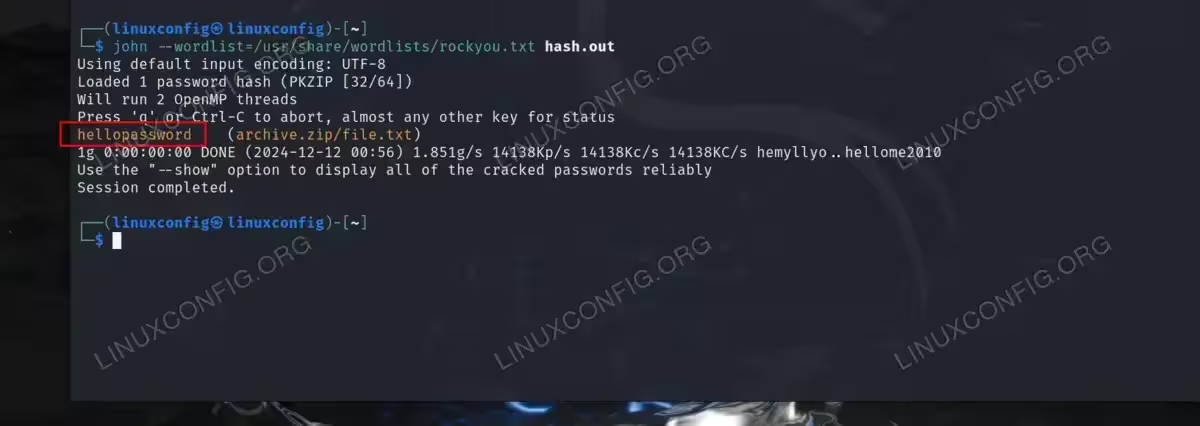
Successfully cracking the password for our zip file
Closing Thoughts
In this tutorial, we saw how to crack passwords with John the Ripper on a Linux system. We also learned the fundamentals of password cracking, and how the process works with hashing methods, word lists, and brute forcing. John the Ripper is straightforward to use, but is a very powerful and effective tool. Essentially, the process involves obtaining a hash file—through methods like unshadow, zip2john, or other means—and using John against the hash file, telling it what kind of hashing algorithm is used, and optionally supplying a word list. Kali Linux comes with a lot of related password cracking tools, as well as a lot of word lists, so we would recommend using it for password cracking.
