
Hashing files is a critical process in the realm of data integrity and security. In this article, we will discuss how to hash a specific file, linuxconfig.txt, using various hashing algorithms available in Linux. Additionally, we will explore how to restore the file based on its hash, ensuring you can verify its integrity over time.
In This Tutorial, You Will Learn:
- How to compute the hash of a file using different algorithms
- How to verify the integrity of the file using its hash
- How to restore the file if changes are detected
Software Requirements and Linux Command Line Conventions
| Category | Requirements, Conventions, or Software Version Used |
|---|---|
| System | Linux-based operating system (Ubuntu, CentOS, etc.) |
| Software | Core utilities including sha256sum, md5sum, and shasum |
| Other | The file linuxconfig.txt should already exist in your working directory. |
| Conventions | # – Requires commands to be executed with root privileges, either directly as root or using sudo.$ – Requires commands to be executed as a regular non-privileged user. |
How to Hash a File on Linux
In this section, we will detail the procedures to hash the file linuxconfig.txt using different algorithms and how to restore the file if necessary.
Step-by-Step Instructions
- Compute MD5 Hash: To compute the MD5 hash of the file, use the following command:
$ md5sum linuxconfig.txt > linuxconfig.txt.md5
The MD5 hash is often used for quick checksum comparisons but is less secure against collisions.
- Compute SHA256 Hash: To compute a more secure SHA256 hash, run:
$ sha256sum linuxconfig.txt > linuxconfig.txt.sha256
$ cat linuxconfig.txt.sha256
SHA256 is widely recommended for verifying file integrity due to its better security characteristics compared to MD5. The above command will also create a file
linuxconfig.txt.sha256containing the hash of the linuxconfig.txt file. - Verify File Integrity: To verify the integrity of
linuxconfig.txt, compare the hash you previously generated with the current hash:$ sha256sum -c linuxconfig.txt.sha256 $ md5sum -c linuxconfig.txt.md5
This command checks the file against the stored hash. If they match, the file is intact. If not, the file may have been altered.
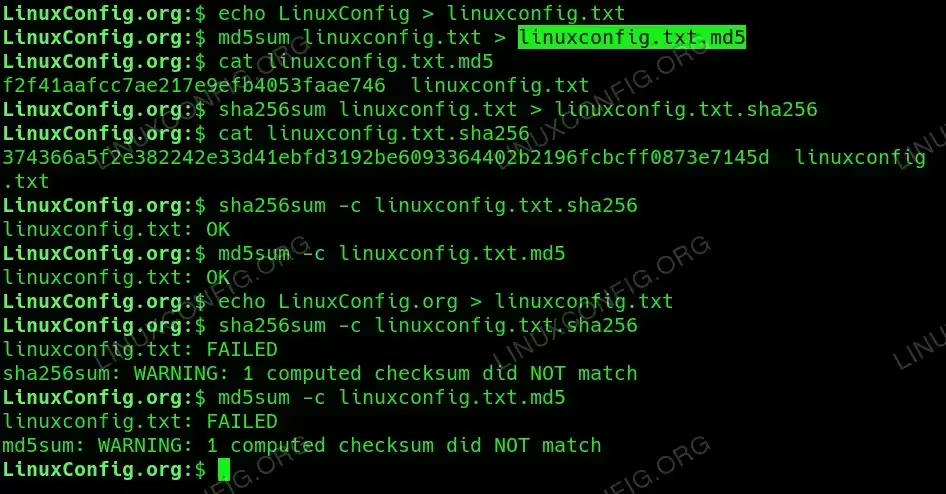
Hash file and check integrity with sha256 and md5
REMEMBER
It’s a good practice to regularly update your backups and keep your hashing files (like linuxconfig.txt.sha256) safely stored alongside your data for verification purposes.
Conclusion
Hashing files in Linux is an essential practice for maintaining data integrity and security. By following the steps outlined in this article, you can effectively compute and verify file hashes, ensuring your data remains unaltered.
Frequently Asked Questions (FAQ)
-
What hashing algorithms can I use on Linux?
You can use several hashing algorithms including MD5, SHA1, SHA256, SHA512, and others available through commands like
md5sum,sha1sum,sha256sum, etc. -
Is MD5 a secure hashing algorithm?
MD5 is considered cryptographically broken and unsuitable for further use due to its vulnerability to collision attacks. It is not recommended for security-sensitive applications.
-
How often should I hash my files?
It is a good practice to hash files after any significant changes and periodically to ensure their integrity over time.
-
Can I hash multiple files at once?
Yes, you can hash multiple files by supplying their names to the hashing command, like this:
sha256sum file1.txt file2.txt
-
What should I do if a file’s hash does not match?
If a file’s hash does not match the expected value, it may have been altered or corrupted. Check for backups to restore the original file.
