
The Fedora Linux distribution is sponsored and backed by Red Hat. It’s available for free and acts as a sort of testing ground for Red Hat’s flagship operating system, Red Hat Enterprise Linux. As a result, Fedora contains many of the newest ideas and bleeding edge technology.
Fedora
unrar – rar extract on Fedora Linux
Files with a .rar extension are compressed archives, much like a .tar.gz or .zip file. It is one of many file compression formats that rose to popularity over the years, but requires its own utility to use.
How to make sleep or suspend Fedora
Disregarding GUI, you can always put your Linux system to sleep from command line. Here is a Fedora suspend procedure step by step.
Virtualbox Guest additions installation on Fedora Linux
If you’re running Fedora Linux inside a VirtualBox virtual machine, installing the Guest Additions software will help you get the most out of the system. VirtualBox Guest Additions will give the machine more capabilities, such as a shared clipboard with the host system, drag and drop file transfer, and automatic window resizing.
This makes copying data to and from a host system much more convenient. It also changes the VM’s resolution automatically when its window is resized, so you don’t need to change it manually. Guest Additions will work with just about any Linux distribution, but instrutions can differ because of dependencies and package managers.
In this guide, we’ll be going over the step by step instructions to get VirtualBox Guest Additions installed on Fedora Linux. With these instructions, it doesn’t matter what host system you’re using, as long as the virtual machine is running Fedora. This guide assumes that you’ve already installed Fedora in the VM correctly.
In this tutorial you will learn:
- How to install VirtualBox Guest Addition on Fedora
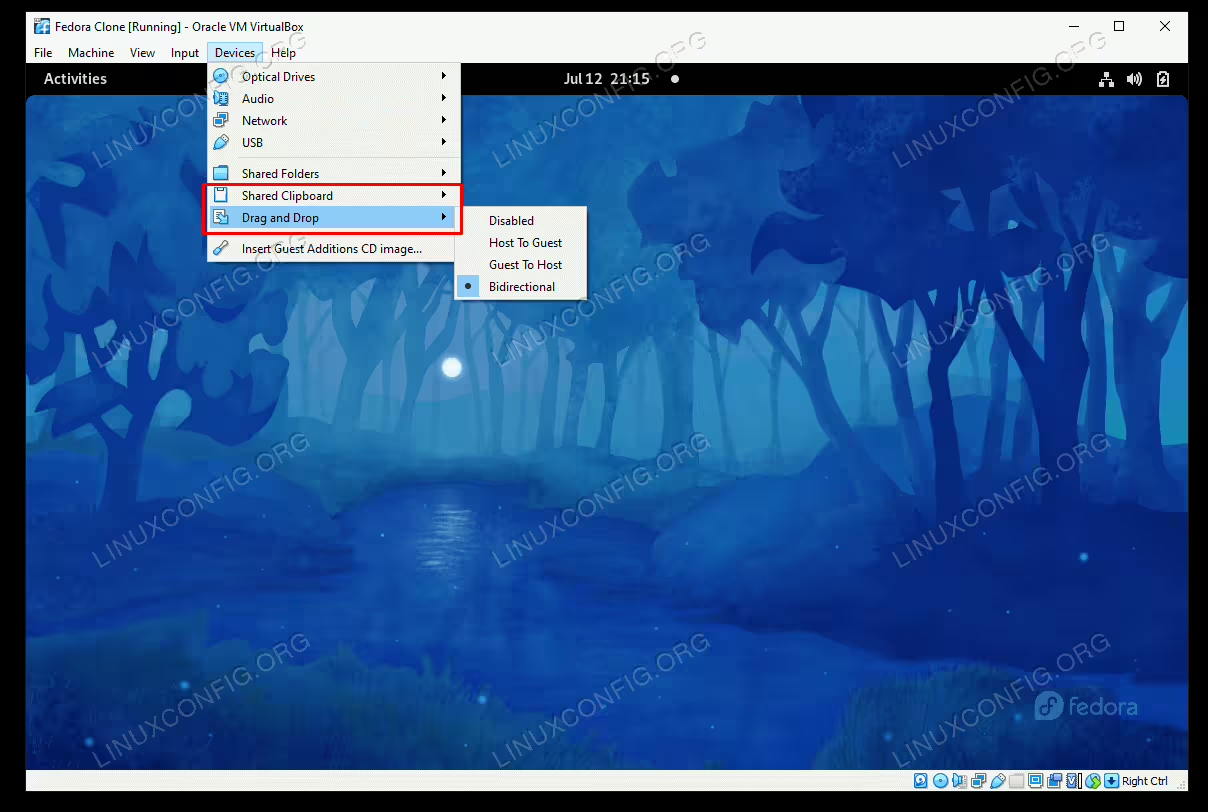
VirtualBox Guest Additions installation of Fedora Linux
How to create a Fedora Linux Live bootable USB key
A great feature of many Linux distributions is that you can create a live USB (or CD/DVD) key and boot directly into it. This allows you to try out an operating system, troubleshoot an existing installation, or install Linux onto the system’s hard drive.
Fedora is one of those distributions of Linux that allows us to boot into a usable environment directly from USB. In order to do that, we just need to write the Fedora installation file (.ISO format) to the USB thumb drive.
In this guide, we’ll go over the step by step instructions to create a Fedora bootable USB key via either command line or GUI. Follow along with us to get your USB key setup through Fedora’s Media Writer tool or the ddrescue command utility.
In this tutorial you will learn:
- How to download Fedora and Fedora Media Writer
- How to create Fedora bootable USB with Media Writer (GUI method)
- How to create Fedora bootable USB with ddrescue (command line method)
How to install Docker on Fedora Linux system
Docker is a tool that is used to run software in a container. It’s a great way for developers and users to worry less about compatibility with an operating system and dependencies because the contained software should run identically on any system.
Docker is available for download and installation on Fedora as well as most other distributions of Linux. However, installing it on Fedora can be a bit tricky because Red Hat doesn’t offer native support for Docker on its distributions. Instead, Red Hat pushes support for Podman, an alternative to Docker. This makes Docker a bit harder to install, but it’s still possible on Fedora.
In this guide, we’ll show you how to install Docker on Fedora and get started with installing containerized software. After Docker is installed, you can use it to install software packages much the same way you would use your distro’s package manager to download an app. The difference of using Docker is that everything is more automated, with compatibility and dependencies no longer being potential issues.
In this tutorial you will learn:
- How to install Docker
- How to start Docker and make it run automatically at boot
- How to run Docker without root
- How to search for a Docker image
- How to install a Docker image
- How to run a Docker image
- How to monitor Docker with various commands
- How to automatically start a Docker container
Installation of RAR compression utility on Fedora Linux
First download RAR rpm package:
$ wget http://pkgs.repoforge.org/rar/rar-3.8.0-1.el7.rf.x86_64.rpm
2014-10-31 18:51:15 (58.6 KB/s) - ‘rar-3.8.0-1.el7.rf.x86_64.rpm’ saved [216008/216008]
How to install Docker on Fedora 31
This tutorial will provide you with simple to follow steps on how to install Docker on Fedora 31 Linux.
In this tutorial you will learn:
- How to add Docker repository
- How to install Docker
How to install and configure Docker-ce/Moby Engine on Fedora 32
Even if Red Hat has developed podman and buildah, its own tools to work with containers, which come with some important advantages like a daemonless architecture, you may want to continue using the original Docker software on Fedora. In this tutorial we will explore the options we have on the latest release of the distribution to do so, and will see how to apply the needed fixes for Docker to work correctly.
In this tutorial you will learn:
- How to install moby-engine
- How to install docker-ce
- How to apply the workarounds needed to make Docker run correctly on Fedora 32

Virtualbox: install guest additions on Fedora 31
The Virtualbox guest additions on Fedora 31 are most likely already included in your installation.
In this tutorial you will learn:
- How to check for loaded Virtualbox guest additions
- How to Virtualbox guest additions
How to configure static IP address on Fedora 31
There ar multiple ways on how to set your Fedora 31 system with a static IP address. Using the nmcli is perhaps the simplest regardless of GUI is currently your system configured with.
In this tutorial you will learn:
- How to set static IP address
- How to set DNS server IP address
- How to Gateway IP address
- How to apply / restart network
How to install Google Chrome on Fedora 31
This artcile will provide you with simple to follow steps on how to install Google Chrome Browser on Fedora 31 Linux.
In this tutorial you will learn:
- How to install Google Chrome Browser
- How to start Google Chrome Browser