
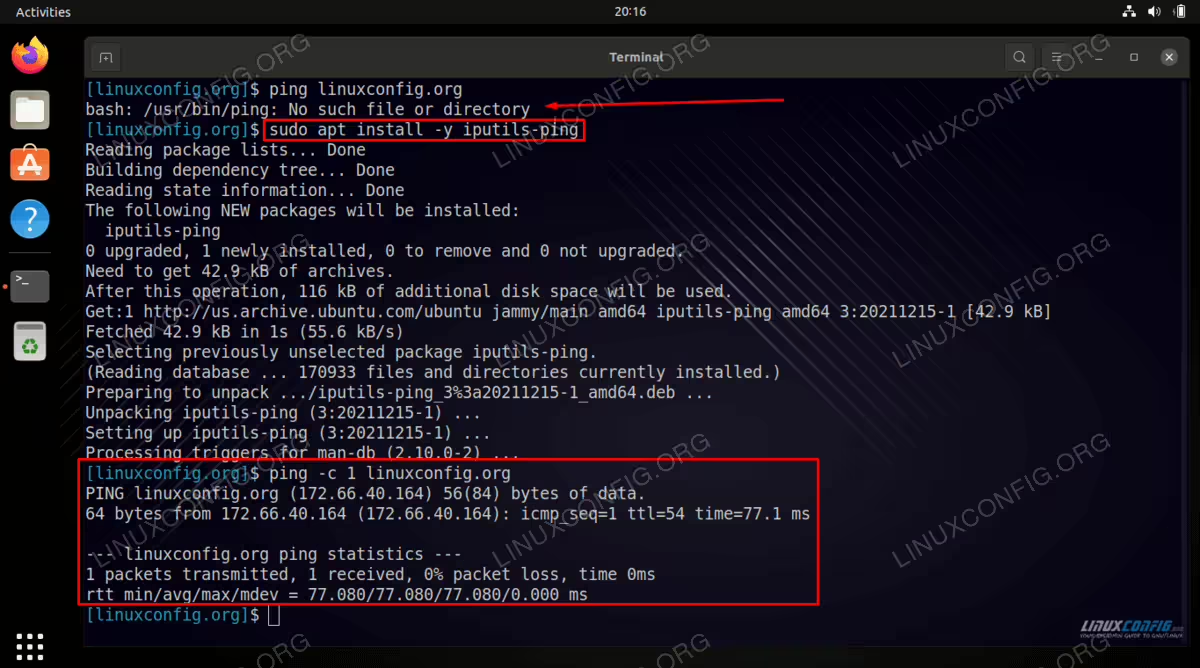
Depending on your Ubuntu 22.04 Jammy Jellyfish Server/Desktop installation your system might not come with the ping command pre-installed. This is especially the case for docker containers. Any attempt to ping a remote system will result in the following error:
$ ping linuxconfig.org
bash: ping: command not found
If you encounter the error bash: ping: command not found, this tutorial will help you resolve it.
In this tutorial you will learn:
- How to install
pingcommand on Ubuntu 22.04
| Category | Requirements, Conventions or Software Version Used |
|---|---|
| System | Ubuntu 22.04 Jammy Jellyfish |
| Software | iputils-ping |
| Other | Privileged access to your Linux system as root or via the sudo command. |
| Conventions |
# – requires given linux commands to be executed with root privileges either directly as a root user or by use of sudo command$ – requires given linux commands to be executed as a regular non-privileged user |
Install ping command on Ubuntu 22.04 step by step instructions
- Start by opening a command line terminal and entering the following command to update the package repository index.
$ sudo apt update
- Install the missing
pingcommand which is available in theiputils-pingpackage on Ubuntu 22.04.$ sudo apt install iputils-ping
- The missing
pingcommand should now be installed and ready to use:$ which ping /usr/bin/ping
Try pinging a remote host:
$ ping -c 1 linuxconfig.org
PING linuxconfig.org (104.26.3.13) 56(84) bytes of data.
64 bytes from 104.26.3.13 (104.26.3.13): icmp_seq=1 ttl=59 time=12.1 ms

--- linuxconfig.org ping statistics ---
1 packets transmitted, 1 received, 0% packet loss, time 0ms
rtt min/avg/max/mdev = 12.122/12.122/12.122/0.000 ms
Closing Thoughts
In this tutorial, we saw how to install the missing ping command on Ubuntu 22.04 Jammy Jellyfish Linux through use of the iputils-ping package. This software can easily be installed from the default Ubuntu repository and will enable ping command on your system. The ping command remains one of the best ways to quickly troubleshoot connectivity problems between your Ubuntu computer and a remote website, server, or other type of host.