Linux shell Sticky Bit usage and examples

Before we talk about what is a sticky bit let’s start by explaining why do we need it. For example we have a directory /var/share somewhere on the filesystem with a full access for all permission groups that is owner, group and any, thus all permission bits are set to “on” drwxrwxrwx:

# ls -ld /var/share/
drwxrwxrwx. 2 root root 4096 Mar  5 11:02 /var/share/

From the above, we can see that any user have read, write and execute permissions to the /var/share directory. Next, in our scenario we have two users named user1 and user2. Since everybody now have an access to /var/share directory, our user1 can navigate to this directory and simply create any arbitrary file:

user1@localhost ~]$ cd /var/share/
[user1@localhost share]$ touch file1
[user1@localhost share]$ ls -l file1 
-rw-rw-r--. 1 user1 user1 0 Mar  5 11:08 file1
[user1@localhost share]$

Read more

LAMP ( Linux, Apache, MariaDB, PHP ) stack Docker image deployment

About

The automated build docker lamp image “linuxconfig/lamp” can be used as a testing and also as a production environment for a dynamic PHP applications. It comprises of Debian GNU/Linux, Apache webserver, MariaDB a community-developed fork of the MySQL relational database management system and PHP scripting language.

Deployment

The deployment of “linuxconfig/lamp” docker image is a fairly simple procedure. Let’ start by creating a sample PHP website with a MariaDB connection handle:

<?php
$dbh = mysqli_connect('localhost', 'admin', 'pass');
if (!$dbh) {
    die('Could not connect: ' . mysqli_error());
}
echo 'Connected successfully to MariaDB database';
mysqli_close($dbh);
?>

Read more

Mobile Broadband Internet connection and Sakis3G

This article is just a continuation of my first article about my experience with mobile broadband Internet on a Linux system. To cut the long story short a current network managers are trying to do a pretty good job by establishing a Mobile Broadband connection in a Plug & Play manner, however, they are not always successful to do so and user ends up with frustration and full hands of debugging and guessing what might went wrong instead of spending time with intended work.

Read more

Introduction to Computer Vision with the OpenCV Library on Linux

Abstract

The purpose of this document is to help a reader to get started with Computer Vision library OpenCV on Linux system. OpencCV is a multi-platform library, but this article will be focused only on OpenCV using Linux operating system ( although, just the installation of the OpenCV library and video camera is platform-specific, all examples in this article should compile on any platform where OpenCV is properly installed such as Mac OS, MS Windows and etc.). Reader will be guided through a step-by-step guide on how to install and use some of the basic functions of OpenCV library such as displaying images, playing a video or using a video camera to process a video input stream.

Conventions used in this article:

  • $ – execution on the command line by a non-privileged user
  • # – execution on the command line by a superuser
  • the actual command to be executed on the command line or code of program to be compiled
  • OUTPUT: output produced on the command line by command execution
  • NOTE: general notes and additional information

Introduction

In simple words a Computer Vision is a scientific field which attempts to provide a sight to the machine. This scientific field has expanded rapidly in recent years. Among researchers this growth is because of many improvements of vision algorithms and among the computer vision hobbyists this is due to the cheaper hardware components and processing power. OpenCV library plays a great role in the Computer Vision field as it helps greatly to reduce cost and preparation time of computer vision research environment needed by university students, hobbyists and professionals. OpenCV also provides a simple to use functions to get the work done in a simple, effective and elegant manner. OpenCV was started by Intel, and later it was transformed to an open source project now available on SourceForge.net. OpenCV library has multi-platform availability, and it is partially written in C++ and C language. Despite the fact that this library is available on many Linux distributions from its relevant package repositories, in this article we will attempt to install and use OpenCV library compiled from a source code downloaded from SourceForge.net web site.

The reasons for compiling a source code may include:

  • new version 2.0.0 recently released and more features available
  • some bugs fixed which affected Linux OpenCV 1.0.0 versions ( such as cvGetCaptureProperty() etc. )
  • more support is available for OpenCV 2.0.0 version than for former 1.0.0 version

This article will start with installation of OpenCV on Debian 5.0 ( Lenny ). Later a reader will be guided through a number of examples on how to use OpenCV to display an image, play a video and use camera to capture the video input stream.

Read more

How to perform AUTH DIGEST-MD5 CRAM-MD5 command line SMTP authentication

This config will describe a procedure to login to SMTP server using AUTH DIGEST-MD5 CRAM-MD5 encryption authentication method via telnet. First, we need to install all prerequisites:

# apt-get install telnet sasl2-bin

Before proceeding, you may need to install telnet if not already present. Using telnet command we will connect to SMTP server. The sasl2-bin package contains gen-auth command which we will use to generate our BASE64 encoded response to server’s authentication challenge. Lets’ start by using telnet command to connect to our server:

$ telnet 10.1.1.11 25
Trying 10.1.1.11...
Connected to 10.1.1.11.
Escape character is '^]'.
220 mail.localhost.localdomain ESMTP Postfix (Ubuntu)

Read more

Resetting Vodafone USB mobile broadband device with usb_modeswitch

First time I used my vodafone USB mobile broadband device on my fedora linux system it worked perfectly . However, after couple minutes I got disconnected I was not able to connect again even when the blue light on the Vodafone USB mobile broadband device was making a clear blue blinking signal that network was found and all I need to do is to just connect. Eventually after many attempts to make an Internet connection I had reseted it with a usb_modeswitch command to make it working again. It is not guaranteed solution but its worth to try.

If you are in the same situation you may also try to reset your Vodafone USB mobile broadband device. To do that we first need vendor and product ID in a hexadecimal form. To get this information execute:

$ lsusb

Read more

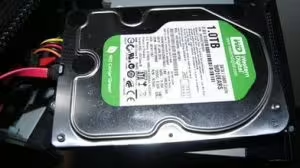
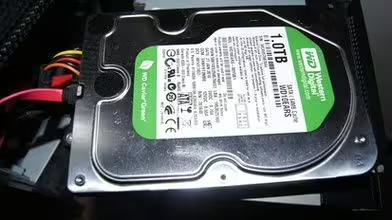
WDC WD10EARS-00Y5B1 EARS WD advanced format

Linux WD EARS Advanced Hard Drive Format

Introduction

Nowadays hard drive manufactures are switching to a new hard drive technology which uses 4KB sectors size instead of conventional 512B. This new technology requires little tweaks to get a better performance in comparison to out-of-the-box settings. This article will describe some simple to follow instructions on how to partition the WD EARS hard-drive to get better overall performance. Getting the partitioning part done by aligning each partition can rapidly increase a hard drive’s performance.

512B sector size standard is here for over 30 years and therefore lots of the code written for a Linux OS has 512 number hard coded in its source.
The main idea in regards to the 4 096 B size sectors is to increase the bit density on each track by reducing the number of gaps which hold Sync/DAM and ECC ( Error Correction Code ) information between each data sectors. Therefore, for 8 x 512 B sectors the track also holds 8 sector gaps.

By having one single sector of size 4 096 B ( 8 x 512 B ) the track holds only 1 sector gap for each data sector thus reducing an overhead for a need to support multiple Sync/DAM and ECC blocks and at the same time increasing bit density.

Linux partitioning tools by default start each partition on sector 63 which leads to a bad performance of WD EARS hard-drives since they are not aligned to 4K sector from the beginning of the track.

For this article I’m using WDC WD10EARS-00Y5B1. This is a 1TB SATA hard-drive with 64MB cache memory.

WDC WD10EARS-00Y5B1 EARS WD advanced format

Read more