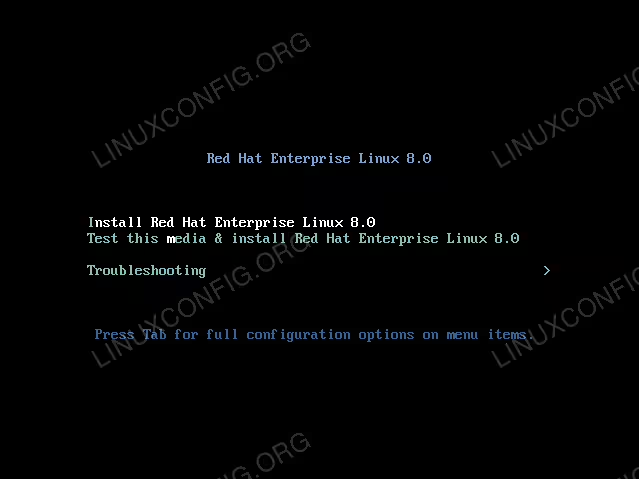
By default the RedHat 8 Linux installation will start in the graphical mode. In case you encounter some issues you have an option to force the text mode TTY installation.
In this tutorial you will learn:
- How to modify GRUB boot entry to force text mode installation.
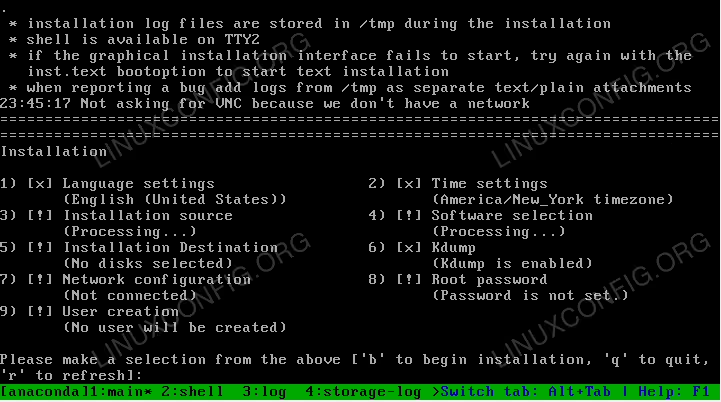
The text mode RedHat 8 installation wizard.
Software Requirements and Conventions Used
| Category | Requirements, Conventions or Software Version Used |
|---|---|
| System | Red Hat Enterprise Linux 8 |
| Software | RHEL 8 installation ISO |
| Other | Privileged access to your Linux system as root or via the sudo command. |
| Conventions |
# – requires given linux commands to be executed with root privileges either directly as a root user or by use of sudo command$ – requires given linux commands to be executed as a regular non-privileged user |
Redhat 8: text mode install guide step by step instructions
- Boot from the Redhat 8 installation ISO image.
- Press
TABwhile in the GRUB boot menu. Redhat 8 GRUB boot installation menu.
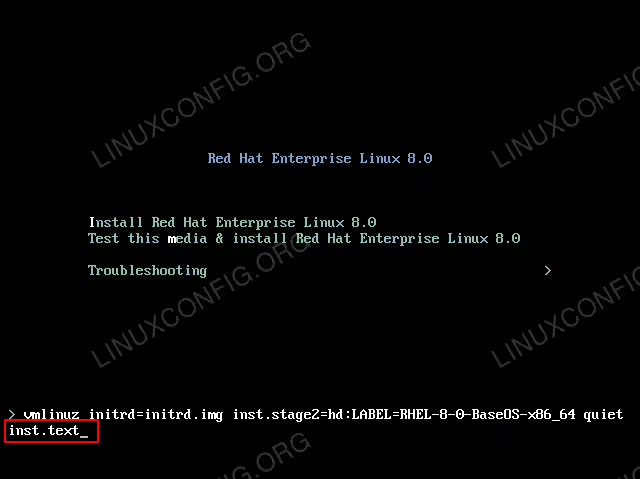
 - Insert the
inst.texttext to the end of the GRUB boot line. Force the text mode RHEL 8 installation using the
inst.textstring. - Press
ENTERto continue with the normal boot. - Make selection from the above menu. Perform configuration and return back to the main menu by pressing the
ckey. Once ready begin the RHEL 8 installation by pressing thebkey.