
Testing network speed is a critical part of diagnosing network issues or optimizing performance. On Linux, the command-line tool iperf3 is a robust and reliable solution for measuring bandwidth, latency, and packet loss. This tutorial will guide you through setting up a server-client environment for iperf3 and using various methods to test network speed effectively.
In this tutorial you will learn:
- How to set up an iperf3 server-client environment
- Various methods to test network speed, including bidirectional, multiple streams, and UDP tests
- How to interpret the results to diagnose network performance

| Category | Requirements, Conventions, or Software Version Used |
|---|---|
| System | Linux (any modern distribution) |
| Software | iperf3 |
| Other | Two networked Linux hosts (client and server) |
| Conventions | # – requires given Linux commands to be executed with root privileges either directly as a root user or by use of sudo command$ – requires given Linux commands to be executed as a regular non-privileged user |
Setting Up iperf3
To test network speed with iperf3, you need two Linux systems: one acting as the server and the other as the client. The server listens for incoming connections, while the client initiates tests.
Steps to set up iperf3:
- Install iperf3 on both systems:
# apt update && apt install iperf3 -y
- Start the iperf3 server on one host:
# iperf3 -s
This command starts the server in listening mode.
- Run tests from the client machine using various methods described below.

Setting Up iperf3 server on Linux
Network Speed Testing Methods
This section covers several iperf3 methods for testing network speed, each suited for different scenarios.
- Basic Bandwidth Test: Measure the speed of data transfer from the client to the server.
$ iperf3 -c <server IP or HOSTNAME>
This basic test sends data from the client to the server and displays the transfer rate (e.g., 942 Mbps). It is a quick and simple way to measure network bandwidth.
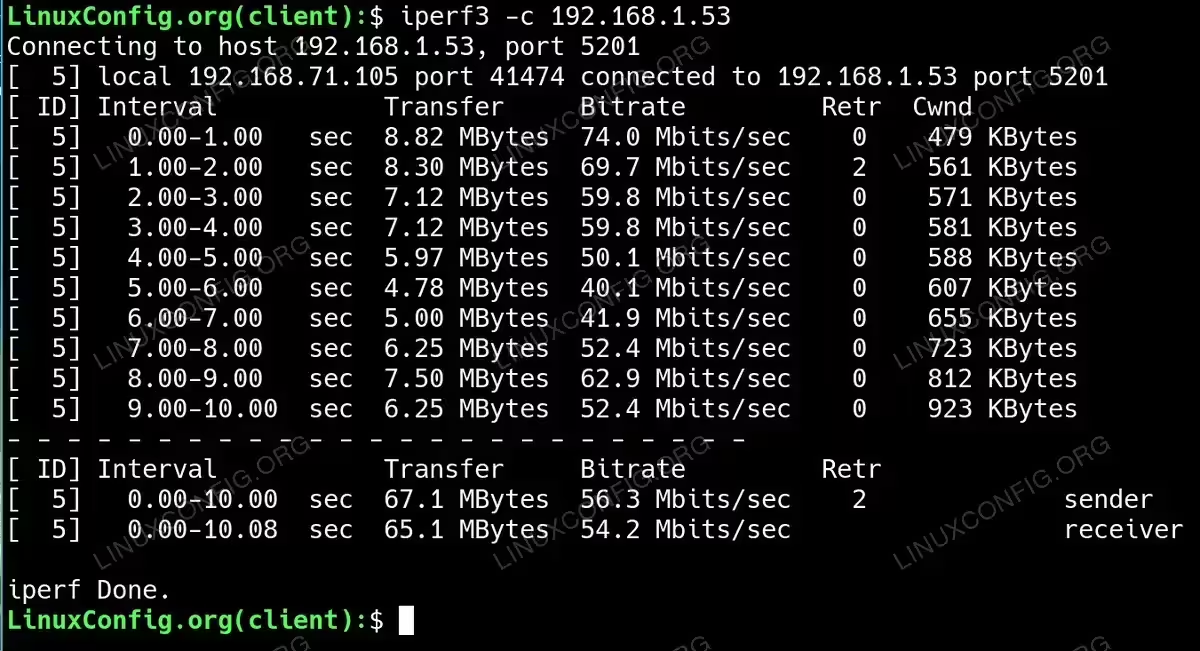
Basic Bandwidth Test to Measure the speed of data transfer The above iperf3 test results indicate a network connection with an average bitrate of 56.3 Mbps over 10 seconds, with some fluctuations in throughput ranging from 40.1 Mbps to 74.0 Mbps. There were 2 retransmissions, suggesting minor packet loss or congestion during the test. The congestion window (Cwnd) gradually increased from 479 KBytes to 923 KBytes, indicating that the network adapted to accommodate higher bandwidth as the test progressed. Overall, the connection was functional but showed signs of inconsistency, potentially caused by network congestion, interference, or hardware limitations, which led to variable performance across intervals.
- Bidirectional Test: Measure upload and download speeds simultaneously.
$ iperf3 -c <server IP or HOSTNAME> --bidir
This test simulates real-world scenarios by measuring speeds in both directions at the same time, making it ideal for bidirectional traffic analysis.
- Multiple Stream Test: Test performance under multiple simultaneous connections.
$ iperf3 -c <server IP or HOSTNAME> -P 8
This test uses 8 parallel streams to measure how well the network handles concurrent connections. The results include the bandwidth of each stream and the total aggregated bandwidth.
- UDP Performance Test: Evaluate bandwidth, packet loss, and jitter.
$ iperf3 -c <server IP or HOSTNAME> -u -b 1G
This test uses UDP instead of TCP, measuring maximum bandwidth and showing jitter and packet loss. It is ideal for latency-sensitive applications like VoIP.
- Long-Duration Stability Test: Check network performance over an extended period.
$ iperf3 -c <server IP or HOSTNAME> -t 60
This test runs for 60 seconds, providing insights into network stability and consistency over time. Use it to detect performance fluctuations or throttling.
- Bandwidth-Limited Test: Simulate a capped connection to analyze performance under limited bandwidth.
$ iperf3 -c <server IP or HOSTNAME> -b 500M
This test sets a bandwidth cap (e.g., 500 Mbps) to analyze how the network behaves under throttling or quality of service (QoS) policies.
Conclusion
By using iperf3, you can gain deep insights into your network’s performance, including bandwidth, latency, jitter, and packet loss. Whether diagnosing issues or optimizing configurations, the flexibility of iperf3’s testing methods makes it an indispensable tool for network administrators. Start with the basic tests and explore advanced scenarios to fully understand your network capabilities.
