
Boom is a system boot manager which supports BLS-compatible bootloaders, Grub2 included. We can use boom to easily create and manage bootloader entries on Linux. In this tutorial, we learn how to use boom to create entries to boot the system from LVM and BTRFS snapshots on the Red Hat family of distributions.
In this tutorial you will learn:
- How to install boom
- How to create a boom profile
- How to create boot entries for LVM or BTRFS snapshots
| Category | Requirements, Conventions or Software Version Used |
|---|---|
| System | Fedora/RHEL and clones |
| Software | Boom |
| Other | Root privileges |
| Conventions | # – requires given linux-commands to be executed with root privileges either directly as a root user or by use of sudo command$ – requires given linux-commands to be executed as a regular non-privileged user |
The Boot Loader Specification
Boom manage entries for bootloaders which supports the Bootloader Specification; grub2 is among them, if built with the “bls” patch. In recent versions of Fedora, and from version 8 of RHEL, if we take a look at the /etc/default/grub configuration file, we can see the following option is included:
GRUB_ENABLE_BLSCFG=true
The line above modifies GRUB behavior, so that it uses boot entry files found under the
/boot/loader/entries directory, instead of producing entries in the /boot/grub2/grub.cfg file directly. In a freshly installed version of Fedora, the directory contains two entries:
096544f3374847bf9bacc18363cd3532-0-rescue.conf
096544f3374847bf9bacc18363cd3532-6.10.7-200.fc40.x86_64.conf
This is how an entry looks like:
title Fedora Linux (6.10.7-200.fc40.x86_64) 40 (Workstation Edition)
version 6.10.7-200.fc40.x86_64
linux /vmlinuz-6.10.7-200.fc40.x86_64
initrd /initramfs-6.10.7-200.fc40.x86_64.img
options root=/dev/mapper/hllpt0-root ro rd.lvm.lv=hllpt0/root rd.luks.uuid=luks-fd94beb6-c0df-4f65-8ee2-9dad499bc3c4 rhgb quiet
grub_users $grub_users
grub_arg --unrestricted
grub_class fedora
Installing boom
Boom is available in the official repositories of RHEL (and clones), since version 7.5. On such distribution, the package was available as lvm2-python-boom, while in more recent versions of the Red Hat family, Fedora included, is available as boom-boot. To install it, we can run:
$ sudo dnf install boom-boot
Creating a Boom profile
Before we can use boom, we must create a profile. The easiest way to do it, is to invoke the utility using the profile command, with the create action, using the --from-host option, which builds the profile using release data from the running host (typically, from the /etc/os-release file):
$ sudo boom profile create --from-host
The command should return an output similar to the following:
Created profile with os_id fab63af:
  OS ID: "fab63af62e654ea986dca5e88d8a2d232d8f392c",
  Name: "Fedora Linux", Short name: "fedora",
  Version: "40 (Workstation Edition)", Version ID: "40",
  Kernel pattern: "/vmlinuz-%{version}", Initramfs pattern: "/initramfs-%{version}.img",
  Root options (LVM2): "rd.lvm.lv=%{lvm_root_lv}",
  Root options (BTRFS): "rootflags=%{btrfs_subvolume}",
  Options: "root=%{root_device} ro %{root_opts} rd.luks.uuid=luks-fd94beb6-c0df-4f65-8ee2-9dad499bc3c4 rhgb quiet",
  Title: "%{os_name} %{os_version_id} (%{version})",
  Optional keys: "grub_users grub_arg grub_class id", UTS release pattern: "fc40"
Boom profiles are stored under the /boot/boom/profiles directory.
Generating boot entries for snapshots
In a recent tutorial, we learned how to create and manage LVM and BTRFS snapshots on Linux, and we saw how we can use them to revert the system to a well-known state in case something goes wrong. By using boom, we can easily create bootloader entries to boot the system from LVM or BTRFS snapshots. Let’s see some example. My current setup consists into a LVM configuration, where the “root” logical volume is mounted on “/”. It is possible to create a reasonable big snapshot (in this case a traditional, or “thick” snapshot) of this volume, by running:
$ sudo lvcreate -s /dev/vg0/root -L5GiB -n root-snapshot0
Now we can use boom to create a bootloader entry which will let us boot the system using the snapshot as the root partition. Generating the entry is as easy as running:
$ sudo boom entry create --title "root-snapshot0" --rootlv /dev/vg0/root-snapshot0
With the --title option, we provide a title for the bootloader entry, while with --rootlv we specify the path to the LVM2 logical volume containing the root filesystem. The command generates the new entry in the /boot/loader/entries directory. In this case, it has the following content:
#OsIdentifier: fab63af62e654ea986dca5e88d8a2d232d8f392c
title root-snapshot0
machine-id 096544f3374847bf9bacc18363cd3532
version 6.10.7-200.fc40.x86_64
linux /vmlinuz-6.10.7-200.fc40.x86_64
initrd /initramfs-6.10.7-200.fc40.x86_64.img
options root=/dev/vg0/root-snapshot0 ro rd.lvm.lv=vg0/root-snapshot0 rd.luks.uuid=luks-fd94beb6-c0df-4f65-8ee2-9dad499bc3c4 rhgb quiet
grub_users $grub_users
grub_arg --unrestricted
grub_class kernel
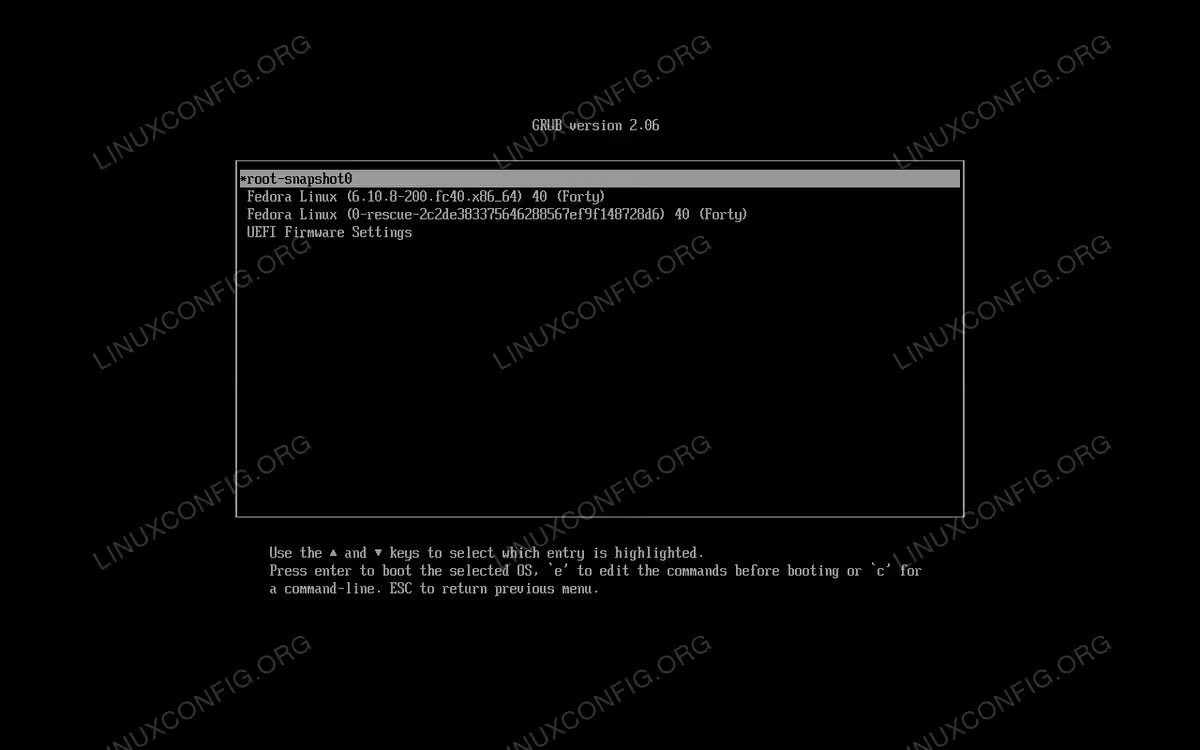
If we reboot the system, we will now see the generated entry in the GRUB menu:
Creating a boot entry for a BTRFS snapshot
What if we want to use a BTRFS snapshot, instead? The default partitioning setup, on recent versions of Fedora, is based on the BTRFS filesystem. By default, the Anaconda installer, creates three partitions: the first is the ESP, formatted as FAT32, and mounted on /boot/efi; the second, formatted as ext4, is mounted on /boot. The third and last partition, is formatted with the BTRFS filesystem, and hosts two subvolumes: “root” and “home”, which are mounted, respectively on “/” and “/home”.
Suppose we want to create a snapshot of the “root” subvolume, to freeze the system state at a certain point in time. As we know, a BTRFS snapshot is just an additional subvolume; we can create it by running:
$ sudo btrfs subvolume snapshot / /.snapshot0
We created a snapshot of the / filesystem (the mountpoint of the “root” subvolume), and save it as
/.snapshot0. To create a new bootloader entry with boom, first we get the identifier of the BTRFS filesystem which hosts the original subvolume. We can specify the filesystem by its path (/dev/vda3 in this case), or, even better, by its UUID. We can get the latter by looking at the current boot entry setup:
$ cat /proc/cmdline
The command returns the command line passed to the kernel at boot, as specified in the boot configuration. On a standard Fedora system installed on BTRFS, it should return an output similar to the following:
BOOT_IMAGE=(hd0,gpt2)/vmlinuz-6.10.8-200.fc40.x86_64 root=UUID=39da18c1-1bb0-4414-a4c1-a70abf6308b6 ro rootflags=subvol=root rhgb quiet
As we can see from the output, the UUID of the BTRFS filesystem is: “39da18c1-1bb0-4414-a4c1-a70abf6308b6”. Now, to create a bootloader based on the snapshot we created above, we would run:
$ sudo boom entry create --title "snapshot0" --btrfs-subvol=root/.snapshot0 --root-device=/dev/disk/by-uuid/39da18c1-1bb0-4414-a4c1-a70abf6308b6
Just as we did when creating an entry for the lvm snapshot, we used the --title option to specify the entry title. This time, instead, we specified the root device using the --root-device option, and the BTRFS subvolume containing the root filesystem using --btrfs-subvol. Notice that we specified the path of the snapshot, as relative to its parent subvolume (“root”), and not by its path in the system.
Conclusions
In this tutorial, we learned how to install the boom bootloader manager on recent versions of Fedora and Red Hat Enterprise Linux (and clones). Boom can be used to easily manage bootloader entries according to the BLS (Boot Loader Specification). In this case, we learned how to use boom to generate entries which allow us to boot the system directly from LVM and BTRFS snapshots.
