Asciinema is a lightweight and very efficient alternative to a Script terminal session recorder. It allows you to record, replay and share your JSON formatted terminal session recordings.
The main advantage in comparison to desktop recorders such as Recordmydesktop, Simplescreenrecorder, Vokoscreen or Kazam is that Asciinema records all standard terminal input, output and error as a
plain ASCII text with ANSI escape code .
As a result, JSON format file is minuscule in size even for a longer terminal session. Furthermore, JSON format gives the user the ability to share the Asciinema JSON output file via simple file
transfer, on the public website as part of embedded HTML code or share it on Asciinema.org using asciinema account. Lastly, in case that you have made some mistake during your terminal session, your
recorded terminal session can be retrospectively edited using any text editor, that is if you know your way around ANSI escape code syntax.
The Cloud can be a great thing. It can also be a terrifying Orwellian nightmare where some faceless corporate entity has every picture you’ve ever taken of your family. To prevent the latter, there’s Nextcloud.
You many have heard of Owncloud. It was the primary solution for open source self hosted cloud storage for quite some time. Unfortunately, due to internal struggles, Owncloud split. Owncloud still remains, but it is currently owned by the people that caused the split. Nextcloud, on the other hand, is run by the original founder and the people who wanted to continue to work with the open source community.
Before you start the Nextcloud install process, you should follow our other guide on setting up a LAMP server on Debian Stretch. Nextcloud is a PHP application that utilizes a database and works best when paired with Apache. Having a LAMP server set up will be the best starting point.
RAID has still not been adopted by most end-users despite its inherent quality such as performance and reliability. Reasons such as complexity of RAID technology (levels, hard/soft), set-up, or support may be given. We believe the main reason is that most end-users own a vast amount of heterogeneous storage devices (USB stick, IDE/SATA/SCSI internal/external hard drives, SD/XD Card, SSD, …), and that RAID-based systems are mostly designed for homogenous (in size and technology) hard disks. Therefore, there is currently no storage solution that manages heterogeneous storage devices efficiently.
In this article, we propose such a solution and we call it PROUHD (Pool of RAID Over User Heterogeneous Devices). This solution supports heterogeneous (in size and technology) storage devices, maximizes the available storage space consumption, is tolerant to device failure up to a customizable degree, still makes automatic addition, removal and replacement of storage devices possible and remains performant in the face of average end-user workflow.
Although this article makes some references to Linux, the algorithms described are independent of the operating system and thus may be implemented on any of them.
Introduction
Whereas RAID1 has been massively adopted by the industry, it is still not common on end-users desktop. Complexity of RAID system might be one reason… among many others. Actually, in a state-of-the-art data center, the storage is designed according to some requirements (the ”top-bottom” approach already discussed in a previous article2). Therefore, from a RAID perspective, the storage is usually composed of a pool of disks of same size and characteristics including spares3. The focus is often on performance. The global storage capacity is usually not a big deal.
The average end-user case is rather different in that their global storage capacity is composed of various storage devices such as:
Hard drives (internal IDE, internal/external SATA, external USB, external Firewire);
USB Sticks;
Flash Memory such as SDCard, XDCard, …;
SSD.
On the opposite, performance is not the big deal for the end-user: most usage does not require very high throughput. Cost and capacity are main important factors along with ease of use. By the way, the end-user does not usually have any spare devices.
We propose in this paper an algorithm for disk layout using (software) RAID that has the following characteristics:
it supports heterogeneous storage devices (size and technology);
it maximizes storage space;
it is tolerant to device failure up to a certain degree that depends on the number of available devices and on the RAID level chosen;
it still makes automatic addition, removal and replacement of storage devices possible under certain conditions;
it remains performant in the face of average end-user workflow.
Algorithm
Description
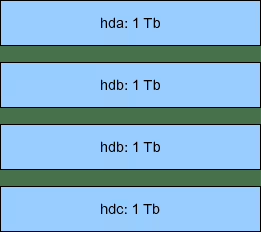
Conceptually, we first stack storage devices one over the other as shown in figure 1.
On that example with devices, each of capacity (terabytes), we end up with a global storage capacity of . From that global storage space, using RAID, you can get:
a 4 Tb () virtual storage devices (called PV for Physical Volume4 in the following) using RAID0 (level 0), but then you have no fault tolerancy (if a physical device fail, the whole virtual device is lost).
a 1 Tb () PV using RAID1; in that case, you have a fault tolerancy degree of 3 (the PV remains valid in the face of 3 drives failure, and this is the maximum).
a 3 Tb () PV using RAID5; in that case, you have a fault tolerancy degree of 1;
a 2 Tb () PV using RAID10; it that case, the fault tolerancy degree is also 15 ( is the number of mirrored sets, 2 in our case).
This SQLite Linux tutorial is intended for beginners who wish to learn how to get started with SQLite database. SQLite is one of the world’s most widely-used Database programs. So, what is a Database, and what is SQLite?
In part one we introduced you to Linux editors and gave a storm course on vim. It’s now time to dismantle the rumors that we’re subjective and talk about the other side, emacs. In some ways, the two editors are opposite one another, mainly from historical reasons, as you will see. We hope you will enjoy this tour and that we’ll help you make up your mind.
Introduction and using emacs
I remember writing somewhere in one of my articles that I won’t under no circumstances reveal what’s my editor/WM/DE/Hollywood actor of choice. Not because I consider myself important, but because I want to avoid any flame material. The true reason for which emacs has an entire article’s space, while vim has only half (or less) is the differences between them, and this is what we’ll talk about right now.
History
vim, through its’ predecessor, vi, is very much linked to Unix in terms of evolution, just like emacs is with the GNU movement. Here’s a crucial difference that influenced the design of the two editors. When Bill Joy developed vi in 1976, hardware resources were scarce, and every character sent to the terminal mattered. In order to imagine what we’re talking about, imagine that vi version 2.0 was still (almost) too big to fit inside the memory of a PDP-11/70. So this is the reason why vi(m)’s commands are short and perhaps cryptic for a beginner, and maybe that’s why it has its’ well-known simplicity. emacs is a wholly different story. It has over 2000 (yes, two thousand) built-in commands and many critics acuse it for its’ size and overly complex commands. The name stands for “Editing MACroS”, but it’s said that it also has to do with a certain ice cream store in Cambridge, MA. Why Cambridge? Because the man responsible for emacs is none other than Richard Stallman, aka RMS, who was working at MIT at the time. That leads to one conclusion: working at MIT equals Richard had access to more powerful hardware, where characters or buffer space weren’t an issue, at least not in the amount Bill Joy had to deal with. So although the first year of existence is the same – 1976 – access to hardware made a difference. Not the only one, but an important one, for sure.
In the last two articles we have learned how to install and run GNU R on the Linux operating system. The purpose of this article is to provide a quick reference tutorial to GNU R that contains introduction to the main objects of the R programming language . We will learn about basic operations in R, functions and variables. Moreover, we will introduce R data structures, objects and classes.
Basic Operations in R
Let us start with a simple mathematical example. Enter, for instance, addition of seven and three into your R console and press enter, as a result we obtain:
> 7+3
[1] 10
To explain in more detail what just happened and what is the terminology we use when running R, we say that the R interpreter printed an object returned by an expression entered into the R console. We should also mention that R interprets any number as a vector. Therefore, “[1]” near our result means that the index of the first value displayed in the given row is one. This can be further clarified by defining a longer vector using the c() function. For example:
Whether you would like to share your code and data with other people or simply pack up your code in a concise way, the ability of building a custom package in GNU R may come useful to you. In this article we will outline as clearly as possible the process of building a basic package in R. This does not include more advanced knowledge on building R packages. This tutorial, however, will get you started. You may also find How to install and use packages in GNU R of help if you are not familiar with using R packages at all.
Creating a package structure
Every package consists of a set of functions that are programmed to apply with a common aim. Additionally, a sample data is often provided with the package in R. Let us now propose a simple example. Below we defined four R objects: two functions div() and pow() and two data sets in a form of two vectors data1 and data2.
When working with Git, it’s common for projects to contain multiple branches. Over time, these branches may become irrelevant and need deleted. Other times, they change purpose and its necessary to rename the branch.
In this guide, we’ll show you the step by step instructions for deleting Git branches via the command line on a Linux system. We’ll show the process for deleting local branches as well as remote branches in the sections below.
When working with Git, it’s common for projects to contain multiple branches. Sometimes these branches change purpose over time or simply have a naming error, and in such cases it’s necessary to rename the branch.
In this guide, we’ll show you the step by step instructions for renaming Git branches via the command line on a Linux system. We’ll show the process for renaming local branches as well as remote branches and go over what you need to know to ensure a smooth transition.
You’ve worked with both functions and methods, but there’s a different type of function, the anonymous function. Anonymous functions are just functions without names, and in Python, they are handled with the lambda operator.
Anonymous functions allow you to use the behavior of a function without having to create a function. This is especially good when you only need to use a function once or twice. It might sound like an unusual occurrence, but it happens fairly frequently when a function or method takes a function as a parameter.
By definition, an higher order function is a function which, at least, receives one or more other functions as arguments or returns another function as its result. In this tutorial we will focus on standard library functions as filter, map and reduce: we will see when they can be useful and how to use them.
In this tutorial you will learn:
What is an higher order function.
Why we can use higher order functions in Javascript.
How and when to use filter, map and reduce functions.


 devices, each of capacity
  (terabytes), we end up with a global storage capacity of
  . From that global storage space, using RAID, you can get:
 ) virtual storage devices (called PV for Physical Volume
 ) PV using RAID1; in that case, you have a fault tolerancy degree of 3 (the PV remains valid in the face of 3 drives failure, and this is the maximum).
 ) PV using RAID5; in that case, you have a fault tolerancy degree of 1;
 ) PV using RAID10; it that case, the fault tolerancy degree is also 1
 is the number of mirrored sets, 2 in our case).