
In this tutorial we will install NVIDIA CUDA toolkit on Debian Linux. CUDA provides GPU computing capabilities for NVIDIA graphics cards, enabling parallel processing for applications like machine learning, video processing, and scientific computing.
In this tutorial you will learn:
- How to install CUDA toolkit
- How to confirm CUDA installation
- How to verify GPU accessibility
Software Requirements and Conventions Used
| Category | Requirements, Conventions or Software Version Used |
|---|---|
| System | Debian Linux |
| Software | NVIDIA GPU with proprietary drivers installed |
| Other | Privileged access to your Linux system as root or via the sudo command. |
| Conventions | # – requires given linux commands to be executed with root privileges either directly as a root user or by use of sudo command$ – requires given linux commands to be executed as a regular non-privileged user |
NVIDIA CUDA on Debian Linux step by step instructions
- Before installing CUDA, ensure you have NVIDIA proprietary drivers installed and working. Follow our complete guide: Debian NVIDIA Driver Installation Guide
Verify your drivers are working with:$ nvidia-smi
You should see your GPU information and driver version displayed.
- Install the CUDA toolkit from Debian repositories:
# apt update
# apt install nvidia-cuda-toolkit
- Verify CUDA installation:
$ nvcc --version
Example output:

CUDA compiler version verification showing successful installation of CUDA 12.4 toolkit - Confirm GPU is accessible to CUDA with
nvidia-smi:$ nvidia-smi
The CUDA Version shown indicates the maximum CUDA version supported by your driver.
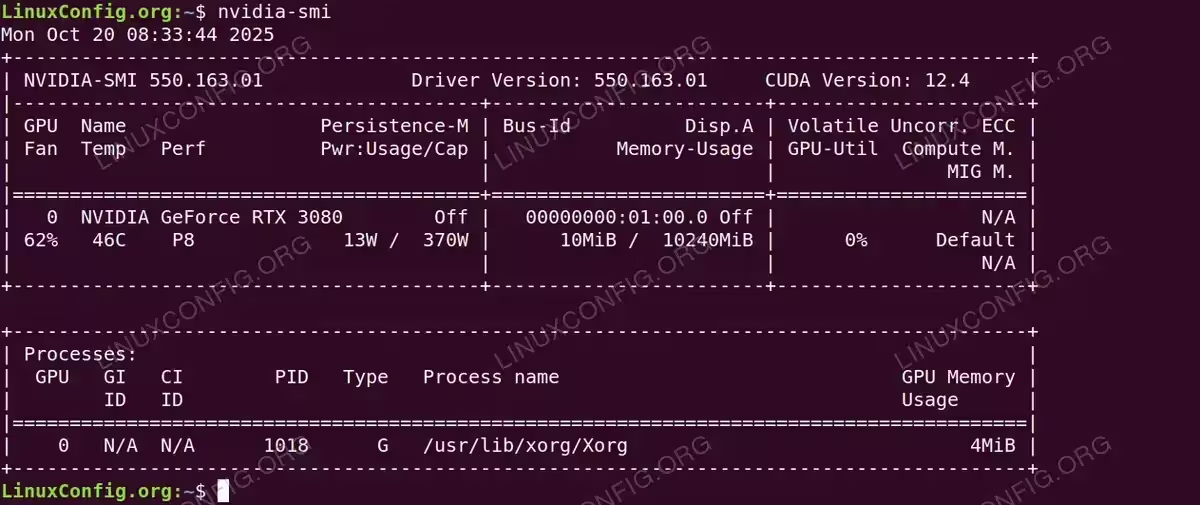
nvidia-smi output confirming NVIDIA RTX 3080 GPU detection with driver 550.163.01 and CUDA 12.4 support
Conclusion
You have successfully installed the NVIDIA CUDA toolkit on your Debian system. The toolkit is now ready for GPU-accelerated computing applications including machine learning frameworks, scientific computing, video processing, and other parallel computing workloads.
The CUDA compiler (nvcc) and associated libraries are now available system-wide. Applications that support CUDA will automatically detect and utilize your NVIDIA GPU for accelerated performance. If you’re developing CUDA applications, you can begin compiling and running CUDA code immediately.
Remember that CUDA toolkit versions must be compatible with your NVIDIA driver version. The nvidia-smi command shows the maximum CUDA version supported by your current driver. If you need a different CUDA version, you may need to update your NVIDIA drivers first.