
Encryption is a crucial aspect of cybersecurity, ensuring that sensitive information remains confidential and secure from unauthorized access. OpenSSL, a robust open-source implementation of the SSL and TLS protocols, provides various cryptographic functions that can be used to encrypt messages and files on Linux systems. This article will guide you through several methods to achieve this, highlighting the flexibility and power of OpenSSL in securing your data.
In this tutorial you will learn:
- How to encrypt a message using OpenSSL
- How to decrypt an encrypted message using OpenSSL
- How to encrypt a file using OpenSSL
- How to decrypt an encrypted file using OpenSSL
- Different encryption algorithms available in OpenSSL
| Category | Requirements, Conventions or Software Version Used |
|---|---|
| System | Linux system |
| Software | OpenSSL |
| Other | Basic knowledge of Linux command line |
| Conventions | # – requires given linux commands to be executed with root privileges either directly as a root user or by use of sudo command$ – requires given linux commands to be executed as a regular non-privileged user |
Encrypting Messages and Files with OpenSSL
OpenSSL offers a variety of encryption algorithms to secure messages and files. This flexibility allows users to choose the best method for their specific needs. Below are five methods for encrypting and decrypting data using OpenSSL.
- Encrypting a Message with a Password: This method encrypts a message using a password, which is then required to decrypt it. It is recommended to use `-pbkdf2` for better security.
$ echo "LinuxConfig.org" | openssl enc -aes-256-cbc -a -salt -pbkdf2 -pass pass:mysecretpassword
U2FsdGVkX19W9lxb8u93hvzRYaTr7rh8Pn6gOKzGJaMjjcQeIcR+PfIKLavho9qF
This command uses the AES-256-CBC encryption algorithm to encrypt the message “LinuxConfig.org”. The `-a` flag ensures the output is base64 encoded, making it easier to handle as a text string. The `-pbkdf2` flag is recommended for better key derivation security.
- Decrypting a Message with a Password: This method decrypts the message encrypted in the previous step using the same password.
$ echo "U2FsdGVkX1/POwwfJq2VK3mqDqFO1Ttfuc+q8UuvoQ4Z0F2byx1uNI3NSjeipkAi" | openssl enc -aes-256-cbc -a -d -salt -pbkdf2 -pass pass:mysecretpassword
Replace “U2FsdGVkX1/POwwfJq2VK3mqDqFO1Ttfuc+q8UuvoQ4Z0F2byx1uNI3NSjeipkAi” with the actual encrypted message. The `-d` flag indicates decryption.

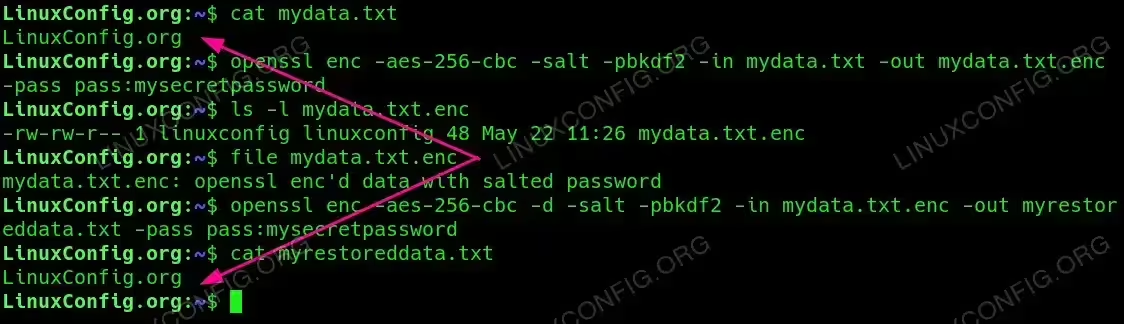
Encrypting and Decrypting a Message with a Password - Encrypting a File with a Password: This method encrypts the contents of a file using a password.
$ openssl enc -aes-256-cbc -salt -pbkdf2 -in mydata.txt -out mydata.txt.enc -pass pass:mysecretpassword
This command reads the file `mydata.txt`, encrypts its contents using AES-256-CBC, and writes the encrypted data to `mydata.txt.enc`.
- Decrypting a File with a Password: This method decrypts the file encrypted in the previous step using the same password.
$ openssl enc -aes-256-cbc -d -salt -pbkdf2 -in mydata.txt.enc -out mydata.txt -pass pass:mysecretpassword
This command reads the encrypted file `mydata.txt.enc`, decrypts its contents, and writes the original data back to `mydata.txt`.
Encrypting and Decrypting a File with a Password - Encrypting and Decrypting Using a Public/Private Key Pair: This method involves encrypting a message with a public key and decrypting it with a corresponding private key.
Generate a key pair:$ openssl genpkey -algorithm RSA -out private_key.pem -aes256 $ openssl rsa -pubout -in private_key.pem -out public_key.pem
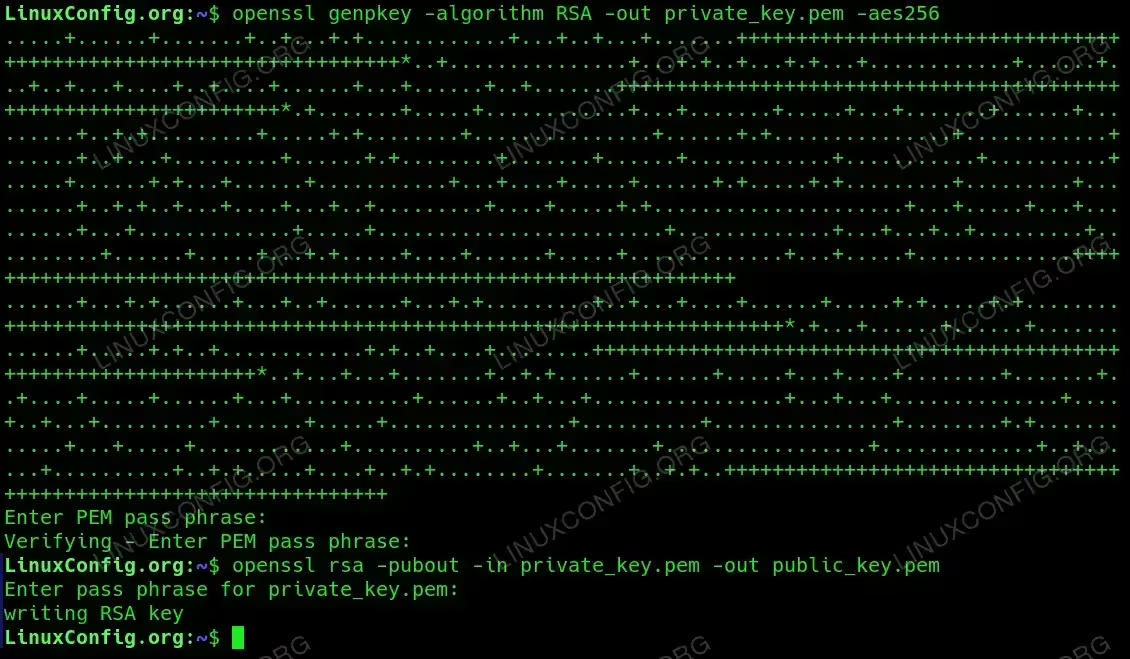
Generating SSL keypair Encrypt a message:
$ echo "LinuxConfig.org" | openssl pkeyutl -encrypt -pubin -inkey public_key.pem -out encrypted_message.bin
Decrypt the message:
$ openssl pkeyutl -decrypt -inkey private_key.pem -in encrypted_message.bin
In this method, the message is encrypted with the public key and can only be decrypted with the corresponding private key, ensuring secure communication.

Encrypting and Decrypting message using OpenSSL key pairs.
Conclusion
OpenSSL provides powerful tools for encrypting and decrypting messages and files on Linux. By mastering these methods, you can significantly enhance the security of your data. Whether you prefer password-based encryption or the robust security of public/private key pairs, OpenSSL has the capabilities to meet your encryption needs.
