
The hosts.deny file can be used on a Linux system to deny connection attempts from one or more IP addresses, hostnames, or domains. It can work with any TCP wrapped service on your system. The hosts.deny file is used in conjunction with hosts.allow to determine whether a connection attempt gets accepted or denied.
security
Regain your Privacy and Security in Digital Era
With privacy and security being more important today than ever, it’s essential to know how best to protect yourself in this digital era.
How to disable/enable SELinux on Ubuntu 22.04 Jammy Jellyfish Linux
The purpose of this tutorial is to cover the step by step instructions to install, enable, and disable SELinux on Ubuntu 22.04 Jammy Jellyfish.
How to enable SSH on Almalinux
SSH is the primary method of remote access and administration on Linux systems. SSH is a client-server service providing secure, encrypted connections over a network connection. After installing AlmaLinux or migrating from CentOS to AlmaLinux, it will probably be one of the first things you want to configure.
In this guide, we’ll go over the step by step instructions to install and configure SSH on AlmaLinux. This will help you whether you just want to connect to remote systems via SSH or you want your own system to accept incoming connections as well.
In this tutorial you will learn:
- How to install SSH
- How to start and stop the SSH service
- How to allow SSH through system firewall
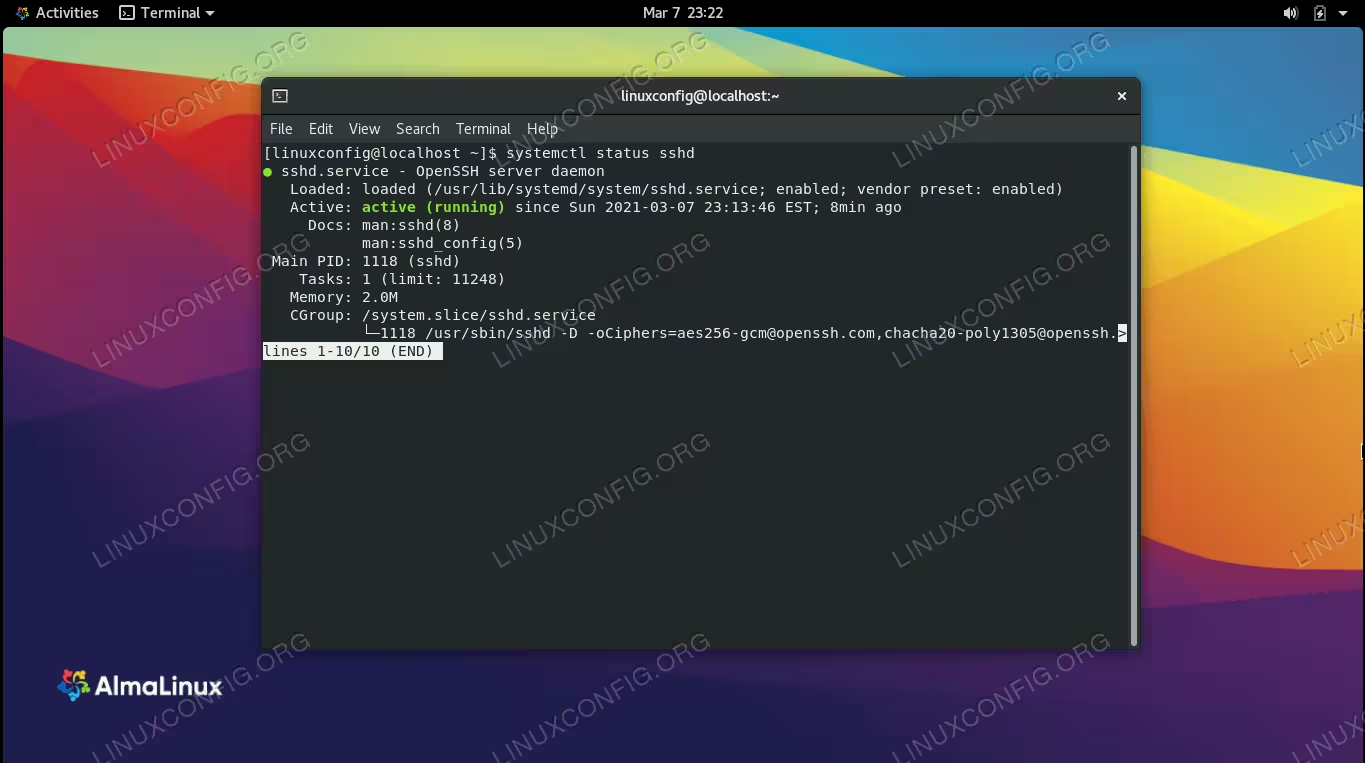
SSH server enabled and running on AlmaLinux
Introduction to the Systemd journal
Systemd is nowadays the init system adopted by almost all Linux distributions, from Red Hat Enterprise Linux to debian and ubuntu. One of the things that made Systemd the target of a lot of critics is that it tries to be a lot more than a simple init system and tries to re-invent some Linux subsystems.
The traditional logging system used on Linux, for example was rsyslog, a modern version of the traditional syslog. Systemd introduced its own logging system: it is implemented by a daemon, journald, which stores logs in binary format into a “journal”, which can be queried by the journalctl utility.
In this tutorial we will learn some parameters we can use to modify the journald daemon behavior, and some examples of how to query the journal and format the output resulting from said queries.
In this tutorial you will learn:
- How to change default journald settings
- How journald can coexist with syslog
- How to query the journal and some ways to format the queries output
Linux hardware monitoring tools
Whether you’re a home user or a system/network administrator at a large site, monitoring your Linux system helps you in many ways – possibly more than you currently know.
Linux: Setup SSH
The SSH protocol allows Linux administrators to log in to any number of remote systems from their own command line terminal. SSH is a client-server service providing secure, encrypted connections over a network connection. This allows us terminal access to other Linux systems or really any device that accepts SSH connections, such as routers and firewalls, and other operating systems.
How to disable IPv6 address on Ubuntu 18.04 Bionic Beaver Linux
Objective
Learn how to disable ipv6 on ubuntu. The objective is to disable IPv6 on Ubuntu Bionic Beaver Linux
Operating System and Software Versions
- Operating System: – Ubuntu 18.04 Bionic Beaver Linux
Requirements
Privileged access to your Ubuntu System as root or via sudo command is required.
Conventions
Install Let’s Encrypt on Centos 8
SSL encryption for your website is extremely important. It prevents man in the middle attacks, helps your page’s SEO, and browsers like Firefox won’t warn users that your site is insecure.
Best of all, you can get all these advantages for just a few minutes of your time. In this guide, we’ll show you how to install Let’s Encrypt on Centos 8, and how to use it to configure SSL encryption for your website. In a few steps, your site will become accessible via HTTPS, with HTTP links (optionally) redirecting to the secure protocol as well.
In this tutorial you will learn:
- How to install Let’s Encrypt
- How to configure Let’s Encrypt SSL

Best Linux Distro: How to Choose Guide for Every User
Choosing the best Linux distro can be a daunting task with the sheer variety of options available. Whether you’re a beginner looking for the best Linux desktop distro, an intermediate user wanting more control, or a power user seeking the best Linux flavor, there is something for everyone in the Linux world. This guide will help you understand what a Linux distribution is, highlight the top Linux distributions, and help you find the best Linux operating system for your needs.
Ubuntu 24.04 Firewall: A Quick Guide
Understanding and managing the firewall on your Ubuntu 24.04 system is crucial for ensuring the security and efficiency of your network. A firewall acts as a gatekeeper, controlling inbound and outbound traffic based on predetermined security rules. Ubuntu 24.04 comes equipped with ‘ufw’ (Uncomplicated Firewall), a user-friendly interface for managing iptables, the default firewall tool on Linux. Whether you’re a seasoned system administrator or a curious user, this guide will walk you through the essentials of using the ufw firewall, including installation, configuration, testing, and more.

Assigning File Permissions to Specific Users with chmod and setfacl
The Linux operating system allows users to assign granular permissions to all files and directories. Ordinarily, it is sufficient to hand out read, write, and/or execute permissions to individual user accounts or groups of users by utilizing the chmod command. But it is also possible to set granular permissions on a per user basis by configuring access control lists.