How to Install Docker On Ubuntu 18.04 Bionic Beaver

Objective

Install the latest Docker release on Ubuntu 18.04

Distributions

Ubuntu 18.04 Bionic Beaver

Requirements

A working install of Ubuntu 18.04 with root privileges

Conventions

  • # – requires given linux commands to be executed with root privileges either directly as a root user or by use of sudo command
  • $ – requires given linux commands to be executed as a regular non-privileged user

Other Versions of this Tutorial

Ubuntu 20.04 (Focal Fossa)

Introduction

For those interested in Ubuntu versions, focal fossa is the latest LTS release.
Docker has revolutionized how web applications are hosted and servers are run. Docker containers allow server administrators to compartmentalize their applications like virtual machines, but containers are much lighter weight, are easier to manager, and add less overhead.

Installing Docker on Ubuntu is very simple. Because Ubuntu is a popular choice for the cloud, the entire process has been streamlined to a science.
Read more

Kimai – Time Trakcer installation deployment using Docker

About

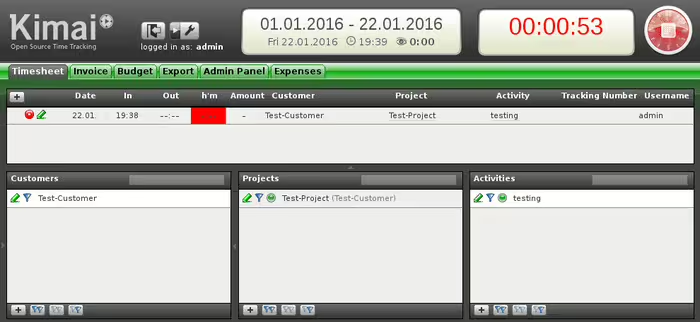
Kimai is a free open source timetracker. It tracks the time you spend with various pre-set projects and prints out a summary of your activities on demand. The automated docker Kimai time tracker image “linuxconfig/kimai” can be used to instantly deploy the Kimai time tracker on your docker hosts.

kimai time tracker installation docker

Configuration

The Kimai runs on Debian GNU/Linux system featuring Apache web server, MariaDB ( MySQL ), database and PHP5. After creating a docker container based on “linuxconfig/kimai” docker image, a port 80 will be exposed which can be access on the docker host for an immediate Kimai web configuration/installation as well as later access.

Configured MySQL users:passwords:

  • root:”empty password”
  • admin:”pass”

Configured MySQL databases:

  • kimai

Exposed ports:

  • 80

Deployment

The below command can be used to download and create a new docker container called kimai and link your docker host system’s port 80 with container’s exposed port 80.

# docker run -d --name=kimai -p 80:80 linuxconfig/kimai

Read more

How to install Kubernetes on Ubuntu 22.04 Jammy Jellyfish Linux

Kubernetes is leading software in container orchestration. Kubernetes works by managing clusters, which is simply a set of hosts meant for running containerized applications. In order to have a Kubernetes cluster, you need a minimum of two nodes – a master node and a worker node. Of course, you can expand the cluster by adding as many worker nodes as you need.

Read more

How to install docker-compose on Ubuntu 20.04 Focal Fossa Linux

Compose is a feature for setting up and running multi-container Docker applications. With a single command, you can create and start all the services from your configuration. To learn more about Compose see How To Launch Containers With Docker Compose. The objective of this short guide is to install docker-compose on Ubuntu 20.04 focal fossa Linux Server/Desktop.

In this tutorial you will learn:

  • How to install docker-compose from Ubuntu repository
  • How to install the latest docker-compose from the official git repository

Read more

How to Install Kubernetes on Rocky Linux

Kubernetes has quickly risen in popularity as the go to solution for deploying containerized applications inside of a cluster. It gives administrators many options for scaling applications, and offers advanced features like rolling updates and self healing. To get started learning about Kubernetes or to test your containerized applications in a deployment scenario, installing minikube will help immensely.

Read more

How to Create a Kubernetes Cluster

Kubernetes is leading software in container orchestration. Kubernetes works by managing clusters, which is simply a set of hosts meant for running containerized applications. In order to have a Kubernetes cluster, you need a minimum of two nodes – a master node and a worker node. Of course, you can expand the cluster by adding as many worker nodes as you need.

Read more

Manjaro Linux Docker installation

Docker is a tool that is used to run software in a container. It’s a great way for developers and users to worry less about compatibility with an operating system and dependencies because the contained software should run identically on any system.

Docker is available for download and installation on Manjaro as well as most other distributions of Linux. After Docker is installed, you can use it to install software packages much the same way you would use your distro’s package manager to download an app. The difference of using Docker is that everything is more automated, with compatability and dependencies no longer being potential issues.

In this guide, we’ll show you how to install Docker on Manjaro Linux and get started with installing containerized software.

In this tutorial you will learn:

  • How to install Docker
  • How to run Docker without root
  • How to search for a Docker image
  • How to install a Docker image
  • How to run a Docker image
  • How to monitor Docker with various commands

Read more

Start Docker Daemon on Linux

Start Docker Daemon on Linux

Docker is a popular containerization platform used by developers and system administrators to build, ship, and run applications in isolated environments. For Docker to function properly on Linux systems, the Docker daemon must be running. This tutorial covers various methods to start the Docker daemon on Linux distributions and ensure it starts automatically at boot time.

Read more

Docker container: Backup and Restore

The purpose of this guide is to go over the step by step instructions of how to back up a Docker container on the Linux command line. We’ll also show how to restore a Docker container from backup. This can be done on any Linux system where Docker is installed, and will work on any Linux distribution.

To understand the Docker container backup and recovery process we first need to understand the difference between a Docker image and a Docker container. A Docker image contains an operating system with possibly one or more preconfigured applications, whereas a Docker container is a running instance created from an image.

In this tutorial you will learn:

  • How to back up a Docker container on Linux
  • How to restore a Docker container on Linux

Read more

Running Ubuntu 24.04 LTS on Docker

Ubuntu 24.04 LTS represents the cutting edge of open-source operating systems for both development and production environments. Docker, on the other hand, simplifies the deployment of applications inside software containers, making it an essential tool for modern developers. Combining Docker with Ubuntu 24.04 LTS can significantly streamline your development workflow. This tutorial aims to guide you through the process of setting up and running an Ubuntu 24.04 LTS Docker container on your machine.

Read more

How to create a docker based LAMP stack using docker on Ubuntu 20.04

The LAMP stack

LAMP is the software stack on which probably the majority of websites run. Linux represents the foundation of the stack, and the traditional implementation includes Apache as the web server, the MySQL database, and PHP as the server-side programming language. There are, however, many possible variations: MariaDB, for example, is often used in place of MySQL, of which it is a fork, and other programming languages, as Python or Perl can be used instead of PHP. In this article we will see how to implement a basic LAMP stack using docker and the docker-compose utility.

In this tutorial you will learn:

  • How to install docker and docker-compose on Ubuntu 20.04
  • How to define services and volumes using docker-compose
  • How to map host ports to container ports in the docker-compose configuration file
  • How to use bind mounts and named volumes
  • How to build a project with docker-compose
How to create a docker based LAMP stack using docker on Ubuntu 20.04

How to create a docker based LAMP stack using docker on Ubuntu 20.04

Read more