
Understanding the filesystem partition type codes on a Linux system is crucial for managing disks and partitions effectively. These codes help identify the type of filesystem and the partitions’ role within the system. This guide will walk you through the steps to list these partition type codes using various command-line tools in Linux.
In this tutorial you will learn:
- How to list filesystem partition type codes using the
partedtool - How to check filesystem types with the
lsblkcommand - How to use the
blkidcommand for identifying filesystem types
| Category | Requirements, Conventions or Software Version Used |
|---|---|
| System | Linux-based operating system |
| Software | parted, lsblk, blkid |
| Other | Basic knowledge of Linux command-line operations |
| Conventions | # – requires given linux commands to be executed with root privileges either directly as a root user or by use of sudo command$ – requires given linux commands to be executed as a regular non-privileged user |
Listing Filesystem Partition Type Codes
To list filesystem partition type codes in Linux, you can use several tools like parted, lsblk, and blkid. Each tool provides different levels of detail and utility.
- Using
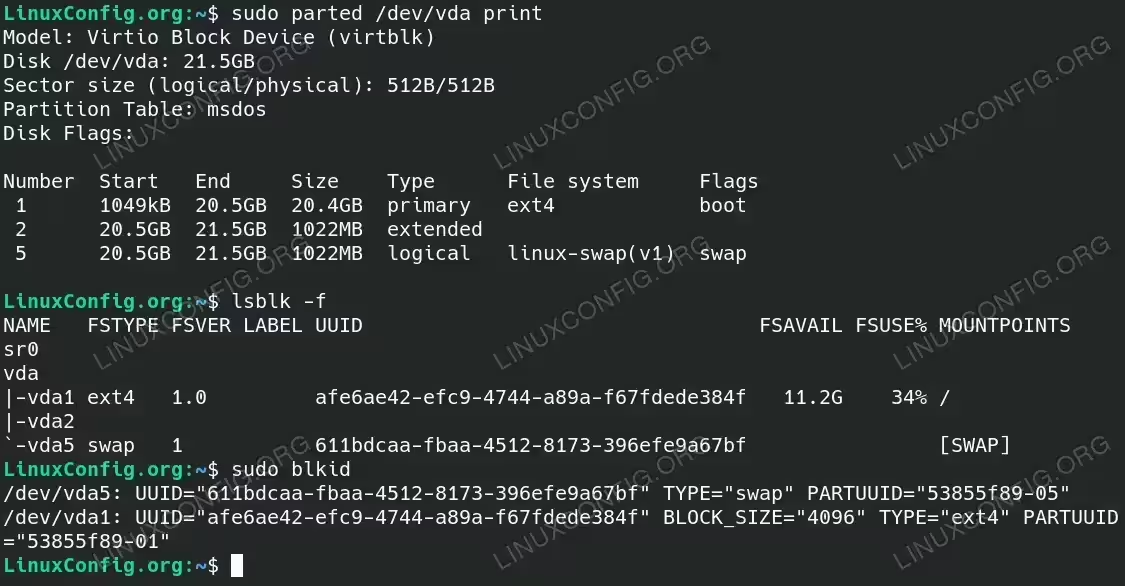
partedto List Filesystem Partition Types: Thepartedtool is a versatile utility for managing partitions. You can use it to list the details of the partitions, including their types. Make sure to replace/dev/vdawith the disk you want to check.$ sudo parted /dev/vda print
Running this command provides detailed information about the partitions on the specified disk. For example:
Model: Virtio Block Device (virtblk)
Disk /dev/vda: 21.5GB
Sector size (logical/physical): 512B/512B
Partition Table: msdos
Disk Flags:

Number  Start   End     Size    Type      File system     Flags
 1      1049kB  20.5GB  20.4GB  primary   ext4            boot
 2      20.5GB  21.5GB  1022MB  extended
 5      20.5GB  21.5GB  1022MB  logical   linux-swap(v1)  swap
This output provides a clear overview of the partitions, including their number, start and end points, size, type, filesystem, and flags.
- Checking Filesystem Types with
lsblk: Thelsblkcommand is used to list information about all available or specified block devices. It can show filesystem types for existing partitions.$ lsblk -f
Running this command provides detailed information including the device name, filesystem type, label, UUID, and mount point. For example:
NAME   FSTYPE FSVER LABEL UUID                                 FSAVAIL FSUSE% MOUNTPOINTS
sr0
vda
|-vda1 ext4   1.0         afe6ae42-efc9-4744-a89a-f67fdede384f   11.2G    34% /
|-vda2
`-vda5 swap   1           611bdcaa-fbaa-4512-8173-396efe9a67bf                [SWAP]
This output helps in understanding the filesystem types of each partition on the system.
- Identifying Filesystem Types with
blkid: Theblkidcommand is another useful tool for identifying filesystem types on block devices.$ sudo blkid
Executing this command displays the UUID and type of all available block devices. For example:
/dev/vda5: UUID="611bdcaa-fbaa-4512-8173-396efe9a67bf" TYPE="swap" PARTUUID="53855f89-05"
/dev/vda1: UUID="afe6ae42-efc9-4744-a89a-f67fdede384f" BLOCK_SIZE="4096" TYPE="ext4" PARTUUID="53855f89-01"
Listing Filesystem Partition Type Codes with parted, lsblk and blkid Linux commands This information is useful for identifying and managing the filesystem types on your partitions.
In Linux systems, managing disk partitions is a crucial task for optimizing storage and ensuring efficient system operation. Each partition is identified by a unique type ID, which defines its purpose and the filesystem it supports. Understanding these partition types is essential for tasks such as system installation, data organization, and multi-boot configurations. Below is a comprehensive table listing various partition ID types, their names, and detailed descriptions, providing Linux users with the necessary insights to effectively manage their disk partitions.
Partition ID Types
| ID | Name | Description |
|---|---|---|
| 00 | Empty | No partition, used to denote unused space. |
| 01 | FAT12 | File Allocation Table (12-bit), used in very early versions of DOS and Windows for small floppy disks. |
| 02 | XENIX root | Xenix root filesystem, used by the Xenix operating system, which is a version of Unix licensed by Microsoft. |
| 03 | XENIX usr | Xenix /usr filesystem, another partition type used by the Xenix operating system. |
| 04 | FAT16 <32M | File Allocation Table (16-bit), used in DOS and early versions of Windows for partitions smaller than 32MB. |
| 05 | Extended | Extended partition, used to overcome the four primary partition limit in MBR by creating logical partitions. |
| 06 | FAT16 | File Allocation Table (16-bit), used in DOS and early versions of Windows for partitions larger than 32MB. |
| 07 | HPFS/NTFS/exFAT | High Performance File System (OS/2), New Technology File System (Windows NT and later), or Extended File Allocation Table (large file support, USB drives). |
| 08 | AIX | IBM AIX filesystem, used by IBM’s Advanced Interactive eXecutive Unix-based operating system. |
| 09 | AIX bootable | IBM AIX bootable partition, used to start the AIX operating system. |
| 0a | OS/2 Boot Manager | OS/2 Boot Manager, used to manage booting multiple operating systems on IBM’s OS/2 systems. |
| 0b | W95 FAT32 | File Allocation Table (32-bit), used in Windows 95 OSR2 and later for larger partitions. |
| 0c | W95 FAT32 (LBA) | File Allocation Table (32-bit) with Logical Block Addressing, used in Windows 95 OSR2 and later for large partitions with improved BIOS support. |
| 0e | W95 FAT16 (LBA) | File Allocation Table (16-bit) with Logical Block Addressing, used in Windows 95 and later for improved BIOS support. |
| 0f | W95 Ext’d (LBA) | Extended partition with Logical Block Addressing, used in Windows 95 and later for creating logical partitions. |
| 10 | OPUS | OPUS, used by the OPUS operating system, which is not widely known or used today. |
| 11 | Hidden FAT12 | Hidden File Allocation Table (12-bit), similar to FAT12 but hidden from the operating system to protect data. |
| 12 | Compaq diagnostics | Compaq diagnostics partition, used to store diagnostic tools and utilities on Compaq computers. |
| 14 | Hidden FAT16 <32M | Hidden File Allocation Table (16-bit), used for partitions smaller than 32MB and hidden from the operating system. |
| 16 | Hidden FAT16 | Hidden File Allocation Table (16-bit), used for larger partitions and hidden from the operating system. |
| 17 | Hidden HPFS/NTFS | Hidden High Performance File System or New Technology File System, used to protect data by hiding the partition from the operating system. |
| 18 | AST SmartSleep | Used by AST’s SmartSleep feature for managing power and sleep modes on their computers. |
| 1b | Hidden W95 FAT32 | Hidden File Allocation Table (32-bit), used to protect data by hiding the partition from the operating system. |
| 1c | Hidden W95 FAT32 (LBA) | Hidden File Allocation Table (32-bit) with Logical Block Addressing, for improved BIOS support and data protection. |
| 1e | Hidden W95 FAT16 (LBA) | Hidden File Allocation Table (16-bit) with Logical Block Addressing, for improved BIOS support and data protection. |
| 24 | NEC DOS | Used by NEC DOS, a Disk Operating System variant developed by NEC. |
| 27 | Hidden NTFS Win | Hidden New Technology File System for Windows, used to protect data by hiding the partition from the operating system. |
| 39 | Plan 9 | Used by the Plan 9 from Bell Labs operating system, a distributed OS designed as a successor to Unix. |
| 3c | PartitionMagic | Used by PartitionMagic, a utility for partitioning hard drives, creating, resizing, and managing partitions. |
| 40 | Venix 80286 | Used by Venix, a Unix-like operating system for the Intel 80286 processor. |
| 41 | PPC PReP Boot | PowerPC Reference Platform Boot partition, used to boot PowerPC-based systems. |
| 42 | SFS | Secure File System, used for enhanced file security and encryption. |
| 4d | QNX4.x | Used by QNX 4.x, a real-time operating system. |
| 4e | QNX4.x 2nd part | Second partition used by QNX 4.x. |
| 4f | QNX4.x 3rd part | Third partition used by QNX 4.x. |
| 50 | OnTrack DM | Used by OnTrack Disk Manager, a utility for managing and optimizing disk drives. |
| 51 | OnTrack DM6 Aux | Auxiliary partition used by OnTrack Disk Manager 6. |
| 52 | CP/M | Used by CP/M (Control Program for Microcomputers), an early operating system for microcomputers. |
| 53 | OnTrack DM6 Aux | Another auxiliary partition used by OnTrack Disk Manager 6. |
| 54 | OnTrackDM6 | Primary partition used by OnTrack Disk Manager 6. |
| 55 | EZ-Drive | Used by EZ-Drive, a utility for managing and optimizing disk drives, often used to overcome BIOS limitations. |
| 56 | Golden Bow | Partition used by Golden Bow, a disk optimization and management utility. |
| 5c | Priam Edisk | Used by Priam’s EDISK, an early disk management utility. |
| 61 | SpeedStor | Partition used by SpeedStor, a utility for managing and optimizing hard drives. |
| 63 | GNU HURD or SysV | Partition used by the GNU HURD operating system or System V Unix. |
| 64 | Novell Netware | Partition used by Novell Netware, a network operating system. |
| 65 | Novell Netware | Another partition used by Novell Netware. |
| 70 | DiskSecure Mult | Partition used by DiskSecure Multi-Boot, a utility for managing multiple operating systems on one disk. |
| 75 | PC/IX | Partition used by PC/IX, an early Unix-like operating system for IBM PCs. |
| 80 | Old Minix | Partition used by the early versions of Minix, a Unix-like operating system. |
| 81 | Minix / old Linux | Partition used by Minix or early versions of the Linux operating system. |
| 82 | Linux swap / Solaris | Swap partition used by Linux or Solaris operating systems. |
| 83 | Linux | Primary partition used by the Linux operating system. |
| 84 | OS/2 hidden or | Hidden partition used by IBM’s OS/2 operating system, or possibly other uses. |
| 85 | Linux extended | Extended partition used by Linux to overcome the primary partition limit. |
| 86 | NTFS volume set | Partition used by NTFS volume sets, for spanning multiple disks. |
| 87 | NTFS volume set | Another partition used by NTFS volume sets. |
| 88 | Linux plaintext | Partition used by Linux for plaintext data storage. |
| 8e | Linux LVM | Partition used by Linux Logical Volume Manager, for managing disk volumes. |
| 93 | Amoeba | Partition used by the Amoeba distributed operating system. |
| 94 | Amoeba BBT | Bad Block Table used by the Amoeba distributed operating system. |
| 9f | BSD/OS | Partition used by BSD/OS, a commercial version of the Berkeley Software Distribution Unix operating system. |
| a0 | IBM Thinkpad hidden | Hidden partition used by IBM ThinkPad laptops for recovery and system management. |
| a5 | FreeBSD | Partition used by FreeBSD, an open-source Unix-like operating system. |
| a6 | OpenBSD | Partition used by OpenBSD, a security-focused Unix-like operating system. |
| a7 | NeXTSTEP | Partition used by NeXTSTEP, an operating system developed by NeXT. |
| a8 | Darwin UFS | Partition used by Darwin, the open-source Unix-like foundation of macOS, with UFS (Unix File System). |
| a9 | NetBSD | Partition used by NetBSD, an open-source Unix-like operating system known for its portability. |
| ab | Darwin boot | Boot partition used by Darwin. |
| af | HFS / HFS+ | Partition used by Apple’s Hierarchical File System and HFS Plus, used in macOS. |
| b7 | BSDI fs | Filesystem partition used by BSDI, a commercial BSD Unix operating system. |
| b8 | BSDI swap | Swap partition used by BSDI. |
| bb | Boot Wizard hidden | Hidden partition used by Boot Wizard for boot management and recovery. |
| bc | Acronis FAT32 L | Partition used by Acronis for FAT32 large volumes. |
| be | Solaris boot | Boot partition used by the Solaris operating system. |
| bf | Solaris | Primary partition used by the Solaris operating system. |
| c1 | DRDOS/sec (FAT-) | Secondary FAT partition used by DR-DOS. |
| c4 | DRDOS/sec (FAT-) | Another secondary FAT partition used by DR-DOS. |
| c6 | DRDOS/sec (FAT-) | Yet another secondary FAT partition used by DR-DOS. |
| c7 | Syrinx | Partition used by Syrinx, a file system for research purposes. |
| da | Non-FS data | Partition containing non-filesystem data, often used for proprietary formats or special purposes. |
| db | CP/M / CTOS / … | Partition used by CP/M, CTOS, and other older operating systems. |
| de | Dell Utility | Utility partition used by Dell computers for diagnostics and recovery tools. |
| df | BootIt | Partition used by BootIt, a boot manager and partitioning utility. |
| e1 | DOS access | Partition used by DOS for access control or special purposes. |
| e3 | DOS R/O | Read-only partition used by DOS for protected data. |
| e4 | SpeedStor | Partition used by SpeedStor, a utility for managing and optimizing hard drives. |
| ea | Linux extended | Extended partition used by Linux, similar to the standard extended partition but specifically for Linux systems. |
| eb | BeOS fs | Filesystem partition used by the BeOS operating system. |
| ee | GPT | GUID Partition Table, used for modern partitioning with large disk support and redundancy. |
| ef | EFI (FAT-12/16/32) | EFI System Partition, used by UEFI firmware to boot the operating system. |
| f0 | Linux/PA-RISC boot | Boot partition used by Linux on PA-RISC systems. |
| f1 | SpeedStor | Another partition used by SpeedStor. |
| f2 | DOS secondary | Secondary partition used by DOS for additional data storage or special purposes. |
| f4 | SpeedStor | Yet another partition used by SpeedStor. |
| f8 | EBBR protective | EBBR protective partition, used to protect the disk from being overwritten by legacy BIOS tools. |
| fb | VMware VMFS | Partition used by VMware’s Virtual Machine File System for storing virtual machine disk images. |
| fc | VMware VMKCORE | Partition used by VMware for VMkernel core dumps. |
| fd | Linux raid auto | Partition used by Linux for automatic RAID detection and configuration. |
| fe | LANstep | Partition used by LANstep, a network utility for DOS. |
| ff | BBT | Bad Block Table, used to track bad sectors on the disk. |
Conclusion
Understanding filesystem partition type codes is essential for effective disk and partition management in Linux. By using tools like parted, lsblk, and blkid, you can easily list and identify the filesystem types on your system, aiding in better organization and maintenance of your data.
