
HAProxy or High Availability Proxy is an open source TCP and HTTP load balancer and proxy server software. HAProxy has been written by Willy Tarreau in C, it supports SSL, compressions, keep-alive, custom log formats and header rewriting. HAProxy is a fast and lightweight proxy server and load balancer with a small memory footprint and low CPU usage. It is used by large sites like Github, StackOverflow, Reddit, Tumblr, Twitter and others. It has become the most popular software load balancer and proxy server in the past years.
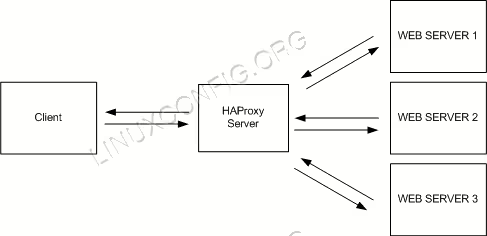
In this tutorial, you will get through the HAProxy installation and configuration on RHEL 8 / CentOS 8. We will install HAProxy on a single server and then install Nginx web server on the other servers. HAProxy will act as a load balancer for the Nginx web servers.
In this tutorial you will learn:
- HAProxy Architecture and Concepts
- Configure hosts file for name resolution
- Install and Configure HAProxy
- Install and Configure Nginx
- Testing the Load Balancing feature
- Access the HAProxy Stats URL
Software Requirements and Conventions Used
| Category | Requirements, Conventions or Software Version Used |
|---|---|
| System | RHEL 8 / CentOS 8 |
| Software | HAProxy, Nginx |
| Other | Privileged access to your Linux system as root or via the sudo command. |
| Conventions |
# – requires given linux commands to be executed with root privileges either directly as a root user or by use of sudo command$ – requires given linux commands to be executed as a regular non-privileged user |
HAProxy Architecture and Concepts
HAProxy can run in two modes: TCP mode Layer 4 and HTTP Mode Layer 7. In Layer 4 TCP mode, HAProxy forwards the RAW TCP packets from the client to the application servers. In the Layer 7 HTTP mode, HAProxy is parsing the HTTP header before forwarding them to the application servers. In this tutorial, we will use Nginx as the web server that supports the Layer 7 HTTP mode.


Balance Algorithm is the algorithm that is used by HAProxy to select the server when doing the load balancing. The following modes are available:
Roundrobin
This is the most simple balance algorithm. For each new connection, it will be handled by the next backend server. If the last backend server in the list is reached, it will start again from the top of backend list.
Leastconn
The new connection will be handled by the backend server with least amount of connections. This is useful when the time and load of the requests vary a lot.
Source
This is for sticky sessions, the client IP will be hashed to determine the backend server that received the last request from this IP. So an IP A will always be handled by backend1, and IP B will always be handled by banckend2 to not interrupt sessions.
Configure hosts file for name resolution
Log in to the load balancer server and edit the /etc/hosts file and HAProxy loadbalancer, nginx1,nginx2 hostnames. Copy the same file on other two nginx nodes and check the network connectivity via ping comand.
# vim /etc/hosts
192.168.1.108 loadbalancer.example.com
192.168.1.104 nginx1.example.com
192.168.1.105 nginx2.example.com
Install and Configure HAProxy
HAProxy is available in the RHEL 8 / CentOS 8 repository, hence log in to the loadbalancer server and install package HAProxy with this yum command.
# yum install haproxy
Once successfully installed you can use the below command to verify the installation.
# yum info haproxy
# yum info haproxy
Updating Subscription Management repositories.
Updating Subscription Management repositories.
Last metadata expiration check: 0:06:03 ago on Sat 16 Mar 2019 11:40:24 PM +04.
Installed Packages
Name         : haproxy
Version      : 1.8.14
Release      : 1.el8
Arch         : x86_64
Size         : 4.1 M
Source       : haproxy-1.8.14-1.el8.src.rpm
Repo         : @System
From repo    : rhel-8-for-x86_64-appstream-beta-rpms
Summary      : HAProxy reverse proxy for high availability environments
URL          : http://www.haproxy.org/
License      : GPLv2+
Description  : HAProxy is a TCP/HTTP reverse proxy which is particularly suited for high
             : availability environments. Indeed, it can:
             :  - route HTTP requests depending on statically assigned cookies
             :  - spread load among several servers while assuring server persistence
             :    through the use of HTTP cookies
             :  - switch to backup servers in the event a main one fails
             :  - accept connections to special ports dedicated to service monitoring
             :  - stop accepting connections without breaking existing ones
             :  - add, modify, and delete HTTP headers in both directions
             :  - block requests matching particular patterns
             :  - report detailed status to authenticated users from a URI
             :    intercepted from the application
When the installation is finished, go to the /etc/haproxy/ directory and backup the original configuration file.
# cd /etc/haproxy/
# cp haproxy.cfg haproxy.cfg.orig
Next, do the below changes in HAProxy configuration file haproxy.cfg with any of the editor.
#---------------------------------------------------------------------
# Example configuration for a possible web application.  See the
# full configuration options online.
#
#   https://www.haproxy.org/download/1.8/doc/configuration.txt
#
#---------------------------------------------------------------------

#---------------------------------------------------------------------
# Global settings
#---------------------------------------------------------------------
global
    # to have these messages end up in /var/log/haproxy.log you will
    # need to:
    #
    # 1) configure syslog to accept network log events.  This is done
    #    by adding the '-r' option to the SYSLOGD_OPTIONS in
    #    /etc/sysconfig/syslog
    #
    # 2) configure local2 events to go to the /var/log/haproxy.log
    #   file. A line like the following can be added to
    #   /etc/sysconfig/syslog
    #
    #    local2.*                       /var/log/haproxy.log
    #
    log         127.0.0.1 local2

    chroot      /var/lib/haproxy
    pidfile     /var/run/haproxy.pid
    maxconn     4000
    user        haproxy
    group       haproxy
    daemon

    # turn on stats unix socket
    stats socket /var/lib/haproxy/stats

    # utilize system-wide crypto-policies
    ssl-default-bind-ciphers PROFILE=SYSTEM
    ssl-default-server-ciphers PROFILE=SYSTEM

#---------------------------------------------------------------------
# common defaults that all the 'listen' and 'backend' sections will
# use if not designated in their block
#---------------------------------------------------------------------
defaults
    mode                    http
    log                     global
    option                  httplog
    option                  dontlognull
    option http-server-close
    option forwardfor       except 127.0.0.0/8
    option                  redispatch
    retries                 3
    timeout http-request    10s
    timeout queue           1m
    timeout connect         10s
    timeout client          1m
    timeout server          1m
    timeout http-keep-alive 10s
    timeout check           10s
    maxconn                 3000
#---------------------------------------------------------------------
# HAProxy Monitoring Config
#---------------------------------------------------------------------
listen stats
    bind loadbalancer.example.com:8080            # HAProxy Monitoring run on port 8080
    mode http
    option forwardfor
    option httpclose
    stats enable
    stats show-legends
    stats refresh 5s
    stats uri /stats                         # URL for HAProxy monitoring
    stats realm Haproxy\ Statistics
    stats auth admin:admin                   # User and Password for login to the monitoring dashboard
    #stats admin if TRUE
    default_backend loadbalancer                 # This is optionally for monitoring backend
#---------------------------------------------------------------------
# main frontend which proxys to the backends
#---------------------------------------------------------------------
frontend loadbalancer
    bind loadbalancer.example.com:80
    #acl url_static       path_beg       -i /static /images /javascript /stylesheets
    #acl url_static       path_end       -i .jpg .gif .png .css .js

    #use_backend static          if url_static
    option http-server-close
    option forwardfor
    default_backend       loadbalancer

#---------------------------------------------------------------------
# static backend for serving up images, stylesheets and such
#---------------------------------------------------------------------
#backend static
#    balance     roundrobin
#    server      static 127.0.0.1:4331 check

#---------------------------------------------------------------------
# round robin balancing between the various backends
#---------------------------------------------------------------------
backend loadbalancer
    balance     roundrobin                                    # Balance algorithm
    option httpchk HEAD / HTTP/1.1\r\nHost:\ localhost        # Check the server application is up and healty - 200 status code
    server  nginx1.example.com 192.168.1.104:80 check         # NGINX Server1
    server  nginx2.example.com 192.168.1.105:80 check         # NGNIX Server2
Save this configuration file and exit.
Now, we will configure the rsyslog daemon to log the HAProxy statistics. Edit the rsyslog.conf file to enable the UDP port 514 to be used by rsyslog. Open the rsyslog configuration file and uncomment the lines to enable the UDP connection.
# vim /etc/rsyslog.conf
module(load="imudp") # needs to be done just once
input(type="imudp" port="514")
Save the file with above changes and exit. Then create new HAProxy configuration file for rsyslog and add the below entries in that file.
# cd /etc/rsyslog.d/
# vi haproxy.conf
local2.=info     /var/log/haproxy-access.log    # For Access Log
local2.notice    /var/log/haproxy-info.log      # For Service Info - Backend, loadbalancer
Now restart rsyslog and then start the HAProxy service and add HAProxy to start at boot time.
# systemctl restart rsyslog
# systemctl start haproxy
# systemctl enable haproxy
Install and Configure Nginx
To install nginx, you’ll find it’s already the part of the existing RHEL 8 / CentOS 8 repo and can be installed with the following command.
# yum install nginx
Once installed you can verify the installation with the help of this command.
# yum info nginx
# yum info nginx
Updating Subscription Management repositories.
Updating Subscription Management repositories.
Last metadata expiration check: 0:06:14 ago on Sat 16 Mar 2019 11:40:24 PM +04.
Installed Packages
Name         : nginx
Epoch        : 1
Version      : 1.14.0
Release      : 3.el8+1631+ba902cf0
Arch         : x86_64
Size         : 568 k
Source       : nginx-1.14.0-3.el8+1631+ba902cf0.src.rpm
Repo         : rhel-8-for-x86_64-appstream-beta-rpms
Summary      : A high performance web server and reverse proxy server
URL          : http://nginx.org/
License      : BSD
Description  : Nginx is a web server and a reverse proxy server for HTTP, SMTP, POP3 and
             : IMAP protocols, with a strong focus on high concurrency, performance and low
             : memory usage.
Once Nginx is installed, go to the web directory and change the index.html file accordingly. Make sure you’re doing below steps on nginx1 and nginx2 server.
# cd /usr/share/nginx/html
# ls -lrth
total 20K
-rw-r--r--. 1 root root 2.8K Oct 31  2016 poweredby.png
-rw-r--r--. 1 root root  368 Oct 31  2016 nginx-logo.png
-rw-r--r--. 1 root root 3.7K Mar 16 20:39 50x.html
-rw-r--r--. 1 root root 3.6K Mar 16 20:39 404.html
-rw-r--r--. 1 root root 3.7K Mar 16 20:42 index.html
Next, add Nginx to start at boot time and then start the daemon with the commands below.
# systemctl enable nginx
# systemctl start nginx
Testing the Load Balancing feature
Testing can be done by browing and access the loadbalancer IP 192.168.1.108 (for my case) and you will see one time it goes to the Nginx Node1 and second time it goes to Nginx Node2 in a round robin fashion.


You can also check the /var/log/haproxy-access.log to get the detail information about the load balancing.
Access the HAProxy Stats URL
Access the dashboard for HAProxy Statistical Report which is running on port 8080 with username and password defined in haproxy.cfg file.
http://192.168.1.108:8080/stats

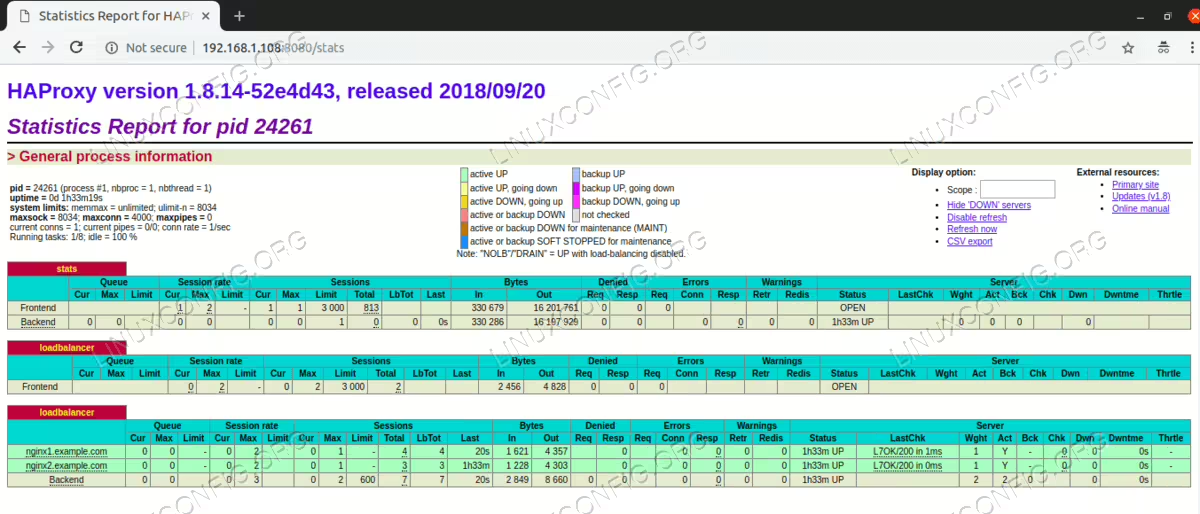
HAProxy is working successfully and acts as a load balancer for the two Nginx web servers.
Conclusion
HAProxy or High Availability proxy is an open source software that provides high availability for TCP-based services, it operates as HTTP load balancer and proxy server. The software is written in C and supports SSL, keep-alive and compression. HAProxy is the right choice for everyone who needs a load balancer and proxy server that is fast and lightweight with a small memory footprint and low CPU usage. Haproxy can run in Layer 4 TCP mode and Layer 7 HTTP mode. Nginx supports only the Layer 7 HTTP mode with HAProxy. If you want to use Layer 4 TCP mode, you can use other web servers like Apache. On RHEL 8 / CentOS 8 Linux, HAProxy is available in the default repository. It’s easy to install and configure.