
Home networks have grown considerably with smart TVs, IoT devices, phones, and tablets all connecting to our routers. This tutorial will guide you through building a lightweight Linux intrusion detection system using Bash script that monitors what devices are connecting to your network. Think of it as a basic network “doorbell” – it alerts you when someone new shows up.
In this tutorial you will learn:
- How to build a basic Linux intrusion detection system using Bash
- How to discover devices on your local network using ARP
- How to monitor network changes and optionally block devices
- Basic iptables usage for blocking unwanted connections
| Category | Requirements, Conventions or Software Version Used |
|---|---|
| System | Any modern Linux distribution (Ubuntu 20.04+, Debian 11+, Fedora 35+) |
| Software | nmap, iptables, iproute2, bash 4.0+ |
| Other | Root access required, Physical network connection recommended |
| Conventions | # – requires given linux commands to be executed with root privileges either directly as a root user or by use of sudo command$ – requires given linux commands to be executed as a regular non-privileged user |
ALTERNATIVE OPEN-SOURCE IDS SOLUTIONS
While this Bash script demonstrates intrusion detection concepts, production networks require more robust solutions. The Linux community maintains several mature IDS projects: Suricata provides multi-threaded real-time intrusion detection and prevention. Snort 3 analyzes network traffic against rulesets to detect malicious patterns. Wazuh focuses on host-based monitoring including log analysis and file integrity checking. Zeek creates detailed transaction logs for network forensics and analysis. Each tool serves different security monitoring needs depending on whether you’re protecting network traffic, host systems, or requiring deep packet inspection.
- Install Required Packages: First, install all necessary tools for the Linux intrusion detection system. The script uses modern
ipcommand instead of deprecatedarp.# Debian/Ubuntu $ sudo apt-get update && sudo apt-get install -y nmap iproute2 # Fedora/RHEL/CentOS $ sudo dnf install -y nmap iproute # Arch Linux $ sudo pacman -S --noconfirm nmap iproute2 # Verify installation $ nmap --version && ip --version
- Create the Linux Intrusion Detection Script: Create a file called
network-monitor.shwith the complete script below. This script will scan your network every 30 seconds and alert you when devices join or leave.#!/usr/bin/env bash # Simple Linux Intrusion Detection System for Home Networks # Detection-only version - monitors and reports network changes set -euo pipefail # Configuration SCAN_INTERVAL=${SCAN_INTERVAL:-30} LOG_FILE=${LOG_FILE:-"/var/log/network-intrusion.log"} # Colors RED='\033[0;31m' GREEN='\033[0;32m' YELLOW='\033[1;33m' NC='\033[0m' # Check if running as root (needed for comprehensive network scanning) if [[ $EUID -ne 0 ]]; then echo -e "${RED}This script must be run as root for full network access${NC}" echo "Run with: sudo $0" exit 1 fi # Check for required commands for cmd in nmap ip; do if ! command -v $cmd &>/dev/null; then echo -e "${RED}Error: $cmd is not installed${NC}" echo "Please install required packages first (see step 1)" exit 1 fi done # Get local network ranges (excluding Docker/virtual networks) get_networks() { ip -4 addr show | grep -oP '(?<=inet\s)\d+\.\d+\.\d+\.\d+/\d+' | grep -v '127.0.0.1' | grep -v '172.17' | grep -v '172.18' } # Scan network for devices scan_network() { local temp_file="/tmp/scan_$" > "$temp_file" for network in $(get_networks); do nmap -sn "$network" 2>/dev/null | grep "Nmap scan report" | awk '{print $NF}' | tr -d '()' >> "$temp_file" done sort -u "$temp_file" rm -f "$temp_file" } # Get MAC address for a device get_mac_address() { local ip=$1 ping -c 1 -W 1 "$ip" &>/dev/null ip neigh show "$ip" 2>/dev/null | grep -oE '([0-9a-fA-F]{2}:){5}[0-9a-fA-F]{2}' | head -1 } # Cleanup on exit cleanup() { echo -e "\n${YELLOW}Stopping Linux Intrusion Detection Monitor${NC}" echo "Detection log saved to: $LOG_FILE" exit 0 } trap cleanup INT TERM # Main monitoring loop monitor_loop() { declare -a PREVIOUS_HOSTS declare -a CURRENT_HOSTS echo "Performing initial network scan..." PREVIOUS_HOSTS=($(scan_network)) echo -e "${GREEN}Initially detected ${#PREVIOUS_HOSTS[@]} devices${NC}" printf '%s\n' "${PREVIOUS_HOSTS[@]}" echo "" echo "Monitoring for changes every $SCAN_INTERVAL seconds..." echo "Press Ctrl+C to stop" echo "" while true; do sleep "$SCAN_INTERVAL" CURRENT_HOSTS=($(scan_network)) # Detect changes NEW_DEVICES="" REMOVED_DEVICES="" for device in "${CURRENT_HOSTS[@]}"; do if [[ ! " ${PREVIOUS_HOSTS[@]} " =~ " ${device} " ]]; then NEW_DEVICES="$NEW_DEVICES $device" fi done for device in "${PREVIOUS_HOSTS[@]}"; do if [[ ! " ${CURRENT_HOSTS[@]} " =~ " ${device} " ]]; then REMOVED_DEVICES="$REMOVED_DEVICES $device" fi done if [ -n "$NEW_DEVICES" ] || [ -n "$REMOVED_DEVICES" ]; then echo -e "${YELLOW}[$(date '+%H:%M:%S')] NETWORK CHANGE DETECTED${NC}" if [ -n "$NEW_DEVICES" ]; then echo -e "${GREEN} NEW DEVICES JOINED:${NC}" for device in $NEW_DEVICES; do mac=$(get_mac_address "$device") echo " + $device ${mac:+(MAC: $mac)}" echo "$(date '+%Y-%m-%d %H:%M:%S') NEW: $device $mac" >> "$LOG_FILE" done fi if [ -n "$REMOVED_DEVICES" ]; then echo -e "${RED} DEVICES LEFT:${NC}" for device in $REMOVED_DEVICES; do echo " - $device" echo "$(date '+%Y-%m-%d %H:%M:%S') REMOVED: $device" >> "$LOG_FILE" done fi # Sound alert echo -e '\a' # Desktop notification if available if command -v notify-send &>/dev/null; then notify-send "Network Intrusion Detection" "Network change detected - check terminal" fi echo "" fi PREVIOUS_HOSTS=("${CURRENT_HOSTS[@]}") done } # Main function main() { echo -e "${GREEN}=====================================${NC}" echo -e "${GREEN} Linux Intrusion Detection System${NC}" echo -e "${GREEN}=====================================${NC}" echo "Mode: Detection & Reporting Only" echo "Scan Interval: $SCAN_INTERVAL seconds" echo "Log File: $LOG_FILE" echo "" # Initialize log file mkdir -p $(dirname "$LOG_FILE") touch "$LOG_FILE" echo "$(date '+%Y-%m-%d %H:%M:%S') IDS Started" >> "$LOG_FILE" # Check networks NETWORKS=$(get_networks) if [ -z "$NETWORKS" ]; then echo -e "${RED}No active networks found${NC}" echo "Check your network connection" exit 1 fi echo "Detected networks to monitor:" echo "$NETWORKS" echo "" monitor_loop } # Start the script main "$@"Save this script as
network-monitor.shin your home directory. - Run the Linux Intrusion Detection Script: Make the script executable and run it with root privileges.
# Make executable
$ chmod +x network-monitor.sh

# Run the script
$ sudo ./network-monitor.sh

# Or run with custom scan interval (5 seconds for testing)
$ sudo SCAN_INTERVAL=5 ./network-monitor.sh
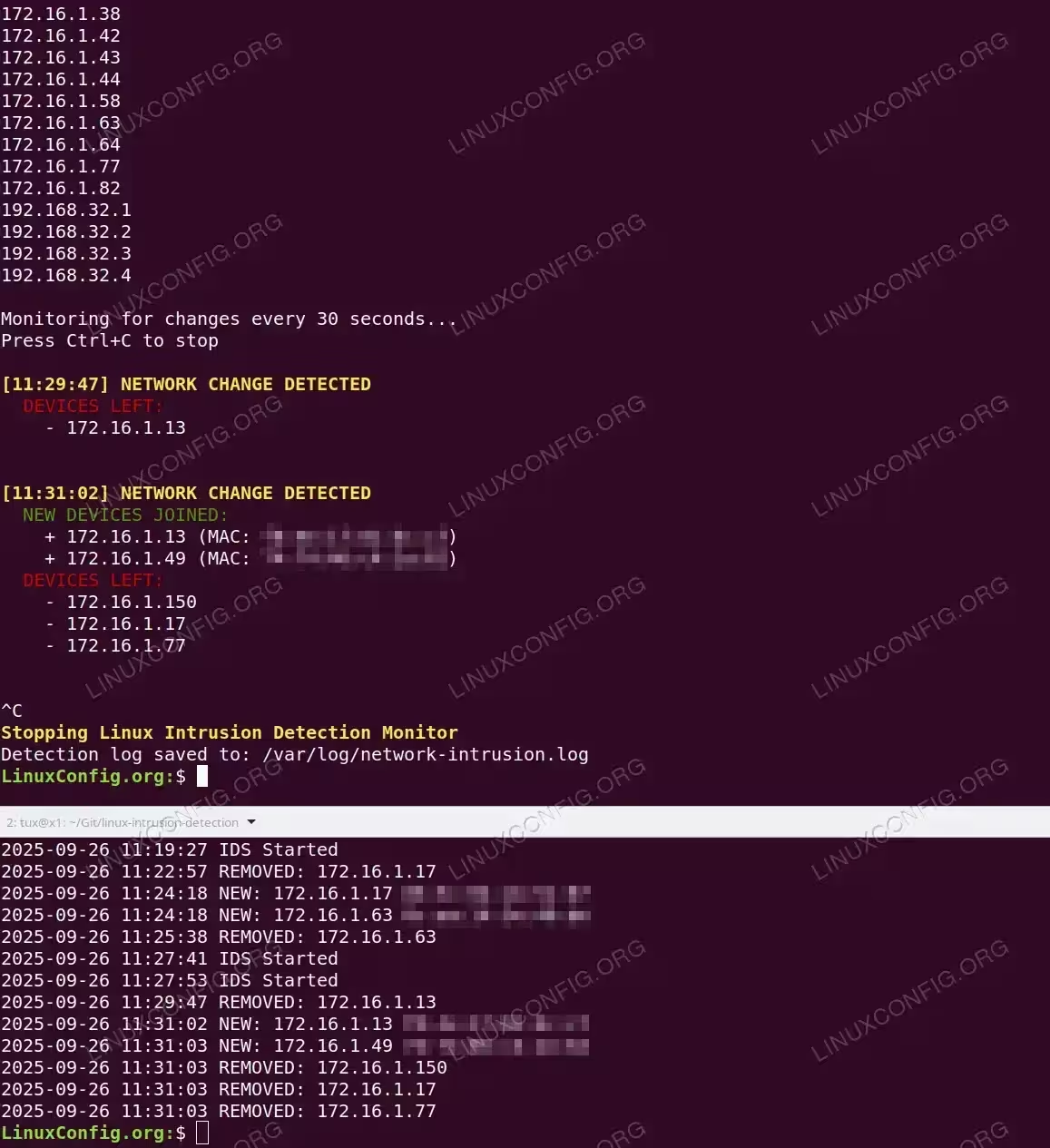
Terminal output of the Simple Linux Intrusion Detection System Important: If the script is scanning the wrong network (like Docker’s 172.17.x.x), check your actual network with
ip route | grep defaultand modify theget_networks()function to exclude virtual networks. - Monitor and Test Your Network: Once running, the script will show all detected devices and then continuously monitor for changes. Test it by:
- Connect a new device: Turn on WiFi on your phone – you’ll see it detected as a new device
- Disconnect a device: Turn off a device – you’ll see it reported as removed
- Check logs: View the detection log with
tail -f /var/log/network-intrusion.log - Stop monitoring: Press Ctrl+C to stop the script
The script provides clear status updates with timestamps:
[14:23:45] NETWORK CHANGE DETECTED
  NEW DEVICES JOINED:
    + 192.168.1.105 (MAC: aa:bb:cc:dd:ee:ff)

[14:25:12] NETWORK CHANGE DETECTED
  DEVICES LEFT:
    - 192.168.1.105
To run continuously as a system service:
# Create systemd service
$ sudo tee /etc/systemd/system/network-ids.service > /dev/null << 'EOF'
[Unit]
Description=Linux Intrusion Detection System
After=network.target

[Service]
Type=simple
ExecStart=/usr/local/bin/network-monitor.sh
Restart=always
Environment="SCAN_INTERVAL=60"

[Install]
WantedBy=multi-user.target
EOF

# Install and start
$ sudo cp network-monitor.sh /usr/local/bin/
$ sudo systemctl daemon-reload
$ sudo systemctl enable --now network-ids.service
$ sudo journalctl -fu network-ids
Troubleshooting
Common Issues:
- Script scanning wrong network: Check
ip route | grep defaultto find your actual network - No devices detected: Ensure you’re on a physical network, not a VM
- MAC address not found: Device might be offline or blocking ping
- Docker networks interfering: The script excludes 172.17.x.x and 172.18.x.x by default
Conclusion
You’ve built a functional Linux intrusion detection system that continuously monitors your home network and alerts you when devices join or leave. This pure detection approach follows true IDS principles – observe, detect, and report without intervention. The script uses modern Linux commands (ip neigh instead of deprecated arp) ensuring compatibility with current distributions.
The script provides:
- Real-time detection of network changes
- MAC address identification for new devices
- Timestamped logging of all network events
- Visual and audio alerts for changes
- Clean, detection-only design perfect for monitoring
For enhanced security, consider pairing this detection script with other tools like fail2ban for automated responses, or professional solutions like Suricata or Snort for deep packet inspection. But for home network awareness and learning Linux intrusion detection concepts, this simple Bash script provides excellent visibility into your network activity.
