
RPM (red hat package manager) is a package management system used primarily in Red Hat-based distributions like RHEL, CentOS, and Fedora. Sometimes, you may need to extract files from an RPM package without installing it, either for inspection or to use certain files in a different context. This article will guide you through the steps to extract files from an RPM package archive.
In this tutorial you will learn:
- How to download an RPM package using dnf
- How to create a directory for the package
- How to extract files from an RPM package using rpm2cpio and cpio
| Category | Requirements, Conventions or Software Version Used |
|---|---|
| System | Any Linux-based system (preferably Red Hat-based distributions) |
| Software | rpm2cpio, cpio, dnf |
| Other | None |
| Conventions | # – requires given linux commands to be executed with root privileges either directly as a root user or by use of sudo command$ – requires given linux commands to be executed as a regular non-privileged user |
Step-by-Step Guide to Extracting Files from an RPM Package Archive
Extracting files from an RPM package can be achieved using rpm2cpio and cpio. Here is a detailed step-by-step guide on how to perform this extraction.
- Create a directory for the package: First, create a directory to store the RPM package and navigate into it.
$ mkdir wget
$ cd wget/
This command creates a directory named
wgetand changes the current working directory to it. - Download the RPM package using dnf: Use the dnf command to download the RPM package. Note that this does not require root privileges.
$ dnf download wget
This command downloads the wget RPM package to the current directory. It may display a message about not updating Subscription Management repositories, which can be ignored.
- List the contents of the directory: Verify that the RPM package has been downloaded.
$ ls
This command lists the contents of the current directory, showing the downloaded eg.
wget-1.21.1-7.el9.x86_64.rpmfile. - Convert and extract the RPM package: Use the rpm2cpio and cpio utilities to extract the contents of the RPM package.
$ rpm2cpio wget-1.21.1-7.el9.x86_64.rpm | cpio -id
This command converts the RPM package to a CPIO archive and then extracts its contents. The
blocksmessage indicates successful extraction. - Verify the extracted files: List the contents of the directory again to see the extracted files.
$ ls
This command lists the contents of the current directory, which now includes the extracted directories
etc,usr, and the original RPM package file.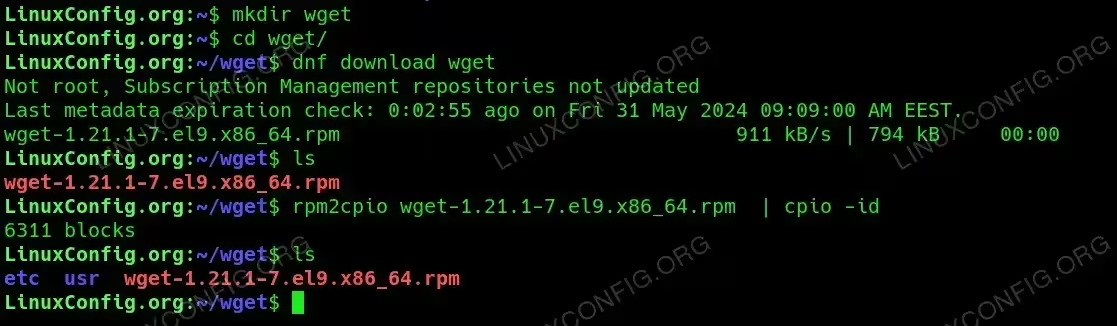
Step-by-Step Guide to Extracting Files from an RPM Package Archive
Conclusion
By following these steps, you can extract files from an RPM package archive without needing to install the package. This can be particularly useful for inspecting the contents of a package or for using certain files in a different context. The rpm2cpio and cpio utilities provide a straightforward method for this process, ensuring you can access the files you need efficiently.