
In this article, we will delve into the methods for explicitly excluding directories from the find command‘s search in Linux. The find command is a powerful utility for searching for files and directories within a directory hierarchy. However, there are scenarios where you may want to exclude certain directories from your search to speed up the process or to avoid irrelevant results. We’ll explore different options and provide practical examples using a sandbox directory structure.
In this tutorial you will learn:
- How to use the
-pruneoption to exclude directories - Combining
-prunewith otherfindoptions - Using multiple
-pruneoptions for complex exclusions - How to exclude directories using pathnames
- Excluding directories based on patterns
- Advanced usage with logical operators
- Real-world examples with different exclusion needs
- Understanding the impact of exclusions on performance

| Category | Requirements, Conventions or Software Version Used |
|---|---|
| System | Any Unix-like operating system (Linux, macOS, etc.) |
| Software | GNU findutils |
| Other | Basic understanding of the Linux command line |
| Conventions | # – requires given linux commands to be executed with root privileges either directly as a root user or by use of sudo command$ – requires given linux commands to be executed as a regular non-privileged user |
Excluding Directories from Find Command’s Search
When working with the find command, you may need to exclude specific directories from your search results. This can be particularly useful when dealing with large directory structures or when you want to focus on specific areas of your filesystem. Here are some methods to achieve this, illustrated with examples based on the following sandbox structure:
.
├── dir1
│   ├── dir2
│   │   └── dir3
│   │       └── file2
│   └── file1
├── dir4
│   └── file3
└── dir5
    └── dir6
        ├── dir4
        │   └── file4
        └── file4
- Using -prune to exclude a directory: The
-pruneoption can be used to exclude a directory and its contents from the search.find . -path "./dir1" -prune -o -print
This command will exclude
dir1and its contents from the search results. The-pathoption specifies the directory to exclude, and the-pruneoption preventsfindfrom descending into that directory. The-o(OR) operator allows the search to continue in other directories, and-printdisplays the results.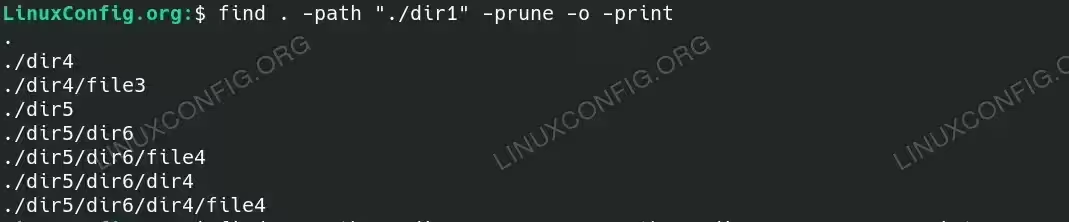
Using -prune option to exclude a directory - Excluding multiple directories: You can exclude multiple directories by combining multiple
-pruneoptions.find . -path "./dir1" -prune -o -path "./dir5" -prune -o -print
This command excludes both
dir1anddir5from the search results.
Excluding multiple directories with find command - Excluding directories by name pattern: Use the
-nameoption to exclude directories that match a specific pattern.find . -name "dir4" -prune -o -print
This command excludes all directories named
dir4from the search results.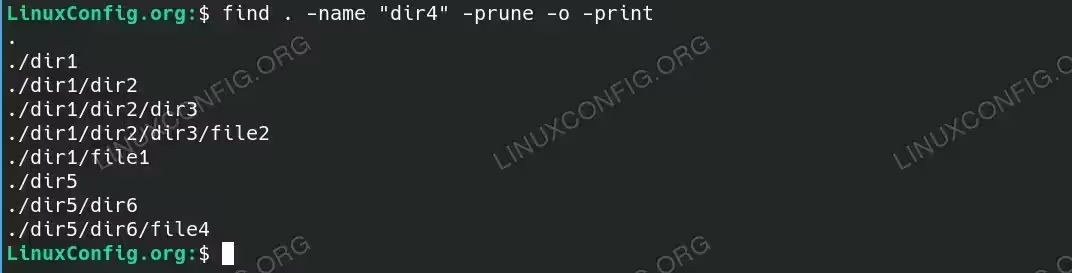
Excluding directories by name pattern with find - Combining -prune with other find options: You can combine
-prunewith otherfindoptions to refine your search.find . -path "./dir1" -prune -o -type f -name "*.txt" -print
This command excludes
dir1and searches for.txtfiles in other directories. - Excluding directories using a complex pattern: Use a combination of options for more complex exclusions.
find . \( -path "./dir1" -o -path "./dir5" \) -prune -o -type f -print
This command excludes both
dir1anddir5and lists all files in other directories. - Using the -not option: The
-notoption can be used for exclusion as well.find . -not -path "./dir1/*" -print
This command excludes all files and directories under
dir1. - Excluding directories based on depth: Control the depth of the search to exclude deeper directories.
find . -maxdepth 2 -path "./dir1/dir2" -prune -o -print
This command excludes
dir2insidedir1if the depth is greater than 2. - Advanced usage with logical operators: Combine logical operators for advanced exclusions.
find . -path "./dir1" -prune -o -type f \( -name "*.sh" -o -name "*.py" \) -print
This command excludes
dir1and searches for.shand.pyfiles in other directories.
Conclusion
Excluding directories from the find command’s search can significantly streamline your file searches and improve efficiency. By understanding and utilizing options like -prune, -path, and logical operators, you can tailor your searches to meet specific needs and avoid irrelevant results. Practice with the examples provided and adapt them to your own directory structures and search requirements.
