
Counting the number of columns in a CSV file is a common task that can be easily accomplished using various tools available in the Bash shell. In this article, we will explore five different methods to achieve this. Each method will utilize different command-line tools and techniques, giving you a comprehensive understanding of how to handle CSV files in a Bash environment.
In this tutorial you will learn:
- How to use
awkto count columns in a CSV file - How to use
sedto count columns in a CSV file - How to use
headandtrto count columns in a CSV file - How to use
cutandwcto count columns in a CSV file - How to use
csvcutfromcsvkitto count columns in a CSV file

| Category | Requirements, Conventions or Software Version Used |
|---|---|
| System | Linux or Unix-based system |
| Software | Bash shell, awk, sed, head, tr, cut, wc, csvkit |
| Other | Basic knowledge of command-line interface |
| Conventions | # – requires given linux commands to be executed with root privileges either directly as a root user or by use of sudo command$ – requires given linux commands to be executed as a regular non-privileged user |
Introduction to Counting Columns in a CSV File
When working with CSV files, it is often necessary to know the number of columns they contain. This can be particularly useful for data processing, validation, or simply gaining an understanding of the file structure. In this tutorial, we will cover five methods to count the number of columns in a CSV file using the Bash shell. Each method leverages different command-line utilities, providing flexibility depending on the tools you have available.
For this tutorial, we will use a sample CSV file named myfile.csv with the following content:
$ cat myfile.csv
1,2,3,4,5
a,b,c,d,e
a,b,c,d,e
This file contains three rows and five columns, and we will demonstrate various methods to count these columns.
- Using
awk:awkis a powerful text-processing language that is well-suited for handling CSV files.$ awk -F, '{print NF; exit}' myfile.csvThis command uses
awkto count the number of fields (columns) in the first row of the CSV file. The-F,option sets the field separator to a comma, which is typical for CSV files. The{print NF; exit}part tellsawkto print the number of fields (NF) and then exit after processing the first row. - Using
sed:sedis a stream editor that can be used to manipulate text.$ sed -n '1s/[^,]//g;1s/./&\n/gp' myfile.csv | wc -l
This method uses
sedto transform the first row of the CSV file by removing all non-comma characters and then adding a newline after each remaining character (commas). The result is piped towc -lto count the number of lines, which corresponds to the number of columns plus one. Therefore, subtracting one from the output will give the correct column count. - Using
headandtr: Combiningheadandtrprovides a straightforward way to count columns.$ head -1 myfile.csv | tr -cd ',' | wc -c | awk '{print $1+1}'This command sequence starts by using
head -1to extract the first row of the CSV file.tr -cd ','then removes all characters except commas, andwc -ccounts the remaining characters (the commas). Finally,awk '{print $1+1}'adds one to the count, giving the total number of columns. - Using
cutandwc:cutandwccan be used together to count columns in a CSV file.$ head -1 myfile.csv | cut -d, --output-delimiter=' ' -f1- | wc -w
In this method,
head -1extracts the first row of the CSV file.cut -d, --output-delimiter=' ' -f1-splits the first row of the CSV file by commas and outputs them separated by spaces. Thewc -wcommand then counts the words, which correspond to the columns in the row. - Using
csvcutfromcsvkit:csvcutis a utility specifically designed for working with CSV files.$ csvcut -n myfile.csv | wc -l
The
csvcutcommand from thecsvkitsuite prints the names of all columns. Piping this output towc -lcounts the lines, giving the number of columns. This method is particularly useful if you are working with CSV files that have headers.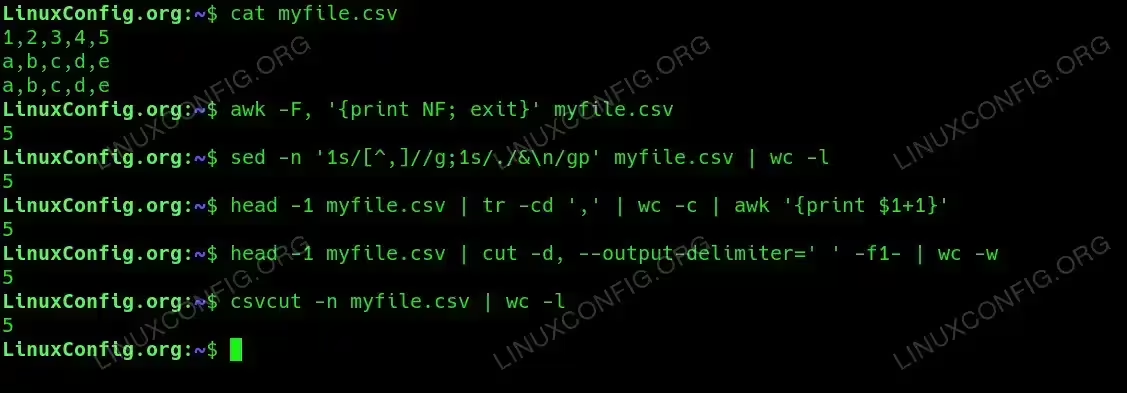
count number of columns in CSV file using bash shell linux commands
Conclusion
In this article, we explored five different methods to count the number of columns in a CSV file using the Bash shell. Each method leverages a different set of command-line tools, providing you with flexibility depending on your needs and the tools available on your system. By mastering these techniques, you can efficiently handle and analyze CSV files in your data processing tasks.
