
A file that has the .DEB file extension is a Debian software package file. They contain software to be installed on Debian Linux or another Debian-based Linux distro such as Ubuntu Linux. When you install software from a DEB file, your system may need to install dependencies for it to run correctly. This is common behavior for apt package manager as well, so you may already be familiar with package dependencies. In this tutorial, we will show you how to check the package dependencies for a DEB file on debian and ubuntu via the Linux command line.
In this tutorial you will learn:
- How to check DEB package dependencies

| Category | Requirements, Conventions or Software Version Used |
|---|---|
| System | Debian Linux or Ubuntu Linux |
| Software | N/A |
| Other | Privileged access to your Linux system as root or via the sudo command. |
| Conventions |
# – requires given linux commands to be executed with root privileges either directly as a root user or by use of sudo command$ – requires given linux commands to be executed as a regular non-privileged user |
Check DEB package dependencies on Ubuntu / Debian
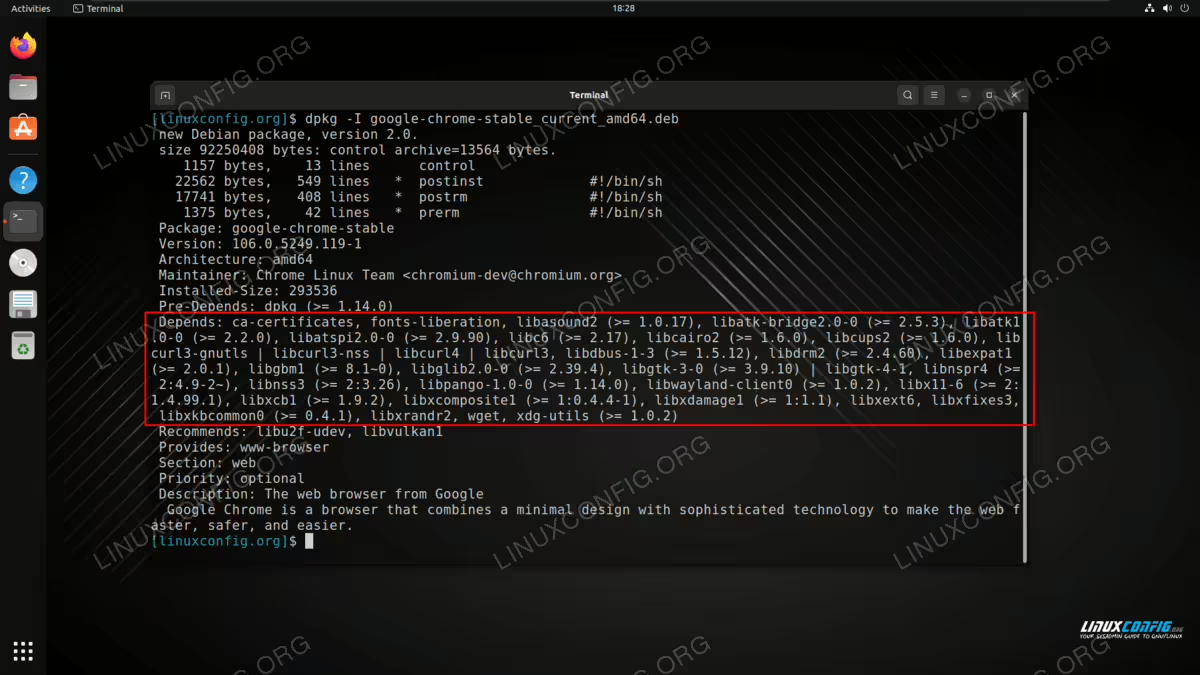
To check the package dependencies, we will use the dpkg command with the
-I flag.
$ dpkg -I package.deb
You will see various information in your terminal about the package, and the package dependencies are listed under the Depends section as seen in the screenshot below.
Now that you have seen the package dependencies, you can continue with installing the package if you would like. We recommend using the apt command for that:
$ sudo apt install ./package.deb