
Security-Enhanced Linux (SELinux) is a powerful security module that provides mechanisms for supporting access control security policies. When managing files and directories on a SELinux-enabled system, it’s crucial to preserve their SELinux context to maintain their security properties. This article will guide you through the steps to copy files and directories while preserving their SELinux context on a Linux system.
In this tutorial you will learn:
- What SELinux context is and why it’s important
- How to copy files while preserving SELinux context
- How to copy directories while preserving SELinux context
| Category | Requirements, Conventions or Software Version Used |
|---|---|
| System | SELinux-enabled Linux system |
| Software | cp command, SELinux management tools |
| Other | Basic understanding of SELinux and file permissions |
| Conventions | # – requires given linux commands to be executed with root privileges either directly as a root user or by use of sudo command$ – requires given linux commands to be executed as a regular non-privileged user |
Understanding SELinux Context
SELinux context, also known as security context, is a set of security attributes associated with a file. It consists of user, role, type, and level (optional) fields. When copying files and directories on a SELinux-enabled system, preserving this context ensures that the copied items maintain their security properties, preventing potential security issues.
Copying Files While Preserving SELinux Context
In this section, we will cover the steps to copy individual files while preserving their SELinux context.
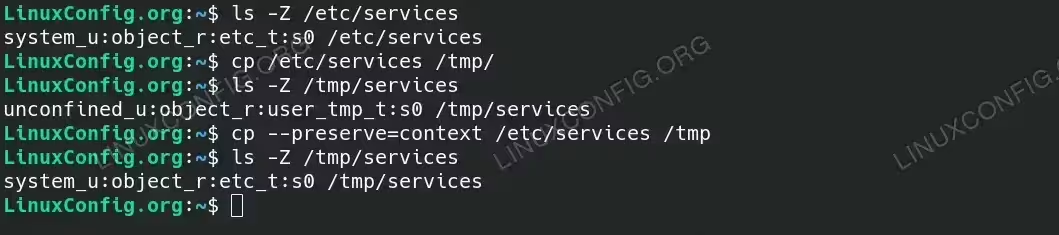
- Check the SELinux context of a file: Before copying a file, it’s good practice to check its SELinux context to understand its security attributes.
$ ls -Z /etc/services
This command will display the SELinux context of the specified file. The output will show the user, role, type, and level associated with the file.
- Copy the file while preserving its SELinux context: Use the
cpcommand with the--preserve=contextoption to copy the file and maintain its SELinux context.$ cp --preserve=context /etc/services /tmp
This command ensures that the SELinux context of the source file is preserved in the destination file, maintaining its security properties.
- Verify the SELinux context of the copied file: After copying the file, verify that the SELinux context has been preserved by checking the context of the destination file.
$ ls -Z /tmp/services
Compare this output with the context of the original file to ensure they match.
Copying Files While Preserving SELinux Context
Copying Directories While Preserving SELinux Context
In this section, we will cover the steps to copy entire directories while preserving their SELinux context.
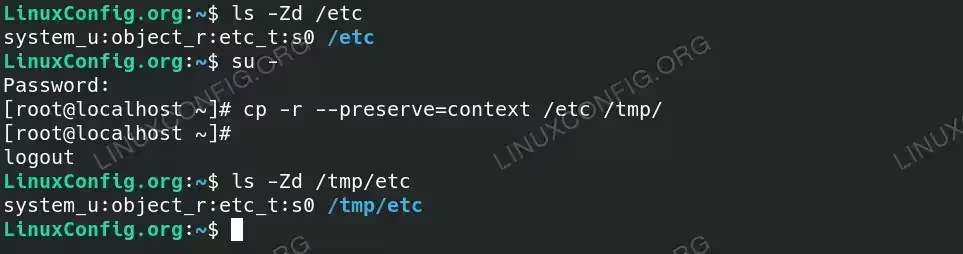
- Check the SELinux context of a directory: Before copying a directory, it’s good practice to check its SELinux context to understand its security attributes. This step can be done on individual files within the directory to get an idea of the contexts used.
$ ls -Zd /etc
This command will display the SELinux context of the files and directories within the specified directory.
- Copy the directory while preserving its SELinux context: When copying directories, use the
-r(recursive) option along with--preserve=contextto ensure all files and subdirectories maintain their SELinux context.# cp -r --preserve=context /etc /tmp/
This command will recursively copy the entire
/etcdirectory to the specified destination, preserving the SELinux context for all contained files and directories. - Verify the SELinux context of the copied directory: After copying the directory, verify that the SELinux context has been preserved by checking the context of a few files and subdirectories.
$ ls -Zd /tmp/etc
Ensure that the context matches the original directory structure.
Copying Directories While Preserving SELinux Context - Restore default SELinux context if needed: If you need to restore the default SELinux context for any reason, use the
restoreconcommand.# restorecon -R /tmp/etc
This command will reset the SELinux context of the specified directory and its contents to their default values based on the system’s policy.
Conclusion
Preserving SELinux context when copying files and directories is crucial for maintaining the security policies enforced by SELinux. By following the steps outlined in this tutorial, you can ensure that the copied items retain their SELinux context, thereby preserving their security attributes and preventing potential issues. Understanding and managing SELinux context is a vital skill for any Linux system administrator working in a security-conscious environment.
