
Running a Bitcoin full node means that your system will be able to validate Bitcoin transactions and blocks. The full node will serve a broad function by joining the network of Bitcoin nodes and helping to verify and update transaction information across the entire platform. The benefit of running your own full node is enhanced privacy, since your own transactions will not necessarily need to update to third party nodes, but can do so from your own.
Other benefits include the peace of mind of seeing from your full node that any of your recent transactions have been posted and validated. In other words, you do not need to rely on a third-party server to tell you about your transactions or Bitcoin balance. Aside from this, you are also benefitting Bitcoin’s peer-to-peer network by contributing spare system resources to the cause of validating transactions and blocks for all users, a process central to the function of Bitcoin mining.
In this tutorial, we will go through the step by step instructions of installing and running a Bitcoin Full Node on a Debian Linux system. We will be running full node as command line only, without a graphical user interface.
In this tutorial you will learn:
- How to download latest version of Bitcoin Core
- How to start the Bitcoin full node daemon
- How to interact with the full node via
bitcoin-clicommand

| Category | Requirements, Conventions or Software Version Used |
|---|---|
| System | Debian Linux |
| Software | Bitcoin core |
| Other | Privileged access to your Linux system as root or via the sudo command. |
| Conventions | # – requires given linux commands to be executed with root privileges either directly as a root user or by use of sudo command$ – requires given linux commands to be executed as a regular non-privileged user |
Bitcoin Full Node Installation – step by step instructions
Follow along with the steps below to get Bitcoin full node installed and running on Debian.
- The first step is to download the latest version of Bitcoin Core from the official download page. Obviously make sure that you are downloading the linux version, and select your appropriate system architecture.
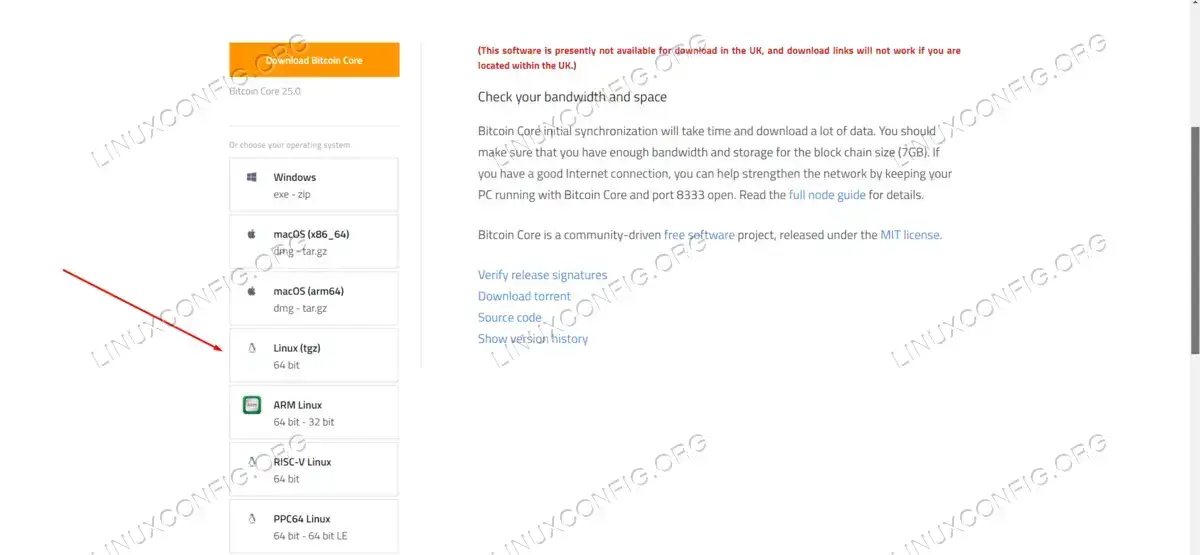
Downloading the Bitcoin Core software from the official site - Change over to the
Downloadsdirectory and extract the contents of the tar file that was just downloaded:$ tar xvzf bitcoin-*.tar.gz
- The next command will install the Bitcoin executables into the
/usr/bin/localdirectory:$ sudo install -m 0755 -o root -g root -t /usr/local/bin bitcoin-*/bin/*
- It is not explicitly necessary, but always a good idea to run the Bitcoin full node under a separate user. The following commands will create a new user called
bitcoin_nodeand then log into that account:$ sudo adduser bitcoin_node $ sudo login bitcoin_node
WARNING
You can use your normal user account to run the Bitcoin full node instead of a dedicated user account, if you want, but it is unrecommended and against the official documentation to run the software as the root user. - We will now execute the following command to start the Bitcoin full node in daemon mode:
$ bitcoind -daemon
Bitcoin Core starting
Is it now running and will listen for commands.
Interacting With Bitcoin Full Node via bitcoin-cli Command
Now that the Bitcoin Full node is running, we can use the bitcoin-cli command to communicate with the server. Let’s see some example commands that we can use:
- To see a list of options that can be used with the
bitcoin-clicommand, execute:$ bitcoin-cli help
This will output a long list of options, some of which we will cover in the examples below.
- Create a new wallet with the following command. In this example, we create a new wallet called
testwallet:$ bitcoin-cli createwallet "testwallet" { "name": "testwallet" } - Load the wallet we just created or another one by specifying the name of it with the
loadwalletoption:$ bitcoin-cli loadwallet testwallet
- Validate a Bitcoin address, which will reveal information such as the public key:
$ bitcoin-cli validateaddress "bc1q09vm5lfy0j5reeulh4x5752q25uqqvz34hufdl"
- Get various types of information, such as block chain info, network info, net totals, and wallet info, respectively:
$ bitcoin-cli getblockchaininfo
$ bitcoin-cli getnetworkinfo
$ bitcoin-cli getnettotals
$ bitcoin-cli getwalletinfo
- Perform a transaction by sending a specified amount of Bitcoin to an address by using the
sendtoaddressoption. Then, specify the address next, and the amount that you want to send:$ bitcoin-cli sendtoaddress "[address]" [amount] "[comment]" "[comment_to]"
Simply executing the command without further options will show a lot of helpful examples:
$ bitcoin-cli sendtoaddress
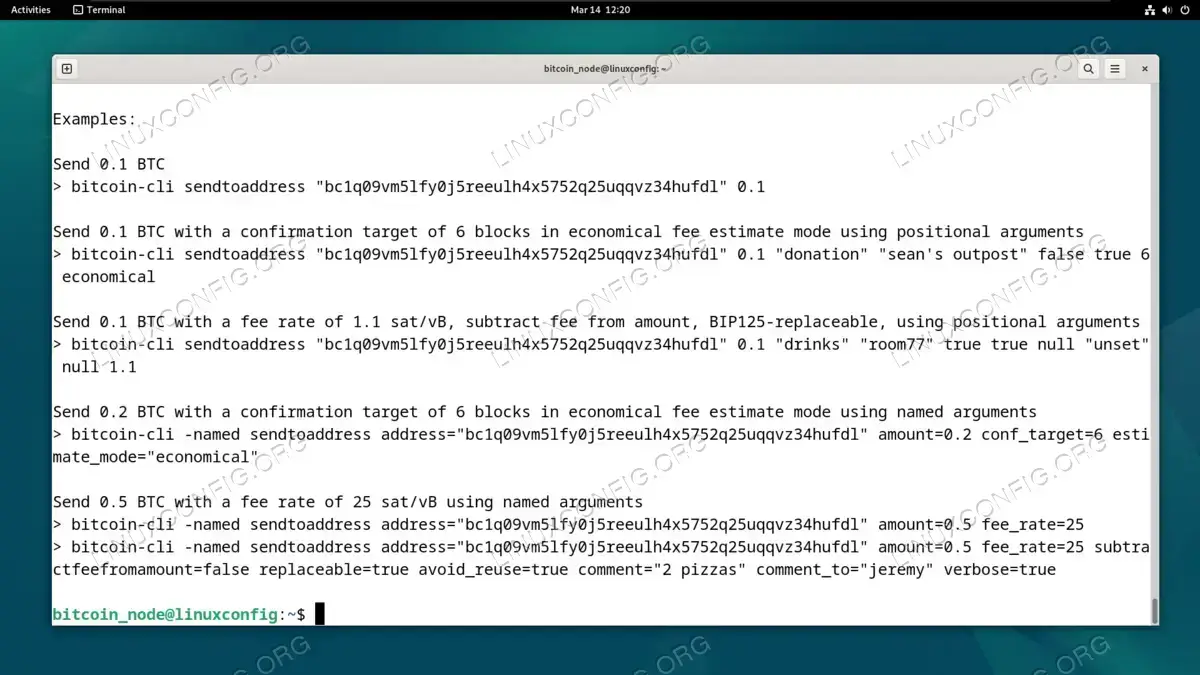
Examples showing how to send Bitcoin to an address via command line
Closing Thoughts
In this tutorial, we saw how to run a Bitcoin Full Node on a Debian Linux system. For users that wish to enhance their privacy, this makes it so that our system will not have to communicate directly with third party servers in order to validate transactions. We can now handle this operation in house, meanwhile the full node will still synchronize to various other servers over the internet, as this is how the peer to peer network communicates and stays on the same page.