
Polkit is an authorization framework installed on every modern Linux distribution: it provides API which allow privileged applications to expose services to unprivileged subjects. Communications with Polkit happens over D-Bus, which is an IPC (Interprocess Communication) system; to understand how the former works, we have to get a grasp of how the latter is implemented, first.
In this tutorial we talk about Polkit; we see how it works and how to use the utilities which comes with it on Linux.
In this tutorial you will learn:
- What is the role of Polkit and D-Bus on modern Linux distributions
- How Polkit works
- How to use the pkaction, pkcheck and pkexec utilities
| Category | Requirements, Conventions or Software Version Used |
|---|---|
| System | Any modern Linux distribution |
| Software | Polkit |
| Other | None |
| Conventions | # – requires given linux-commands to be executed with root privileges either directly as a root user or by use of sudo command$ – requires given linux-commands to be executed as a regular non-privileged user |
Polkit and D-Bus
Before we start talking about Polkit, and see what is its role in modern Linux-based operating systems, we have to understand how D-Bus works. D-Bus is a message bus system, used to allow communication between processes. Some services register on the bus and expose information and functionalities as properties, signals and methods. Each user session gets a session bus; services registered on it, run with the user privileges. System-wide services potentially running as root, instead, register on the system bus: they offer functionalities which require administrative privileges, such as filesystem mounting. Utilities like d-feet (GTK) or QDBusViewer (QT) let us visualize services registered on existing buses.
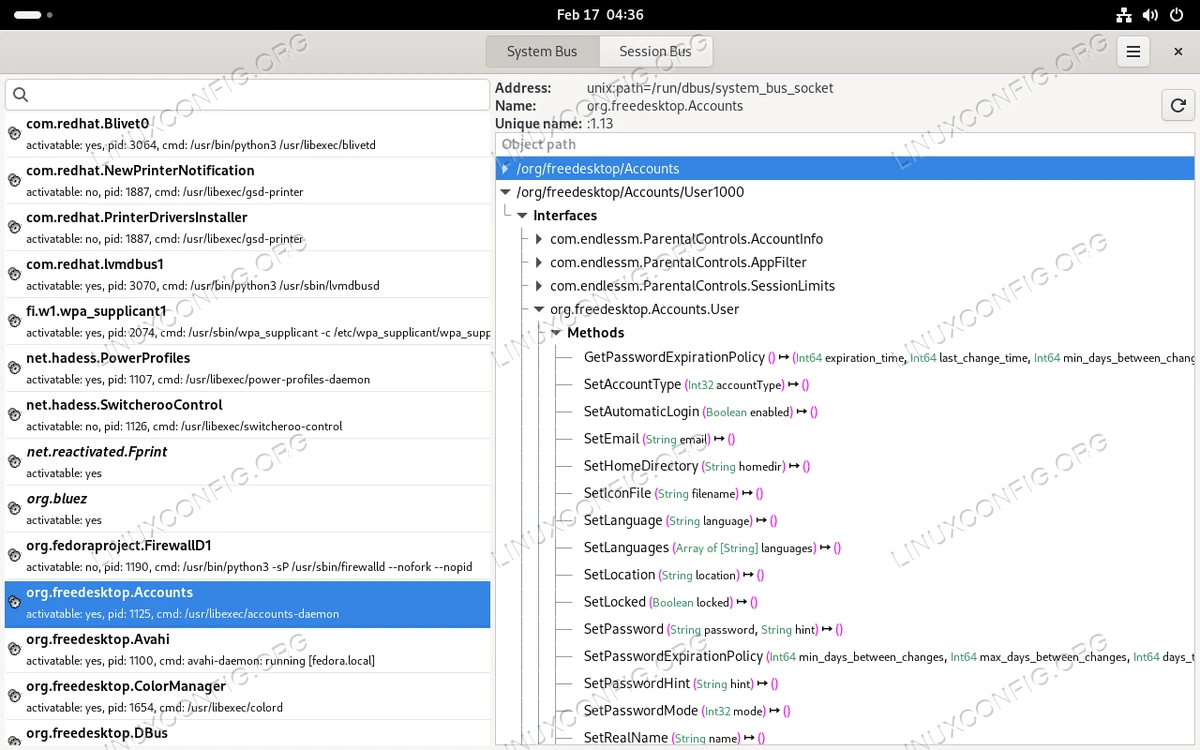
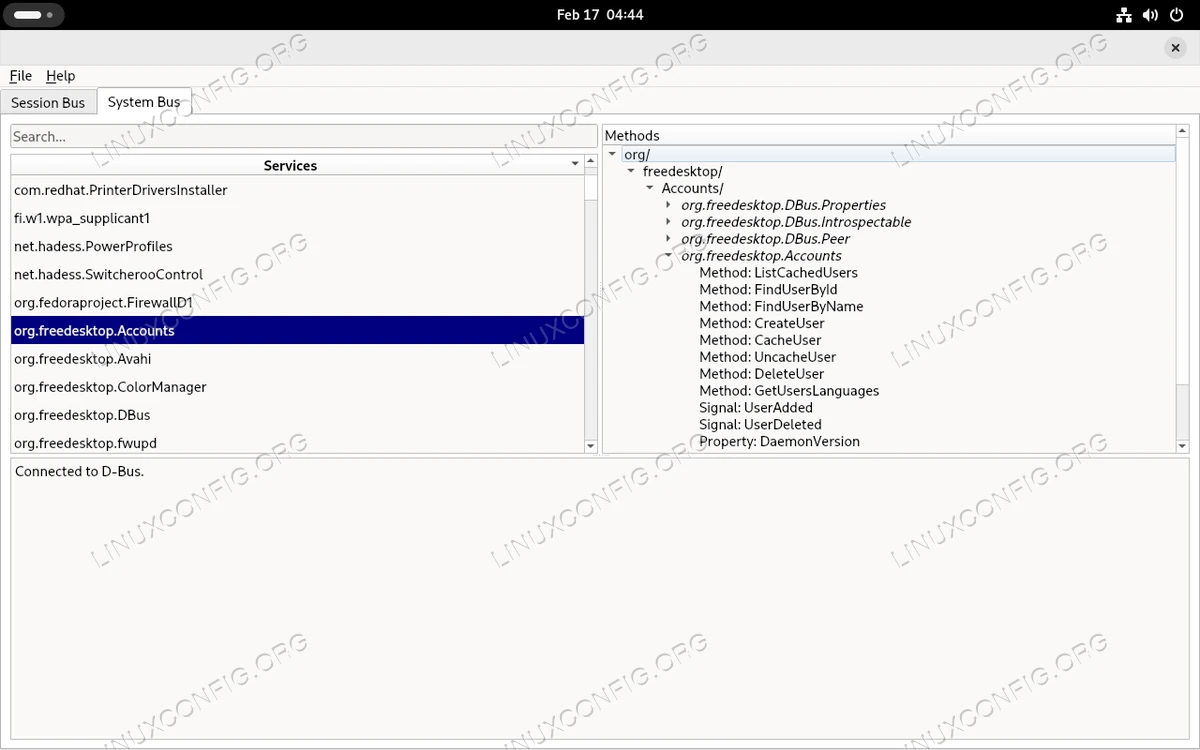
Both utilities display services registered on a bus on the left column (e.g org.freedesktop.Accounts), and the path of the objects they come with, on the right (e.g /org/freedesktop/Accounts). Each object provides one or more interfaces which act as namespaces for methods, signals and properties.
In the screenshots you can see the org.freedesktop.Accounts service is registered on the System Bus: it comes with the /org/freedesktop/Accounts object, which provides the org.freedesktop.Accounts interface. The interface includes methods like “CreateUser” and “DeleteUser”. Creating and deleting users are actions which require root privileges, so there must be a way for unprivileged subjects who want to perform them, to ask for authorization. Here is where Polkit comes in to play.
How Polkit works
Polkit is registered on the D-Bus “system” bus with the org.freedesktop.PolicyKit1 name. The service doesn’t run as root, but with the privileges of the polkitd user and the polkitd group (see /usr/lib/systemd/system/polkit.service). Polkit doesn’t need to run as root, because it doesn’t itself execute privileged actions: it just checks if a subject is authorized to access a service, or mechanism, in Polkit terminology.
Sometimes, in order to authorize access to a service, Polkit may request a subject to authenticate as itself or as administrator. What makes this possible is the use of a polkit agent. Polkit comes with a basic agent, called pkttyagent; all the main desktop environments, however, provide their own agent implementation. GNOME, for example comes with the “polkit-gnome” package, while the KDE includes “polkit-kde”, etc. The agent is started automatically with the user session, and runs with the user privileges.
The diagram below, taken from the freedesktop polkit page, summarize how polkit works:

How does Polkit decide if a subject is authorized to access a certain service, and if authentication is required? As you can see in the diagram above, it consults basically two things: policies and rules. Let’s take a look at them.
Polkit actions
Polkit “actions” are defined in XML files with the “.policy” extension, under the /usr/share/polkit-1/actions directory. We previously mentioned the org.freedesktop.Accounts service; actions related to it are defined in the /usr/share/polkit-1/actions/org.freedesktop.accounts.policy file. Here we include the definition of one as an example:
<action id="org.freedesktop.accounts.change-own-user-data">
  <description>Change your own user data</description>
  <message>Authentication is required to change your own user data</message>
  <defaults>
    <allow_any>yes</allow_any>
    <allow_inactive>yes</allow_inactive>
    <allow_active>yes</allow_active>
  </defaults>
</action>
An action is defined inside “action” tags, and it is identified via the “id” attribute. The ID is used to reference the action from code or from custom Polkit rules (see below). The org.freedesktop.Accounts service, for example, references the org.freedesktop.accounts.change-own-user-data action when we issue a request to change details of our own user, either via the settings panel of our favorite desktop environment, or by issuing a dbus call directly, with the dbus-send application.
With the “description” tag we provide a brief description of the action; with the “message” tag, instead, we define the message which is displayed to a subject when it is prompted for authentication.
The default behavior of the action is defined inside the “default” tags, using the “allow_any”, “allow_inactive” and “allow_active” tags. What are they used for? Polkit is able to distinguish between active and inactive clients, and adjust its behavior accordingly. The “allow_active” and “allow_inactive” tags are used for active and inactive clients on local consoles or graphical displays, while the “allow_any” tag becomes relevant in all other situations, such as SSH or VNC remote connections. The content allowed in these tags are:
- no: the user is not authorized on the action
- yes: the user is authorized on the action without need for authentication
- auth_self: the user needs to authenticate as itself (with its own password) to be authorized
- auth_self_keep: same as auth_self but password is rembembered
- auth_admin: the user needs to authenticate as root to be authorized on the action
- auth_admin_keep: same as auth_admin, but password is rembembered
In the action definition included above, “yes” is used in all cases. It is for this reason that, although modifying an user is an action which requires root privileges, we can, for example, change our password from the settings panel of our favorite the desktop environment without having to authenticate for privilege escalation.
A tag which doesn’t appear in this example, is “annotate”: it is used to provide extra key-value pairs for an action. The most known annotations are:
- org.freedesktop.policykit.exec.path: this is related to the use of the pkexec utility, see below.
- org.freedesktop.policykit.imply: used to define “meta” actions. Takes a string contaning a space separated list of action IDs. If an user is authorized for this action, it will be also authorized for those.
- org.freedesktop.policykit.owner: takes a space separated list of PolkitIdentity entries (e.g “unix-user:1000”) which specifies who can query whether a client is authorized to perform the action: a typical use is for daemons not running as root.
Polkit rules
In addition to implicit actions, Polkit looks for rules, which can be used to define more fine-grained policies. Rules provided by vendors are installed under the /usr/share/polkit-1/rules.d directory: they must not be modified in place, since they can be potentially be overridden by system updates. User-provided rules, instead, live under /etc/polkit-1/rules.d. Rules are written using Javascript, in files with the “.rules” extension. Here is an example of a rule installed by the GNOME desktop environment as /usr/share/polkit-1/rules.d/gnome-control-center.rules:
polkit.addRule(function(action, subject) {
  if ((action.id == "org.freedesktop.locale1.set-locale" ||
    action.id == "org.freedesktop.locale1.set-keyboard" ||
    action.id == "org.freedesktop.ModemManager1.Device.Control" ||
    action.id == "org.freedesktop.hostname1.set-static-hostname" ||
    action.id == "org.freedesktop.hostname1.set-hostname" ||
    action.id == "org.gnome.controlcenter.datetime.configure") &&
    subject.local &&
    subject.active &&
    subject.isInGroup ("wheel")) {
      return polkit.Result.YES;
  }
});
The addRule method of the polkit object is used to add a function which is invoked when a specific action is referenced. The method accepts a function as argument. Said function receives two arguments: “action” and “subject”. They are two objects which represent the involved action and the subject who performed the request, respectively.
The rules establishes that, if the ID of the action, accessed via the id property of the action object is one among “org.freedesktop.locale1.set-locale”, “org.freedesktop.locale1.set-keyboard”, “org.freedesktop.ModemManager1.Device.Control”, “org.freedesktop.hostname1.set-static-hostname”, “org.freedesktop.hostname1.set-hostname”, and “org.gnome.controlcenter.datetime.configure”, the subject is on a local and active session, and part of the “wheel” unix group (this is the equivalent of the sudo group in debian-based systems), then it will be authorized without the need to authenticate. This is due to the returned value: polkit.Result.YES. Return values are the equivalent of the values we saw before in actions definitions, and are organized in a dictionary:
polkit.Result = {
  NO : "no",
  YES : "yes",
  AUTH_SELF : "auth_self",
  AUTH_SELF_KEEP : "auth_self_keep",
  AUTH_ADMIN : "auth_admin",
  AUTH_ADMIN_KEEP : "auth_admin_keep",
  NOT_HANDLED : null
};
In order to overwrite a rule defined under /usr/share/polkit-1/rules.d, we can create a file with the same name under /etc/polkit-1/rules.d. Rules in both directories are processed in lexical order, but if two rule files with the same name exist in both directories, the one under /etc/polkit-1/rules.d prevails.
There are other methods available on the “polkit” object, other than addRule. Another commonly used one is addAdminRule. The method has the same signature of addRule, but is called whenever authenticating as administrator is required. It is used to specify what identities can authenticate as administrator. In most cases the method is used like in the example below, to include the members of the “wheel” group:
polkit.addAdminRule(function(action, subject) {
  return ["unix-group:wheel"];
});
Polkit utilities
Three command line utilities are included in any Polkit installation: “pkaction”, “pkcheck” and “pkexec”, let’s briefly see what they can be used for.
pkaction
The pkaction utility can be used to retrieve detailed information about a registered Polkit action. When the utility is invoked without any argument or option, it displays all registered actions:
$ pkaction
Here is an excerpt of what the command returns on a standard Fedora Workstation installation:
[...]
org.freedesktop.login1.attach-device
org.freedesktop.login1.chvt
org.freedesktop.login1.flush-devices
org.freedesktop.login1.halt
org.freedesktop.login1.halt-ignore-inhibit
org.freedesktop.login1.halt-multiple-sessions
org.freedesktop.login1.hibernate
org.freedesktop.login1.hibernate-ignore-inhibit
org.freedesktop.login1.hibernate-multiple-sessions
org.freedesktop.login1.inhibit-block-idle
org.freedesktop.login1.inhibit-block-shutdown
org.freedesktop.login1.inhibit-block-sleep
org.freedesktop.login1.inhibit-delay-shutdown
org.freedesktop.login1.inhibit-delay-sleep
org.freedesktop.login1.inhibit-handle-hibernate-key
org.freedesktop.login1.inhibit-handle-lid-switch
org.freedesktop.login1.inhibit-handle-power-key
org.freedesktop.login1.inhibit-handle-reboot-key
org.freedesktop.login1.inhibit-handle-suspend-key
[...]
To get detailed information about actions, and not just their names, we can invoke the utility with the --verbose option. To focus on a specific action, instead, we pass its name as argument to --action-id. Here is an example which involves the org.freedesktop.login1.halt action:
$ pkaction --verbose --action-id org.freedesktop.login1.halt
Here is the output we would obtain:
org.freedesktop.login1.halt:
  description: Halt the system
  message: Authentication is required to halt the system.
  vendor: The systemd Project
  vendor_url: https://systemd.io
  icon:
  implicit any: auth_admin_keep
  implicit inactive: auth_admin_keep
  implicit active: auth_admin_keep
  annotation: org.freedesktop.policykit.imply -> org.freedesktop.login1.set-wall-message
pkcheck
The pkcheck utility is used to check whether a process is authorized to perform a certain action exposed by a service on the system dbus. This utility is basically a command line way to invoke the CheckAuthorization method exposed by the polkit D-Bus interface. A process can be identified by its system bus name or by passing details such as its PID, start-time and uid. To use the latter strategy we pass such details as arguments to the --process option. The action we want to test the process against, instead, is specified as argument to --action-id.
Here is an example. Suppose I want to check if the interactive shell I am working from is authorized to shut down the system (by running the “systemctl halt” command, for example), I would run:
$ pkcheck -u --process $$ --action-id org.freedesktop.login1.halt
The $$ variable expands into the PID of the current shell, and the -u option we used as part of the command, allows user authentication via a Polkit agent. As soon as we execute the command, we are indeed prompted to authenticate, since the referenced action uses “auth_admin_keep” for all types of users/sessions:
<action id="org.freedesktop.login1.halt">
  <description gettext-domain="systemd">Halt the system</description>
  <message gettext-domain="systemd">Authentication is required to halt the system.</message>
  <defaults>
    <allow_any>auth_admin_keep</allow_any>
    <allow_inactive>auth_admin_keep</allow_inactive>
    <allow_active>auth_admin_keep</allow_active>
  </defaults>
  <annotate key="org.freedesktop.policykit.imply">org.freedesktop.login1.set-wall-message</annotate>
</action>
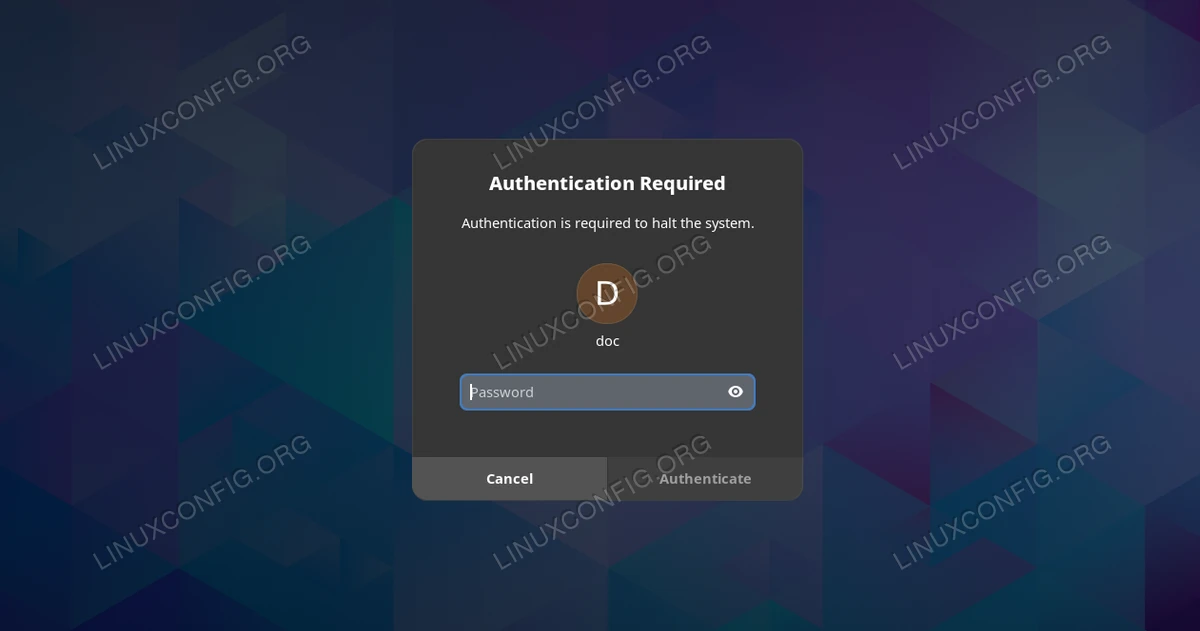
After I authenticate succesfully as administrator (my user is in the wheel group), the pkcheck utility returns the following output:
polkit\56temporary_authorization_id=tmpauthz3
polkit\56retains_authorization_after_challenge=true
Since the process is authorized, the exit code of the utility is 0:
$ echo $?
0
When a process is not authorized, the utility returns 3 as exist status. For more specific exit codes, take a look at the manpage.
In the example above, we provided just the PID of the process we want to test, hower, in order to avoid race conditions (PIDs can be recycled), it is recommended to use the “pid,start-time,uid” format. To obtain the start-time of a process, for example, we can take a look at the column 22 of the related file under the /proc pseudo filesystem. To obtain the start-time value of a process with PID 87325, we would run:
$ cat /proc/87325/stat | cut -d ' ' -f 22
Or:
$ awk -F ' ' '{print $22}' /proc/87325/stat
pkexec
The pkexec utility can be used to allow a user to execute a program as another user, typically as root. This is basically also what sudo does: the main, big, difference between the two is that pkexec works in the context of the Polkit infrastructure, with all its advantages and complexities. To execute a command as root with pkexec, we just pass the program as argument to pkexec. Here is an example in which we try to update Fedora using the dnf update command:
$ pkexec dnf update
If we are running on GNOME or some other graphical environment which provide its own version of the polkit agent, we will be promted to authenticate in a graphical prompt; if we execute the command from a TTY, instead, a textual prompt will appear, since Polkit will fallback to the pkttyagent agent:
==== AUTHENTICATING FOR org.freedesktop.policykit.exec ====
Authentication is needed to run `/usr/bin/dnf update' as the super user
Authenticating as: doc
Password:
Once we succesfully authenticate, the command should be executed without problems. Unfortunately in recent versions of Polkit, most probably you will be notified of an error, instead:
polkit-agent-helper-1: error response to PolicyKit daemon: GDBus.Error:org.freedesktop.PolicyKit1.Error.Failed: No session for cookie
==== AUTHENTICATION FAILED ====
Error executing command as another user: Not authorized

This incident has been reported.
This is due to a known bug. A possible workaround consists into explicitly launching the textual agent:
pkttyagent -p $(echo $$) | pkexec dnf update
By default, when pkaction is used, it references the org.freedesktop.policykit.exec action, defined in the /usr/share/polkit-1/actions/org.freedesktop.policykit.policy file. If we want pkexec to reference a custom action, we use the org.freedesktop.policykit.exec.path annotation on said action, and set the path of the program we want to execute as content of the “annotate” tag. This is what, at least on Fedora, Gparted does in the /usr/share/polkit-1/actions/org.gnome.gparted.policy file:
<?xml version="1.0" encoding="UTF-8"?>
<!DOCTYPE policyconfig PUBLIC "-//freedesktop//DTD PolicyKit Policy Configuration 1.0//EN" "http://www.freedesktop.org/standards/PolicyKit/1/policyconfig.dtd">
<policyconfig>
  <vendor>The GParted Project</vendor>
  <vendor_url>https://gparted.org</vendor_url>
  <icon_name>gparted</icon_name>
  <action id="org.gnome.gparted">
    <description>Run GParted as root</description>
    <message>Authentication is required to run the GParted Partition Editor as root</message>
    <defaults>
      <allow_any>auth_admin</allow_any>
      <allow_inactive>auth_admin</allow_inactive>
      <allow_active>auth_admin</allow_active>
    </defaults>
    <annotate key="org.freedesktop.policykit.exec.path">/usr/bin/gparted</annotate>
    <annotate key="org.freedesktop.policykit.exec.allow_gui">true</annotate>
  </action>
</policyconfig>
Notice the other annotation used in the action: org.freedesktop.policykit.exec.allow_gui. This is needed because when pkexec is used, it drops a lot of environment variables to maintain a minimal know environment, for security. This makes impossible to run X11 applications, since the DISPLAY and XAUTHORITY variables are dropped. The use of the annotation disables this behavior.
Closing thoughts
In this tutorial we talked about Polkit and D-Bus, and we saw how the two technologies are related. Polkit is an authorization framework which provides API to allow unprivileged subjects to access privileged services. In this tutorial we saw how Polkit works, how Polkit actions and rules are defined, and how to use the pkaction, pkcheck, pkexec utilities.
