
Linux is based on the UNIX operating system, a multi-user and multitasking platform developed in the 1970s at AT&T Bell Labs that became the foundation for many modern operating systems. Linux is free and open-source, encouraging global collaboration and innovation while providing strong security, flexibility, and reliable performance across different devices and industries.
- Provides strong security and stability, making it suitable for servers and development environments.
- Allows users to freely use, modify, and distribute the operating system.
- Supports customization for different user requirements and industry applications.
- Backed by a large global community and a wide range of software tools.
Linux combines a wide range of open-source tools and components to form a complete computing environment. These components include file systems, user interfaces, system utilities and application programs, all working together to manage hardware and enable users to interact with their computer systems.
Distributions in Linux
A Linux distribution (distro) is a complete operating system built around the Linux kernel along with system tools, libraries, and applications. Different distributions are designed for various purposes such as desktops, servers, cybersecurity, and development.
- Ubuntu is a beginner-friendly Linux distribution used for desktops, servers, and cloud computing.
- Debian is a stable and reliable Linux distribution widely used for servers.
- Kali Linux is a security-focused Linux distribution used for ethical hacking and penetration testing.
- MX Linux is a lightweight Linux distribution suitable for older hardware.
- Manjaro is a user-friendly Arch-based Linux distribution with rolling updates.
- Linux Mint is a simple and beginner-friendly Linux distribution for Windows users.
- Solus is a modern Linux distribution focused on desktop performance and simplicity.
- Fedora is a developer-focused Linux distribution with the latest technologies.
- openSUSE is a powerful Linux distribution used for development and enterprise environments.
- Deepin is a visually attractive Linux distribution with an easy-to-use interface.
Architecture
Linux architecture is the layered structure of the Linux operating system that defines how components like the kernel, shell, system libraries, and hardware interact to manage resources and run programs efficiently. It consists of the following components:
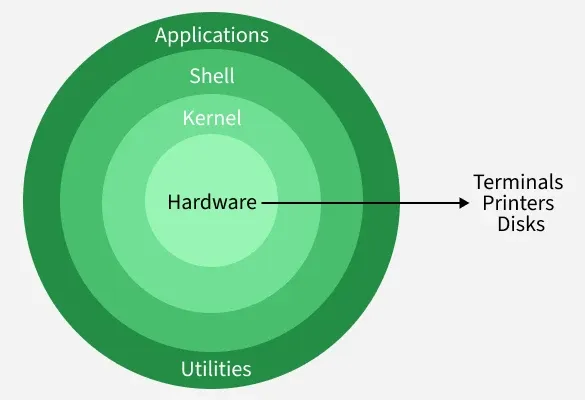
- Kernel: Core component of Linux that manages hardware resources, processes, and system operations.
- System Libraries: System libraries provide functions that help applications interact with the Linux kernel.
- Shell: It is the command-line interface that interprets and executes user commands.
- Hardware Layer: Hardware layer includes physical components like CPU, RAM, storage, and input/output devices.
- System Utilities: System utilities are built-in tools used for system management, configuration, and maintenance.
Applications
The Linux operating system is widely used across multiple domains due to its flexibility, strong security, and open-source nature. It supports a wide range of applications across different industries, as outlined below.

- Servers and Hosting: Powers web servers, cloud platforms, and data centers with high stability and security.
- Development: Provides useful tools and environments for coding, testing, and debugging applications.
- Desktop and Personal Use: Offers secure and customizable desktop environments for everyday computing tasks.
- Cybersecurity: Widely used for ethical hacking, penetration testing, and security analysis.
- Embedded Systems: Runs efficiently on IoT devices, routers, and other low-resource systems.
- Supercomputers: Powers most supercomputers for scientific computing and large-scale simulations.
- Education: Helps students learn programming, networking, and system administration at low cost.
Installing Linux
Selecting an Ubuntu, Fedora or Linux Mint distribution which suits your needs is the initial step in the straightforward procedure for installing Linux.
- Choose a Linux distribution like Ubuntu, Fedora, or Linux Mint.
- Download the ISO file and create a bootable USB.
- Restart the system and boot from the USB drive.
- Follow the installation steps to set language, disk, and user account.
- Complete the installation and reboot the system.
- Install software using package managers like
aptordnf.
Note: For a detailed guide on installing Linux using a virtual machine, refer to this article : Installing Linux Using a Virtual Machine