
I tried binding my note articles to make a "Hormone Book"!

I, I finally...
my long-awaited"Hormone Book"is complete.
With content from note, edited in Canva, and using aservice that allows you to bind books from a single copy, I tried making a book for the first time! I've summarized the steps and tips for creating the manuscript, so everyone should give it a try too.
You can make books like this!
Before explaining the production steps, first, let me introducethe finished book.

This time, I created"Solitary Hormone".
I carefully selectedarticles I felt particularly attached tofrom what I've written on this note.

Since I focused on photos, I was worried about how the colors would turn out when printed on paper, butthe result is very close to what I see on the web, and I'm very satisfied.

It feels like my usual note has jumped out and come into my hands.
This is fun!
If you can turn the articles you've posted on note, such as your favorite dishes, recipes, or hobby records, into a book and keep it on hand,your attachment to them will deepen even further.
The benefits of making a paper book
In this day and age, you might think that e-books are better. However, there are benefits unique to paper books.
For example, when you are having a conversation, you canquickly take it out, open it immediately, and show it. In situations where you need to promote yourself, it can also be a tool that allows you to flip through the pages and instantly explain, "This is what I do," or "This is my hobby."

showing this will get the point across.
Paper books havea large amount of information visible at once and high visibility. It's faster and more convenient than explaining it in words.
There are services that can bind from one copy
Recently, there are variousservices that can bind from one copy. After considering several, I used "Seihon Chokuso.com" this time.
Services that can create books from one copy
・Seihon Chokuso.com
・Shimauma Shuppan
・Photo Book Softcover
Each bookbinding service has its own strengths.
Choose according to the image of the book you want to create, such as wanting to be particular about the texture of the cover, wanting to finish it as a photo book, or prioritizing price above all else.
If you can convert it to a PDF file, it can become a book
Depending on the bookbinding service, they have editing tools that allow you to easily create pages on the web, butit is convenient to choose a service that allows you to submit in PDF file format.
If you create your manuscript using proprietary tools provided by a bookbinding service, you will be locked into printing only with them. If you use a service that allows you to submit your own PDF files, you can use the same manuscript to print with other companies as well.
Above all, if you can output a PDF file, the biggest advantage is that you can create your manuscript using tools you are already familiar with, such as Word, Pages, or Canva.

Choose a tool for creating your manuscript that is easy to edit and matches the image of the book you want to create. This time, since it was a photo book-style book, I decided to create the manuscript using Canva, which I am used to using.
Let's create a manuscript in Canva
Canva is a "graphic design platform" where you can easily create cool-looking images, presentations, flyers, and even brochures. Since plugins are also integrated into note's header images, it is a familiar tool for note users as well.graphic design platform.
◎ There are plenty of wonderful magazine templates!
The good thing about Canva is the abundance of templates. There are many magazine templates, and just looking at them stirs up your creative motivation.

There are also templates that include a table of contents and several page samples in addition to the cover. Since you can replace the images and text, you can easily create a high-quality book.

◎ It has a great selection of cool fonts
Another appeal of Canva is that it is packed with cool fonts that you can use for free. If you use the "font sets" within the design, it will make your headings, subheadings, and body text fonts look stylish.

If you decide you want to change to a different font while you are working, you can rest assured because you can change them all at once. By pressing the "Change All" button, you can collectively change the same font across all text boxes on every page.

◎ You can work intuitively
You can freely place images and text as if you were doodling in a sketchbook. It is okay to leave fine adjustments for later. Let's paste the parts intuitively as they come to mind.

Things to keep in mind when creating a manuscript
There are some tricky rules for creating a manuscript for bookbinding. Before you start making pages, decide on the following three things.
1. "Perfect binding" or "Saddle stitching"
For bookbinding types, you can choose between "perfect binding" and "saddle stitching". Be aware that the number of pages you can bind changes depending on the binding method.

'Perfect binding' requires a certain thickness because it is glued with adhesive, so a certain amount of thickness is necessary. Conversely, 'Saddle stitching' uses staples in the center, so it cannot be used if it is too thick.
2. Make the total number of pages in the main text a multiple of 4 or 8
'Saddle stitching' involves folding sheets in half and stapling the center. Since it is printed so that one sheet equals 4 pages when front and back are combined, the total number of pages must be 'a multiple of 4'.

'Perfect binding' glues pages with adhesive, so it only needs to be 'a multiple of 2' for the front and back of a page. However, there is a point to note when ordering a single copy.
In the case of SeihonChokuso.com, for perfect binding, 8 pages are printed and cut from a single sheet of paper. When binding only one copy, if the number of pages in the main text is not 'a multiple of 8', blank pages may be added at the end. (If ordering multiple copies at once, they are printed continuously, so no blank pages are included).
It is a bit complicated, but you can't go wrong if you make the total number of pages in the main text 'a multiple of 8', which can accommodate saddle stitching, perfect binding, and even single-copy binding.
If you decide on the exact number of pages beforehand, you might get stuck wondering, 'How should I make this?' It is recommended to just create it however you like first, and then trim or add pages as needed.
3. Decide how to make the cover
At SeihonChokuso.com, you can create professional-looking covers, including book jackets. It also comes with an original tool called the 'Cover Generator,' so you can rest easy. However, since the cover is created as a separate file, some people might feel it seems difficult.
If it is your first time making a book, the 'Automatic Cover Course,' where you include the front and back covers in the PDF file, is recommended. It is easy to understand because the first and last pages of the PDF file become the front and back covers.
Think about which pages will be two-page spreads
Unlike publishing notes on the web, there are 'ways of presenting' unique to bound paper. Try to create an exciting page layout by being creative with spreads and title pages.

◎ Check the image with Canva's 'Grid View'
In Canva, you can switch to 'Grid View' using the icon at the bottom right of the editor. Since you can see the entire page layout, edit while checking the positional relationship of the pages that will be spreads.

◎ Export the PDF and check the two-page spreads
PDF viewers have a 'Two-page spread view' setting. If you export 'only the main text' excluding the front and back covers as a PDF, you can check the pages with the same image as the bound state.

For example, when opening a PDF file in Mac's "Preview," if you select [Two Pages] from the [View] menu, you can set it to two-page spread view.

Let's export the PDF file for printing
Once your manuscript is complete, let's export the PDF file for printing.
With Canva Pro, you can also choose options optimal for professional-quality printing. This time, I created it within the scope of the free plan, but even so, the finish was highly satisfying, including the photo output.

Let's make use of the Amazon gift received on note
At Seihon Chokusetsu.com, you can pay with your Amazon account, and I also want to highlight that you can use Amazon gifts.

On note, there are cases where earnings received from support, etc., are paid out in Amazon gifts. For example, if your earnings remain under 1,000 yen and pass the 180-day "holding period," they will be paid out as an Amazon gift. (Reference:
Regarding the payout of earnings that have passed the holding period)
If you have Amazon gifts to spare, you could use them as funds to bind your note articles. Making a book with money received from support. This is a good cycle!
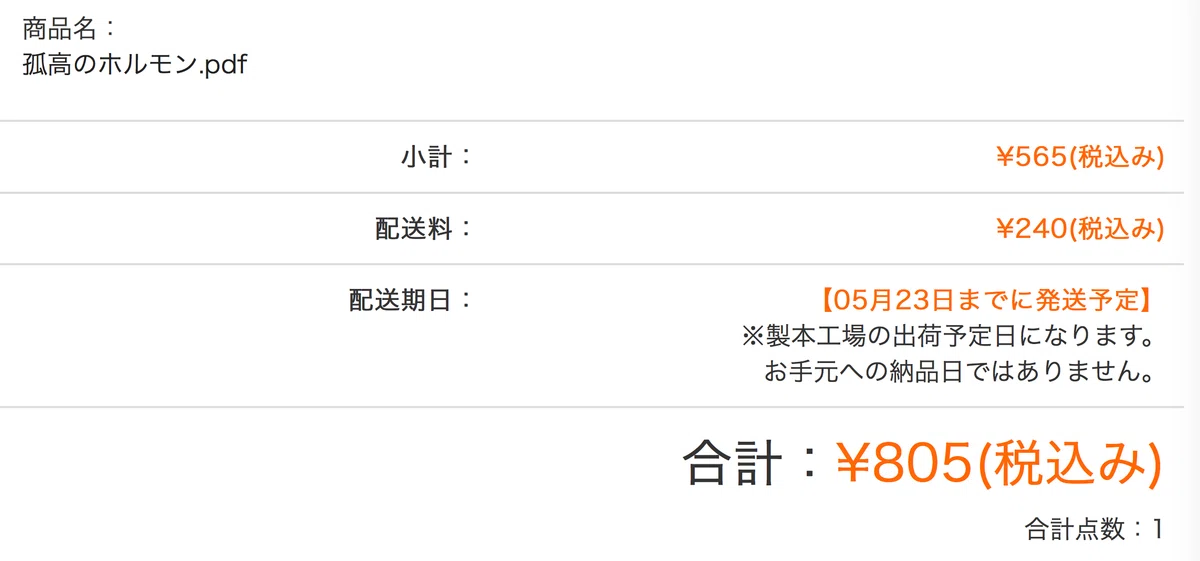
Production cost this time = 565 yen per copy + 240 yen shipping
The production cost this time was 565 yen (tax included) for binding just one copy.
It is surprising that you can make a book for the price of a lunch bento or a bottle of beer at a pub. At this rate, even if you fail, the damage is minimal. It is perfectly fine to treat it as a trial run. Don't be afraid, make the book you love!
For a few copies, it will be delivered to your mailbox via Yamato Transport's "Nekopos."
◎ There is also an on-demand sales service!
Seihon Chokusetsu.com also has a service called "Publish Anywhere" that allows you to sell your own books without holding any inventory. By simply registering your manuscript PDF, you can sell your book through blogs, websites, and social media.
The dreams expand!
The real thrill of self-publishing is that you can create books that aren't out in the world exactly as you like. Whether it's something too niche for a regular publisher to approve, or a theme that makes people ask, "Who would read this?!," you can create whatever you want, however you want.
In fact, it would be great to turn your entry for the "Creative Awards 2023" that everyone is applying for into a book to keep. Let's capture what you are thinking about now and what you are passionate about into a single book in this moment while your feelings are still hot. It will surely become a time capsule for your future self.
The possibilities for your dreams are infinite!
Make use of convenient services and enjoy creating!
<Sequel> The second volume is even more powered up!
120 full-color pages.
I packed in about 35,000 characters, including 13 note articles plus new content!
いいなと思ったら応援しよう!
 閲覧ありがとうございマルチョウ。これからもよろしくお願いシマチョウ!