
Creative Awards 2026 #AllCategoriesDivision 💡Born from the despair of my right arm not moving. A digital handwriting practice book created with AI that is "easy to write with the left hand"🖊 A multi-functional web app that works on iPad! Supports Hiragana, Katakana, Romaji, and numbers #PlayWithAI #WhenIFeelMyChildGrowing #StartedWithAI #HowToOvercomeASlump

I always thought that "writing" characters was something I would always be able to do.
Until the day I lost it.
Recently, I have been unwell and have spent days unable to move my body as I would like. What was particularly painful was that my right arm stopped bending.
Unable to use my dominant right hand,
I could not write characters or type on a keyboard
as I wanted to.
Casual daily movements became difficult one after another,
and I realized for the first time
how precious the things I took for granted really were.
Typing with my unaccustomed left hand
takes more time than I imagined and leaves me completely exhausted.
Even when I try to rely on smartphone voice input,
writing long texts like a novel is a daunting task...💦
"I guess I have no choice but to give up
on submitting a new entry to this year's 'Creative Awards 2026'...."
I was feeling so down.
Creative Awards 2026 All Categories Division [Completely Free, God-tier App] Multi-functional Digital Handwriting Practice App📱Penmanship practice on iPad, smartphone, and PC🖊 #BeautifulWriting #App #ai #Gemini #canvas
Japanese version↓

English version↓ *Note article automatically translated by AI

🔥 Because I didn't want to let the light of creation go out
The reason I still couldn't give up is because
I haveprecious works and the people who support them
.
Shion-chan's Stickers - LINE Stickers | LINE STORE
The novel I submitted last year in the Entertainment Original Work category
“Hikari no Kakera -Fragment of Light-”✨
This year, I changed the category and
Fantasy Novel Category (TALES) I have submitted it again🎊
🖊 Novel “Hikari no Kakera -Fragment of Light-”
📚 Click here for the magazine
🔗 Creative Awards 2026💎Hikari no Kakera-Fragment of Light-|note
This work received, surprisingly,
over 100,000 characters of feedback last year, and so many people drew
fan art for it; it is
a work like a treasure to me💎
Furthermore, aiming for a film adaptation, I collaborated with my first international members and even managed to
achieve an anime video adaptation (special medley MV)🛫
💬 List of Impressions & Fan Art Special
💌A collection of impressions filled with 100,000 characters of love
🔗 [Creative Awards Impressions] Work Guide & List of Everyone's Impressions✨
🎨 Overseas Magazine Style! Fan Art Special
🔗 AI ART TOKYO 2025 - Kawaii Wonderland
🎬 Anime Video Adaptation (YouTube)
My first co-production with an international team!
It is a Japanese special medley♪
Please, take a look🐇
🎵Hikari no Kakera (Fragments of Light) Playlist
Total Feature💫Hikari no Kakera💎
Hikari no Kakera🪄Fragments of Light💍 - YouTube
▶️ Hikari no Kakera – The Miracle Answer | Cinematic Anime Music Video
▶️ Hikari no Kakera MV: ~ Dreams of Parallel Lines ~
💡 An app "for the left hand" born from adversity

Born from the despair of my right arm being paralyzed.
A digital handwriting practice book created with AI that is "easy to write with the left hand"🖊
A multi-functional web app that runs on iPad!
Supports Hiragana, Katakana, Romaji, and numbers
Writing a new novel is difficult.
But, there must be something that only I can create now.
Thinking that, I decided,
"I will make an app that uses AI to overcome my current inconveniences!"
and made my resolve.
And so, what was born is what I am entering in the
[Creative Awards 2026 All Categories Category],
a
multi-functional digital handwriting practice app that runs in a browser.
For those who, like me, struggle with writing with one hand, such as the "left hand",
For those who want to write beautifully with their "right hand" (or are undergoing rehabilitation),
For children who have started learning to write and for non-native speakers,
And for those who want to digitize their penmanship practice books.
Packed with kindness and ease of use,
here are 5 features!

Scan the QR code to jump to this note🔗
🖊Multi-functional digital handwriting practice app

You can perform all operations intuitively from the multi-functional button in the header!
For example...
Switching between Hiragana ⇔ Katakana ⇔ Romaji ⇔ Numbers
Left-hand mode ⇔ Right-hand mode
Selection of save format (PNG image ⇔ PDF)
Language conversion (Japanese ⇔ English)
Voice reading, zoom operations, etc.

📱 5 Major Features of the Digital Handwriting Practice App

5 Features
1. A user-friendly UI fully compatible with "left-handedness"
My biggest focus is the "dominant hand switching function."
When you switch to "Left-hand mode (red theme),"
the order of the "model, tracing, and practice" grid cells is reversed
so that your hand doesn't cover the characters while you write.
It is also perfect for left-handed children learning to write!
2. Abundant character types and "step-by-step" learning
Instead of just listing the Japanese syllabary,
we use a "step-up method"
that allows you to practice from the easiest characters.
Hiragana/Katakana:
From simple single-stroke characters to complex ones.
Complete with a Japanese syllabary chart (vertical and horizontal).Romaji:
From uppercase/lowercase letters, voiced sounds, and contracted sounds,
to practical content like "the difference between Hepburn and Kunrei-shiki systems (passport notation vs. school education)."
Covers everything.Numbers:
Arabic numerals (0-9) and Kanji numerals (1-10,000, 0, Yen).
3. Tap to hear! "Voice reading function"
Tap a model character to hear it read aloud 🎵
Fine-tuned to read alphabet letters with a native accent
and Romaji with Japanese sounds.
There is also a button to read the entire page at once,
supporting learning through the "ears" as well.
4. "Writing & Saving" features unique to digital
Pen & Eraser:
Write directly on the screen from tablets like iPads or PCs.Zoom & Pan:
Zoom in to practice fine details even on small screens.PDF / Image (PNG) Saving:
Save written pages all at once!
You can print them out to use as a "paper workbook" 📖
(Includes image saving for easy storage on PCs, iPads, and tablets).
5. "Convenient switching functions" tailored to the user
Dark Mode support:
A black background mode for nighttime study or eye comfort.
The color of the lines you write also automatically inverts to white.Japanese-English Bilingual Support:
Switch the menu between "Japanese and English" with a single button!
It can be used as-is by foreigners who are studying Japanese.
📝 App screen and how to use (WEB/HTML)

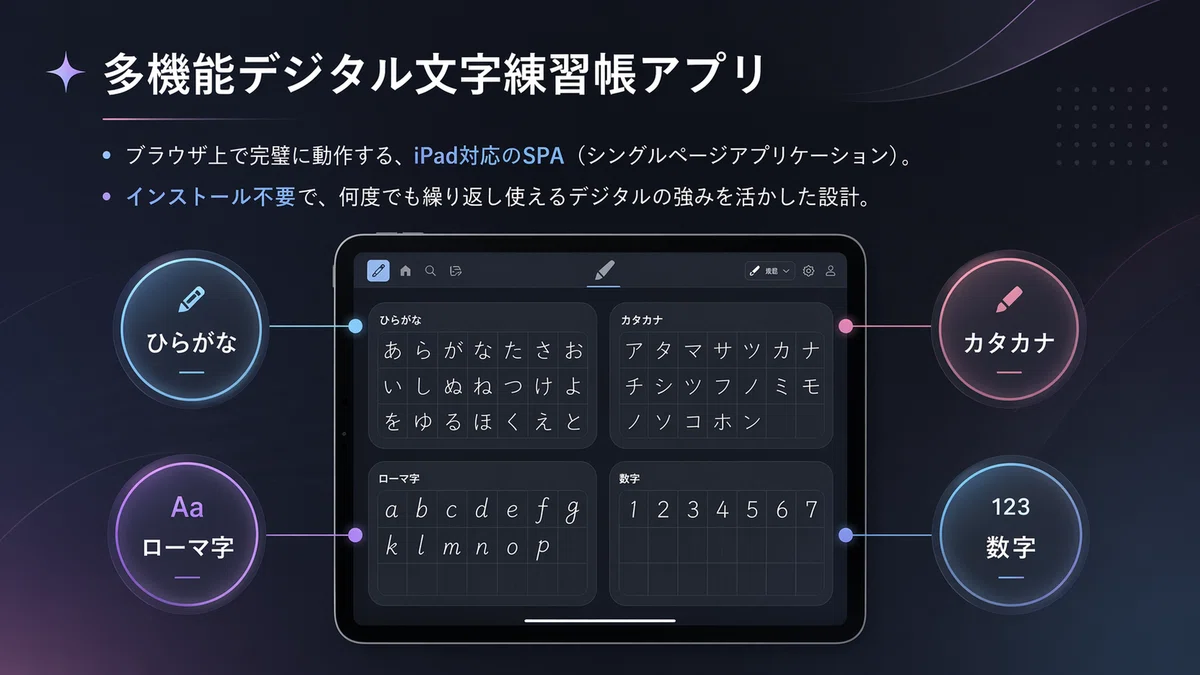
Multi-functional web app that runs on iPad
Direct access to Gemini - Google AI
The biggest highlight of this app is that it is
compatible with both hands and is a digital web app,
so you can use it for training over and over again!!
Furthermore, instead of just lining up characters in
the order of the Japanese syllabary,
it adopts a unique step-up method
that gradually increases the difficulty starting from characters that are easier to write. point.
🔘 Header Explanation

Header Explanation
This header is a menu for viewing, editing, and saving images and materials.
Hiragana/Katakana Switch
Switches between Hiragana and Katakana.Romaji/Alphabet (Set)
Displays Romaji and Alphabet notation as a set.Numbers/Kanji Numbers (Set)
Displays numbers and Kanji numbers as a set.Handedness Switch
Allows switching from left-handed (default) to right-handed.Erase
Erases the selected part or handwriting.Erase All
Erases all handwriting and input content on the screen.Save Format (PNG / PDF)
You can download and save in PNG or PDF format.Save (Current Page)
Saves the current page as an image file.Save All (All Pages)
Saves all pages together as image files.Drawing Tools
You can select pen, eraser, or hand (move) tools.Page Navigation
Flip through pages using Home (return to first page), Previous, and Next.Display / Zoom
Zoom out, full-screen display, and zoom in are available.Audio Playback
Plays or stops the audio.Language Switch
You can switch between Japanese and English.Display Orientation Switch
You can switch between vertical and horizontal list views.Theme Switch
You can switch between light mode and dark mode.
Tip
By switching display modes and tools to suit your purpose and learning style, it becomes even easier to use.
🌸 Hiragana (8 pages total)
We don't start by making you write difficult characters!
We proceed in small steps based on the difficulty of the brush strokes.

Step 1 (Super Beginner):
Simple lines that can be written in one stroke.
[shi, tsu, ku, he]Step 2 (Beginner):
Simple curves and 2-stroke characters.
【no, te, to, i, ko, ri, hi】Step 3 (Intermediate):
Practice movements involving turns and waves.
【u, e, so, ya, yu, yo, ru, ro, n】Step 4 (Advanced):
Characters requiring line intersections and overall balance.
【ka, ki, ke, sa, se, ta, chi, ni, fu, mo, ra, wa, wo】Step 5 (Most Difficult):
Challenge characters with "loops" that go around, which are the most common stumbling block in penmanship!
【a, o, su, na, nu, ne, ha, ho, ma, mi, mu, me, re】Step 6 & 7:
As a final review, we have complete
vertical and horizontal writing syllabary charts.
✨ Katakana (8 pages total)
A curriculum focused on the "straight lines" and "angles" unique to Katakana.

Step 1 (Super Introductory):
Simple straight lines and sweeps.
【I, No, Ha, He, To, Ni, Fu】Step 2 (Beginner):
Master characters that are easy to mistake, where direction and angle are everything.
【Shi, Tsu, So, N, Mu, Ya, Ku】Step 3 (Intermediate):
Characters for learning folds and corners.
【A, Ka, Ko, Sa, Se, Ta, Te, Na, Ne, Ra, Ro】Step 4 (Advanced):
Learn the balance of intersecting lines.
【Ma, Me, Ki, Ke, Chi, Nu, Su, Ho, Mo, Yo, Ru, Wa】Step 5 (Most Difficult):
Finish with characters where spacing is difficult.
【U, E, O, Hi, Mi, Yu, Ri, Re, Wo】Step 6 & 7:
Just like with Hiragana, it comes with complete vertical and horizontal syllabary charts.
🔤 Romaji & Alphabet (10 pages total)
From the basics to the differences in practical notation rules,
you can cover everything perfectly with just this!

Step 1-2:
First, practice the basics of English: "Uppercase (A-Z)" and "Lowercase (a-z)."Step 3-4:
Basic Romaji for the "A-row to Wa-row" sounds.Step 5:
Voiced and semi-voiced sounds for the "Ga-row to Pa-row" sounds.Step 6-8:
Thorough practice of contracted sounds (yoon) like "kya, hya, gya."-
Steps 9-10 (Super Practical Edition!):
This is the most important point!
Compare and learn the differences between 'Hepburn' and 'Kunrei-shiki' romanization while practicing.Hepburn (SHI, CHI, TSU, FU):
Easier for English speakers to pronounce,
a practical writing style used for passports, station names, and road signs.Kunrei-shiki (SI, TI, TU, HU):
Follows the rules of the Japanese syllabary,
a writing style often taught in Japanese elementary school classes.We also highlight common mistakes,
such as 'fu', 'sha', and 'cha',
clearly in red and blue.
🔢 Numbers & Kanji Numerals (2 pages total)

Step 1:
The 'Arabic numerals (0-9)' used most in daily lifeStep 2:
'Kanji Numerals (1-10,000, 0, Yen)'
The Kanji numeral squares include
readings (ruby) like 'ichi' or '1000' and Arabic numerals as aids,
making it a very user-friendly design for foreigners studying Japanese.
*By the way, in all modes, you can switch the language to English!
The language switch button is to the right of the audio button!


💕 Slide Explanation
![Creative Award 2026 All Category Section [Completely Free, God-tier App] Multi-functional Digital Handwriting Practice App 📱 Penmanship practice on iPad, Smartphone, and PC 🖊 #BeautifulWriting #App <a target=](/https://assets.st-note.com/img/1784528643-5xU6uHSbeTojdpcOaNCDZz7m.jpg) #ai #Gemini #canvas Koro-chan♥RabbitEarKoro Creative Award 2026 [100% FREE] AI Handwriting Practice App for iPad, Phone & PC ✍️Japanese " width="620" height="349">
#ai #Gemini #canvas Koro-chan♥RabbitEarKoro Creative Award 2026 [100% FREE] AI Handwriting Practice App for iPad, Phone & PC ✍️Japanese " width="620" height="349">AI Handwriting Practice App for iPad, Phone & PC ✍️

What if there were people who have something they want to convey but cannot.
What if there were people who have a desire to learn but cannot fully access the opportunity.
We faced that reality.
What I am talking about today is not just about an app.
It is about a future where the potential of each individual is not closed off by differences.
The multi-functional digital handwriting practice app was born as a small step toward that future.

In this world, there are many less visible difficulties.
Being left-handed.
Differences in language or culture.
Differences in physical function or learning environment.
None of these have anything to do with one's true ability.
Yet, many people hit a wall before they even try.
We asked a question.
Is it not the environment, not the person that really needs to change?

Born as an answer to that question is the Inclusive AI Writing Canvas.
It is not a tool for using the power of AI.
It is a tool that uses AI to bring out the power of people.
Instead of treating individual differences as weaknesses, we embrace them as unique characteristics.
We wanted to realize such a place of learning through the power of digital.
What we aim for is a learning experience where no one is left behind.
The more technology evolves, the more we want to cherish our humanity.
That is why this app retains the warmth of writing on paper.
Write down what comes to mind freely.
Try it out.
Make mistakes.
And try again.
We value not disrupting that natural flow of learning above all else.

Operations that are taken for granted by many people can become a source of difficulty for others.
For example, left-handed people.
Many services in the world are unconsciously designed with right-handed users in mind.
However, we thought about it.
Is a design that assumes someone will have to endure inconvenience really correct?
It might be a small consideration.
But that consideration becomes the power to support someone's challenge.

Learning is not just for that moment.
What you couldn't do today, you will be able to do tomorrow.
To witness that growth, records are necessary.
In this app, you can save and review your achievements.
By looking at your past self, people can gain the courage to move forward.
Records are not just data.
They are hope for the future.

When starting something new, people feel anxious.
That is why we made the operations as simple as possible.
Write.
Correct.
Save.
That is all.
We want you to spend your time expressing yourself, not learning difficult operations. We want you to spend your time expressing yourself.
We have poured that sentiment into this design.

Words are the power that connects people. However, sometimes words also become
a barrier.
Not knowing how to pronounce them.
Not knowing how to read them. Because of this,
people lose confidence. We want to
reduce those moments as much as possible. By connecting characters with sounds and supporting understanding, we hope to deliver the joy of learning
.

In learning, there is the most beautiful moment. That is
the moment when you understand something you didn't understand before. Even taking just the expression of numbers,
the form that is easy to understand differs from person to person. That is why we have prepared an environment where you can learn while comparing diverse expressions
. Because the success experience of having understood
is what leads people to their next challenge.

Everyone has different strengths.
People who are good at writing characters.
People who are good at speaking to communicate.
People who are good at thinking with pictures or diagrams.
Therefore, we did not limit the input method to just one. Instead of people adapting to tools,
tools adapt to people. We believe that is
true inclusive design.

No matter how gentle the experience is, it cannot be realized without the technology that supports it. This system is packed with
many innovations and technologies. However, we must not make the user
feel the complexity. What we aimed for was a world where advanced technology quietly supports people
. The protagonist is not the system.
It is each and every person who uses it.

Characters written by someone with great effort.
Records of repeated practice.
The trajectory of gradual improvement.
These are all that person's own unique treasure. That is why we created a mechanism to
securely preserve that effort.
Human growth is something that is hard to see. That is precisely why
being able to save, review, and realize it is important.

Usability is not about the number of features.
It is about being able to use it with peace of mind.
It is about not getting tired even after long hours of use.
It is about being able to use it in your own way.
Both light mode and dark mode exist for that purpose.
In any environment, for any person.
We aimed for an experience that is comfortable to use.

What we are looking at is the person on the other side of the screen.
Those working hard on rehabilitation.
Those learning new languages.
Children writing letters for the first time.
Those who felt inconvenienced because they are left-handed.
We want to support each and every one of them.
We believe the value of technology is determined by how many people it can support.

Everyone wants to convey something. Everyone wants to
learn. Everyone wants to
grow. There should be no differences or barriers
to those wishes. What we created is not just an app
. It is a message that you don't have to give up on your potential. Toward a society where as many people as possible can
learn and express themselves in their own way. This
multi-functional digital handwriting practice app will
continue to walk forward, believing in that future. Thank you very much.
👇 Click here for the actual code (how to use)

You can use it by copying the HTML code written below, pasting it into a notepad,
saving it with the .html extension, and opening it, or by tapping the link created in
Gemini's Canvas 🔗
When you click the link above and open it in a web browser, the following screen will appear; click the "Continue" button!
*You can use the app without logging into Gemini!!

Example) File name: japanese_practice_workbook.html
Hiragana & Katakana & Numbers & Romaji Practice Book (Ambidextrous/Voice Read-aloud support).html
<!DOCTYPE html>
<html lang="ja">
<head>
<meta charset="UTF-8">
<meta name="viewport" content="width=device-width, initial-scale=1.0, maximum-scale=1.0, user-scalable=no, viewport-fit=cover">
<title>ひらがな&カタカナ&数字&ローマ字 練習帳(両利き・音声読み上げ対応)</title>
<link href="/https://fonts.googleapis.com/css2?family=Klee+One:wght@400;600&family=Noto+Sans+JP:wght@400;700&display=swap" rel="stylesheet">
<link rel="stylesheet" href="/https://cdnjs.cloudflare.com/ajax/libs/font-awesome/6.5.1/css/all.min.css">
<script src="/https://cdnjs.cloudflare.com/ajax/libs/html2canvas/1.4.1/html2canvas.min.js"></script>
<script src="/https://cdnjs.cloudflare.com/ajax/libs/jspdf/2.5.1/jspdf.umd.min.js"></script>
<style>
* { box-sizing: border-box; }
body {
margin: 0;
padding-top: calc(130px + env(safe-area-inset-top, 0px));
font-family: 'Noto Sans JP', sans-serif;
background-color: var(--body-bg); color: var(--text-color);
transition: background-color 0.3s, color 0.3s;
overflow: auto; touch-action: pan-x pan-y;
}
/* ライトモード */
:root {
--body-bg: #e9ecef; --bg-color: #ffffff; --text-color: #212529;
--border-color: #adb5bd; --grid-color: rgba(0,0,0,0.15);
--trace-color: rgba(0,0,0,0.2);
--ctrl-bg: #ffffff; --block-bg: #f8f9fa; --cell-bg: #ffffff;
--btn-hover: #f1f3f5;
}
/* 左手: 赤系 / 右手: 青系 */
body.left-hand { --accent-color: #b52a2a; }
body.right-hand { --accent-color: #2a5eb5; }
/* ダークモード */
body.dark-mode {
--body-bg: #121212; --bg-color: #1e1e1e; --text-color: #f8f9fa;
--border-color: #495057; --grid-color: rgba(255,255,255,0.15);
--trace-color: rgba(255,255,255,0.25);
--ctrl-bg: #212529; --block-bg: #2b2b2b; --cell-bg: #1e1e1e;
--btn-hover: #343a40;
}
body.dark-mode.left-hand { --accent-color: #ff6b6b; }
body.dark-mode.right-hand { --accent-color: #4a90e2; }
body.move-mode { touch-action: none; }
/* 左手用の場合はマス目の並び順を反転 */
body.left-hand .char-block { flex-direction: row-reverse; }
/* コントロールバー(セーフエリア対応) */
#controls {
position: fixed; top: 0; left: 0; width: 100%;
background-color: var(--ctrl-bg);
padding: calc(12px + env(safe-area-inset-top, 0px)) 15px 12px;
display: flex; flex-direction: column; gap: 12px;
align-items: center;
z-index: 1000; box-shadow: 0 2px 10px rgba(0,0,0,0.15);
border-bottom: 1px solid var(--border-color);
transition: background-color 0.3s;
}
.control-row {
display: flex; justify-content: flex-start; align-items: center;
flex-wrap: nowrap; gap: 12px;
width: fit-content; max-width: 100%;
overflow-x: auto;
-ms-overflow-style: none; scrollbar-width: none;
padding-bottom: 2px;
}
.control-row::-webkit-scrollbar { display: none; }
.tool-group {
display: flex; align-items: center; background: var(--block-bg);
padding: 4px; border-radius: 25px; border: 1px solid var(--border-color);
gap: 2px; white-space: nowrap;
}
.btn {
padding: 8px 14px; border: none; border-radius: 20px;
background-color: transparent; color: var(--text-color); cursor: pointer;
font-size: 14px; font-weight: 600; display: flex; align-items: center; gap: 6px;
transition: all 0.2s; font-family: inherit; white-space: nowrap;
}
.btn:hover:not(:disabled) { background-color: var(--btn-hover); }
.btn:disabled { opacity: 0.5; cursor: not-allowed; }
.btn.active { background-color: var(--accent-color); color: #fff; }
.btn-primary { background-color: var(--accent-color); color: #fff; }
.btn-primary:hover:not(:disabled) { filter: brightness(0.9); }
.icon-btn { width: 40px; height: 40px; justify-content: center; border-radius: 50%; padding: 0; font-size: 16px; }
.text-danger { color: #dc3545; } body.dark-mode .text-danger { color: #ff8787; }
.format-select { padding: 8px 12px; border-radius: 20px; border: none; background-color: transparent; color: var(--text-color); font-weight: bold; font-family: inherit; outline: none; cursor: pointer; }
.format-select option { color: #000; }
.page-indicator { font-weight: bold; font-size: 16px; min-width: 60px; text-align: center; background: var(--block-bg); padding: 6px 16px; border-radius: 20px; border: 1px solid var(--border-color); white-space: nowrap; }
#pages-container { display: flex; justify-content: center; padding: 20px; transform-origin: top center; transition: transform 0.1s ease-out; }
/* ページサイズ (A4横) */
.page {
display: none; width: 1120px; height: 792px; min-width: 1120px;
background-color: var(--bg-color); padding: 15px 30px;
border-radius: 8px; box-shadow: 0 10px 30px rgba(0,0,0,0.1);
margin: 0 auto; position: relative; flex-direction: column;
}
.page.active { display: flex; }
.main-title { font-size: 22px; margin: 0 0 6px; border-bottom: 2px solid var(--border-color); padding-bottom: 6px; display: flex; align-items: center; gap: 10px; }
.step-title-small { font-size: 14px; font-weight: bold; margin: 2px 0; display: flex; align-items: center; gap: 8px; }
.step-desc { font-size: 13px; line-height: 1.4; margin-bottom: 8px; opacity: 0.9; white-space: pre-wrap; }
.step-badge { background-color: var(--accent-color); color: #fff; padding: 2px 10px; border-radius: 12px; font-size: 13px; font-weight: bold; }
.step-badge.large { font-size: 16px; padding: 4px 12px; }
.char-block { display: flex; background-color: var(--block-bg); border-radius: 8px; border: 1px solid var(--border-color); }
.cell { position: relative; border: 1px solid var(--border-color); background-color: var(--cell-bg); display: flex; align-items: center; justify-content: center; font-family: 'Klee One', cursive; line-height: 1; flex-shrink: 0; }
.cell.sample span.main-char { color: var(--text-color); font-weight: 600; }
.cell.trace span.main-char { color: var(--trace-color); }
.cell::before, .cell::after { content: ''; position: absolute; pointer-events: none; }
.cell::before { top: 50%; left: 0; right: 0; border-top: 1px dashed var(--grid-color); }
.cell::after { left: 50%; top: 0; bottom: 0; border-left: 1px dashed var(--grid-color); }
canvas { position: absolute; top: 0; left: 0; width: 100%; height: 100%; z-index: 10; touch-action: none; }
.cell.sample { cursor: pointer; transition: opacity 0.2s; }
.cell.sample:active { opacity: 0.5; }
.summary-wrapper { margin: 0 auto; width: max-content; display: flex; flex-direction: column; align-items: flex-start; }
.blocks-container.compact { display: grid; grid-template-columns: repeat(7, max-content); justify-content: flex-start; gap: 6px 8px; margin-bottom: 6px; width: 100%; }
.char-block.compact { gap: 2px; padding: 3px; }
.cell.compact { width: 43px; height: 43px; font-size: 32px; }
.blocks-container.step-layout { display: grid; grid-template-columns: repeat(3, max-content); justify-content: center; gap: 20px 30px; margin-top: 20px; width: 100%; }
.char-block.step { gap: 4px; padding: 6px; }
.cell.step { width: 105px; height: 105px; font-size: 80px; }
.vertical-layout { display: flex; flex-direction: row-reverse; justify-content: center; gap: 14px; margin-top: 10px; }
.column-group { display: flex; flex-direction: column; gap: 4px; }
.horizontal-layout { display: flex; flex-direction: column; justify-content: center; align-items: center; gap: 4px; margin-top: 10px; }
.row-group { display: flex; flex-direction: row; gap: 10px; }
.char-block.aiueo { gap: 2px; padding: 3px; }
.cell.aiueo { width: 54px; height: 54px; font-size: 40px; }
.blocks-container.numbers-layout, .blocks-container.kanji-layout { display: grid; grid-template-columns: repeat(3, max-content); justify-content: center; gap: 20px 20px; margin-top: 30px; width: 100%; }
.char-block.numbers-block, .char-block.kanji { gap: 6px; padding: 6px; }
.cell.numbers-cell, .cell.kanji { width: 105px; height: 105px; font-size: 80px; }
.cell.kanji { font-size: 64px; font-family: 'Klee One', cursive; }
.kanji-ruby { position: absolute; top: 6px; left: 0; right: 0; text-align: center; font-size: 18px; font-family: 'Klee One', cursive; font-weight: bold; color: var(--accent-color); opacity: 0.85; pointer-events: none; line-height: 1; }
body.dark-mode .kanji-ruby { color: var(--text-color); opacity: 0.7; }
.kanji-num { position: absolute; bottom: 6px; left: 0; right: 0; text-align: center; font-size: 18px; font-family: 'Noto Sans JP', sans-serif; font-weight: bold; color: var(--accent-color); opacity: 0.85; pointer-events: none; line-height: 1; }
body.dark-mode .kanji-num { color: var(--text-color); opacity: 0.7; }
.cell.kanji span.main-char { margin-top: 0; }
.blocks-container.alphabet-layout { display: flex; flex-direction: column; gap: 14px; align-items: center; margin-top: 20px; width: 100%; }
.blocks-container.alphabet-layout .row-group { display: flex; justify-content: center; align-items: center; gap: 10px; width: 100%; }
.char-block.alphabet { gap: 3px; padding: 3px; }
.cell.alphabet { width: 44px; height: 44px; font-size: 32px; font-family: 'Noto Sans JP', sans-serif; }
.char-block.romaji { gap: 4px; padding: 4px; }
.cell.romaji { width: 64px; height: 64px; font-size: 24px; font-family: 'Noto Sans JP', sans-serif; letter-spacing: 0; }
.romaji-kana { position: absolute; top: 3px; left: 0; right: 0; display: flex; justify-content: space-between; padding: 0 4px; font-size: 14px; font-family: 'Klee One', cursive; font-weight: bold; color: var(--accent-color); opacity: 0.85; pointer-events: none; line-height: 1; }
body.dark-mode .romaji-kana { color: var(--text-color); opacity: 0.7; }
.cell.alphabet span.main-char { font-family: 'Noto Sans JP', sans-serif; }
.cell.romaji span.main-char { font-family: 'Noto Sans JP', sans-serif; margin-top: 14px; }
.char-block.romaji-yoon { gap: 6px; padding: 6px; }
.cell.romaji-yoon { width: 96px; height: 96px; font-size: 40px; font-family: 'Noto Sans JP', sans-serif; letter-spacing: 0; }
.cell.romaji-yoon .romaji-kana { font-size: 16px; top: 6px; padding: 0 8px; }
.cell.romaji-yoon span.main-char { margin-top: 16px; }
/* ==== ヘボン式・訓令式の比較ページ用 CSS ==== */
.diff-page-container { display: flex; gap: 20px; margin-top: 15px; height: calc(100% - 40px); align-items: stretch; }
.diff-text-area { width: 380px; display: flex; flex-direction: column; gap: 12px; }
.diff-card { background: var(--block-bg); border: 1px solid var(--border-color); border-radius: 8px; padding: 12px 16px; font-size: 14.5px; line-height: 1.5; box-shadow: 0 2px 5px rgba(0,0,0,0.05); }
.diff-card p { margin: 0; }
.diff-card h4 { margin: 0 0 8px; font-size: 16px; color: var(--accent-color); border-bottom: 1px dashed var(--border-color); padding-bottom: 6px; display: flex; align-items: center; gap: 6px; }
.hebon-card h4 { color: #d35400; } .kunrei-card h4 { color: #2980b9; }
body.dark-mode .hebon-card h4 { color: #e67e22; } body.dark-mode .kunrei-card h4 { color: #3498db; }
/* ヘボン式ハイライト(赤系) */
.diff-highlight { color: #e74c3c; font-weight: bold; }
body.dark-mode .diff-highlight { color: #ff7675; }
.cell.trace span.main-char .diff-highlight { color: inherit; }
/* 訓令式ハイライト(青系) */
.kunrei-highlight { color: #2980b9; font-weight: bold; }
body.dark-mode .kunrei-highlight { color: #3498db; }
.cell.trace span.main-char .kunrei-highlight { color: inherit; }
.diff-note-list { margin: 0; padding-left: 20px; } .diff-note-list li { margin-bottom: 6px; }
.diff-practice-area { flex: 1; background: var(--block-bg); border: 1px solid var(--border-color); border-radius: 8px; padding: 12px 16px; box-shadow: 0 2px 5px rgba(0,0,0,0.05); }
.diff-table-header { display: flex; align-items: center; border-bottom: 2px solid var(--border-color); padding-bottom: 6px; margin-bottom: 8px; font-weight: bold; font-size: 14px; text-align: center; color: var(--text-color); }
.diff-table-header.small { font-size: 12px; }
.diff-col-kana { width: 45px; text-align: center; font-size: 18px; font-family: 'Klee One', cursive; font-weight: bold; }
.diff-col-hebon, .diff-col-kunrei { flex: 1; display: flex; justify-content: center; align-items: center; position: relative; }
.diff-row { display: flex; align-items: center; margin-bottom: 6px; background: var(--cell-bg); padding: 6px; border-radius: 6px; border: 1px solid var(--border-color); }
.char-block.diff-block { gap: 4px; padding: 0; border: none; background: transparent; }
.cell.diff-cell { width: 52px; height: 52px; font-size: 20px; border-radius: 4px; font-family: 'Noto Sans JP', sans-serif; }
.cell.diff-cell.small { width: 46px; height: 46px; font-size: 16px; }
.cell.diff-cell span.main-char { margin-top: 0; }
/* ロード用オーバーレイ */
#loading-overlay { display: none; position: fixed; top: 0; left: 0; width: 100%; height: 100%; background: rgba(0,0,0,0.85); z-index: 9999; flex-direction: column; justify-content: center; align-items: center; color: white; text-align: center; }
/* 画像保存(写真アプリ用)モーダル */
#image-modal {
display: none; position: fixed; top: 0; left: 0; width: 100%; height: 100%;
background: rgba(0,0,0,0.95); z-index: 10000; flex-direction: column;
}
.modal-header {
display: flex; justify-content: space-between; align-items: center;
padding: calc(15px + env(safe-area-inset-top, 0px)) 15px 15px;
background: #222; color: #fff; font-weight: bold;
}
.modal-content {
flex: 1; overflow-y: auto; padding: 20px; display: flex; flex-direction: column; gap: 20px; align-items: center;
}
.modal-content img {
max-width: 100%; height: auto; border-radius: 8px; box-shadow: 0 4px 12px rgba(0,0,0,0.5);
border: 2px solid #555;
}
</style>
</head>
<body class="dark-mode left-hand" data-tool="pen">
<div id="loading-overlay">
<i class="fa-solid fa-spinner fa-spin fa-4x"></i>
<h2 style="margin-top: 20px;" data-i18n="common.loading_title">保存処理中...</h2>
<p data-i18n="common.loading_desc"></p>
</div>
<!-- 写真アプリ保存用モーダル -->
<div id="image-modal">
<div class="modal-header">
<span data-i18n="common.modal_guide">画像を長押しして「写真に追加」または「保存」を選んでください。</span>
<button class="btn icon-btn text-danger" onclick="closeModal()"><i class="fa-solid fa-xmark"></i></button>
</div>
<div class="modal-content" id="modal-images"></div>
</div>
<!-- コントロールバー -->
<div id="controls">
<div class="control-row">
<div class="tool-group">
<button class="btn btn-primary" onclick="setScriptMode('kana')" title="ひらがな/カタカナ" style="min-width: 90px; justify-content: center; background-color: #2b908f;">
<span id="kana-btn-text">ひらがな</span>
</button>
<button class="btn btn-primary" onclick="setScriptMode('alphabet')" title="ローマ字" style="min-width: 90px; justify-content: center; background-color: #8e44ad;">
<span data-i18n="common.script_alphabet">ローマ字</span>
</button>
<button class="btn btn-primary" onclick="setScriptMode('numbers')" title="数字" style="min-width: 90px; justify-content: center; background-color: #d35400;">
<span data-i18n="common.script_numbers">数字</span>
</button>
<button class="btn btn-primary" id="hand-toggle-btn" onclick="toggleHand()" title="利き手切り替え" style="min-width: 100px; justify-content: center;">
<i class="fa-solid fa-hand"></i> <span>左手用</span>
</button>
</div>
<div class="tool-group">
<button class="btn" onclick="clearCurrentPage()"><i class="fa-regular fa-trash-can"></i> <span data-i18n="common.btn_clear_page">ページ消去</span></button>
<button class="btn text-danger" onclick="clearAllPages()"><i class="fa-solid fa-trash-can"></i> <span data-i18n="common.btn_clear_all">全消去</span></button>
</div>
<div class="tool-group">
<select id="save-format" class="format-select">
<option value="png">PNG</option>
<option value="pdf">PDF</option>
</select>
<button class="btn btn-primary" onclick="saveCurrentPage()"><i class="fa-solid fa-download"></i> <span data-i18n="common.btn_save_page">保存</span></button>
<button class="btn btn-primary" onclick="saveAllPages()"><i class="fa-solid fa-file-zipper"></i> <span data-i18n="common.btn_save_all">全保存</span></button>
</div>
</div>
<div class="control-row">
<div class="tool-group">
<button class="btn active icon-btn" id="btn-pen" onclick="setTool('pen')" title="Pen"><i class="fa-solid fa-pen"></i></button>
<button class="btn icon-btn" id="btn-eraser" onclick="setTool('eraser')" title="Eraser"><i class="fa-solid fa-eraser"></i></button>
<button class="btn icon-btn" id="btn-move" onclick="setTool('move')" title="Move/Pan"><i class="fa-solid fa-hand"></i></button>
</div>
<div class="tool-group nav-group" style="padding: 4px;">
<button class="btn" onclick="goToTop()" title="Home">
<i class="fa-solid fa-house"></i>
</button>
<button class="btn" id="prev-btn" onclick="changePage(-1)">
<i class="fa-solid fa-chevron-left"></i> <span data-i18n="common.btn_prev">前へ</span>
</button>
<span class="page-indicator" id="page-indicator" style="border: none; background: transparent;">1 / 8</span>
<button class="btn" id="next-btn" onclick="changePage(1)">
<span data-i18n="common.btn_next">次へ</span> <i class="fa-solid fa-chevron-right"></i>
</button>
</div>
<!-- ズーム操作コントロールを追加 -->
<div class="tool-group">
<button class="btn icon-btn" onclick="changeZoom(-0.1)" title="縮小"><i class="fa-solid fa-magnifying-glass-minus"></i></button>
<button class="btn icon-btn" onclick="resetZoom()" title="100%" style="font-size: 14px;"><i class="fa-solid fa-expand"></i></button>
<button class="btn icon-btn" onclick="changeZoom(0.1)" title="拡大"><i class="fa-solid fa-magnifying-glass-plus"></i></button>
</div>
<div class="tool-group">
<button class="btn icon-btn" onclick="speakCurrentPage()" title="ページを読み上げる"><i class="fa-solid fa-volume-high"></i></button>
<button class="btn icon-btn text-danger" onclick="stopSpeaking()" title="読み上げを停止する"><i class="fa-solid fa-stop"></i></button>
</div>
<div class="tool-group">
<button class="btn icon-btn" onclick="toggleLang()" title="Language Switch"><i class="fa-solid fa-language"></i></button>
<button class="btn icon-btn jump-btn" onclick="jumpToAiueoV()" title="縦書き" style="gap: 2px;">
<i class="fa-solid fa-arrow-down" style="font-size: 12px;"></i>
<span id="jump-v-text" style="font-size: 12px; font-weight: bold; font-family: 'Noto Sans JP';">あ</span>
</button>
<button class="btn icon-btn jump-btn" onclick="jumpToAiueoH()" title="横書き" style="gap: 2px;">
<i class="fa-solid fa-arrow-right" style="font-size: 12px;"></i>
<span id="jump-h-text" style="font-size: 12px; font-weight: bold; font-family: 'Noto Sans JP';">あ</span>
</button>
<button class="btn icon-btn" onclick="toggleTheme()" title="Theme"><i id="theme-icon" class="fa-solid fa-sun"></i></button>
</div>
</div>
</div>
<div id="pages-container"></div>
<script>
// iOS/iPadOS判定(長押し保存モード用)
const isIOS = /iPad|iPhone|iPod/.test(navigator.userAgent) || (navigator.platform === 'MacIntel' && navigator.maxTouchPoints > 1);
let currentLang = 'jp';
let currentHand = 'left';
let currentScript = 'hiragana';
let lastKana = 'hiragana';
let lastKanaPage = 1;
let currentPage = 1;
let currentTool = 'pen';
let penSize = 3;
let eraserSize = 50;
let currentZoom = 1.0;
let lastSpokenChar = '';
let lastSpokenTime = 0;
const i18n = {
jp: {
common: {
btn_clear_page: "消去", btn_clear_all: "全消去", btn_save_page: "保存", btn_save_all: "全保存", btn_prev: "前へ", btn_next: "次へ",
loading_title: "保存処理中...", loading_desc: "※全ページ保存には少し時間がかかります。<br>ブラウザから<b>「複数ファイルのダウンロードを許可しますか?」</b>と聞かれた場合は、<b>「許可」</b>を押してください。",
script_hiragana: "ひらがな", script_katakana: "カタカナ", script_alphabet: "ローマ字", script_numbers: "数字", hand_left: "左手用", hand_right: "右手用",
kana: "かな", hebon: "ヘボン式", kunrei: "訓令式",
modal_guide: "画像を長押しして「写真に追加」または「画像を保存」を選んでください。"
},
hiragana: {
title_main: { left: "左手用 ひらがな練習帳", right: "右手用 ひらがな練習帳" }, title_aiueo_v: "縦書き 五十音順(あ〜わ行)", title_aiueo_h: "横書き 五十音順(あ〜わ行)",
step1_title: "1画のシンプルな線(超入門)", step2_title: "単純なカーブと2画の文字(初級)", step3_title: "折り返しと波打ち(中級)", step4_title: "線の交差とバランス(上級)", step5_title: "ぐるっと回る「結び」(最難関)"
},
katakana: {
title_main: { left: "左手用 カタカナ練習帳", right: "右手用 カタカナ練習帳" }, title_aiueo_v: "縦書き 五十音順(ア〜ワ行)", title_aiueo_h: "横書き 五十音順(ア〜ワ行)",
step1_title: "シンプルな直線と払い(超入門)", step2_title: "向きと角度が命(初級)", step3_title: "折れとカド(中級)", step4_title: "交差とバランス(上級)", step5_title: "空間の取り方と形(最難関)"
},
alphabet: {
title_main: { left: "左手用 アルファベット・ローマ字", right: "右手用 アルファベット・ローマ字" },
step1_title: "アルファベット 大文字 (A〜Z)", step2_title: "アルファベット 小文字 (a〜z)", step3_title: "ローマ字 (あ行〜な行)", step4_title: "ローマ字 (は行〜わ行)", step5_title: "ローマ字 濁音・半濁音 (が〜ぱ行)", step6_title: "ローマ字 拗音1 (きゃ〜にゃ)", step7_title: "ローマ字 拗音2 (ひゃ〜りゃ)", step8_title: "ローマ字 拗音3 (ぎゃ〜ぴゃ)",
step9_title: "ヘボン式と訓令式の違い(子音)", step10_title: "ヘボン式と訓令式の違い(拗音)",
diff_hebon_title: "<i class=\"fa-solid fa-passport\"></i> ヘボン式",
diff_hebon_desc: "英語話者が発音しやすい書き方。<br>SI → <span class=\"diff-highlight\">SHI</span> / TI → <span class=\"diff-highlight\">CHI</span><br>TU → <span class=\"diff-highlight\">TSU</span> / HU → <span class=\"diff-highlight\">FU</span><br>👉 <strong>パスポートや駅名・道路標識</strong>などで一般的。",
diff_kunrei_title: "<i class=\"fa-solid fa-school\"></i> 訓令式",
diff_kunrei_desc: "五十音表の規則をそのまま表す書き方。<br>さ行: SA <span class=\"kunrei-highlight\">SI</span> SU SE SO<br>た行: TA <span class=\"kunrei-highlight\">TI</span> <span class=\"kunrei-highlight\">TU</span> TE TO<br>👉 <strong>学校のローマ字教育</strong>で習うことが多い。",
diff_note_title: "⚠️ 特に間違えやすい注意点",
diff_note_1: "<strong>「ふ」</strong> <span class=\"diff-highlight\">ヘボン式: <b>FU</b></span> / <span class=\"kunrei-highlight\">訓令式: <b>HU</b></span><br><strong>「し」</strong> <span class=\"diff-highlight\">ヘボン式: <b>SHI</b></span> / <span class=\"kunrei-highlight\">訓令式: <b>SI</b></span><br><strong>「ち」</strong> <span class=\"diff-highlight\">ヘボン式: <b>CHI</b></span> / <span class=\"kunrei-highlight\">訓令式: <b>TI</b></span><br><strong>「つ」</strong> <span class=\"diff-highlight\">ヘボン式: <b>TSU</b></span> / <span class=\"kunrei-highlight\">訓令式: <b>TU</b></span>",
diff_note_2: "<strong>「しゃ・しゅ・しょ」</strong><br><span class=\"diff-highlight\">ヘボン式: <b>SHA・SHU・SHO</b></span><br><span class=\"kunrei-highlight\">訓令式: <b>SYA・SYU・SYO</b></span><br><br><strong>「ちゃ・ちゅ・ちょ」</strong><br><span class=\"diff-highlight\">ヘボン式: <b>CHA・CHU・CHO</b></span><br><span class=\"kunrei-highlight\">訓令式: <b>TYA・TYU・TYO</b></span><br><br><strong>「じゃ・じゅ・じょ」</strong><br><span class=\"diff-highlight\">ヘボン式: <b>JA・JU・JO</b></span><br><span class=\"kunrei-highlight\">訓令式: <b>ZYA・ZYU・ZYO</b></span>"
},
numbers: { title_main: { left: "左手用 数字・漢数字 練習帳", right: "右手用 数字・漢数字 練習帳" }, step1_title: "算用数字 (0〜9)", step2_title: "漢数字 (一〜万、〇、円)" }
},
en: {
common: {
btn_clear_page: "Clear", btn_clear_all: "Clear All", btn_save_page: "Save", btn_save_all: "Save All", btn_prev: "Prev", btn_next: "Next",
loading_title: "Saving...", loading_desc: "Saving all pages may take a while.<br>If asked 'Allow downloading multiple files?', please select <b>Allow</b>.",
script_hiragana: "Hiragana", script_katakana: "Katakana", script_alphabet: "Romaji", script_numbers: "Numbers", hand_left: "Left", hand_right: "Right",
kana: "Kana", hebon: "Hepburn", kunrei: "Kunrei",
modal_guide: "Long press the image to save it to your Photos."
},
hiragana: { title_main: { left: "Left-Handed Hiragana", right: "Right-Handed Hiragana" }, title_aiueo_v: "Vertical Gojuon", title_aiueo_h: "Horizontal Gojuon", step1_title: "1-Stroke Lines", step2_title: "Simple Curves", step3_title: "Fold Back & Wave", step4_title: "Intersections", step5_title: "Looping 'Knots'" },
katakana: { title_main: { left: "Left-Handed Katakana", right: "Right-Handed Katakana" }, title_aiueo_v: "Vertical Gojuon", title_aiueo_h: "Horizontal Gojuon", step1_title: "Simple Lines", step2_title: "Direction & Angle", step3_title: "Folds & Corners", step4_title: "Intersections", step5_title: "Spacing" },
alphabet: {
title_main: { left: "Left-Handed Alphabet & Romaji", right: "Right-Handed Alphabet & Romaji" },
step1_title: "Alphabet Uppercase (A-Z)", step2_title: "Alphabet Lowercase (a-z)", step3_title: "Romaji (A - No)", step4_title: "Romaji (Ha - Wa)", step5_title: "Romaji Dakuon (Ga - Pa)", step6_title: "Romaji Yoon 1 (Kya - Nya)", step7_title: "Romaji Yoon 2 (Hya - Rya)", step8_title: "Romaji Yoon 3 (Gya - Pya)",
step9_title: "Differences: Hepburn vs Kunrei (Consonants)", step10_title: "Differences: Hepburn vs Kunrei (Yoon)",
diff_hebon_title: "<i class=\"fa-solid fa-passport\"></i> Hepburn",
diff_hebon_desc: "Pronunciation-based spelling.<br>SI → <span class=\"diff-highlight\">SHI</span> / TI → <span class=\"diff-highlight\">CHI</span><br>TU → <span class=\"diff-highlight\">TSU</span> / HU → <span class=\"diff-highlight\">FU</span><br>👉 Used in <strong>passports and signs</strong>.",
diff_kunrei_title: "<i class=\"fa-solid fa-school\"></i> Kunrei",
diff_kunrei_desc: "Follows the Gojuon rules.<br>Sa row: SA <span class=\"kunrei-highlight\">SI</span> SU SE SO<br>Ta row: TA <span class=\"kunrei-highlight\">TI</span> <span class=\"kunrei-highlight\">TU</span> TE TO<br>👉 Taught in <strong>Japanese schools</strong>.",
diff_note_title: "⚠️ Common Mistakes",
diff_note_1: "<strong>「ふ(fu/hu)」</strong> <span class=\"diff-highlight\">Hepburn: <b>FU</b></span> / <span class=\"kunrei-highlight\">Kunrei: <b>HU</b></span><br><strong>「し(shi/si)」</strong> <span class=\"diff-highlight\">Hepburn: <b>SHI</b></span> / <span class=\"kunrei-highlight\">Kunrei: <b>SI</b></span><br><strong>「ち(chi/ti)」</strong> <span class=\"diff-highlight\">Hepburn: <b>CHI</b></span> / <span class=\"kunrei-highlight\">Kunrei: <b>TI</b></span><br><strong>「つ(tsu/tu)」</strong> <span class=\"diff-highlight\">Hepburn: <b>TSU</b></span> / <span class=\"kunrei-highlight\">Kunrei: <b>TU</b></span>",
diff_note_2: "<strong>「しゃ・しゅ・しょ」</strong><br><span class=\"diff-highlight\">Hepburn: <b>SHA・SHU・SHO</b></span><br><span class=\"kunrei-highlight\">Kunrei: <b>SYA・SYU・SYO</b></span><br><br><strong>「ちゃ・ちゅ・ちょ」</strong><br><span class=\"diff-highlight\">Hepburn: <b>CHA・CHU・CHO</b></span><br><span class=\"kunrei-highlight\">Kunrei: <b>TYA・TYU・TYO</b></span><br><br><strong>「じゃ・じゅ・じょ」</strong><br><span class=\"diff-highlight\">Hepburn: <b>JA・JU・JO</b></span><br><span class=\"kunrei-highlight\">Kunrei: <b>ZYA・ZYU・ZYO</b></span>"
},
numbers: { title_main: { left: "Left-Handed Numbers", right: "Right-Handed Numbers" }, step1_title: "Arabic Numerals (0-9)", step2_title: "Kanji Numerals" }
}
};
const charsData = {
hiragana: {
steps: [
{ id: 1, chars: ['し','つ','く','へ'] },
{ id: 2, chars: ['の','て','と','い','こ','り','ひ'] },
{ id: 3, chars: ['う','え','そ','や','ゆ','よ','る','ろ','ん'] },
{ id: 4, chars: ['か','き','け','さ','せ','た','ち','に','ふ','も','ら','わ','を'] },
{ id: 5, chars: ['あ','お','す','な','ぬ','ね','は','ほ','ま','み','む','め','れ'] }
],
aiueo: [
['あ','い','う','え','お'], ['か','き','く','け','こ'], ['さ','し','す','せ','そ'],
['た','ち','つ','て','と'], ['な','に','ぬ','ね','の'], ['は','ひ','ふ','へ','ほ'],
['ま','み','む','め','も'], ['や','','ゆ','','よ'], ['ら','り','る','れ','ろ'],
['わ','','を','','ん']
]
},
katakana: {
steps: [
{ id: 1, chars: ['イ','ノ','ハ','ヘ','ト','ニ','フ'] },
{ id: 2, chars: ['シ','ツ','ソ','ン','ム','ヤ','ク'] },
{ id: 3, chars: ['ア','カ','コ','サ','セ','タ','テ','ナ','ネ','ラ','ロ'] },
{ id: 4, chars: ['マ','メ','キ','ケ','チ','ヌ','ス','ホ','モ','ヨ','ル','ワ'] },
{ id: 5, chars: ['ウ','エ','オ','ヒ','ミ','ユ','リ','レ','ヲ'] }
],
aiueo: [
['ア','イ','ウ','エ','オ'], ['カ','キ','ク','ケ','コ'], ['サ','シ','ス','セ','ソ'],
['タ','チ','ツ','テ','ト'], ['ナ','ニ','ヌ','ネ','ノ'], ['ハ','ヒ','フ','ヘ','ホ'],
['マ','ミ','ム','メ','モ'], ['ヤ','','ユ','','ヨ'], ['ラ','リ','ル','レ','ロ'],
['ワ','','ヲ','','ン']
]
},
alphabet: {
uppercase: [
['A','B','C','D','E','F','G'], ['H','I','J','K','L','M','N'],
['O','P','Q','R','S','T','U'], ['V','W','X','Y','Z']
],
lowercase: [
['a','b','c','d','e','f','g'], ['h','i','j','k','l','m','n'],
['o','p','q','r','s','t','u'], ['v','w','x','y','z']
],
romaji1: [
[{c:'a',h:'あ',k:'ア'},{c:'i',h:'い',k:'イ'},{c:'u',h:'う',k:'ウ'},{c:'e',h:'え',k:'エ'},{c:'o',h:'お',k:'オ'}],
[{c:'ka',h:'か',k:'カ'},{c:'ki',h:'き',k:'キ'},{c:'ku',h:'く',k:'ク'},{c:'ke',h:'け',k:'ケ'},{c:'ko',h:'こ',k:'コ'}],
[{c:'sa',h:'さ',k:'サ'},{c:'s<span class="diff-highlight">h</span>i',h:'し',k:'シ'},{c:'su',h:'す',k:'ス'},{c:'se',h:'せ',k:'セ'},{c:'so',h:'そ',k:'ソ'}],
[{c:'ta',h:'た',k:'タ'},{c:'<span class="diff-highlight">c</span>hi',h:'ち',k:'チ'},{c:'t<span class="diff-highlight">s</span>u',h:'つ',k:'ツ'},{c:'te',h:'て',k:'テ'},{c:'to',h:'と',k:'ト'}],
[{c:'na',h:'な',k:'ナ'},{c:'ni',h:'に',k:'ニ'},{c:'nu',h:'ぬ',k:'ヌ'},{c:'ne',h:'ね',k:'ネ'},{c:'no',h:'の',k:'ノ'}]
],
romaji2: [
[{c:'ha',h:'は',k:'ハ'},{c:'hi',h:'ひ',k:'ヒ'},{c:'<span class="diff-highlight">f</span>u',h:'ふ',k:'フ'},{c:'he',h:'へ',k:'ヘ'},{c:'ho',h:'ほ',k:'ホ'}],
[{c:'ma',h:'ま',k:'マ'},{c:'mi',h:'み',k:'ミ'},{c:'mu',h:'む',k:'ム'},{c:'me',h:'め',k:'メ'},{c:'mo',h:'も',k:'モ'}],
[{c:'ya',h:'や',k:'ヤ'},null,{c:'yu',h:'ゆ',k:'ユ'},null,{c:'yo',h:'よ',k:'ヨ'}],
[{c:'ra',h:'ら',k:'ラ'},{c:'ri',h:'り',k:'リ'},{c:'ru',h:'る',k:'ル'},{c:'re',h:'れ',k:'レ'},{c:'ro',h:'ろ',k:'ロ'}],
[{c:'wa',h:'わ',k:'ワ'},null,{c:'o',h:'を',k:'ヲ'},null,{c:'n',h:'ん',k:'ン'}]
],
romaji3: [
[{c:'ga',h:'が',k:'ガ'},{c:'gi',h:'ぎ',k:'ギ'},{c:'gu',h:'ぐ',k:'グ'},{c:'ge',h:'げ',k:'ゲ'},{c:'go',h:'ご',k:'ゴ'}],
[{c:'za',h:'ざ',k:'ザ'},{c:'<span class="diff-highlight">j</span>i',h:'じ',k:'ジ'},{c:'zu',h:'ず',k:'ズ'},{c:'ze',h:'ぜ',k:'ゼ'},{c:'zo',h:'ぞ',k:'ゾ'}],
[{c:'da',h:'だ',k:'ダ'},{c:'<span class="diff-highlight">j</span>i',h:'ぢ',k:'ヂ'},{c:'zu',h:'づ',k:'ヅ'},{c:'de',h:'で',k:'デ'},{c:'do',h:'ど',k:'ド'}],
[{c:'ba',h:'ば',k:'バ'},{c:'bi',h:'び',k:'ビ'},{c:'bu',h:'ぶ',k:'ブ'},{c:'be',h:'べ',k:'ベ'},{c:'bo',h:'ぼ',k:'ボ'}],
[{c:'pa',h:'ぱ',k:'パ'},{c:'pi',h:'ぴ',k:'ピ'},{c:'pu',h:'ぷ',k:'プ'},{c:'pe',h:'ぺ',k:'ペ'},{c:'po',h:'ぽ',k:'ポ'}]
],
romaji4: [
[{c:'kya',h:'きゃ',k:'キャ'},{c:'kyu',h:'きゅ',k:'キュ'},{c:'kyo',h:'きょ',k:'キョ'}],
[{c:'s<span class="diff-highlight">h</span>a',h:'しゃ',k:'シャ'},{c:'s<span class="diff-highlight">h</span>u',h:'しゅ',k:'シュ'},{c:'s<span class="diff-highlight">h</span>o',h:'しょ',k:'ショ'}],
[{c:'<span class="diff-highlight">ch</span>a',h:'ちゃ',k:'チャ'},{c:'<span class="diff-highlight">ch</span>u',h:'ちゅ',k:'チュ'},{c:'<span class="diff-highlight">ch</span>o',h:'ちょ',k:'チョ'}],
[{c:'nya',h:'にゃ',k:'ニャ'},{c:'nyu',h:'にゅ',k:'ニュ'},{c:'nyo',h:'にょ',k:'ニョ'}]
],
romaji5: [
[{c:'hya',h:'ひゃ',k:'ヒャ'},{c:'hyu',h:'ひゅ',k:'ヒュ'},{c:'hyo',h:'ひょ',k:'ヒョ'}],
[{c:'mya',h:'みゃ',k:'ミャ'},{c:'myu',h:'みゅ',k:'ミュ'},{c:'myo',h:'みょ',k:'ミョ'}],
[{c:'rya',h:'りゃ',k:'リャ'},{c:'ryu',h:'りゅ',k:'リュ'},{c:'ryo',h:'りょ',k:'リョ'}]
],
romaji6: [
[{c:'gya',h:'ぎゃ',k:'ギャ'},{c:'gyu',h:'ぎゅ',k:'ギュ'},{c:'gyo',h:'ぎょ',k:'ギョ'}],
[{c:'<span class="diff-highlight">j</span>a',h:'じゃ',k:'ジャ'},{c:'<span class="diff-highlight">j</span>u',h:'じゅ',k:'ジュ'},{c:'<span class="diff-highlight">j</span>o',h:'じょ',k:'ジョ'}],
[{c:'bya',h:'びゃ',k:'ビャ'},{c:'byu',h:'びゅ',k:'ビュ'},{c:'byo',h:'びょ',k:'ビョ'}],
[{c:'pya',h:'ぴゃ',k:'ピャ'},{c:'pyu',h:'ぴゅ',k:'ピュ'},{c:'pyo',h:'ぴょ',k:'ピョ'}]
],
romajiDiff1: [
{ h: 'し', hebon: 'S<span class="diff-highlight">H</span>I', kunrei: '<span class="kunrei-highlight">S</span>I' },
{ h: 'ち', hebon: '<span class="diff-highlight">C</span>HI', kunrei: '<span class="kunrei-highlight">T</span>I' },
{ h: 'つ', hebon: 'T<span class="diff-highlight">S</span>U', kunrei: '<span class="kunrei-highlight">TU</span>' },
{ h: 'ふ', hebon: '<span class="diff-highlight">F</span>U', kunrei: '<span class="kunrei-highlight">H</span>U' },
{ h: 'じ', hebon: '<span class="diff-highlight">J</span>I', kunrei: '<span class="kunrei-highlight">Z</span>I' },
{ h: 'ぢ', hebon: '<span class="diff-highlight">J</span>I', kunrei: '<span class="kunrei-highlight">Z</span>I' },
{ h: 'づ', hebon: 'ZU', kunrei: 'ZU' }
],
romajiDiff2_col1: [
{ h: 'しゃ', hebon: 'S<span class="diff-highlight">H</span>A', kunrei: 'S<span class="kunrei-highlight">Y</span>A' },
{ h: 'しゅ', hebon: 'S<span class="diff-highlight">H</span>U', kunrei: 'S<span class="kunrei-highlight">Y</span>U' },
{ h: 'しょ', hebon: 'S<span class="diff-highlight">H</span>O', kunrei: 'S<span class="kunrei-highlight">Y</span>O' },
{ h: 'じゃ', hebon: '<span class="diff-highlight">J</span>A', kunrei: '<span class="kunrei-highlight">ZY</span>A' },
{ h: 'じゅ', hebon: '<span class="diff-highlight">J</span>U', kunrei: '<span class="kunrei-highlight">ZY</span>U' },
{ h: 'じょ', hebon: '<span class="diff-highlight">J</span>O', kunrei: '<span class="kunrei-highlight">ZY</span>O' }
],
romajiDiff2_col2: [
{ h: 'ちゃ', hebon: '<span class="diff-highlight">CH</span>A', kunrei: '<span class="kunrei-highlight">TY</span>A' },
{ h: 'ちゅ', hebon: '<span class="diff-highlight">CH</span>U', kunrei: '<span class="kunrei-highlight">TY</span>U' },
{ h: 'ちょ', hebon: '<span class="diff-highlight">CH</span>O', kunrei: '<span class="kunrei-highlight">TY</span>O' },
{ h: 'ぢゃ', hebon: '<span class="diff-highlight">J</span>A', kunrei: '<span class="kunrei-highlight">ZY</span>A' },
{ h: 'ぢゅ', hebon: '<span class="diff-highlight">J</span>U', kunrei: '<span class="kunrei-highlight">ZY</span>U' },
{ h: 'ぢょ', hebon: '<span class="diff-highlight">J</span>O', kunrei: '<span class="kunrei-highlight">ZY</span>O' }
]
},
numbers: {
arabic: ['1','2','3','4','5','6','7','8','9','0'],
kanji: [
[{c:'一',r:'いち',n:'1'},{c:'二',r:'に',n:'2'},{c:'三',r:'さん',n:'3'}],
[{c:'四',r:'よん',n:'4'},{c:'五',r:'ご',n:'5'},{c:'六',r:'ろく',n:'6'}],
[{c:'七',r:'なな',n:'7'},{c:'八',r:'はち',n:'8'},{c:'九',r:'きゅう',n:'9'}],
[{c:'十',r:'じゅう',n:'10'},{c:'百',r:'ひゃく',n:'100'},{c:'千',r:'せん',n:'1000'}],
[{c:'万',r:'まん',n:'10000'},{c:'〇',r:'ぜろ',n:'0'},{c:'円',r:'えん',n:'¥'}]
]
}
};
window.onload = () => {
renderPages();
applyLanguage();
updatePageDisplay();
initDrawing();
updateNavigation();
updateCursor();
initPanAndZoom();
};
function stopSpeaking() {
if ('speechSynthesis' in window) speechSynthesis.cancel();
}
function speakText(text, forceLang = null) {
if (!('speechSynthesis' in window)) return;
// 記号や特定の単語を自然に読めるように置き換え(「帳」問題などの回避)
let cleanText = text.replace(/[※\*]/g, '')
.replace(/×/g, '')
.replace(/→/g, '、') // 「つぎに」ではなく読点にして一呼吸置く
.replace(/〜/g, 'から')
.replace(/行/g, 'ぎょう')
.replace(/半濁音/g, 'はんだくおん')
.replace(/濁音/g, 'だくおん')
.replace(/拗音/g, 'ようおん')
.replace(/英語話者/g, 'えいごわしゃ')
.replace(/練習帳/g, 'れんしゅうちょう')
.replace(/帳/g, 'ちょう')
.replace(/\//g, '、')
.replace(/:/g, 'は、')
.replace(/👉/g, '');
// ページ全体の説明文などで、アルファベットの連続を単語読みではなく1文字ずつ(スペル)読ませる
cleanText = cleanText.replace(/[A-Z]{2,}/g, match => {
return match.split('').join(', ').toLowerCase();
});
const msg = new SpeechSynthesisUtterance(cleanText);
msg.lang = forceLang ? forceLang : (currentLang === 'en' ? 'en-US' : 'ja-JP');
msg.rate = 0.85;
speechSynthesis.speak(msg);
}
function speakChar(char, forceLang = null) {
const now = Date.now();
if (char === lastSpokenChar && (now - lastSpokenTime) < 1500) return;
lastSpokenChar = char;
lastSpokenTime = now;
stopSpeaking();
let textToSpeak = char;
// 日本語の助詞の読み方の調整
if (char === 'は') textToSpeak = 'ハ';
if (char === 'へ') textToSpeak = 'ヘ';
// アルファベット1文字のタップ時に「キャピタル〜」と読まれるのを回避するため、小文字にしてから渡す
if (forceLang === 'en-US' && textToSpeak.length === 1 && /[A-Z]/.test(textToSpeak)) {
textToSpeak = textToSpeak.toLowerCase();
}
speakText(textToSpeak, forceLang || 'ja-JP');
}
function speakCurrentPage() {
const page = document.querySelector('.page.active');
if (page) speakPageInfo(page);
}
function speakPageInfo(page) {
if (!page) return;
stopSpeaking();
let speechQueue = [];
const mainLang = currentLang === 'en' ? 'en-US' : 'ja-JP';
const mainTitle = page.querySelector('.main-title');
if (mainTitle) {
const badge = mainTitle.querySelector('.step-badge');
const textSpan = mainTitle.querySelector('span[data-i18n]');
if (badge) speechQueue.push({ text: badge.innerText, lang: mainLang });
if (textSpan) speechQueue.push({ text: textSpan.innerText, lang: mainLang });
}
if (currentScript === 'alphabet' && currentPage >= 9) {
// Step 9, 10 用の説明文と文字リストの読み上げ
const diffCards = page.querySelectorAll('.diff-card');
diffCards.forEach(card => {
const h4 = card.querySelector('h4');
const p = card.querySelector('p');
if (h4) speechQueue.push({ text: h4.innerText, lang: mainLang });
if (p) speechQueue.push({ text: p.innerText, lang: mainLang });
});
const prefix = currentLang === 'en' ? "Characters are: " : "このページの文字は、";
speechQueue.push({ text: prefix, lang: mainLang });
let chars = [];
page.querySelectorAll('.diff-row .diff-col-kana').forEach(cell => {
const char = cell.innerText.trim();
if(char && char !== 'かな' && char !== 'Kana' && !chars.includes(char)) {
chars.push(char);
}
});
speechQueue.push({ text: chars.join('、'), lang: 'ja-JP' });
} else if (currentScript === 'alphabet') {
const prefix = currentLang === 'en' ? "Characters are: " : "このページの文字は、";
speechQueue.push({ text: prefix, lang: mainLang });
let chars = [];
page.querySelectorAll('.char-block[data-char]').forEach(block => {
const char = block.getAttribute('data-char');
if(char && !chars.includes(char)) chars.push(char);
});
if (currentPage === 1 || currentPage === 2) {
// アルファベット単体の誤読を防ぐため、カンマとスペースで完全に区切る
// 大文字のページ(currentPage === 1)の場合も「キャピタル」回避のため小文字にする
if (currentPage === 1) {
chars = chars.map(c => c.toLowerCase());
}
speechQueue.push({ text: chars.join(', '), lang: 'en-US' });
} else {
speechQueue.push({ text: chars.join('、'), lang: 'ja-JP' });
}
} else if ((currentScript === 'hiragana' || currentScript === 'katakana') && (currentPage === 7 || currentPage === 8)) {
const prefix = currentLang === 'en' ? "Characters are: " : "このページの文字は、";
speechQueue.push({ text: prefix, lang: mainLang });
let chars = [];
charsData[currentScript].aiueo.forEach(group => {
group.forEach(char => { if (char !== '') chars.push(char); });
});
speechQueue.push({ text: chars.join('、'), lang: 'ja-JP' });
} else if (currentPage >= 2 && currentScript !== 'numbers') {
const charBlocks = page.querySelectorAll('.char-block[data-char]');
if (charBlocks.length > 0) {
const prefix = currentLang === 'en' ? "Characters are: " : "このページの文字は、";
speechQueue.push({ text: prefix, lang: mainLang });
let chars = [];
charBlocks.forEach(block => {
const char = block.getAttribute('data-ruby') || block.getAttribute('data-char');
if(char) chars.push(char);
});
speechQueue.push({ text: chars.join('、'), lang: 'ja-JP' });
}
} else if (currentPage === 1 && currentScript !== 'numbers') {
const stepTitles = page.querySelectorAll('.step-title-small');
const containers = page.querySelectorAll('.blocks-container');
stepTitles.forEach((stepTitle, idx) => {
const badge = stepTitle.querySelector('.step-badge');
const textSpan = stepTitle.querySelector('span[data-i18n]');
if (badge) speechQueue.push({ text: badge.innerText, lang: mainLang });
if (textSpan) speechQueue.push({ text: textSpan.innerText, lang: mainLang });
const container = containers[idx];
if (container) {
let chars = [];
container.querySelectorAll('.char-block[data-char]').forEach(block => {
const char = block.getAttribute('data-char');
if(char) chars.push(char);
});
if (chars.length > 0) speechQueue.push({ text: chars.join('、'), lang: 'ja-JP' });
}
});
}
speechQueue.forEach(item => {
const punctuation = item.lang === 'en-US' ? '.' : '。';
let textToSpeak = item.text;
if (!textToSpeak.endsWith(punctuation)) textToSpeak += punctuation;
speakText(textToSpeak, item.lang);
});
}
function getTotalPages() {
if (currentScript === 'numbers') return 2;
if (currentScript === 'alphabet') return 10;
return 8;
}
function setScriptMode(mode) {
if (mode === 'kana') {
if (currentScript === 'hiragana' || currentScript === 'katakana') {
currentScript = currentScript === 'hiragana' ? 'katakana' : 'hiragana';
lastKana = currentScript;
} else {
currentScript = lastKana;
currentPage = lastKanaPage;
}
}
else if (mode === 'alphabet') {
if (currentScript !== 'alphabet') {
if (currentScript === 'hiragana' || currentScript === 'katakana') lastKanaPage = currentPage;
currentScript = 'alphabet';
currentPage = 1;
}
}
else if (mode === 'numbers') {
if (currentScript !== 'numbers') {
if (currentScript === 'hiragana' || currentScript === 'katakana') lastKanaPage = currentPage;
currentScript = 'numbers';
currentPage = 1;
}
}
updatePageDisplay();
applyLanguage();
}
function toggleHand() {
currentHand = currentHand === 'left' ? 'right' : 'left';
document.body.classList.toggle('left-hand', currentHand === 'left');
document.body.classList.toggle('right-hand', currentHand === 'right');
applyLanguage();
}
function toggleLang() {
currentLang = currentLang === 'jp' ? 'en' : 'jp';
applyLanguage();
}
function applyLanguage() {
document.querySelectorAll('[data-i18n]').forEach(el => {
const keys = el.getAttribute('data-i18n').split('.');
let val = i18n[currentLang];
for (const k of keys) { if (val) val = val[k]; }
if (val) {
if (typeof val === 'object') el.innerHTML = val[currentHand] || val;
else el.innerHTML = val;
}
});
const handBtn = document.getElementById('hand-toggle-btn');
if (handBtn) {
const text = i18n[currentLang].common[`hand_${currentHand}`];
if (currentHand === 'left') {
handBtn.innerHTML = `<i class="fa-solid fa-hand"></i> <span>${text}</span>`;
} else {
handBtn.innerHTML = `<span>${text}</span> <i class="fa-solid fa-hand"></i>`;
}
}
const kanaBtnText = document.getElementById('kana-btn-text');
if (kanaBtnText) {
const targetScript = (currentScript === 'hiragana' || currentScript === 'katakana') ? currentScript : lastKana;
kanaBtnText.innerText = i18n[currentLang].common[`script_${targetScript}`];
}
document.getElementById('jump-v-text').innerText = currentScript === 'katakana' ? 'ア' : 'あ';
document.getElementById('jump-h-text').innerText = currentScript === 'katakana' ? 'ア' : 'あ';
}
function renderPages() {
const container = document.getElementById('pages-container');
container.innerHTML = '';
// --- ひらがな・カタカナ ---
['hiragana', 'katakana'].forEach(script => {
const sData = charsData[script].steps;
const aData = charsData[script].aiueo;
let page1 = `<div id="page-${script}-1" class="page"><h1 class="main-title"><span data-i18n="${script}.title_main"></span></h1><div class="summary-wrapper">`;
sData.forEach((data, i) => {
let mt = i > 0 ? 'margin-top: 18px;' : 'margin-top: 16px;';
page1 += `<div class="step-title-small" style="${mt}"><span class="step-badge">Step ${i+1}</span> <span data-i18n="${script}.step${i+1}_title"></span></div><div class="blocks-container compact">`;
data.chars.forEach(char => {
page1 += `<div class="char-block compact" data-char="${char}">
<div class="cell compact sample" onclick="speakChar('${char}')" title="読み上げる"><span class="main-char">${char}</span></div>
<div class="cell compact trace"><span class="main-char">${char}</span><canvas data-size="43"></canvas></div>
<div class="cell compact"><canvas data-size="43"></canvas></div>
</div>`;
});
page1 += `</div>`;
});
page1 += `</div></div>`;
container.insertAdjacentHTML('beforeend', page1);
sData.forEach((data, index) => {
let pageHtml = `<div id="page-${script}-${index+2}" class="page"><h1 class="main-title"><span class="step-badge large">Step ${index+1}</span> <span data-i18n="${script}.step${index+1}_title"></span></h1><div class="blocks-container step-layout">`;
data.chars.forEach(char => {
pageHtml += `<div class="char-block step" data-char="${char}">
<div class="cell step sample" onclick="speakChar('${char}')" title="読み上げる"><span class="main-char">${char}</span></div>
<div class="cell step trace"><span class="main-char">${char}</span><canvas data-size="105"></canvas></div>
<div class="cell step"><canvas data-size="105"></canvas></div>
</div>`;
});
pageHtml += `</div></div>`;
container.insertAdjacentHTML('beforeend', pageHtml);
});
let page7 = `<div id="page-${script}-7" class="page"><h1 class="main-title"><span data-i18n="${script}.title_aiueo_v"></span></h1><div class="vertical-layout">`;
for(let i=0; i<5; i++){
page7 += `<div class="column-group">`;
aData[i].forEach(char => {
if(char === '') {
page7 += `<div class="char-block aiueo" style="visibility: hidden;"><div class="cell aiueo"></div><div class="cell aiueo"></div><div class="cell aiueo"></div></div>`;
} else {
page7 += `<div class="char-block aiueo" data-char="${char}">
<div class="cell aiueo sample" onclick="speakChar('${char}')" title="読み上げる"><span class="main-char">${char}</span></div>
<div class="cell aiueo trace"><span class="main-char">${char}</span><canvas data-size="54"></canvas></div>
<div class="cell aiueo"><canvas data-size="54"></canvas></div>
</div>`;
}
});
page7 += `</div>`;
}
page7 += `</div><div class="vertical-layout" style="margin-top: 40px;">`;
for(let i=5; i<10; i++){
page7 += `<div class="column-group">`;
aData[i].forEach(char => {
if(char === '') {
page7 += `<div class="char-block aiueo" style="visibility: hidden;"><div class="cell aiueo"></div><div class="cell aiueo"></div><div class="cell aiueo"></div></div>`;
} else {
page7 += `<div class="char-block aiueo" data-char="${char}">
<div class="cell aiueo sample" onclick="speakChar('${char}')" title="読み上げる"><span class="main-char">${char}</span></div>
<div class="cell aiueo trace"><span class="main-char">${char}</span><canvas data-size="54"></canvas></div>
<div class="cell aiueo"><canvas data-size="54"></canvas></div>
</div>`;
}
});
page7 += `</div>`;
}
page7 += `</div></div>`;
container.insertAdjacentHTML('beforeend', page7);
let page8 = `<div id="page-${script}-8" class="page"><h1 class="main-title"><span data-i18n="${script}.title_aiueo_h"></span></h1><div class="horizontal-layout">`;
aData.forEach((group, idx) => {
let mt = (idx === 5) ? 'margin-top: 24px;' : '';
page8 += `<div class="row-group" style="${mt}">`;
group.forEach(char => {
if(char === '') {
page8 += `<div class="char-block aiueo" style="visibility: hidden;"><div class="cell aiueo"></div><div class="cell aiueo"></div><div class="cell aiueo"></div></div>`;
} else {
page8 += `<div class="char-block aiueo" data-char="${char}">
<div class="cell aiueo sample" onclick="speakChar('${char}')" title="読み上げる"><span class="main-char">${char}</span></div>
<div class="cell aiueo trace"><span class="main-char">${char}</span><canvas data-size="54"></canvas></div>
<div class="cell aiueo"><canvas data-size="54"></canvas></div>
</div>`;
}
});
page8 += `</div>`;
});
page8 += `</div></div>`;
container.insertAdjacentHTML('beforeend', page8);
});
// --- アルファベット ---
let pageAlphabet1 = `<div id="page-alphabet-1" class="page"><h1 class="main-title"><span class="step-badge large">Step 1</span> <span data-i18n="alphabet.step1_title"></span></h1><div class="blocks-container alphabet-layout">`;
charsData.alphabet.uppercase.forEach(row => {
pageAlphabet1 += `<div class="row-group">`;
row.forEach(char => {
pageAlphabet1 += `<div class="char-block alphabet" data-char="${char}">
<div class="cell alphabet sample" onclick="speakChar('${char}', 'en-US')" title="読み上げる"><span class="main-char">${char}</span></div>
<div class="cell alphabet trace"><span class="main-char">${char}</span><canvas data-size="44"></canvas></div>
<div class="cell alphabet"><canvas data-size="44"></canvas></div>
</div>`;
});
pageAlphabet1 += `</div>`;
});
pageAlphabet1 += `</div></div>`;
container.insertAdjacentHTML('beforeend', pageAlphabet1);
let pageAlphabet2 = `<div id="page-alphabet-2" class="page"><h1 class="main-title"><span class="step-badge large">Step 2</span> <span data-i18n="alphabet.step2_title"></span></h1><div class="blocks-container alphabet-layout">`;
charsData.alphabet.lowercase.forEach(row => {
pageAlphabet2 += `<div class="row-group">`;
row.forEach(char => {
pageAlphabet2 += `<div class="char-block alphabet" data-char="${char}">
<div class="cell alphabet sample" onclick="speakChar('${char}', 'en-US')" title="読み上げる"><span class="main-char">${char}</span></div>
<div class="cell alphabet trace"><span class="main-char">${char}</span><canvas data-size="44"></canvas></div>
<div class="cell alphabet"><canvas data-size="44"></canvas></div>
</div>`;
});
pageAlphabet2 += `</div>`;
});
pageAlphabet2 += `</div></div>`;
container.insertAdjacentHTML('beforeend', pageAlphabet2);
const romajiPages = [
{ id: 3, data: charsData.alphabet.romaji1 }, { id: 4, data: charsData.alphabet.romaji2 },
{ id: 5, data: charsData.alphabet.romaji3 }, { id: 6, data: charsData.alphabet.romaji4 },
{ id: 7, data: charsData.alphabet.romaji5 }, { id: 8, data: charsData.alphabet.romaji6 }
];
romajiPages.forEach(pageInfo => {
const isYoon = (pageInfo.id >= 6);
const blockClass = isYoon ? "char-block romaji-yoon" : "char-block romaji";
const cellClass = isYoon ? "cell romaji-yoon" : "cell romaji";
const canvasSize = isYoon ? 96 : 64;
let html = `<div id="page-alphabet-${pageInfo.id}" class="page"><h1 class="main-title"><span class="step-badge large">Step ${pageInfo.id}</span> <span data-i18n="alphabet.step${pageInfo.id}_title"></span></h1><div class="blocks-container alphabet-layout">`;
pageInfo.data.forEach(row => {
let rowStyle = "";
if (!isYoon && row.length === 3) rowStyle = 'style="gap: 50px;"';
html += `<div class="row-group" ${rowStyle}>`;
row.forEach(item => {
if (!item) {
html += `<div class="${blockClass}" style="visibility: hidden;"><div class="${cellClass}"></div><div class="${cellClass}"></div><div class="${cellClass}"></div></div>`;
} else {
let rawC = item.c.replace(/<[^>]*>?/gm, ''); // なぞり書き用はタグを除外した文字列
html += `<div class="${blockClass}" data-char="${item.h}">
<div class="${cellClass} sample" onclick="speakChar('${item.h}', 'ja-JP')" title="読み上げる">
<div class="romaji-kana"><span>${item.h}</span><span>${item.k}</span></div>
<span class="main-char">${item.c}</span>
</div>
<div class="${cellClass} trace"><span class="main-char">${rawC}</span><canvas data-size="${canvasSize}"></canvas></div>
<div class="${cellClass}"><canvas data-size="${canvasSize}"></canvas></div>
</div>`;
}
});
html += `</div>`;
});
html += `</div></div>`;
container.insertAdjacentHTML('beforeend', html);
});
// --- Step 9 (ヘボン式 vs 訓令式:子音) ---
let pageAlphabet9 = `<div id="page-alphabet-9" class="page">
<h1 class="main-title"><span class="step-badge large">Step 9</span> <span data-i18n="alphabet.step9_title"></span></h1>
<div class="diff-page-container">
<div class="diff-text-area">
<div class="diff-card hebon-card"><h4 data-i18n="alphabet.diff_hebon_title"></h4><p data-i18n="alphabet.diff_hebon_desc"></p></div>
<div class="diff-card kunrei-card"><h4 data-i18n="alphabet.diff_kunrei_title"></h4><p data-i18n="alphabet.diff_kunrei_desc"></p></div>
<div class="diff-card note-card"><h4 data-i18n="alphabet.diff_note_title"></h4><p data-i18n="alphabet.diff_note_1"></p></div>
</div>
<div class="diff-practice-area">
<div class="diff-table-header"><div class="diff-col-kana" data-i18n="common.kana">かな</div><div class="diff-col-hebon" data-i18n="common.hebon">ヘボン式</div><div class="diff-col-kunrei" data-i18n="common.kunrei">訓令式</div></div>`;
charsData.alphabet.romajiDiff1.forEach(item => {
let rawHebon = item.hebon.replace(/<[^>]*>?/gm, '');
let rawKunrei = item.kunrei.replace(/<[^>]*>?/gm, '');
pageAlphabet9 += `<div class="diff-row"><div class="diff-col-kana">${item.h}</div>
<div class="diff-col-hebon"><div class="char-block romaji diff-block" data-char="${item.h}">
<div class="cell romaji sample diff-cell" onclick="speakChar('${item.h}', 'ja-JP')" title="読み上げる"><span class="main-char">${item.hebon}</span></div>
<div class="cell romaji trace diff-cell"><span class="main-char">${rawHebon}</span><canvas data-size="52"></canvas></div><div class="cell romaji diff-cell"><canvas data-size="52"></canvas></div></div></div>
<div class="diff-col-kunrei"><div class="char-block romaji diff-block" data-char="${item.h}">
<div class="cell romaji sample diff-cell" onclick="speakChar('${item.h}', 'ja-JP')" title="読み上げる"><span class="main-char">${item.kunrei}</span></div>
<div class="cell romaji trace diff-cell"><span class="main-char">${rawKunrei}</span><canvas data-size="52"></canvas></div><div class="cell romaji diff-cell"><canvas data-size="52"></canvas></div></div></div></div>`;
});
pageAlphabet9 += `</div></div></div>`;
container.insertAdjacentHTML('beforeend', pageAlphabet9);
// --- Step 10 (ヘボン式 vs 訓令式:拗音) ---
let pageAlphabet10 = `<div id="page-alphabet-10" class="page">
<h1 class="main-title"><span class="step-badge large">Step 10</span> <span data-i18n="alphabet.step10_title"></span></h1>
<div class="diff-page-container">
<div class="diff-text-area" style="width: 330px;"><div class="diff-card note-card" style="height: 100%;"><h4 data-i18n="alphabet.diff_note_title"></h4><p data-i18n="alphabet.diff_note_2" style="margin-top: 10px;"></p></div></div>
<div class="diff-practice-area" style="display: flex; gap: 15px; padding: 12px 14px;">
<div style="flex: 1;"><div class="diff-table-header small"><div class="diff-col-kana" data-i18n="common.kana">かな</div><div class="diff-col-hebon" data-i18n="common.hebon">ヘボン式</div><div class="diff-col-kunrei" data-i18n="common.kunrei">訓令式</div></div>`;
charsData.alphabet.romajiDiff2_col1.forEach(item => {
let rawHebon = item.hebon.replace(/<[^>]*>?/gm, '');
let rawKunrei = item.kunrei.replace(/<[^>]*>?/gm, '');
pageAlphabet10 += `<div class="diff-row"><div class="diff-col-kana">${item.h}</div>
<div class="diff-col-hebon"><div class="char-block romaji diff-block" data-char="${item.h}">
<div class="cell romaji sample diff-cell small" onclick="speakChar('${item.h}', 'ja-JP')" title="読み上げる"><span class="main-char">${item.hebon}</span></div>
<div class="cell romaji trace diff-cell small"><span class="main-char">${rawHebon}</span><canvas data-size="46"></canvas></div><div class="cell romaji diff-cell small"><canvas data-size="46"></canvas></div></div></div>
<div class="diff-col-kunrei"><div class="char-block romaji diff-block" data-char="${item.h}">
<div class="cell romaji sample diff-cell small" onclick="speakChar('${item.h}', 'ja-JP')" title="読み上げる"><span class="main-char">${item.kunrei}</span></div>
<div class="cell romaji trace diff-cell small"><span class="main-char">${rawKunrei}</span><canvas data-size="46"></canvas></div><div class="cell romaji diff-cell small"><canvas data-size="46"></canvas></div></div></div></div>`;
});
pageAlphabet10 += `</div><div style="flex: 1;"><div class="diff-table-header small"><div class="diff-col-kana" data-i18n="common.kana">かな</div><div class="diff-col-hebon" data-i18n="common.hebon">ヘボン式</div><div class="diff-col-kunrei" data-i18n="common.kunrei">訓令式</div></div>`;
charsData.alphabet.romajiDiff2_col2.forEach(item => {
let rawHebon = item.hebon.replace(/<[^>]*>?/gm, '');
let rawKunrei = item.kunrei.replace(/<[^>]*>?/gm, '');
pageAlphabet10 += `<div class="diff-row"><div class="diff-col-kana">${item.h}</div>
<div class="diff-col-hebon"><div class="char-block romaji diff-block" data-char="${item.h}">
<div class="cell romaji sample diff-cell small" onclick="speakChar('${item.h}', 'ja-JP')" title="読み上げる"><span class="main-char">${item.hebon}</span></div>
<div class="cell romaji trace diff-cell small"><span class="main-char">${rawHebon}</span><canvas data-size="46"></canvas></div><div class="cell romaji diff-cell small"><canvas data-size="46"></canvas></div></div></div>
<div class="diff-col-kunrei"><div class="char-block romaji diff-block" data-char="${item.h}">
<div class="cell romaji sample diff-cell small" onclick="speakChar('${item.h}', 'ja-JP')" title="読み上げる"><span class="main-char">${item.kunrei}</span></div>
<div class="cell romaji trace diff-cell small"><span class="main-char">${rawKunrei}</span><canvas data-size="46"></canvas></div><div class="cell romaji diff-cell small"><canvas data-size="46"></canvas></div></div></div></div>`;
});
pageAlphabet10 += `</div></div></div></div>`;
container.insertAdjacentHTML('beforeend', pageAlphabet10);
// --- 数字・漢数字 ---
let pageNum1 = `<div id="page-numbers-1" class="page"><h1 class="main-title"><span class="step-badge large">Step 1</span> <span data-i18n="numbers.step1_title"></span></h1><div class="blocks-container numbers-layout">`;
charsData.numbers.arabic.forEach(num => {
pageNum1 += `<div class="char-block numbers-block" data-char="${num}">
<div class="cell numbers-cell sample" onclick="speakChar('${num}')" title="読み上げる"><span class="main-char">${num}</span></div>
<div class="cell numbers-cell trace"><span class="main-char">${num}</span><canvas data-size="105"></canvas></div>
<div class="cell numbers-cell"><canvas data-size="105"></canvas></div>
</div>`;
});
pageNum1 += `</div></div>`;
container.insertAdjacentHTML('beforeend', pageNum1);
let pageNum2 = `<div id="page-numbers-2" class="page"><h1 class="main-title"><span class="step-badge large">Step 2</span> <span data-i18n="numbers.step2_title"></span></h1><div class="blocks-container kanji-layout">`;
charsData.numbers.kanji.forEach(row => {
row.forEach(item => {
pageNum2 += `<div class="char-block kanji" data-char="${item.c}" data-ruby="${item.r}">
<div class="cell kanji sample" onclick="speakChar('${item.r}', 'ja-JP')" title="読み上げる"><div class="kanji-ruby">${item.r}</div><span class="main-char">${item.c}</span><div class="kanji-num">${item.n}</div></div>
<div class="cell kanji trace"><span class="main-char">${item.c}</span><canvas data-size="105"></canvas></div>
<div class="cell kanji"><canvas data-size="105"></canvas></div>
</div>`;
});
});
pageNum2 += `</div></div>`;
container.insertAdjacentHTML('beforeend', pageNum2);
}
function updatePageDisplay() {
document.querySelectorAll('.page').forEach(p => p.classList.remove('active'));
document.getElementById(`page-${currentScript}-${currentPage}`).classList.add('active');
updateNavigation();
applyZoom();
}
// ズーム操作関数群
function changeZoom(delta) {
currentZoom += delta;
if(currentZoom < 0.5) currentZoom = 0.5;
if(currentZoom > 2.5) currentZoom = 2.5;
applyZoom();
}
function resetZoom() {
currentZoom = 1.0;
applyZoom();
}
function applyZoom() {
const container = document.getElementById('pages-container');
container.style.transform = `scale(${currentZoom})`;
const activePage = document.querySelector('.page.active');
if(activePage) {
document.body.style.minHeight = `${(activePage.offsetHeight * currentZoom) + 180}px`;
document.body.style.minWidth = `${activePage.offsetWidth * currentZoom}px`;
}
}
function changePage(delta) {
const total = getTotalPages();
currentPage += delta;
if (currentPage < 1) currentPage = 1;
if (currentPage > total) currentPage = total;
updatePageDisplay();
}
function updateNavigation() {
const total = getTotalPages();
const isKana = (currentScript === 'hiragana' || currentScript === 'katakana');
document.getElementById('page-indicator').textContent = `${currentPage} / ${total}`;
document.getElementById('prev-btn').disabled = currentPage === 1;
document.getElementById('next-btn').disabled = currentPage === total;
document.querySelectorAll('.jump-btn').forEach(btn => { btn.style.display = isKana ? 'flex' : 'none'; });
}
function goToTop() { changePage(1 - currentPage); }
function jumpToAiueoV() { changePage(7 - currentPage); }
function jumpToAiueoH() { changePage(8 - currentPage); }
function toggleTheme() {
document.body.classList.toggle('dark-mode');
const isDark = document.body.classList.contains('dark-mode');
const icon = document.getElementById('theme-icon');
icon.className = isDark ? 'fa-solid fa-sun' : 'fa-solid fa-moon';
// すでに描かれたキャンバスの線の色を反転させる処理(黒⇔白)
document.querySelectorAll('canvas').forEach(canvas => {
const w = canvas.width;
const h = canvas.height;
if(w === 0 || h === 0) return;
const ctx = canvas.getContext('2d');
const imgData = ctx.getImageData(0, 0, w, h);
const data = imgData.data;
for (let i = 0; i < data.length; i += 4) {
if (data[i+3] > 0) { // 透明でない描画ピクセルを反転
data[i] = 255 - data[i];
data[i+1] = 255 - data[i+1];
data[i+2] = 255 - data[i+2];
}
}
ctx.putImageData(imgData, 0, 0);
});
updateCursor();
}
function setTool(tool) {
currentTool = tool;
document.getElementById('btn-pen').classList.toggle('active', tool === 'pen');
document.getElementById('btn-eraser').classList.toggle('active', tool === 'eraser');
document.getElementById('btn-move').classList.toggle('active', tool === 'move');
const canvases = document.querySelectorAll('canvas');
if (tool === 'move') {
document.body.classList.add('move-mode');
canvases.forEach(c => c.style.pointerEvents = 'none');
document.body.style.cursor = 'grab';
} else {
document.body.classList.remove('move-mode');
canvases.forEach(c => c.style.pointerEvents = 'auto');
document.body.style.cursor = 'default';
updateCursor();
}
}
function updateCursor() {
if(currentTool === 'move') return;
const canvases = document.querySelectorAll('canvas');
if (currentTool === 'eraser') {
const size = eraserSize;
const strokeColor = document.body.classList.contains('dark-mode') ? '#fff' : '#000';
const svg = `<svg xmlns="http://www.w3.org/2000/svg" width="${size}" height="${size}" viewBox="0 0 ${size} ${size}"><circle cx="${size/2}" cy="${size/2}" r="${Math.max(1, size/2 - 1)}" fill="rgba(150,150,150,0.3)" stroke="${strokeColor}" stroke-width="1"/></svg>`;
const dataUrl = `data:image/svg+xml;utf8,${encodeURIComponent(svg)}`;
const offset = Math.floor(size / 2);
canvases.forEach(c => { c.style.cursor = `url('${dataUrl}') ${offset} ${offset}, cell`; });
} else {
canvases.forEach(c => { c.style.cursor = 'crosshair'; });
}
}
let isDrawing = false;
let currentCtx = null;
function initDrawing() {
document.querySelectorAll('canvas').forEach(canvas => {
const size = parseInt(canvas.getAttribute('data-size'));
canvas.width = size * 2;
canvas.height = size * 2;
const ctx = canvas.getContext('2d');
ctx.scale(2, 2);
canvas.addEventListener('mousedown', startDrawing);
canvas.addEventListener('mousemove', draw);
canvas.addEventListener('mouseup', stopDrawing);
canvas.addEventListener('mouseout', stopDrawing);
canvas.addEventListener('touchstart', startDrawing, {passive: false});
canvas.addEventListener('touchmove', draw, {passive: false});
canvas.addEventListener('touchend', stopDrawing, {passive: false});
});
}
function getEventPos(e, canvas) {
const rect = canvas.getBoundingClientRect();
const clientX = e.touches ? e.touches[0].clientX : e.clientX;
const clientY = e.touches ? e.touches[0].clientY : e.clientY;
return {
x: (clientX - rect.left) / currentZoom,
y: (clientY - rect.top) / currentZoom
};
}
function startDrawing(e) {
if(currentTool === 'move') return;
e.preventDefault();
const charBlock = this.closest('.char-block');
if (charBlock) {
const char = charBlock.getAttribute('data-char');
const ruby = charBlock.getAttribute('data-ruby');
if (char && char.trim() !== '') {
let lang = 'ja-JP';
let textToSpeak = ruby ? ruby : char;
// アルファベット単体のページ(Step1, 2)のみ英語エンジンで発音
if (currentScript === 'alphabet' && [1, 2].includes(currentPage)) lang = 'en-US';
speakChar(textToSpeak, lang);
}
}
isDrawing = true;
currentCtx = this.getContext('2d');
currentCtx.beginPath();
currentCtx.moveTo(getEventPos(e, this).x, getEventPos(e, this).y);
}
function draw(e) {
if (!isDrawing || !currentCtx || currentTool === 'move') return;
e.preventDefault();
const pos = getEventPos(e, this);
currentCtx.lineCap = 'round';
currentCtx.lineJoin = 'round';
if (currentTool === 'eraser') {
currentCtx.globalCompositeOperation = 'destination-out';
currentCtx.lineWidth = eraserSize;
currentCtx.strokeStyle = 'rgba(0,0,0,1)';
} else {
currentCtx.globalCompositeOperation = 'source-over';
currentCtx.lineWidth = penSize;
const isDark = document.body.classList.contains('dark-mode');
currentCtx.strokeStyle = isDark ? '#ffffff' : '#111111'; // ダークモード時は常に白で描画
}
currentCtx.lineTo(pos.x, pos.y);
currentCtx.stroke();
}
function stopDrawing(e) {
if(e) e.preventDefault();
isDrawing = false;
currentCtx = null;
}
function initPanAndZoom() {
let isPanning = false;
let startX, startY, scrollLeft, scrollTop;
let initialPinchDistance = null;
let initialZoomScale = 1.0;
document.addEventListener('mousedown', (e) => {
if (currentTool !== 'move') return;
isPanning = true;
startX = e.pageX - document.documentElement.offsetLeft;
startY = e.pageY - document.documentElement.offsetTop;
scrollLeft = window.scrollX;
scrollTop = window.scrollY;
document.body.style.cursor = 'grabbing';
});
document.addEventListener('mousemove', (e) => {
if (!isPanning || currentTool !== 'move') return;
e.preventDefault();
const x = e.pageX - document.documentElement.offsetLeft;
const y = e.pageY - document.documentElement.offsetTop;
window.scrollTo(scrollLeft - (x - startX), scrollTop - (y - startY));
});
document.addEventListener('mouseup', () => {
isPanning = false;
if(currentTool === 'move') document.body.style.cursor = 'grab';
});
document.addEventListener('touchstart', (e) => {
if (currentTool !== 'move') return;
if (e.touches.length === 1) {
isPanning = true;
startX = e.touches[0].pageX - document.documentElement.offsetLeft;
startY = e.touches[0].pageY - document.documentElement.offsetTop;
scrollLeft = window.scrollX;
scrollTop = window.scrollY;
} else if (e.touches.length === 2) {
isPanning = false;
initialPinchDistance = Math.hypot(e.touches[0].pageX - e.touches[1].pageX, e.touches[0].pageY - e.touches[1].pageY);
initialZoomScale = currentZoom;
}
}, {passive: false});
document.addEventListener('touchmove', (e) => {
if (currentTool !== 'move') return;
e.preventDefault();
if (e.touches.length === 1 && isPanning) {
const x = e.touches[0].pageX - document.documentElement.offsetLeft;
const y = e.touches[0].pageY - document.documentElement.offsetTop;
window.scrollTo(scrollLeft - (x - startX), scrollTop - (y - startY));
} else if (e.touches.length === 2 && initialPinchDistance) {
const currentDistance = Math.hypot(e.touches[0].pageX - e.touches[1].pageX, e.touches[0].pageY - e.touches[1].pageY);
let newZoom = initialZoomScale * (currentDistance / initialPinchDistance);
if(newZoom < 0.5) newZoom = 0.5;
if(newZoom > 2.5) newZoom = 2.5;
currentZoom = newZoom;
applyZoom();
}
}, {passive: false});
document.addEventListener('touchend', (e) => {
if (e.touches.length < 2) initialPinchDistance = null;
if (e.touches.length === 0) isPanning = false;
});
}
function clearCurrentPage() {
clearCanvasesInElement(document.querySelector('.page.active'));
}
function clearAllPages() {
document.querySelectorAll(`.page[id^="page-${currentScript}-"]`).forEach(page => clearCanvasesInElement(page));
}
function clearCanvasesInElement(el) {
el.querySelectorAll('canvas').forEach(canvas => {
const ctx = canvas.getContext('2d');
ctx.save();
ctx.setTransform(1, 0, 0, 1, 0, 0);
ctx.clearRect(0, 0, canvas.width, canvas.height);
ctx.restore();
});
}
function getDateString() {
const d = new Date();
return `${d.getFullYear()}${String(d.getMonth() + 1).padStart(2, '0')}${String(d.getDate()).padStart(2, '0')}`;
}
function getBaseName() {
const handStr = currentHand === 'left' ? (currentLang === 'en' ? 'LeftHanded' : '左手用') : (currentLang === 'en' ? 'RightHanded' : '右手用');
let scriptStr = '';
if (currentScript === 'hiragana') scriptStr = currentLang === 'en' ? 'Hiragana' : 'ひらがな';
else if (currentScript === 'katakana') scriptStr = currentLang === 'en' ? 'Katakana' : 'カタカナ';
else if (currentScript === 'alphabet') scriptStr = currentLang === 'en' ? 'Romaji' : 'ローマ字';
else scriptStr = currentLang === 'en' ? 'Numbers' : '数字';
return currentLang === 'en' ? `${handStr}_${scriptStr}` : `${handStr}_${scriptStr}練習`;
}
async function capturePage(pageEl) {
const bgColor = getComputedStyle(document.body).getPropertyValue('--bg-color').trim();
const origRadius = pageEl.style.borderRadius;
const origShadow = pageEl.style.boxShadow;
pageEl.style.borderRadius = '0';
pageEl.style.boxShadow = 'none';
await new Promise(r => setTimeout(r, 50));
const canvas = await html2canvas(pageEl, { scale: 2, backgroundColor: bgColor, useCORS: true });
pageEl.style.borderRadius = origRadius;
pageEl.style.boxShadow = origShadow;
return canvas;
}
function closeModal() {
document.getElementById('image-modal').style.display = 'none';
document.getElementById('modal-images').innerHTML = '';
}
async function saveCurrentPage() {
document.getElementById('loading-overlay').style.display = 'flex';
try {
const tempZoom = currentZoom;
resetZoom();
const format = document.getElementById('save-format').value;
const canvas = await capturePage(document.querySelector('.page.active'));
const fName = `${getBaseName()}_Page${currentPage}_${getDateString()}`;
if (format === 'png') {
if (isIOS) {
// iOS/iPadOSはモーダルで画像を表示し、長押し保存させる
const modalImages = document.getElementById('modal-images');
modalImages.innerHTML = '';
const img = document.createElement('img');
img.src = canvas.toDataURL('image/png');
modalImages.appendChild(img);
document.getElementById('image-modal').style.display = 'flex';
} else {
// PCやAndroid等はそのままダウンロード
const link = document.createElement('a');
link.download = `${fName}.png`;
link.href = canvas.toDataURL('image/png');
link.click();
}
} else if (format === 'pdf') {
const { jsPDF } = window.jspdf;
const pdf = new jsPDF({ orientation: 'landscape', format: 'a4' });
pdf.addImage(canvas.toDataURL('image/png'), 'PNG', 0, 0, 297, 210);
pdf.save(`${fName}.pdf`);
}
currentZoom = tempZoom;
applyZoom();
} catch (err) {
console.error(err);
alert("Error while saving.");
}
finally {
document.getElementById('loading-overlay').style.display = 'none';
}
}
async function saveAllPages() {
document.getElementById('loading-overlay').style.display = 'flex';
const format = document.getElementById('save-format').value;
const originalPage = currentPage;
const tempZoom = currentZoom;
resetZoom();
const base = getBaseName();
const allStr = currentLang === 'en' ? 'AllPages' : '全ページ';
const dateStr = getDateString();
const total = getTotalPages();
try {
let capturedCanvases = [];
for (let i = 1; i <= total; i++) {
document.querySelectorAll('.page').forEach(p => p.classList.remove('active'));
const pageEl = document.getElementById(`page-${currentScript}-${i}`);
pageEl.classList.add('active');
capturedCanvases.push(await capturePage(pageEl));
}
if (format === 'png') {
if (isIOS) {
// iOS/iPadOSはモーダルに全ページの画像を並べて表示する
const modalImages = document.getElementById('modal-images');
modalImages.innerHTML = '';
for (let idx = 0; idx < capturedCanvases.length; idx++) {
const img = document.createElement('img');
img.src = capturedCanvases[idx].toDataURL('image/png');
modalImages.appendChild(img);
}
document.getElementById('image-modal').style.display = 'flex';
} else {
// PCやAndroid等はそのまま連続ダウンロード
for (let idx = 0; idx < capturedCanvases.length; idx++) {
const link = document.createElement('a');
link.download = `${base}_Page${idx + 1}_${dateStr}.png`;
link.href = capturedCanvases[idx].toDataURL('image/png');
link.click();
await new Promise(r => setTimeout(r, 600)); // 連続DLのフリーズ防止
}
}
} else if (format === 'pdf') {
const { jsPDF } = window.jspdf;
let pdf = null;
capturedCanvases.forEach((cvs, idx) => {
if (idx === 0) pdf = new jsPDF({ orientation: 'landscape', format: 'a4' });
else pdf.addPage('a4', 'landscape');
pdf.addImage(cvs.toDataURL('image/png'), 'PNG', 0, 0, 297, 210);
});
pdf.save(`${base}_${allStr}_${dateStr}.pdf`);
}
} catch (err) {
console.error(err);
alert("Error while saving.");
}
finally {
currentPage = originalPage;
updatePageDisplay();
currentZoom = tempZoom;
applyZoom();
document.getElementById('loading-overlay').style.display = 'none';
}
}
</script>
</body>
</html>🔑 Detailed explanation of the code
It is a "handwriting practice app for Hiragana, Katakana, Romaji, and numbers that runs in the browser (SPA: Single Page Application)".
HTML, CSS, and JavaScript are all contained within a single HTML file, making it designed to work even without a server (offline).
I will explain what is amazing about this code and how it works in an easy-to-understand way!
🌟 Main features of the app (implemented functions)
4 learning modes:
Hiragana, Katakana, Romaji, numbersAmbidextrous support:
The order of characters (position of the model and writing box) is reversed for left-handed and right-handed usersDrawing function:
Supports writing with a pen/eraser (supports both tablet touch operation and PC mouse operation)Voice read-aloud:
Reads out tapped characters or the entire page using browser functions (Web Speech API)Image/PDF Save Function:
Allows downloading written content as a PNG image or PDF
(also handles iOS-specific saving restrictions)Multilingual & Theme Support:
Switch between Japanese/English and Light/Dark modeZoom & Pan:
Supports pinch-to-zoom (scaling) and swipe-to-move screen navigation
🛠️ Code Structure Explanation
The code is broadly divided into four blocks:
① Settings & Library Loading
② CSS (Design)
③ HTML (UI Framework)
④ JavaScript (Logic)
and is composed of these.
1. <head>: Loading external libraries and fonts
Google Fonts:
Loads Klee One (a handwriting-style font similar to textbook script) and
Noto Sans JP (for UI).FontAwesome:
A library for displaying button icons
(pen, eraser, trash can, etc.).html2canvas / jsPDF:
Powerful JavaScript libraries for capturing the HTML screen as an "image"
and converting it into a "PDF" for saving.
2. <style>: CSS design and responsive support
CSS Variables (:root):
Color settings are converted into variables, and when the .dark-mode class is applied,
all variable colors are switched to dark colors at once,
making it easy to implement
Dark Mode.Left-handed support features:
css
body.left-hand .char-block { flex-direction: row-reverse; }
In left-hand mode,
the Flexbox order is reversed (row-reverse).
This ensures that the "model" is not hidden
by your own hand while writing.Canvas Layering:
A
<canvas> tag is layered on top of the character grid (.cell) using absolute positioning,
allowing you to trace the model characters.
3. <body>: The skeleton of the HTML
Only the following three parts exist on the screen from the beginning.
#loading-overlay:
A screen that darkens the display and shows "Processing" during tasks like saving.#image-modal:
Since direct downloads can sometimes be restricted on iPhone/iPad (iOS),
this is a dedicated screen that displays "Long-press the image to save it."#controls:
A menu bar fixed to the top of the screen.#pages-container:
An "empty box" that holds the pages of the practice book.
All contents are generated via JavaScript.
4. <script>: The heart of the JavaScript
Highly advanced processing is performed here. I will highlight the main functions.
Data Management (i18n, charsData):
Japanese/English translation data and
the data for the characters to be practiced (the syllabary, alphabet,
differences between Hepburn and Kunrei-shiki romanization, etc.) are organized as objects.Dynamic Page Generation (renderPages()):
Based on the data in charsData,
a JavaScript for-loop is used to
automatically generate a large amount of HTML (practice grids and Canvas)
and inject it into #pages-container.Drawing Function (initDrawing(), startDrawing(), draw(), etc.):
Uses the <canvas> API.
It detects mouse or touch movements (mousemove, touchmove)
to draw lines on the Canvas.
In eraser mode, it uses a mode called destination-out
to make the lines transparent (erasing them).Voice Synthesis (speakText(), speakChar()):
Uses the browser-standard SpeechSynthesisUtterance.
Rather than just passing the characters,
it includes detailed implementation of
replacement processing for natural pronunciation, such as reading "ha" as "wa" or ignoring symbols.Pinch-to-Zoom and Panning (initPanAndZoom()):
Calculates the distance between two-finger touches (e.touches.length === 2)
using the Pythagorean theorem (Math.hypot)
to achieve intuitive zooming.Save function (saveCurrentPage(), saveAllPages()):
Converts the screen to an image using html2canvas. A wonderful feature here is that it
determines whether the user's device is iOS (isIOS).
Since iOS browsers (such as Safari) often block forced downloads from JavaScript,
we use a safe fallback (alternative processing)
only for iOS, where we "display the image on the screen and
have the user long-press to save it themselves."
👍Overall Review
![Creative Awards 2026 All Categories [Completely Free, God-tier App] Multi-functional digital handwriting practice app📱Practice penmanship on iPad, smartphone, and PC🖊 #BeautifulWriting #App <a target=](/https://assets.st-note.com/img/1784522794-eVukx8LYo1TimH6pvh9rFBbO.jpg) #ai #Gemini #canvas handwriting practice,handwriting app,digital handwriting,learn to write,penmanship,beautiful handwriting,free handwriting app,free learning app,AI app,Google Gemini,Gemini AI,AI development,iPad handwriting,Apple Pencil handwriting,iPad learning,iPad education app,writing practice app,education app,learning app,web app,Chrome app,no download app,EdTech,assistive technology,accessibility,inclusive design,rehabilitation,occupational therapy,left handed writing,right handed writing,ambidextrous,English writing practice,Japanese writing practice,language learning,kids learning app,Creative Awards 2026,Sosaku Taisho 2026,Generative AI,Creative Awards 2026,Beautiful Writing,Writing Practice" width="620" height="349">
#ai #Gemini #canvas handwriting practice,handwriting app,digital handwriting,learn to write,penmanship,beautiful handwriting,free handwriting app,free learning app,AI app,Google Gemini,Gemini AI,AI development,iPad handwriting,Apple Pencil handwriting,iPad learning,iPad education app,writing practice app,education app,learning app,web app,Chrome app,no download app,EdTech,assistive technology,accessibility,inclusive design,rehabilitation,occupational therapy,left handed writing,right handed writing,ambidextrous,English writing practice,Japanese writing practice,language learning,kids learning app,Creative Awards 2026,Sosaku Taisho 2026,Generative AI,Creative Awards 2026,Beautiful Writing,Writing Practice" width="620" height="349">This code is not just a web page, but
"a complete educational web app".
-
Consideration for UX (User Experience):
Consideration for learners is evident throughout, including left-handed support, dark mode, screen zoom, prevention of misreading during text-to-speech (such as how to read "ha"), and even an explanatory page for Hepburn and Kunrei-shiki romanization.
-
Utilization of modern technology:
Without using frameworks (like React or Vue), it beautifully implements state management, DOM generation, Canvas drawing, and device detection using only plain JavaScript (Vanilla JS).
This is a very high-quality code that you can
open directly in your browser (Chrome, Safari, etc.)
and immediately play with full functionality!
🎁 Recommended for these people
Small children who have just started learning Hiragana, Katakana, and Romaji👶
Left-handed people who find that their hands get dirty or the text gets hidden when using commercial workbooks left-handed people✍️
Parents who want to encourage paperless learning on a tablet without consuming paper📱
Foreigners learning Japanese who want to learn correct stroke order and pronunciation🌍
Born from the depths of despair after losing the use of my right arm, together with AI as a powerful partner, I created this app.
It is a work I am proud of, fusing educational consideration with features unique to digital.
If this app can become a catalyst for someone learning to write to
turn "inconvenience" into "fun",
there would be nothing that makes me happier.
Please try it out on your iPad or PC!
The app is here👇
■ Contest Tags
#CreativeAwards2026 #AllCategoriesDivision
■ Left-handed/Essay/Life
#LeftHanded #Essay #Rehabilitation #Health #FightingIllness #PersonWithDisability #Disability #BarrierFree #Accessibility #Diversity #Minority #Lifestyle #WayOfLife #Life #Challenge #PersonalExperience #Motivation
■ Education/Child-rearing/Intellectual Training
#IntellectualTraining #ChildRearing #Parenting #Education #Learning #Study #EarlyChildhoodEducation #ElementarySchoolStudent #NurserySchool #Kindergarten #ICTEducation #EdTech #EducationalApp #Drill #Homework #Kids #StudyAccount #Diary
■ Characters/Penmanship/Language
#JapaneseLearning #Hiragana #Katakana #Romaji #Numbers #Penmanship #BeautifulWriting #Calligraphy #Handwriting #HandwrittenCharacters #Shuji #Japanese #JapaneseLanguage #JapaneseEducation #Language #EnglishLearning #English
■ iPad/Digital Utilization
#iPadUtilization #iPad #Tablet #ApplePencil #Digital #Paperless #LifeHack #ConvenientTool #RecommendedApp #FreeApp
■ AI/Programming/Personal Development
#AppDevelopment #TriedWithAI #Programming #WebApp #HTML #JavaScript #AI #GenerativeAI #ChatGPT #Gemini #Engineer #Technology #IT #ProgrammingBeginner #UIUX #WebDesign
■ Creation/Novel/Entertainment
#Creation #Novel #Fantasy #Creator #FanArt #Illustration #Anime #VideoProduction #Movie #Entertainment
■ note Standard/Daily Life
#DailyNote #note #Diary #Column #DailyLife #TryGivingALike #Reading
#PlayWithAI #WhenIFeelMyChildsGrowth
#StartedWithAI #HowToOvercomeASlump
いいなと思ったら応援しよう!
 宜しければ、サポートお願い致します❤🐰🌈
これからも可愛いコロちゃんをお見せできればと思っております☺
宜しければ、サポートお願い致します❤🐰🌈
これからも可愛いコロちゃんをお見せできればと思っております☺