


 该博客介绍了如何使用Mock.js生成模拟数据,并在Vue.js应用中配置和使用这些数据来展示表格。步骤包括在mock/role.js中定义模拟接口,mock/index.js中配置,api/role.js中设置接口请求,views/role/config/index.js中定义表格字段,以及在views/role/config/index.vue中渲染表格。整个过程详细展示了前端开发中的数据模拟和组件渲染流程。
第一步:mock/role.js(开始使用mock):
const Mock = require('mockjs')
const data = Mock.mock({
    'items|10': [{
        id: '@id',
        'title|1': ['语文', '数学', '英语', '化学'],
        'status|+15': 20,
        author: '@cname',
        display_time: '@datetime',
        pageviews: '@integer(300, 5000)'
    }]
})
module.exports = [{
    url: '/vue-admin-template/role/list',
    type: 'get',
    response: config => {
        const items = data.items
        return {
            code: 20000,
            data: {
                total: items.length,
                items: items
            }
        }
    }
}]
第二步:mock/index.js(进行相关的配置):
const role = require('./role')
const mocks = [
    ...role
]
第三步:在api/role.js(进行相关的接口配置)
import request from '@/utils/request'
export function getList(params) {
    return request({
        url: '/vue-admin-template/role/list',
        method: 'get',
        params
    })
}
第四步:views/role/config/index.js(写入你想要的的字段):
const tableTemplate = [
{
label: '科目',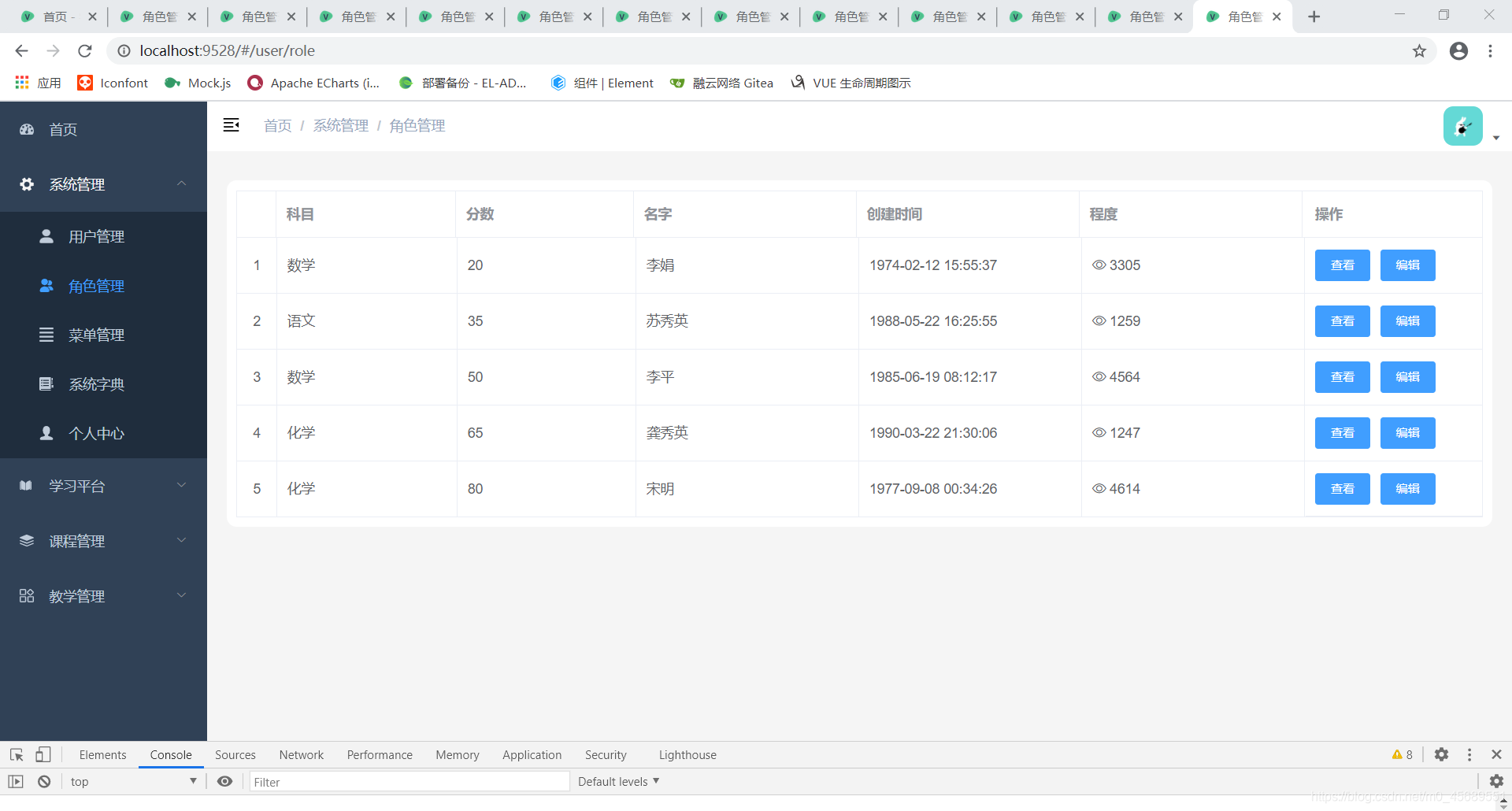
props: 'title',
minWidth: 80,
width: null
},
{
label: '分数',
props: 'status',
minWidth: 80,
width: null
},
{
label: '名字',
props: 'author',
minWidth: 100,
width: null
},
{
label: '创建时间',
props: 'display_time',
minWidth: 100,
width: null
},
{
label: '程度',
props: 'pageviews',
minWidth: 100,
width: null
},
];
export default {
tableTemplate
}
第五步:views/role/config/index.vue(你想显示的页面):
<template>
  <div class="app-container">
      <div class="table-container">
                <el-table
                    ref="multipleTable" :data="tableData" tooltip-effect="dark" style="width: 100%" border v-loading="loading"
                >
                    <el-table-column type="index" align="center" width="40"></el-table-column>
                 <template v-for="(item,idx) in tableTemp" >
                        <el-table-column :label="item.label" :width="item.width" :min-width="item.minWidth" :key="idx">
                            <template slot-scope="scope" >
                                <span v-if="item.props=='pageviews'"><i class="el-icon-view"></i> {{ scope.row[item.props] }} </span>
                                 <span v-else :title="scope.row[item.props]">{{ scope.row[item.props]}}</span>
                            </template>
                        </el-table-column>
                    </template>
                    <el-table-column
                        fixed="right"
                        label="操作"
                        width="180">
                        <template >
                            <el-button type="primary" size="small">查看</el-button>
                            <el-button  type="primary" size="small">编辑</el-button>
                        </template>
                    </el-table-column>
                </el-table>
            </div>
  </div>
</template>

<script>
import { getList } from "@/api/role";
import templateData  from './config/index'

export default {
  name: "menu-sys",
  data() {
    return {
     tableTemp:templateData.tableTemplate,
      loading: false,
      tableData: [],
    };
  },
  created() {
    this.getListData();
  },
  mounted() {},
  methods: {
    getListData() {
      getList().then((res) => {
        const {
          code,
          data: { items, total },
        } = res;
        if (code == "20000") {
          this.tableData = items;
          this.total = total;
        }
      });
    },
  },
};
</script>
第六步:显示


 扫一扫
扫一扫


&spm=1001.2101.3001.5002&articleId=109676431&d=1&t=3&u=aa907523567b46e5a32b6bb1ec9356b5)
 234
234

 被折叠的 条评论
为什么被折叠?
被折叠的 条评论
为什么被折叠?
 到【灌水乐园】发言


