As per usual, Microsoft is rolling out a new build of Windows 11 to Insiders in the Dev channel this week, and this time, we're getting build 25231. This feature doesn't include big brand-new changes, but it does finally make some features available to everyone in the Dev channel, whereas they were previously being tested with a limited subset of users.
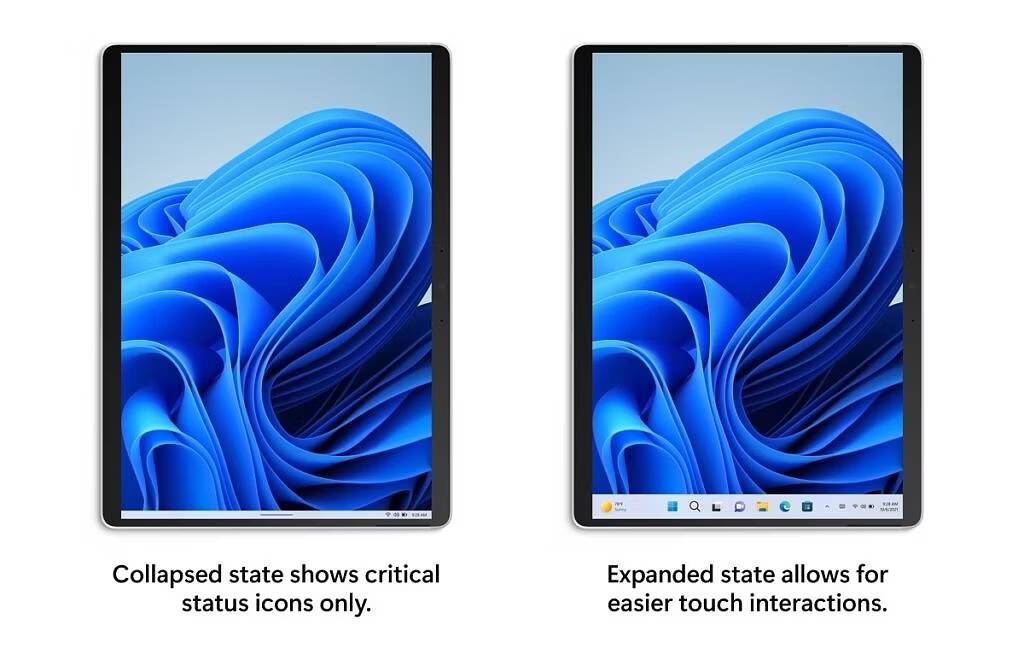
One of those features is the new touch-optimized taskbar, which makes it so that the taskbar collapses to a smaller size if you have a touchscreen device and there's no keyboard or mouse attached, optimizing the experience for touch input. Additionally, the new system tray experience is now available for everyone as well, with some slight tweaks to the design and usability.
Another new feature that's now fully available is a language-neutral word suggestion list, which means when you type using the touch keyboard and you have multiple languages installed on your PC, you can now see word suggestions for all your installed languages, rather than being limited to the current active language. Microsoft has also fully tolled out the new cloud suggestion capability for the Chinese input method Editor.
Aside from making all these features finally available to everyone in the Dev channel, Windows 11 build 25231 is mostly focused on fixes, so there isn't a whole lot of fun stuff to go over. Even then, the list of fixes is relatively small this time around. You can find it below:
-
When moving your mouse over the sound icon on Quick Settings, the tooltip will now display when spatial audio is in use – not just that it is enabled.
-
Removed the backplate from UWP app icons in Apps > Default apps and Apps > Apps for websites.
-
Fixed the font used on the Wi-Fi section of Quick Settings when Wi-Fi was off, so that it’s consistent with the other text in Quick Settings
-
Fixed an issue believed to be the root cause of certain network cameras unexpectedly not being added when you selected them under Bluetooth & Devices > Cameras.
-
Improved DPI-awareness when launching setup.exe from a mounted ISO, so the initial logo while it’s preparing should no longer be blurry in certain cases.
-
Fixed a rare issue where FindWindow and FindWindowEx might return an unexpected window.
-
Fixed an issue where sometimes you wouldn’t be able to use FIDO to unlock your PC if it was connected to an external display with the laptop lid closed.
-
Fixed an issue which sometimes led to crashes in certain apps (like Paint, and Windows Terminal) when attempting to display a tooltip.
There's also a list of known issues for Windows 11 build 25231, which is a bit more extensive. Those are as follows:
-
We’re looking into reports that audio stopped working for some Insiders after upgrading to the latest flights.
-
We’re investigating reports of crashes with a few different apps and games in recent builds.
-
We’re investigating reports that various UI elements in apps appear to be disappearing and reappearing sometimes in recent builds.
-
[NEW] We’re investigating reports that some apps like Microsoft Edge are unexpectedly showing thick lines on the side of the window after the last flight.
-
[NEW] When using the latest ISO to install the Dev Channel build, you might get a SYSTEM_SERVICE_EXCEPTION bugcheck citing an error with win32kfull.sys. We’re working on a fix.
[Tablet-optimized taskbar]
-
The taskbar sometimes flashes when transitioning between desktop posture and tablet posture.
-
When using the bottom right edge gesture to see Quick Settings, the taskbar sometimes stays stuck in the expanded state, instead of dismissing to collapsed state.
-
[NEW] Opening the hidden icons flyout can result in a File Explorer entry for it appearing in the taskbar. We’re working on a fix.
-
[NEW] Chat apps aren’t flashing with new messages or opening a preview on hover in the system tray. We’re working on a fix.
-
[NEW] We’re investigating reports that folders in Start menu don’t open on the first try.
-
We’re investigating reports that the text cursor becomes white on white when hovering over text fields, making it difficult to see.
-
In right-to-left display languages like Arabic, content animates out of view before the widgets board resizes when clicking to expanded view of the widgets board.
If you're enrolled in the Dev channel of the Windows Insider Program, this build should download sooner rather than later for you. You can always check for updates manually in Windows Update if you want to get it a little faster.
While it's not necessarily part of this build, Microsoft is also rolling out an update to Windows Insiders running Windows 11 build 22621 or higher, which adds the ability to turn on the mobile hotspot on select Samsung phones using the Phone Link app. This way, you can enable a hotspot and connect to it from your PC without ever having to touch your phone. This also requires your phone to be running OneUI 4.1.1 or higher, as well as version 1.22082.142.0 or higher of the Link to Windows app on your phone. The app is preinstalled, so you only need to make sure you have the latest updates installed.
Source: Microsoft