
Spring Authorization Server is a powerful framework for implementing OAuth2 and OpenID Connect compliant Authorization Servers in a Spring Boot application. When integrated with Redis, the Authorization Server can scale efficiently while ensuring rapid access to tokens, sessions, and approvals. Redis provides high-performance in-memory data storage for token persistence, allowing better scalability and resilience in distributed systems. Let us delve into understanding how Spring Authorization Server can be integrated with Redis to manage token storage, session data, and secure OAuth2 workflows effectively.
1. What is Spring Authorization?
Spring Authorization refers to the mechanism of controlling access to protected resources in Spring applications. It is a fundamental concept in Spring Security, which offers declarative and programmatic ways to enforce security policies. Using annotations, expressions, and configurations, developers can specify which users or roles are allowed to access specific methods, endpoints, or URLs.
Spring Authorization integrates seamlessly with authentication mechanisms and supports OAuth2, JWT, and other industry-standard protocols. It helps ensure that only authorized users can perform sensitive operations, thereby protecting your applications from unauthorized access.
1.1 What is Spring Authorization Server?
The Spring Authorization Server is an OAuth2-compliant server built on top of Spring Security. Its main purpose is to manage the issuance of tokens and serve as the central authority for OAuth2 workflows. It supports:
- Authorization Code, Client Credentials, and Password Grant flows
- Refresh Token management
- PKCE (Proof Key for Code Exchange) support
- OpenID Connect 1.0 for identity verification
- Token introspection and revocation
This server is ideal when you need to build a secure, standards-compliant authentication and authorization system in your own infrastructure.
1.2 What is Redis?
Redis (Remote Dictionary Server) is a high-performance, in-memory key-value data store widely used for caching, session storage, and message brokering. It’s particularly useful in security frameworks like Spring Authorization Server due to its ability to quickly store and retrieve tokens, authorization codes, and other ephemeral data.
Key features of Redis that make it suitable for authentication systems include:
- Sub-millisecond latency and high throughput
- Support for complex data types like lists, hashes, sets, and sorted sets
- Built-in persistence and replication
- Lightweight pub/sub messaging model
- Compatibility with TTL (Time to Live) for automatic expiration of tokens
Redis can be integrated with Spring Boot applications using Spring Data Redis, making it easy to manage security-related data and improve the scalability of your authentication system.
2. Setting up Redis with Docker
Running Redis locally with Docker is a fast and convenient way to get started without installing Redis manually on your system. Docker ensures that Redis runs in an isolated container, making it easier to manage and clean up. To start a Redis instance, use the following command:
docker run --name spring-redis -p 6379:6379 -d redis
Here’s a breakdown of the command:
docker run: Tells Docker to start a new container--name spring-redis: Assigns a name to the container for easy reference-p 6379:6379: Maps port 6379 on your host machine to port 6379 in the container (Redis default port)-d: Runs the container in detached mode (in the background)redis: Uses the official Redis image from Docker Hub
Once the container is running, Redis will be accessible on localhost:6379. You can verify that Redis is running properly by executing:
docker ps
To connect to the Redis CLI within the container, use:
docker exec -it spring-redis redis-cli
This opens an interactive terminal to the Redis CLI where you can issue commands like PING, SET, and GET.
If you’re using Redis in a Spring Boot project, tools like Spring Data Redis can help you integrate Redis easily for token storage, caching, or session management.
3. Code Example
To demonstrate how to implement Spring Authorization Server with Redis, we’ll build a simple Spring Boot application. Redis will be used as the session and token store via Spring Session.
3.1 Dependencies (build.gradle)
Start by adding the necessary dependencies in your build.gradle file. These include Spring Web, Spring Security, the Spring Authorization Server, Redis support, and Spring Session. The Redis starter will allow integration with Redis for storing session and token data.
plugins {
    id 'org.springframework.boot' version '3.2.0'
    id 'io.spring.dependency-management' version '1.1.0'
    id 'java'
}

dependencies {
    implementation 'org.springframework.boot:spring-boot-starter-web'
    implementation 'org.springframework.boot:spring-boot-starter-security'
    implementation 'org.springframework.security:spring-security-oauth2-authorization-server:1.1.1'
    implementation 'org.springframework.boot:spring-boot-starter-data-redis'
    implementation 'org.springframework.session:spring-session-data-redis'
    implementation 'org.springframework.boot:spring-boot-starter-oauth2-resource-server'
    testImplementation 'org.springframework.boot:spring-boot-starter-test'
}
3.2 Redis Configuration
The RedisConfig class is a Spring @Configuration class responsible for enabling Redis-based HTTP session management in the application. The class is annotated with @EnableRedisHttpSession, which activates Spring Session support and automatically stores HTTP sessions in Redis instead of the default in-memory storage. It defines a single bean redisConnectionFactory() that creates a LettuceConnectionFactory pointing to a Redis instance running on localhost at port 6379. The Lettuce client is a scalable and thread-safe Redis client recommended by Spring for production environments. This configuration ensures that user sessions and tokens managed by Spring Authorization Server are persisted in Redis.
import org.springframework.context.annotation.Bean;
import org.springframework.context.annotation.Configuration;
import org.springframework.session.data.redis.config.annotation.web.http.EnableRedisHttpSession;
import org.springframework.data.redis.connection.lettuce.LettuceConnectionFactory;

@Configuration
@EnableRedisHttpSession
public class RedisConfig {
  @Bean
  public LettuceConnectionFactory redisConnectionFactory() {
    return new LettuceConnectionFactory("localhost", 6379);
  }
}
3.3 Security Configuration
The SecurityConfig class is a Spring @Configuration class that defines the application’s security filter chain using the Spring Security DSL. The defaultSecurityFilterChain() method configures the HttpSecurity object to require authentication for all HTTP requests using anyRequest().authenticated(). It also enables default form-based login with formLogin(withDefaults()), which provides a basic login UI out of the box. The method returns a built SecurityFilterChain, which Spring Boot automatically uses to secure endpoints. This configuration ensures all endpoints are protected unless explicitly allowed elsewhere.
import org.springframework.context.annotation.Bean;
import org.springframework.context.annotation.Configuration;
import org.springframework.security.config.annotation.web.builders.HttpSecurity;
import org.springframework.security.web.SecurityFilterChain;
import static org.springframework.security.config.Customizer.withDefaults;

@Configuration
public class SecurityConfig {
  @Bean
  public SecurityFilterChain defaultSecurityFilterChain(HttpSecurity http)
      throws Exception {
    http.authorizeHttpRequests(auth -> auth.anyRequest().authenticated())
        .formLogin(withDefaults());
    return http.build();
  }
}
3.4 Authorization Server Configuration
The AuthorizationServerConfig class is a Spring @Configuration class that sets up the essential components for running a Spring Authorization Server. It defines a RegisteredClientRepository bean which registers a client with ID client and secret secret using authorization code and refresh token grant types. The client is configured with redirect URI and scopes including OpenID and “read”. The configuration also defines the AuthorizationServerSettings bean with default settings, and a JWKSource bean that provides cryptographic keys for signing tokens using a generated RSA key. This setup enables secure token issuance and client registration using the in-memory storage provided by Spring Authorization Server.
import com.nimbusds.jose.jwk.JWKSet;
import com.nimbusds.jose.jwk.source.JWKSource;
import com.nimbusds.jose.proc.SecurityContext;
import com.nimbusds.jose.jwk.RSAKey;
import org.springframework.context.annotation.Bean;
import org.springframework.context.annotation.Configuration;
import org.springframework.security.config.annotation.web.configuration.EnableWebSecurity;
import org.springframework.security.oauth2.core.AuthorizationGrantType;
import org.springframework.security.oauth2.core.ClientAuthenticationMethod;
import org.springframework.security.oauth2.server.authorization.config.ProviderSettings; // For older versions
import org.springframework.security.oauth2.server.authorization.config.AuthorizationServerSettings;
import org.springframework.security.oauth2.server.authorization.client.RegisteredClient;
import org.springframework.security.oauth2.server.authorization.client.RegisteredClientRepository;
import org.springframework.security.oauth2.server.authorization.client.InMemoryRegisteredClientRepository;
import org.springframework.security.oauth2.core.oidc.OidcScopes;

import java.util.UUID;

@Configuration
public class AuthorizationServerConfig {
  @Bean
  public RegisteredClientRepository registeredClientRepository() {
    RegisteredClient registeredClient =
        RegisteredClient.withId(UUID.randomUUID().toString())
            .clientId("client")
            .clientSecret("{noop}secret")
            .clientAuthenticationMethod(
                ClientAuthenticationMethod.CLIENT_SECRET_BASIC)
            .authorizationGrantType(AuthorizationGrantType.AUTHORIZATION_CODE)
            .authorizationGrantType(AuthorizationGrantType.REFRESH_TOKEN)
            .redirectUri("http://localhost:8080/login/oauth2/code/custom")
            .scope(OidcScopes.OPENID)
            .scope("read")
            .build();

    return new InMemoryRegisteredClientRepository(registeredClient);
  }

  @Bean
  public AuthorizationServerSettings authorizationServerSettings() {
    return AuthorizationServerSettings.builder().build();
  }

  @Bean
  public JWKSource<SecurityContext> jwkSource() {
    RSAKey rsaKey = Jwks.generateRsa();
    JWKSet jwkSet = new JWKSet(rsaKey);
    return (jwkSelector, securityContext) -> jwkSelector.select(jwkSet);
  }
}
3.5 Redis Token Store Integration
Thanks to the @EnableRedisHttpSession annotation and the presence of Spring Session Redis in the classpath, tokens and sessions are automatically persisted in Redis. No extra code is required to enable this functionality—it’s auto-configured by Spring Boot.
3.6 Helper Key Generator
The Jwks class is a utility class marked as final to prevent inheritance and provides a static method generateRsa() for creating a new RSAKey used in JSON Web Key (JWK) token signing. It internally generates a 2048-bit RSA key pair using Java’s KeyPairGenerator. The public and private keys from the pair are wrapped into an RSAKey object, which includes a randomly generated key ID (kid). This key is then used by the Spring Authorization Server to sign and validate JWT tokens during OAuth2 flows.
import com.nimbusds.jose.jwk.RSAKey;
import java.security.KeyPair;
import java.security.KeyPairGenerator;
import java.security.interfaces.RSAPrivateKey;
import java.security.interfaces.RSAPublicKey;
import java.util.UUID;

public final class Jwks {
    public static RSAKey generateRsa() {
        KeyPair keyPair = generateRsaKey();
        RSAPublicKey publicKey = (RSAPublicKey) keyPair.getPublic();
        RSAPrivateKey privateKey = (RSAPrivateKey) keyPair.getPrivate();
        return new RSAKey.Builder(publicKey)
            .privateKey(privateKey)
            .keyID(UUID.randomUUID().toString())
            .build();
    }

    private static KeyPair generateRsaKey() {
        KeyPairGenerator generator = KeyPairGenerator.getInstance("RSA");
        generator.initialize(2048);
        return generator.generateKeyPair();
    }
}
3.7 application.properties
We configure the Redis host, port, and session store type in the application.properties file. Also, we define the server port for the Spring Authorization Server instance.
spring.redis.host=localhost
spring.redis.port=6379
server.port=9000
spring.session.store-type=redis
spring.security.user.name=admin
spring.security.user.password=admin123
3.8 Output
After launching the application, you can test the OAuth2 flow using the URL below. Upon successful login, Spring Authorization Server will issue an authorization code, and Redis will persist session/token data automatically.
- Visit: Initiate OAuth2 Authorization (client: client)
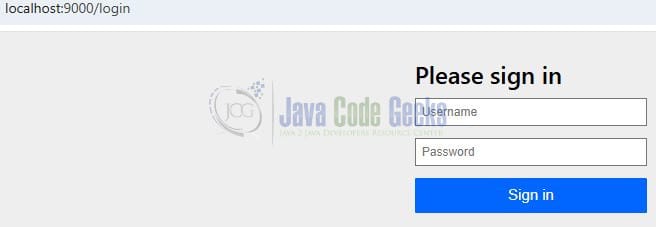
- Login using the default form. Use any username and password — no actual user validation is configured unless a custom user store is provided.

Fig. 1: Login form - You will be redirected to your configured redirect URI with an authorization
codein the URL.http://localhost:9000/oauth2/authorize?response_type=code&client_id=client&redirect_uri=http://localhost:9000/login/oauth2/code/custom&scope=read
- Redis will store and manage the issued access and refresh tokens for your session.

4. Conclusion
Integrating Spring Authorization Server with Redis provides a powerful, scalable, and fast mechanism for managing OAuth2 tokens and session data. Using Docker for Redis simplifies development setup, and the combination ensures performance and stateless token management for large-scale microservices systems.





