
Testing Spring Boot applications secured with OAuth2 Single Sign-On (SSO) can be difficult, especially when authentication relies on an external provider. To avoid depending on third-party services during test execution, we can simulate or bypass SSO. This article demonstrates two practical approaches: using MockMvc to bypass authentication and using WireMock to fake an OAuth2 SSO provider.
1. Setting Up OAuth2 SSO in Spring Boot
Before testing, we need a minimal OAuth2-secured Spring Boot application. This section demonstrates how to configure the application using Spring Security APIs, including the SecurityFilterChain bean, and defines a secured endpoint that exposes user information.
To get started, you can generate a Spring Boot project using start.spring.io. Select the following options:
- Project: Maven
- Language: Java
- Spring Boot version: 3.4.7 or (latest stable)
- Dependencies:
- Spring Web
- Spring Security
- OAuth2 Client
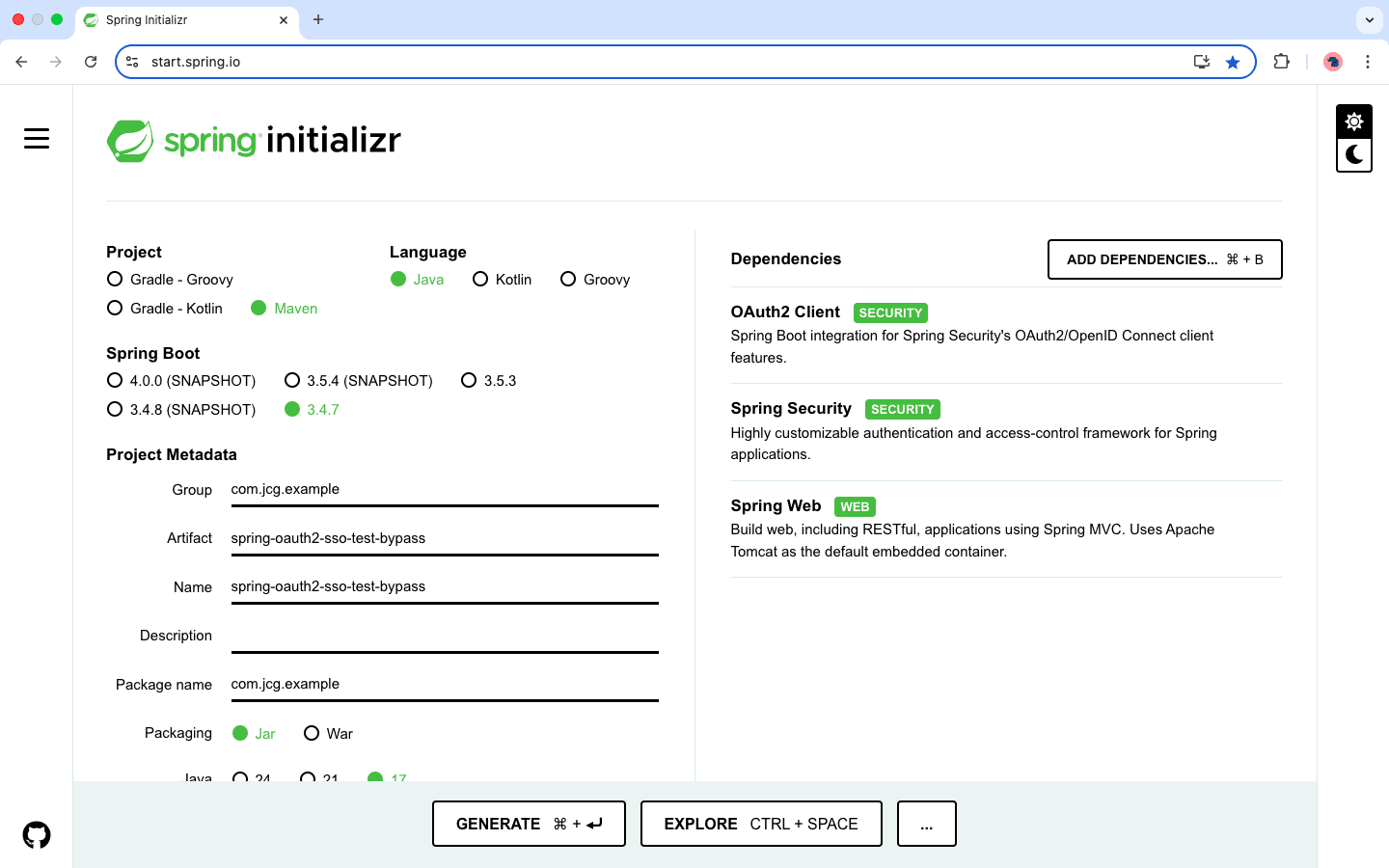
Once generated, the project will include the necessary dependencies in the pom.xml file. Below is the corresponding pom.xml.
        <dependency>
            <groupId>org.springframework.boot</groupId>
            <artifactId>spring-boot-starter-oauth2-client</artifactId>
        </dependency>
        <dependency>
            <groupId>org.springframework.boot</groupId>
            <artifactId>spring-boot-starter-security</artifactId>
        </dependency>
        <dependency>
            <groupId>org.springframework.boot</groupId>
            <artifactId>spring-boot-starter-web</artifactId>
        </dependency>
        <dependency>
            <groupId>org.springframework.boot</groupId>
            <artifactId>spring-boot-starter-test</artifactId>
            <scope>test</scope>
        </dependency>
        <dependency>
            <groupId>org.springframework.security</groupId>
            <artifactId>spring-security-test</artifactId>
            <scope>test</scope>
        </dependency>
        <dependency>
            <groupId>com.github.tomakehurst</groupId>
            <artifactId>wiremock-jre8-standalone</artifactId>
            <version>2.35.2</version>
            <scope>test</scope>
        </dependency>
This configuration includes Spring Boot’s starters for OAuth2 client, web, and security modules, along with test-specific dependencies like spring-security-test for mocking authentication and wiremock for simulating HTTP endpoints.
OAuth2 Client Configuration (application.yml)
The following configuration sets up the client and provider information required for OAuth2 login.
spring:
  security:
    oauth2:
      client:
        registration:
          keycloak:
            client-id: demo-app-client
            scope: openid,profile,email
            authorization-grant-type: authorization_code
            redirect-uri: "{baseUrl}/login/oauth2/code/{registrationId}"
        provider:
          keycloak:
            issuer-uri: http://localhost:9090/realms/demo-realm
Spring Boot uses the registration and provider entries to initiate the OAuth2 login flow, with the issuer-uri helping it fetch necessary metadata such as token and authorization endpoints. Although the tests won’t connect to an actual Keycloak server, this configuration is still required to activate Spring Security’s OAuth2 auto-configuration.
The client-id identifies the OAuth2 client in Keycloak, the issuer-uri specifies the Keycloak realm, and the redirect-uri defines where users are redirected after login.
2. Application and Security Configuration
@SpringBootApplication
@RestController
public class MockSSOApplication {

    public static void main(String[] args) {
        SpringApplication.run(MockSSOApplication.class, args);
    }

    @GetMapping("/api/user")
    public String userInfo(@AuthenticationPrincipal OAuth2User oauth2User) {
        return "Hello, " + oauth2User.getAttribute("name");
    }

    @Bean
    public SecurityFilterChain securityFilterChain(HttpSecurity http) throws Exception {
        return http
                .authorizeHttpRequests(auth -> auth
                .requestMatchers(
                        new AntPathRequestMatcher("/login"),
                        new AntPathRequestMatcher("/oauth2/**"),
                        new AntPathRequestMatcher("/error"),
                        new AntPathRequestMatcher("/css/**"),
                        new AntPathRequestMatcher("/js/**"),
                        new AntPathRequestMatcher("/images/**"),
                        new AntPathRequestMatcher("/assets/**"))
                .permitAll()
                .anyRequest().authenticated())
                .oauth2Login(oauth2 -> oauth2.successHandler(successHandler()))
                .build();
    }

    public AuthenticationSuccessHandler successHandler() {
        var handler = new SimpleUrlAuthenticationSuccessHandler();
        handler.setDefaultTargetUrl("/");
        return handler;
    }
}
This application exposes an /api/user endpoint that is protected and only accessible after OAuth2 login. The SecurityFilterChain defines public and protected routes and configures OAuth2 login with a post-login success handler.
3. Bypass OAuth2 Authentication with MockMvc
To bypass the authentication in tests, we need a dummy provider that can be registered as a client by Spring’s OAuth2AuthorizedClientService. This allows us to simulate login flows and secure endpoints without connecting to a real OAuth2 server.
@TestConfiguration
public class TestOAuth2Config {

    @Bean
    public ClientRegistrationRepository clientRegistrationRepository() {
        ClientRegistration registration = ClientRegistration.withRegistrationId("sso-demo-app")
                .clientId("demo-app-client")
                .clientSecret("demo-app-secret")
                .clientAuthenticationMethod(org.springframework.security.oauth2.core.ClientAuthenticationMethod.CLIENT_SECRET_BASIC)
                .authorizationGrantType(org.springframework.security.oauth2.core.AuthorizationGrantType.AUTHORIZATION_CODE)
                .redirectUri("{baseUrl}/login/oauth2/code/{registrationId}")
                .scope("openid", "profile", "email")
                .authorizationUri("http://dummy-provider/oauth2/authorize")
                .tokenUri("http://dummy-provider/oauth2/token")
                .userInfoUri("http://dummy-provider/userinfo")
                .userNameAttributeName("sub")
                .clientName("Dummy Provider")
                .build();

        return new InMemoryClientRegistrationRepository(registration);
    }

    @Bean
    public OAuth2AuthorizedClientService authorizedClientService(
            ClientRegistrationRepository clientRegistrationRepository) {
        return new InMemoryOAuth2AuthorizedClientService(clientRegistrationRepository);
    }
}
This test configuration registers a fake OAuth2 provider called “dummy,” offers in-memory support for clients and tokens, and avoids external HTTP calls for user information or token verification.
Integration Test with oauth2Login()
To simulate a logged-in user without actually logging in, we can use Spring Security Test’s built-in helpers.
@AutoConfigureMockMvc
@Import(TestOAuth2Config.class)
@SpringBootTest(webEnvironment = SpringBootTest.WebEnvironment.MOCK)
class UserControllerMockMvcTest {

    @Autowired
    private MockMvc mockMvc;

    @Test
    void testUserEndpointWithMockLogin() throws Exception {
        mockMvc.perform(MockMvcRequestBuilders.get("/api/user")
                .with(oauth2Login().attributes(attrs -> attrs.put("name", "Thomas P"))))
                .andExpect(status().isOk())
                .andExpect(content().string("Hello, Thomas P"));
    }

}
This test bypasses real OAuth2 authentication, injects a mock OAuth2User with a predefined name attribute to simulate a logged-in user, and verifies that the secured endpoint responds as expected, ensuring the application behaves correctly without relying on an actual OAuth2 provider.
4. Simulate OAuth2 Provider Using WireMock
Sometimes we want to exercise the full OAuth2 login flow but still avoid connecting to a real SSO server. In this case, WireMock can simulate our identity provider.
Ensure that the application.yml file includes a mock OAuth2 provider configuration, which instructs Spring Security to interact with the fake issuer served by WireMock. This setup is essential for enabling the application to complete the OAuth 2.0 flow during tests. The issuer-uri should match the value that WireMock will return for the discovery endpoint, enabling Spring Security to fetch the necessary metadata (authorization, token, and userinfo endpoints) from the simulated provider.
spring:
  security:
    oauth2:
      client:
        registration:
          dummy:
            client-id: test-client
            client-secret: test-secret
            authorization-grant-type: authorization_code
            redirect-uri: "{baseUrl}/login/oauth2/code/{registrationId}"
            scope: openid, profile, email
            provider: wiremock
        provider:
          dummy:
            issuer-uri: http://localhost:8888/realms/test-realm
The issuer-uri is set to a local URL (http://localhost:8888/realms/test-realm) that WireMock will intercept and mock in test runs. Then, in the test class, set up the WireMock server and define the necessary stubs:
@SpringBootTest
@AutoConfigureMockMvc
@Import(TestOAuth2Config.class)
public class WireMockOAuth2Test {

    @Autowired
    private MockMvc mockMvc;

    private WireMockServer wireMockServer;

    @BeforeEach
    void setUp() {
        wireMockServer = new WireMockServer(8888);
        wireMockServer.start();
        WireMock.configureFor("localhost", 8888);

        // Stub discovery endpoint
        stubFor(get(urlEqualTo("/realms/test-realm/.well-known/openid-configuration"))
                .willReturn(okJson("""
                    {
                      "issuer": "http://localhost:8888/realms/test-realm",
                      "authorization_endpoint": "http://localhost:8888/realms/test-realm/auth",
                      "token_endpoint": "http://localhost:8888/realms/test-realm/oauth/token",
                      "userinfo_endpoint": "http://localhost:8888/realms/test-realm/userinfo",
                      "jwks_uri": "http://localhost:8888/realms/test-realm/.well-known/jwks.json",
                      "response_types_supported": [
                                                       "code",
                                                       "token",
                                                       "id_token",
                                                       "code token",
                                                       "code id_token",
                                                       "token id_token",
                                                       "code token id_token",
                                                       "none"
                                                   ],
                                                   "subject_types_supported": [
                                                       "public"
                                                   ],
                                                   "id_token_signing_alg_values_supported": [
                                                       "RS256"
                                                   ],
                                                   "scopes_supported": [
                                                       "openid",
                                                       "email",
                                                       "profile"
                                                   ]
                    }
                """)));

        // Stub token endpoint
        stubFor(post(urlEqualTo("oauth/token"))
                .willReturn(okJson("""
                    {
                      "access_token": "fake-access-token",
                      "id_token": "fake-id-token",
                      "token_type": "Bearer",
                      "expires_in": 3600
                    }
                """)));

        // Stub userinfo endpoint
        stubFor(get(urlEqualTo("userinfo"))
                .willReturn(okJson("""
                    {
                      "sub": "1234567890",
                      "name": "Thomas P",
                      "email": "thomas_p@jcg.com"
                    }
                """)));
    }

    @AfterEach
    void tearDown() {
        wireMockServer.stop();
    }

    @Test
    void simulateLoginWithWireMock() throws Exception {
        // Your test logic using WebTestClient, MockMvc, or RestTemplate

    }
}
The WireMock stubs simulate the key components of an OAuth2 provider needed for Spring Security to complete its login flow during tests. The discovery document stub responds to the expected metadata URL (.well-known/openid-configuration) with necessary endpoints. The token endpoint stub accepts token requests and returns a fake access token along with an ID token. The user info endpoint stub provides mock user claims such as name and email.
Together, these stubs supply all required responses, allowing the application to behave as if it were interacting with a real identity provider, making WireMock a reliable local substitute for external SSO services during testing.
Now that WireMock is simulating the OAuth2 provider, we can write a full integration test that hits the protected endpoint and validates that authentication works with the mocked provider. Below is an example test using MockMvc:
    @Test
    void simulateLoginWithWireMock() throws Exception {
        OAuth2User mockUser = new DefaultOAuth2User(
            Collections.singleton(() -> "ROLE_USER"),
            Map.of("name", "Thomas P"),
            "name"
        );

        mockMvc.perform(MockMvcRequestBuilders.get("/api/user")
                .with(oauth2Login().oauth2User(mockUser)))
                .andExpect(status().isOk())
                .andExpect(content().string("Hello, Thomas P"));
    }
This test simulates a real OAuth2 login process, sends a token to the /api/user endpoint, and validates the expected greeting message. Since the token and user info are fake but correctly stubbed, Spring Security proceeds as if a real user were authenticated.
5. Conclusion
In this article, we explored two ways to test Spring Boot applications secured with OAuth2 Single Sign-On. The first approach bypasses authentication entirely using MockMvc, while the second simulates a complete login flow using WireMock. Both methods help eliminate external dependencies during testing, resulting in faster and more reliable test execution.
6. Download the Source Code
This article explored how to mock SSO in Spring OAuth2 applications.
You can download the full source code of this example here: spring oauth2 mock sso






