
1. Introduction
Insignificant zeros refer to zeros that don’t affect the value of the number. In this example, I will delete leading trailing zeros from a numeric string with the following methods:
- public String java.lang.String.replaceFirst(String regex, String replacement) – replaces the first substring of this string that matches the given regular expression pattern
- public String java.lang.String.replaceAll(String regex, String replacement) – replaces each substring of this string that matches the given regular expression pattern.
- public final String java.text.NumberFormat.format(double number) – formats the number based on the format.
- public BigDecimal java.math.BigDecimal.stripTrailingZeros()- returns a
BigDecimalwhich is numerically equal to this one but with any trailing zeros removed from the representation.
2. Setup
In this step, I will create a Java project in Eclipse IDE with the JUnit5 library. The RemoveInsignificantZerosBase has three children that implement removeInsignificantZero method with different approaches.
2.1 Delete Leading Trailing Zeros Base Class
In this step, I will create a RemoveInsignificantZerosBase.java that includes several constants and a removeInsignificantZero method to remove insignificant zeros from a numeric string.
RemoveInsignificantZerosBase.java
package org.zheng.demo;

public abstract class RemoveInsignificantZerosBase {

	protected static final String EMPTY = "";
	protected static final String DOT = ".";

	protected RemoveInsignificantZerosBase() {
		super();
	}

	public abstract String removeInsignificantZero(final String rawNumStr);

}- Line 12: defines an abstract method
removeInsignificantZeroto delete the leading trailing zeros from a numeric string.
2.2 RemoveInsignificantZerosBaseTest
In this step, I will create a RemoveInsignificantZerosBaseTest.java that verifies a numeric string with leading and trailing zeros removed.
RemoveInsignificantZerosBaseTest.java
package org.zheng.demo;

import static org.junit.jupiter.api.Assertions.*;

import org.junit.jupiter.api.Test;

abstract class RemoveInsignificantZerosBaseTest {

	protected RemoveInsignificantZerosBase testClass;

	private static final String DECIMAL_NUMBER = "123.45";
	private static final String LEADING_TRAILIG_ZERO_INT = "000123.000";
	private static final String LEADING_TRAILING_DECIMAL = "000123.4500";
	private static final String LEADING_ZERO_DECIMAL = "000123.45";
	private static final String LEADING_ZERO_INT = "000123";
	private static final String NUMBER = "123";
	private static final String NUMBER_WITH_ZERO = "1230";
	private static final String TAILING_INT = "123.000";

	@Test
	void test_removeInsignificantZero_leading_trailingZero_decimal() {
		assertEquals(DECIMAL_NUMBER, testClass.removeInsignificantZero(LEADING_TRAILING_DECIMAL));
	}

	@Test
	void test_removeInsignificantZero_leading_trailingZero_int() {
		assertEquals(NUMBER, testClass.removeInsignificantZero(LEADING_TRAILIG_ZERO_INT));
	}

	@Test
	void test_removeInsignificantZero_leadingZero_decimal() {
		assertEquals(DECIMAL_NUMBER, testClass.removeInsignificantZero(LEADING_ZERO_DECIMAL));
	}

	@Test
	void test_removeInsignificantZero_leadingZero_int() {
		assertEquals(NUMBER, testClass.removeInsignificantZero(LEADING_ZERO_INT));
	}

	@Test
	void test_removeInsignificantZero_nochange() {
		assertEquals(NUMBER, testClass.removeInsignificantZero(NUMBER));
	}

	@Test
	void test_removeInsignificantZero_nochange_int() {
		assertEquals(NUMBER_WITH_ZERO, testClass.removeInsignificantZero(NUMBER_WITH_ZERO));
	}

	@Test
	void test_removeInsignificantZero_trailing() {
		assertEquals(NUMBER, testClass.removeInsignificantZero(TAILING_INT));
	}

	@Test
	void test_removeInsignificantZero_allZero() {
		assertEquals("0", testClass.removeInsignificantZero("0000.000"));

	}

}
- Line 11: defines a
DECIMAL_NUMBERvariable without any leading trailing zeros with the value of"123.45". - Line 12: defines a
LEADING_TRAILIG_ZERO_INTvariable with both leading and trailing zeros with the value of"000123.000". - Line 13: defines a
LEADING_TRAILING_DECIMALvariable with both leading and trailing zeros with the value of"000123.45000". - Line 14: defines a
LEADING_ZERO_DECIMALvariable with leading zeros with the value of"000123.45". - Line 15: defines a
LEADING_ZERO_INTvariable with leading zeros with the value of"000123". - Line 16: defines a
NUMBERvariable with both leading and trailing zeros with the value of"123". - Line 17: defines a
NUMBER_WITH_ZEROvariable with a significant zero with the value of"1230". - Line 18: defines a
TAILING_INTvariable with trailing zeros with the value of"123.000". - Line 57: verified the special case – the zeros string is trimmed to
"0".
3. Delete Leading Trailing Zeros via String.replaceAll
In this step, I will create a RemoveZeroViaRegularExpress.java class to delete insignificant zeros from a numeric string via the replaceAll and replaceFirst methods.
RemoveZeroViaRegularExpress.java
package org.zheng.demo;

public class RemoveZeroViaRegularExpress extends RemoveInsignificantZerosBase {

	protected static final String LEADING_ZERO_REGEX = "^0+(?!$)";
	protected static final String TRAILING_ZERO_REGEX = "\\.?0+$";

	public String removeInsignificantZero(final String rawNumStr) {
		int docIndex = rawNumStr.indexOf(DOT);
		String result = rawNumStr.replaceFirst(LEADING_ZERO_REGEX, EMPTY);

		if (docIndex > -1) {
			result = result.replaceAll(TRAILING_ZERO_REGEX, EMPTY);
		}

		return handleEdgeCases(result);

	}

	private String handleEdgeCases(final String formatted) {
		if (EMPTY.endsWith(formatted)) {
			return "0";
		}

		if (formatted.startsWith(DOT)) {
			return "0".concat(formatted);
		}

		return formatted;
	}

}
- Line 5 & 6: define the regular expression for leading and trailing zeros.
- Line 9: check if the
rawNumStrargument contains the decimal point(.). - Line 10: remove any leading zeros with the regular expression pattern:
LEADING_ZERO_REGEX. - Line 13: remove the trailing zeros after the decimal point.
- Line 20: handles the special case when the
rawNumStrargument only contains zeros.
3.1 RemoveZeroViaRegularExpressTest
In this step, I will create a RemoveZeroViaRegularExpressTest.java class to verify.
RemoveZeroViaRegularExpress.java
package org.zheng.demo;

import org.junit.jupiter.api.BeforeEach;

class RemoveZeroViaRegularExpressTest extends RemoveInsignificantZerosBaseTest {

	@BeforeEach
	void setup() {
		testClass = new RemoveZeroViaRegularExpress();

	}
}
- Line 9: assign a new object of
RemoveZeroViaRegularExpressto thetestClassvariable.
4. Delete Insignificant Zeros via DecimalFormat
In this step, I will create a RemoveZeroViaDecimalFormat.java class to delete insignificant zeros from a numeric string via the parseDouble and format methods.
RemoveZeroViaDecimalFormat
package org.zheng.demo;

import java.text.DecimalFormat;

public class RemoveZeroViaDecimalFormat extends RemoveInsignificantZerosBase {

	private static final String NUMBER_PATTERN = "#.##";

	public String removeInsignificantZero(final String rawNumStr) {

		// Define a DecimalFormat pattern to remove trailing zeros
		DecimalFormat decimalFormat = new DecimalFormat(NUMBER_PATTERN);

		// Parse the input string to a number (double)
		double number = Double.parseDouble(rawNumStr);

		// Format the number using DecimalFormat to remove trailing zeros
		return decimalFormat.format(number);

	}

}
- Line 7: define a decimal format string
NUMBER_PATTERNwith"#.##". - Line 15: convert the
rawNumStrtodoublevia theparseDoublemethod. - Line 18: return the string format of the
doublevalue via theformatmethod.
4.1 RemoveZeroViaDecimalFormatTest
In this step, I will create a RemoveZeroViaFormatTest.java class.
RemoveZeroViaDecimalFormatTest.java
package org.zheng.demo;

import org.junit.jupiter.api.BeforeEach;

class RemoveZeroViaDecimalFormatTest extends RemoveInsignificantZerosBaseTest {

	@BeforeEach
	void setup() {
		testClass = new RemoveZeroViaDecimalFormat();

	}
}
5. Delete Insignificant Zeros via BigDecimal
In this step, I will create a RemoveZeroViaBigDecimal.java class to delete insignificant zeros from a numeric string via the stripTrailingZeros and toPlainString methods.
RemoveZeroViaBigDecimal.java
package org.zheng.demo;

import java.math.BigDecimal;

public class RemoveZeroViaBigDecimal extends RemoveInsignificantZerosBase {

	public String removeInsignificantZero(final String rawNumStr) {

		// Create a BigDecimal from the input string
		BigDecimal bigDecimal = new BigDecimal(rawNumStr);

		// Use stripTrailingZeros to remove unnecessary zeros
		BigDecimal strippedDecimal = bigDecimal.stripTrailingZeros();

		// Convert the result back to a String
		return strippedDecimal.toPlainString();

	}

}
- Line 10: create a new
BigDecimalobject from therawNumStrargument. - Line 13: remove insignificant zeros via the
stripTrailingZerosmethod. - Line 16: return the string format via the
toPlainStringmethod.
5.1 RemoveZeroViaBigDecimalTest
In this step, I will create a RemoveZeroViaBigDecimalTest.java class.
RemoveZeroViaBigDecimalTest.java
package org.zheng.demo;

import org.junit.jupiter.api.BeforeEach;

class RemoveZeroViaBigDecimalTest extends RemoveInsignificantZerosBaseTest {

	@BeforeEach
	void setup() {
		testClass = new RemoveZeroViaBigDecimal();

	}
}
6. Conclusion
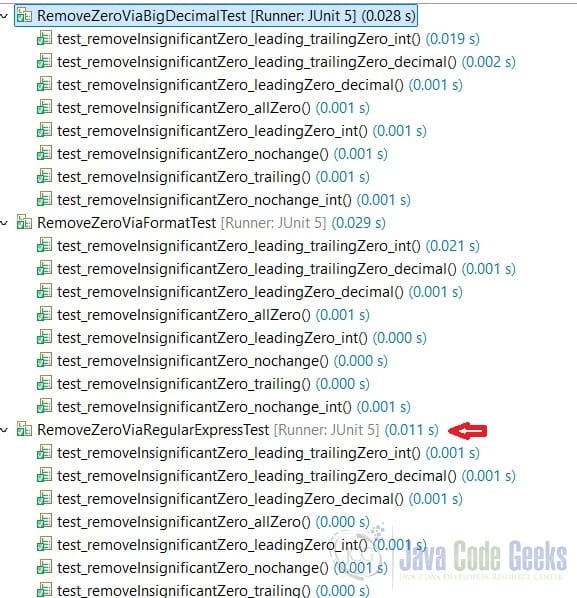
In this example, I created several classes to delete leading trailing zeros from a numeric string using java.lang.String, java.text.NumberFormat, and java.math.BigDecimal classes’ methods. I also verified with Junit5 test classes. As Figure 1 shows, the RemoveZeroViaRegularExpress approach performs best as it does not need to convert to the other object. However, the logic is a bit complex.
7. Download
This was an example of a Java project that deletes leading trailing zeros from a numeric string.
You can download the full source code of this example here: Remove Insignificant Zeros From a Numeric String Example



