
1. Introduction
Using GSON to read and write json to file is easy with the fromJson and toJson APIs. GSON is an open-source library provided by Google for parsing and generating JSON. Here are the fromJson and toJson methods’ definition:
GSON toJson & fromJson
 /**
   * This method deserializes the JSON read from the specified reader into an object of the
   * specified class. It is not suitable to use if the specified class is a generic type since it
   * will not have the generic type information because of the Type Erasure feature of Java.
   * Therefore, this method should not be used if the desired type is a generic type. Note that this
   * method works fine if any of the fields of the specified object are generics, just the object
   * itself should not be a generic type. For the cases when the object is of generic type, invoke
   * {@link #fromJson(Reader, TypeToken)}. If you have the JSON in a String form instead of a {@link
   * Reader}, use {@link #fromJson(String, Class)} instead.
   *
   * <p>An exception is thrown if the JSON data has multiple top-level JSON elements, or if there is
   * trailing data. Use {@link #fromJson(JsonReader, Type)} if this behavior is not desired.
   *
   * @param <T> the type of the desired object
   * @param json the reader producing the JSON from which the object is to be deserialized.
   * @param classOfT the class of T
   * @return an object of type T from the Reader. Returns {@code null} if {@code json} is at EOF.
   * @throws JsonIOException if there was a problem reading from the Reader
   * @throws JsonSyntaxException if json is not a valid representation for an object of type typeOfT
   * @since 1.2
   * @see #fromJson(String, Class)
   * @see #fromJson(Reader, TypeToken)
   */
  public <T> T fromJson(Reader json, Class<T> classOfT)
      throws JsonSyntaxException, JsonIOException {
    T object = fromJson(json, TypeToken.get(classOfT));
    return Primitives.wrap(classOfT).cast(object);
  }

 /**
   * This method serializes the specified object into its equivalent JSON representation and writes
   * it to the writer. This method should be used when the specified object is not a generic type.
   * This method uses {@link Class#getClass()} to get the type for the specified object, but the
   * {@code getClass()} loses the generic type information because of the Type Erasure feature of
   * Java. Note that this method works fine if any of the object fields are of generic type, just
   * the object itself should not be of a generic type. If the object is of generic type, use {@link
   * #toJson(Object, Type, Appendable)} instead.
   *
   * @param src the object for which JSON representation is to be created
   * @param writer Writer to which the JSON representation needs to be written
   * @throws JsonIOException if there was a problem writing to the writer
   * @since 1.2
   * @see #toJson(Object)
   * @see #toJson(Object, Type, Appendable)
   */
  public void toJson(Object src, Appendable writer) throws JsonIOException {
    if (src != null) {
      toJson(src, src.getClass(), writer);
    } else {
      toJson(JsonNull.INSTANCE, writer);
    }
}- Line 24: read JSON from a
Readerclass. In this example, I will demonstrate withFileReaderandBufferedReader. - Line 46: write JSON to an
AppendableInterface. In this example, I will demonstrate withFileWriterandBufferedWriter.
2. Setup
In this step, I will create a maven project with GSON, Lombok, and Junit libraries.
pom.xml
<project xmlns="http://maven.apache.org/POM/4.0.0"
	xmlns:xsi="http://www.w3.org/2001/XMLSchema-instance"
	xsi:schemaLocation="http://maven.apache.org/POM/4.0.0 https://maven.apache.org/xsd/maven-4.0.0.xsd">
	<modelVersion>4.0.0</modelVersion>
	<groupId>org.zheng.demo</groupId>
	<artifactId>gson-file</artifactId>
	<version>0.0.1-SNAPSHOT</version>
	<dependencies>
		<!-- https://mvnrepository.com/artifact/com.google.code.gson/gson -->
		<dependency>
			<groupId>com.google.code.gson</groupId>
			<artifactId>gson</artifactId>
			<version>2.11.0</version>
		</dependency>

		<dependency>
			<groupId>org.junit.jupiter</groupId>
			<artifactId>junit-jupiter-api</artifactId>
			<version>5.10.2</version>
			<scope>test</scope>
		</dependency>

		<!-- https://mvnrepository.com/artifact/org.projectlombok/lombok -->
		<dependency>
			<groupId>org.projectlombok</groupId>
			<artifactId>lombok</artifactId>
			<version>1.18.32</version>
			<scope>provided</scope>
		</dependency>
	</dependencies>
</project>
3. Java POJO
In this step, I will create a Customer.java class which annotates with @Data and @NoArgsConstructor annotations to reduce the boilerplate code.
Customer.java
package org.zheng.demo.data;

import java.io.Serializable;
import java.util.List;

import lombok.Data;
import lombok.NoArgsConstructor;

@Data
@NoArgsConstructor
public class Customer implements Serializable {

	private static final long serialVersionUID = 5963349342478710542L;

	private int[] custTagIds;

	private List<String> emails;

	private int id;

	private String name;

	public Customer(String name, int id) {
		super();
		this.id = id;
		this.name = name;
	}

}
4. Write JSON to File
In this step, I will create a TestWriteJsonToFile.java Junit test class which writes a JSON to a file via toJson method. It has two examples, one for FileWriter, and the other for BufferedWriter.
TestWriteJsonToFile.java
package org.zheng.demo;

import java.io.BufferedWriter;
import java.io.FileWriter;
import java.io.IOException;
import java.util.List;

import org.junit.jupiter.api.BeforeEach;
import org.junit.jupiter.api.Test;
import org.zheng.demo.data.Customer;

import com.google.gson.Gson;
import com.google.gson.GsonBuilder;

class TestWriteJsonToFile {

	private Customer customer = new Customer("Mary", 5);

	Gson gson = new GsonBuilder().setPrettyPrinting().create();

	@BeforeEach
	void setup() {
		customer.setCustTagIds(new int[] { 1, 2, 3, 4 });
		customer.setEmails(List.of("test@test.com", "test@test.org"));

	}

	@Test
	void test_write_to_json_file() {
		try (FileWriter writer = new FileWriter("customer_file.json")) {
			gson.toJson(customer, writer);
		} catch (IOException e) {
			e.printStackTrace();
		}
	}

	@Test
	void test_write_to_json_via_bufferedWriter() {
		try (BufferedWriter writer = new BufferedWriter(new FileWriter("customer_buff.json"))) {
			gson.toJson(customer, writer);
		} catch (IOException e) {
			e.printStackTrace();
		}

	}

}
- Line 19: constructs a Gson object via the
GsonBuilder. - Line 30: create
writerfromFileWriterresource. - Line 31, 40: write the JSON file via the
toJsonmethod. - Line 39: create
writerfromBufferedWriterresource.
Execute the Junit tests and capture the JSON file content.
customer_file.json
{
  "custTagIds": [
    1,
    2,
    3,
    4
  ],
  "emails": [
    "test@test.com",
    "test@test.org"
  ],
  "id": 5,
  "name": "Mary"
}
5. Read JSON from File
In this step, I will create a TestReadJsonFile.java Junit test to read the JSON from the customer_file.json file generated from step 4. It also includes two examples. One for FileReader, the other for BufferedReader.
TestReadJsonFile.java
package org.zheng.demo;

import static org.junit.jupiter.api.Assertions.assertEquals;

import java.io.BufferedReader;
import java.io.FileReader;
import java.io.IOException;

import org.junit.jupiter.api.Test;
import org.zheng.demo.data.Customer;

import com.google.gson.Gson;
import com.google.gson.GsonBuilder;

class TestReadJsonFile {

	Gson gson = new GsonBuilder().setPrettyPrinting().create();

	@Test
	void test_read_json_file() {
		try (FileReader reader = new FileReader("customer_file.json")) {
			Customer person = gson.fromJson(reader, Customer.class);
			assertEquals("Mary", person.getName());
			assertEquals(5, person.getId());
			assertEquals(2, person.getEmails().size());
			assertEquals(4, person.getCustTagIds().length);
		} catch (IOException e) {
			e.printStackTrace();
		}
	}

	@Test
	void test_read_json_bufferedReader() {
		try (BufferedReader reader = new BufferedReader(new FileReader("customer_buff.json"))) {
			Customer person = gson.fromJson(reader, Customer.class);
			assertEquals("Mary", person.getName());
			assertEquals(5, person.getId());
			assertEquals(2, person.getEmails().size());
			assertEquals(4, person.getCustTagIds().length);
		} catch (IOException e) {
			e.printStackTrace();
		}
	}

}
- Line 17: construct a Gson object via the
GsonBuilder. - Line 21: create
readerfromFileReaderresource. - Line 22, 35: write the JSON file via the
fromJsonmethod. - Line 34: create
readerfromBufferedReaderresource.
Run the Junit tests and capture the results as the following screenshot..
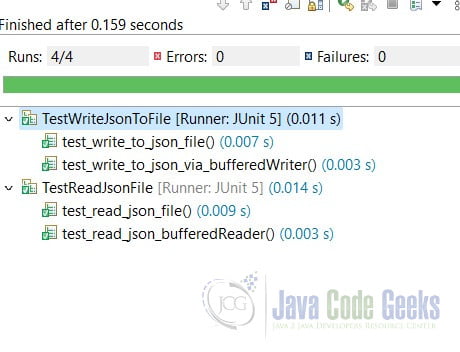
6. Conclusion
In this example, I created two Junit test classes which read and write JSON to file via GSON’s toJson and fromJson methods. If the file is small, then FileWriter and FileReaderare the good choice, otherwise, using wrapped BufferedWriter and BufferedRead as they reduce the I/O operations.
7. Download
This was an example of a maven project which demonstrates how to read and write JSON to file via the GSON library.
You can download the full source code of this example here: Read and Write JSON to File with GSON



