
1. Introduction
GZIP, short for GNU Zip, is a compression technology used for transferring data over the internet. Java built-in library includes the GZIPInputStream class which reads compressed data in the GZIP file format. In this example, I’ll demonstrate how to utilize gzipinputstream to read a .gz file line by line, performing the following steps.
- Construct
FileInputStreamfrom the compressed.gzfile. - Construct
GZIPInputStreamfrom theFileInputStream. - Construct
BufferReaderfrom theGZIPInputStream. - Utilize the
BufferReader‘sreadLineorlinesto process line by line. Stream API is more efficient when reading from a large compressed file.
2. Read .gz file via BufferReader.readLine
In this step, I will use try-resource clause to create three AutoCloseable resources: InputStream, GZIPInputStream, and BufferReader and then loop through BufferReader‘s lines to print the compressed sample.csv.gz file.
ReadGZipViaBufferReader.java
package readgzipfile;

import java.io.BufferedReader;
import java.io.IOException;
import java.io.InputStream;
import java.io.InputStreamReader;
import java.util.zip.GZIPInputStream;

public class ReadGZipViaBufferReader {
	public static void main(String[] args) {
		String fileName = "sample.csv.gz";

		try (InputStream fileInputStream = ReadGZipViaBufferReader.class.getClassLoader().getResourceAsStream(fileName);
				GZIPInputStream gzipInputStream = new GZIPInputStream(fileInputStream);
				BufferedReader bufferedReader = new BufferedReader(new InputStreamReader(gzipInputStream))) {

			String line;
			while ((line = bufferedReader.readLine()) != null) {
				System.out.println(line);
			}
		} catch (IOException e) {
			e.printStackTrace();
		}
	}
}
- line 13: create a
try-resourceclause. The first resource isfileInputStreamfrom thesample.csv.gzfile. - line 14: create a
GZIPInputStreamfrom thefileInputStreamcreated at line 13. - line 15: create a
BufferReaderfrom theGZIPInputStreamcreated at line 14. - line 18: loop through the
bufferReadercreated at line 15 and print out each line.
Note: the try-resource clause will auto close the resources in the reversed order from the declaration statements.
3. Read .gz file via BufferReader.lines
In this step, I will use try-resource clause to create three resources: InputStream, GZIPInputStream, and BufferReader and then use Stream.forEach to print the compressed sample.csv.gz file.
Please note that this is the same as step 2 except using Stream.forEach method to process data because Stream API reads and processes the file without loading the entire contents into memory, therefore it’s more efficient when dealing with large compressed .gz files.
ReadGZipViaStream.java
package readgzipfile;

import java.io.BufferedReader;
import java.io.IOException;
import java.io.InputStream;
import java.io.InputStreamReader;
import java.util.zip.GZIPInputStream;

public class ReadGZipViaStream {
	public static void main(String[] args) {
		String fileName = "sample.csv.gz";

		try (InputStream fileInputStream = ReadGZipViaStream.class.getClassLoader().getResourceAsStream(fileName);
				GZIPInputStream gzipInputStream = new GZIPInputStream(fileInputStream);
				BufferedReader bufferedReader = new BufferedReader(new InputStreamReader(gzipInputStream))) {

			bufferedReader.lines().forEach(System.out::println);

		} catch (IOException e) {
			e.printStackTrace();
		}
	}
}
- line 13: create a
try-resourceclause. The first resource isfileInputStreamfrom thesample.csv.gzfile. - line 14: create a
GZIPInputStreamfrom thefileInputStreamcreated at line 13. - line 15: create a
BufferReaderfrom theGZIPInputStreamcreated at line 14. - line 17: loop through the
bufferReaderviaStream.forEachmethod as it’s more efficient.
4. Read .gz file via BufferReader.lines with Nested Resources
In this step, I will use try-resource clause to create a BufferReader which is built from GZIPInputStream, and the GZIPInputStream is built from the FileInputStream of the compressed sample.csv.gz file. Note: this step is exactly the same as step 3 but using the nested constructor to create a BufferReader object.
ReadGZipViaStream2.java
package readgzipfile;

import java.io.BufferedReader;
import java.io.IOException;
import java.io.InputStreamReader;
import java.util.zip.GZIPInputStream;

public class ReadGZipViaStream2 {
	public static void main(String[] args) {
		String fileName = "sample.csv.gz";

		try (BufferedReader bufferedReader = new BufferedReader(new InputStreamReader(
				new GZIPInputStream(ReadGZipViaStream2.class.getClassLoader().getResourceAsStream(fileName))))) {

			bufferedReader.lines().forEach(System.out::println);

		} catch (IOException e) {
			e.printStackTrace();
		}
	}
}
- line 12,13: create a
BufferReaderresource withtry-resourceclause with nested constructors. - line 15: loop through the
bufferReaderviaStream.forEachmethod as it’s more efficient.
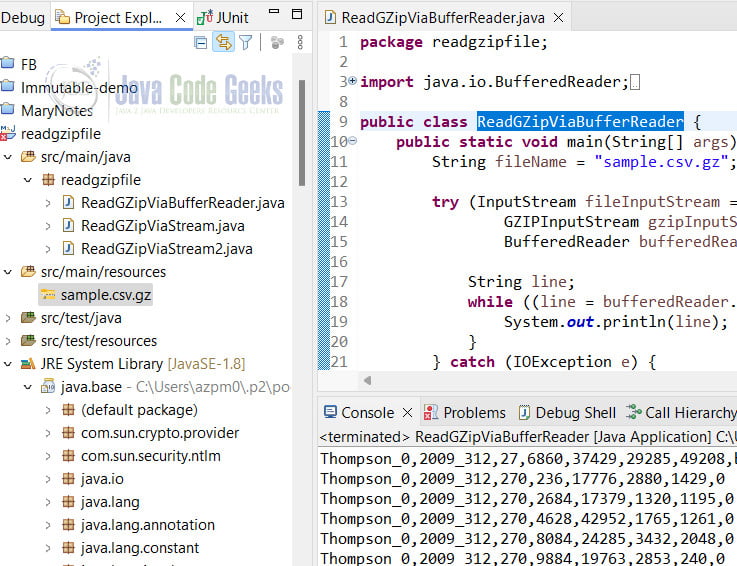
Ran the program and captured the output as the following screenshot. Please note that the sample.csv.gz file is under the src/main/resources folder.
5. Conclusion
In this example, I created three classes with java gzipinputstream read gz file line by line with the following steps:
- Construct a
FileInputStreamfrom the compressed .gz file. - Construct a
GZIPInputStreamfrom theFileInputStream. - Construct a
BufferReaderfrom theGZIPInputStream. - Invoke
BufferReader.readLinemethod to process line by line. - Invoke
BufferReader.linesand theStream.foreachmethod to process line by line.
6. Download
This was an example of reading a .gz file via GZIPInputStream .
You can download the full source code of this example here: Read a .gz File via GZIPInputStream



