
Apache JMeter is widely recognised as a versatile tool for load testing and performance analysis. In many test scenarios, it is common to design plans with multiple Thread Groups, each representing distinct user flows. This article examines some practical methods for sharing variables between Thread Groups in JMeter.
1. Example Scenario
The scenario we will implement involves two Thread Groups that work together in sequence. The first Thread Group (Fetcher) sends an API call to obtain an employeeID. The response returned by this request contains the identifier, which represents the dynamic value we want to carry forward. Once this ID is extracted, it becomes available for subsequent processing.
The second Thread Group depends on the value provided by the Fetcher. It picks up the previously retrieved employeeID value and submits another API request where that value is passed as a parameter. This second request then returns the details of the employee that corresponds to the given ID.
Below is a REST controller that simulates fetching and consuming employee details.
@RestController
@RequestMapping("/employee")
public class EmployeeController {

    private static final Map<String, String> EMPLOYEES = new HashMap<>();

    static {
        EMPLOYEES.put("1", "Thomas Smith");
        EMPLOYEES.put("2", "Bob Johnson");
    }

    @GetMapping("/fetch")
    public Map<String, String> fetchEmployeeId() {
        Map<String, String> response = new HashMap<>();
        response.put("employeeID", "1"); // Always return "1" for demo
        return response;
    }

    @GetMapping("/consume")
    public String consumeEmployee(@RequestParam String id) {
        return "Employee Details: " + EMPLOYEES.getOrDefault(id, "Unknown");
    }
}
/employee/fetchalways returns a fixedemployeeID = 1./employee/consume?id=1retrieves the details of the employee with ID 1.- JMeter will first call fetch, extract the ID, and then use it in the consume request.
2. Create the First Thread Group
Add a Thread Group under your JMeter Test Plan and name it Thread Group 1.
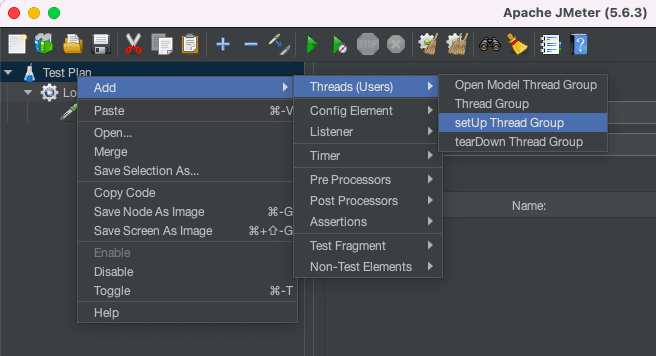
Inside it, add an HTTP Request Sampler configured as follows:
- Method:
GET - Path:
/employee/fetch - Server Name or IP: localhost
- Port: 8080
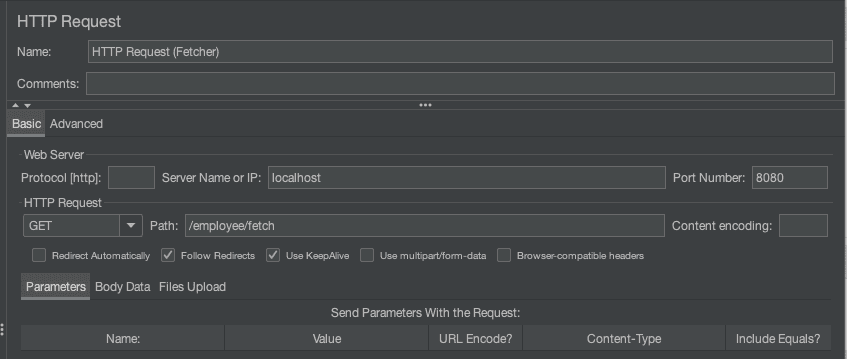
Add a Regular Expression Extractor (Child of HTTP Request)
The Fetcher Thread Group sends an HTTP GET request to the /employee/fetch endpoint. Once the response is received, we need to extract the employeeID value from the JSON payload so that it can be stored and reused later. To achieve this, we attach a Post Processor Regular Expression Extractor as a child element of the HTTP Request. The configuration for this extractor is as follows:
- Reference Name:
employeeID - Regular Expression:
"employeeID":"(.+?)" - Template:
$1$ - Match No:
1
Add BeanShell Assertion (as a child element)
${__setProperty(idToPass,${employeeID})}
This saves the extracted ID as a global property called idToPass.
3. Create the Second Thread Group (Consumer)
In this step, we will use the value extracted earlier and pass it into another request. Add another Thread Group and name it Thread Group 2 (Consumer). Inside it, add an HTTP Request Sampler configured as follows:
- Name:
Consume Employee - Method:
GET - Path:
/employee/consume - Server Name or IP:
localhost - Port:
8080 - Add parameter:
- Name:
id - Value:
${__property(idToPass)}
- Name:

Here, we retrieve the property idToPass set by Thread Group 1.
Run the Test
To confirm that the GET request is retrieving the expected data, add a View Results Tree listener and verify the server response.
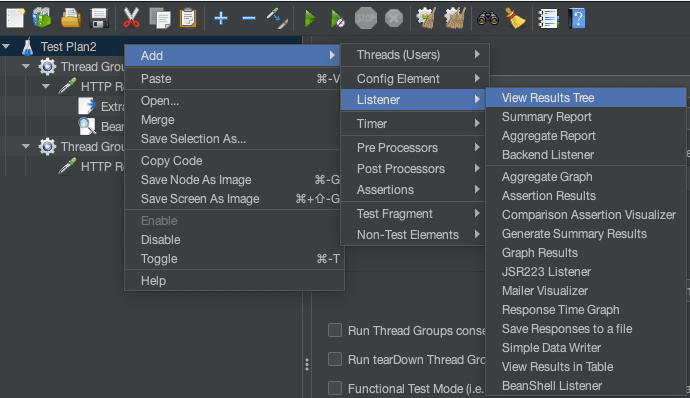
Thread Group 1 (Fetcher) calls /employee/fetch and gets {"employeeID":"1"}. The ID is extracted, saved as a property (idToPass=1), and then used by Thread Group 2 (Consumer) to call /employee/consume?id=1, returning Employee Details: Thomas Smith.
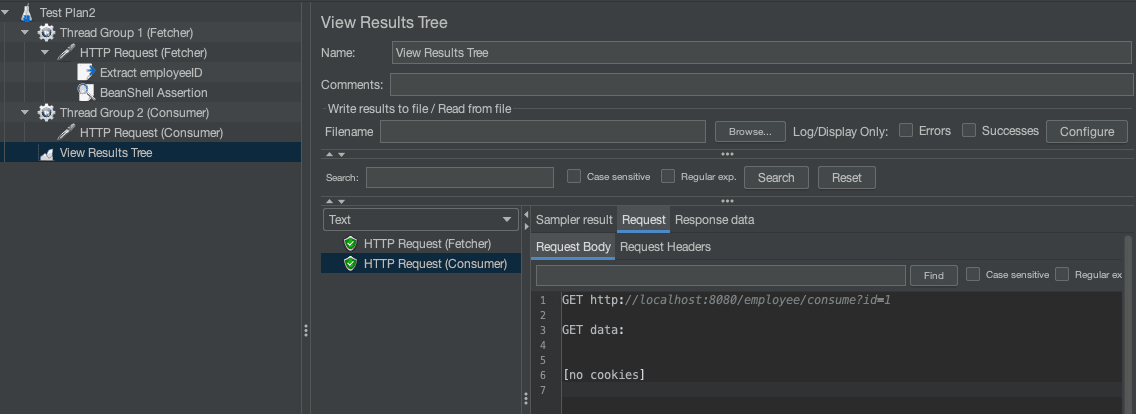
This confirms the variable passed successfully between Thread Groups. By design, JMeter separates variables and properties:
- Variables (
vars): Thread-scoped, accessible only within the same thread. - Properties (
props): Global, shared across the entire test run.
This is why we convert the extracted value into a property in Thread Group 01. Any other Thread Group can then read it during execution.
Another method for sharing values across thread groups is through the props object. For example, in one Thread Group, we can store a value:
props.put("sharedKey", "12345");
And in another Thread Group, we can retrieve it:
String value = props.get("sharedKey").toString();
vars.put("employeeID", value); // make available as a variable
4. Conclusion
In this article, we explored how to share variables between JMeter thread groups using properties. By extracting a value in one thread group, storing it as a property, and reusing it in another, we demonstrated a simple way to maintain data flow across different stages of a test plan.
5. Download the Source Code
This article explored how to pass a variable between Thread groups in JMeter.
You can download the full source code of this example here: jmeter pass variable to another thread group



