
1. Introduction
JPA Entity can have optional fields as not every data is needed for every operation. In this example, I will create a simple Spring Data JPA application that shows how to define the optional fields and retrieve the optional data from a database.
2. Setup
In this step, I will create a Spring boot gradle project along with Lombok, Spring Data JPA, Rest, and H2 libraries via Spring Initializer.
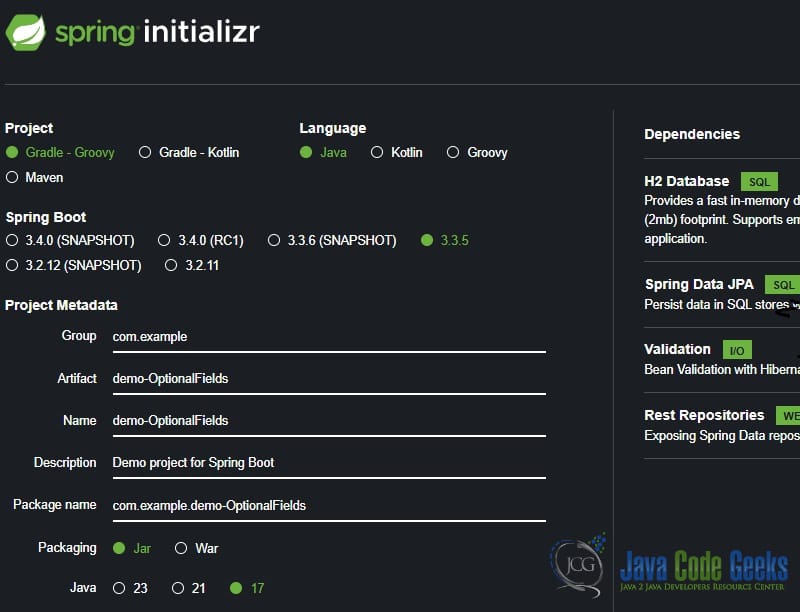
Here is the generated build.gradle file. No modification is needed.
build.gradle
plugins {
	id 'java'
	id 'org.springframework.boot' version '3.3.5'
	id 'io.spring.dependency-management' version '1.1.6'
}

group = 'com.example'
version = '0.0.1-SNAPSHOT'

java {
	toolchain {
		languageVersion = JavaLanguageVersion.of(17)
	}
}

configurations {
	compileOnly {
		extendsFrom annotationProcessor
	}
}

repositories {
	mavenCentral()
}

dependencies {
	implementation 'org.springframework.boot:spring-boot-starter-data-jpa'
	implementation 'org.springframework.boot:spring-boot-starter-validation'
    implementation 'org.springframework.boot:spring-boot-starter-data-rest'
	compileOnly 'org.projectlombok:lombok'
	runtimeOnly 'com.h2database:h2'
	annotationProcessor 'org.projectlombok:lombok'

	testImplementation 'org.springframework.boot:spring-boot-starter-test'
	testRuntimeOnly 'org.junit.platform:junit-platform-launcher'
}

tasks.named('test') {
	useJUnitPlatform()
}
2.1 Generated Spring Boot Application
No modification is needed for the generated DemoOptionalFieldsApplication.java.
DemoOptionalFieldsApplication.java
package com.example.demo_OptionalFields;

import org.springframework.boot.SpringApplication;
import org.springframework.boot.autoconfigure.SpringBootApplication;

@SpringBootApplication
public class DemoOptionalFieldsApplication {

	public static void main(String[] args) {
		SpringApplication.run(DemoOptionalFieldsApplication.class, args);
	}

}
2.2 Generated Spring Properties
In this step, I will update the generated application.properties to enable the logger for SQL statements.
application.properties
spring.application.name=demo-OptionalFields

spring.jpa.properties.hibernate.format_sql=true
spring.jpa.show-sql=true
- Line 3, 4: enable the SQL logging.
3. Jpa Optional Field Entity
In this step, I will create an OptionalFieldsEntity.Java class that includes an optional field – usedName and two projections: IdName and Names.
OptionalFieldsEntity.java
package com.example.demo_OptionalFields;

import org.springframework.data.rest.core.config.Projection;

import jakarta.persistence.Column;
import jakarta.persistence.Entity;
import jakarta.persistence.GeneratedValue;
import jakarta.persistence.Id;
import jakarta.persistence.Table;
import lombok.Data;
import lombok.NoArgsConstructor;

@Data
@Entity
@Table(name = "T_DEMOTABLE")
@NoArgsConstructor
public class OptionalFieldsEntity {

	@Id
	@GeneratedValue
	private Long id;

	@Column(name = "T_NAME", nullable = false)
	private String name;

	@Column(name = "T_USED_NAME", nullable = true)
	private String usedName;

	@Projection(name = "idName", types = { OptionalFieldsEntity.class })
	public interface IdName {
		Long getId();
		String getName();
	}

	@Projection(name = "Names", types = { OptionalFieldsEntity.class })
	public interface Names {
		String getName();
		String getUsedName();
	}

}
- Line 14, 15: annotates with
@Entityand@Tableand the database table name is “T_DEMOTABLE“. - Line 23: annotates
@Columnwithnullable=falseattribute for a mandatory field. - Line 26: annotates
@Columnwithnullable=trueattribute for an optional field. - Line 29, 35: annotates @Projection with a different grouping of fields.
4. Jpa Optional Field Repository
In this step, I will create an OptionalFieldsRepo.java that extends from JpaRepository. It has three methods:
finalAllIdName: annotates@Querywith HQL query and returns the result as a list of the projectionIdNameinterface.finalAllNames: similar tofinalAllIdNamebut returns a list of theNamesprojection.finalAllNamesWithoutUsedName: annotates@Querywith raw SQL query and returns results as a list ofOptionalFieldsEntity.
OptionalFieldsRepo.java
package com.example.demo_OptionalFields;

import java.util.List;

import org.springframework.data.jpa.repository.JpaRepository;
import org.springframework.data.jpa.repository.Query;
import org.springframework.stereotype.Repository;

@Repository
public interface OptionalFieldsRepo extends JpaRepository<OptionalFieldsEntity, Long> {

	@Query(value = "SELECT idName from OptionalFieldsEntity idName")
	List<OptionalFieldsEntity.IdName> finalAllIdName();

	@Query(value = "SELECT names from OptionalFieldsEntity names")
	List<OptionalFieldsEntity.Names> finalAllNames();

	@Query(value = "SELECT * from T_DEMOTABLE where t_used_name is null", nativeQuery = true)
	List<OptionalFieldsEntity> finalAllNamesWithoutUsedName();

}
- Line 12, 13: use a native HQL query to return the
IdNameprojection. - Line 15, 16: use a native HQL query to return the
Namesprojection. - Line 18, 19: use a native raw SQL query to return the
OptionalFieldsEntity. Note:nativeQuery = true.
5. JPA Optional Field Test
In this step, I will create an OptionalFieldsRepoTest.java that has three tests to save and verify the optional field data via findAll methods.
OptionalFieldsRepoTest.java
package com.example.demo_OptionalFields;

import static org.junit.jupiter.api.Assertions.assertEquals;
import static org.junit.jupiter.api.Assertions.assertNull;

import java.util.List;

import org.junit.jupiter.api.Test;
import org.springframework.beans.factory.annotation.Autowired;
import org.springframework.boot.test.context.SpringBootTest;

import com.example.demo_OptionalFields.OptionalFieldsEntity.Names;

@SpringBootTest
class OptionalFieldsRepoTest {

	@Autowired
	private OptionalFieldsRepo testClass;

	private OptionalFieldsEntity buildData(String name, String usedName) {
		OptionalFieldsEntity user1 = new OptionalFieldsEntity();
		user1.setName(name);
		if (usedName != null) {
			user1.setUsedName(usedName);
		}
		return user1;
	}

	@Test
	void test_findAll_hql() {
		testClass.save(buildData("Mary", "Shuning"));
		testClass.save(buildData("Zheng", null));

		List<OptionalFieldsEntity> allData = testClass.findAll();
		assertEquals("Shuning", allData.get(0).getUsedName());
		assertNull(allData.get(1).getUsedName());
	}

	@Test
	void test_findAll_projection() {
		testClass.save(buildData("Mary", "Shuning"));
		testClass.save(buildData("Zheng", null));

		List<OptionalFieldsEntity.IdName> allData = testClass.finalAllIdName();
		assertEquals("Mary", allData.get(0).getName());
		assertEquals("Zheng", allData.get(1).getName());

		List<Names> names = testClass.finalAllNames();
		assertEquals("Mary", names.get(0).getName());
		assertEquals("Zheng", names.get(1).getName());
		assertEquals("Shuning", names.get(0).getUsedName());
		assertNull(names.get(1).getUsedName());
	}

	@Test
	void test_findAll_raw_sql() {
		testClass.save(buildData("Mary", "Shuning"));
		testClass.save(buildData("Zheng", null));

		List<OptionalFieldsEntity> allData = testClass.finalAllNamesWithoutUsedName();
		assertEquals(1, allData.size());
		assertEquals("Zheng", allData.get(0).getName());
		assertNull(allData.get(0).getUsedName());

	}

}
- Line 35, 36, 51, 52, 63: the optional field –
useName– can have anullvalue.
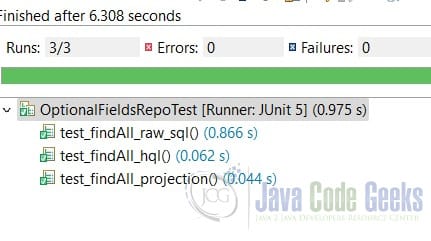
Ran the Junit test and verified tests were passed.
6. Conclusion
In this example, I created a simple Spring boot application that defined a JPA entity with an optional field and created a repository interface to retrieve the data via both Spring projection interface and native query with HQL and raw SQL.
7. Download
This was an example of a gradle project that included Jpa optional fields.
You can download the full source code of this example here: Optional Fields in JPA Entity Example



