
Clear and interactive API documentation is critical for developers consuming your APIs. One of the most widely adopted formats for documenting APIs is the OpenAPI Specification (OAS), formerly known as Swagger. This guide demonstrates how to build OpenAPI documentation using a YML file stored in the resources folder and render it with Swagger UI in a Spring Boot application.
1. Project Setup with Spring Boot and SpringDoc
We will use Spring Boot as the base framework and integrate OpenAPI using the springdoc-openapi library. This tool automatically generates interactive documentation (Swagger UI) based on external YML files.
Below is the Maven setup required to add springdoc-openapi to your project.
        <dependency>
            <groupId>org.springframework.boot</groupId>
            <artifactId>spring-boot-starter-web</artifactId>
        </dependency>
        <dependency>
            <groupId>org.springdoc</groupId>
            <artifactId>springdoc-openapi-starter-webmvc-ui</artifactId>
            <version>2.8.9</version>
        </dependency>
We added springdoc-openapi-starter-webmvc-ui, which enables Swagger UI integration with Spring Boot. This setup allows rendering OpenAPI documentation defined in external files, such as YAML.
2. Define OpenAPI Documentation Using YML
We define the OpenAPI specification in a file named openapi.yml and place it in the src/main/resources/static directory. This YML file outlines the structure of the REST APIs, including paths, HTTP methods, parameters, and response schemas. In our example, it describes two endpoints: one for listing all books and another for retrieving a book by its ID.
src/main/resources/static/openapi.yml
openapi: 3.0.1
info:
  title: Book Management API
  description: API for managing books in a digital library
  version: 1.0.0

servers:
  - url: http://localhost:8080
    description: Local development server

paths:
  /books:
    get:
      summary: Get all books
      responses:
        '200':
          description: A list of books
          content:
            application/json:
              schema:
                type: array
                items:
                  $ref: '#/components/schemas/Book'

  /books/{id}:
    get:
      summary: Get a book by ID
      parameters:
        - in: path
          name: id
          schema:
            type: integer
          required: true
          description: ID of the book to retrieve
      responses:
        '200':
          description: Book found
          content:
            application/json:
              schema:
                $ref: '#/components/schemas/Book'
        '404':
          description: Book not found

components:
  schemas:
    Book:
      type: object
      properties:
        id:
          type: integer
          example: 1
        title:
          type: string
          example: Effective Java
        author:
          type: string
          example: Joshua Bloch
Below is a breakdown of each major section in the OpenAPI YML file, detailing how the specification is built to describe a REST API for managing books.
2.1 Basic Specification and API Metadata
openapi: 3.0.1

info:
  title: Book Management API
  description: API for managing books in a digital library
  version: 1.0.0
This section brings together the core building blocks of the OpenAPI specification. The openapi field specifies the version of the OpenAPI Specification being used, in this case 3.0.1, which is supported by most tools, including Swagger UI. The info section offers essential metadata about the API. It includes the title, which names the API; the description, which outlines its purpose (book management); and the version, which identifies the current version of the API contract.
2.2 Server Configuration (servers Section)
servers:
  - url: http://localhost:8080
    description: Local development server
The servers section lists the base URLs where the API is served. Here, we define a single local server running on port 8080. This helps tools like Swagger UI to know where to send requests when trying out endpoints directly from the documentation.
2.3 API Endpoints (paths Section)
The paths section defines all available API endpoints, the HTTP methods they support, and the request and response structures.
books – Get All Books
paths:
  /books:
    get:
      summary: Get all books
      responses:
        '200':
          description: A list of books
          content:
            application/json:
              schema:
                type: array
                items:
                  $ref: '#/components/schemas/Book'
This endpoint describes a GET request on /books, which returns a list of books. The response includes a 200 status code for success and a JSON array of Book objects. The schema of the response items is referenced from the Book definition under components.
/books/{id} – Get Book by ID
  /books/{id}:
    get:
      summary: Get a book by ID
      parameters:
        - in: path
          name: id
          schema:
            type: integer
          required: true
          description: ID of the book to retrieve
      responses:
        '200':
          description: Book found
          content:
            application/json:
              schema:
                $ref: '#/components/schemas/Book'
        '404':
          description: Book not found
This endpoint handles fetching a specific book by ID. The {id} is defined as a required path parameter. The endpoint returns either a 200 response with the book details (using the same Book schema), or a 404 if the book does not exist.
2.4 Reusable Components (components > schemas Section)
components:
  schemas:
    Book:
      type: object
      properties:
        id:
          type: integer
          example: 1
        title:
          type: string
          example: Effective Java
        author:
          type: string
          example: Joshua Bloch
The components section allows us to define and reuse data structures. Here, the Book schema describes the structure of a book object with three fields: id, title, and author. This schema is referenced elsewhere using $ref, ensuring consistency and avoiding duplication.
3. Configure SpringDoc to Load the YAML File
To make SpringDoc use the openapi.yml file instead of generating the OpenAPI spec from code annotations, we must configure it properly.
src/main/resources/application.yml
springdoc:
  api-docs:
    enabled: true
    resolve-schema-properties: true
  swagger-ui:
    url: /openapi.yml
    path: /swagger-ui.html
This configuration tells SpringDoc to serve Swagger UI using the static openapi.yml file. When a user navigates to /swagger-ui.html, Swagger UI will render documentation based on the contents of openapi.yml.
4. Implement the Book API Endpoints
The YAML file defines what the API should look like. Now let’s create the actual REST endpoints in Java to fulfil the contract. We will implement a simple BookController.
@RestController
@RequestMapping("/books")
public class BookController {

    private final List<Map<String, Object>> books = List.of(
            Map.of("id", 1, "title", "Effective Java", "author", "Joshua Bloch"),
            Map.of("id", 2, "title", "Clean Code", "author", "Robert C. Martin")
    );

    @GetMapping
    public List<Map<String, Object>> getAllBooks() {
        return books;
    }

    @GetMapping("/{id}")
    public Map<String, Object> getBookById(@PathVariable int id) {
        return books.stream()
                .filter(book -> (int) book.get("id") == id)
                .findFirst()
                .orElseThrow(() -> new RuntimeException("Book not found"));
    }
}
This is a mock implementation of the endpoints defined in the YAML file. It serves two endpoints: one to fetch all books and another to fetch a book by ID. The data is hard-coded for simplicity.
5. Running the Application
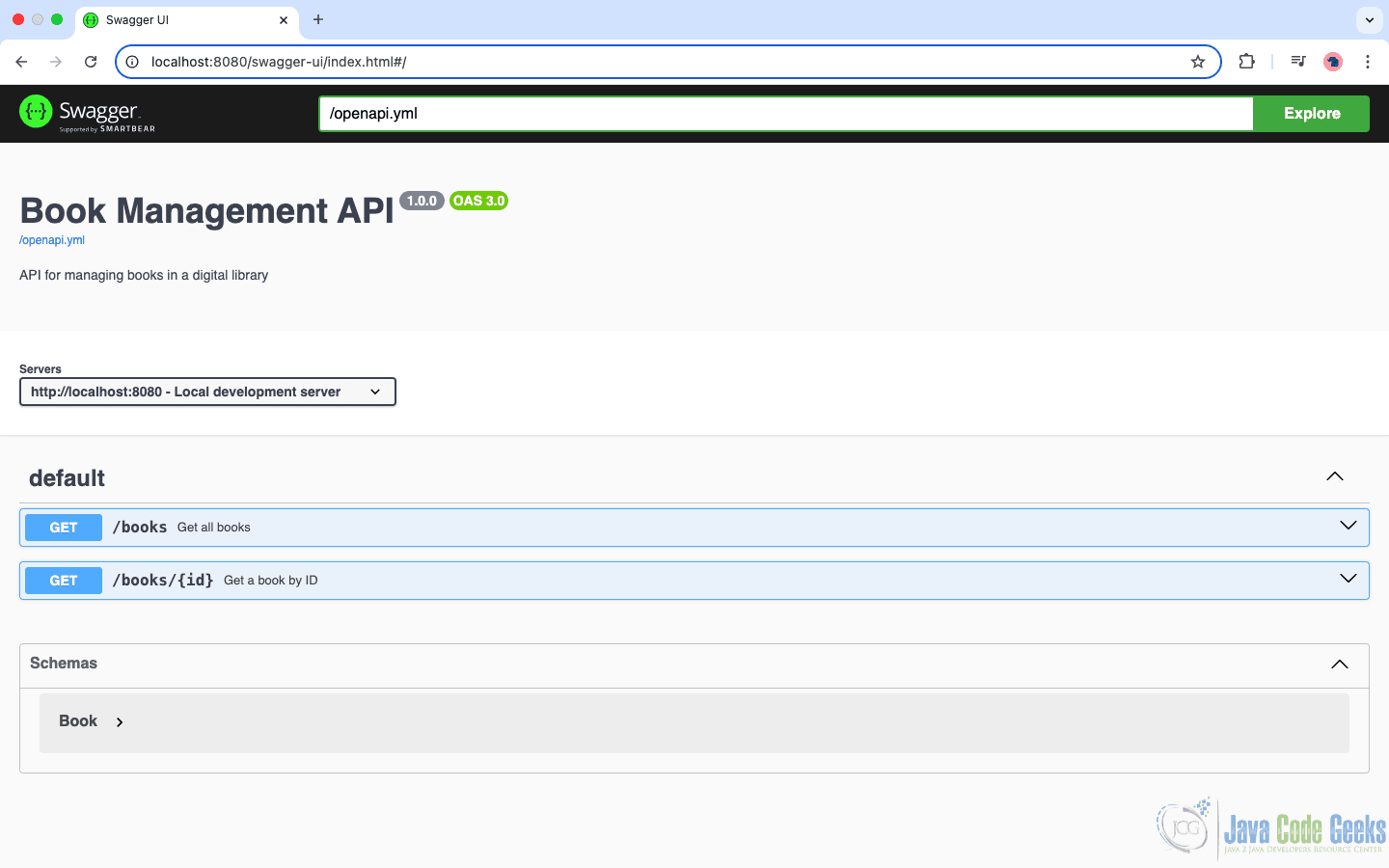
You can now run the Spring Boot application, and once it starts successfully, you can visit the Swagger UI at http://localhost:8080/swagger-ui.html, which will automatically fetch the OpenAPI specification from http://localhost:8080/openapi.yml.
The Swagger UI will then render the complete Book Management API documentation defined in the YAML file, allowing you to explore the endpoints, view request and response details, and test the API interactively — all from within your browser.
6. Benefits of This Approach
By maintaining the OpenAPI specification in a YML file rather than embedding it through annotations in the codebase, we gain several important advantages. This approach promotes a clear separation of concerns, keeping the API documentation distinct from the application logic, which simplifies maintenance. It also encourages a contract-first design, allowing teams to align and finalize the API structure before any implementation begins.
Additionally, using YML enhances reusability, as schemas and definitions can be referenced across multiple endpoints without duplication. Finally, the YML-based spec offers broad tool compatibility, making it easier to integrate with API gateways, client SDK generators, and automated documentation tools.
7. Conclusion
In this article, we demonstrated how to build and serve OpenAPI documentation using a YAML file in a Spring Boot application. By leveraging springdoc-openapi and placing the YAML file in the resources folder, we achieved a clean separation of documentation and implementation.
8. Download the Source Code
This article explored generating OpenAPI documentation from a YML/YAML file.
You can download the full source code of this example here: openapi documentation yml file





