
1. Introduction
Lombok is an open-source Java library that generates getter, setter, toString, equals, hashCode, and constructors automatically to reduce common boilerplate code. The @Data is a convenient shortcut annotation that bundles the features of @ToString, @EqualsAndHashCode, @Getter,@Setter, and @RequiredArgsConstructor(if has final or @NonNull fields) together. If a base class has any final fields and is annotated with @Data, then @RequiredArgsConstructor generates the constructor with final fields instead of the default no-arguments constructor. In this case, any child class extended from that base class will get “constructor in class cannot be applied to given types” error during compile time because the Java compiler automatically generates an implicit no-argument constructor to call super() but the base class does not have the no-arguments constructor. In this example, I will address this error in the following ways:
- Add no-arguments constructor to the base class via
@NoArgsConstructor(force = true). - Add an explicit default constructor in the child class.
2. Setup
2.1 Build.gradle
In this step, I will create a Gradle Java 21 project via Spring Initializer with: Lombok, Spring Data JPA, and H2 libraries.
build.gradle
plugins {
	id 'java'
	id 'org.springframework.boot' version '3.5.6'
	id 'io.spring.dependency-management' version '1.1.7'
}

group = 'org.jcg.zheng.demo'
version = '0.0.1-SNAPSHOT'
description = 'Demo project for Spring Boot'

java {
	toolchain {
		languageVersion = JavaLanguageVersion.of(21)
	}
}

configurations {
	compileOnly {
		extendsFrom annotationProcessor
	}
}

repositories {
	mavenCentral()
}

dependencies {
	implementation 'org.springframework.boot:spring-boot-starter-data-jpa'
	implementation 'org.springframework.boot:spring-boot-starter-web'
	compileOnly 'org.projectlombok:lombok'
	runtimeOnly 'com.h2database:h2'
	annotationProcessor 'org.projectlombok:lombok'
	testImplementation 'org.springframework.boot:spring-boot-starter-test'
	testRuntimeOnly 'org.junit.platform:junit-platform-launcher'
}

tasks.named('test') {
	useJUnitPlatform()
}
2.2 Application.properties
In this step, I will show the generated application.properties.
application.properteis
spring.application.name=lombok-final
2.3 LombokFinalApplication
In this step, I will show the generated LombokFinalApplication.java. No change is needed.
LombokFinalApplication.java
package org.jcg.zheng.demo.lombok_final;

import org.springframework.boot.SpringApplication;
import org.springframework.boot.autoconfigure.SpringBootApplication;

@SpringBootApplication
public class LombokFinalApplication {

	public static void main(String[] args) {
		SpringApplication.run(LombokFinalApplication.class, args);
	}

}
2.4 Install Eclipse Lombok
Run java -jar lombok.jar command if Lombok is not installed in Eclipse.
Install Lombok Command
java -jar lombok.jar
3. Demonstrate the Problem
3.1 Base Entity
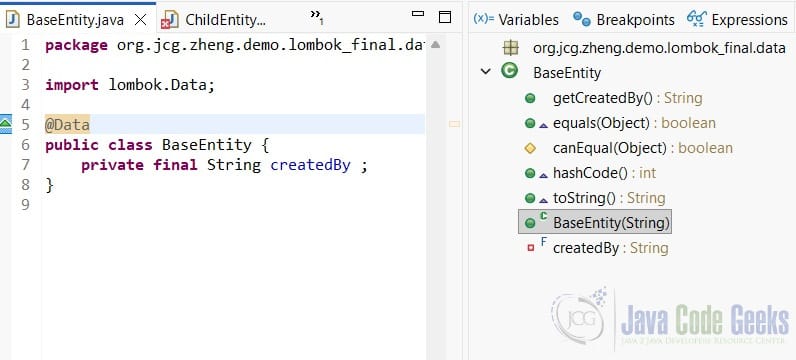
In this step, I will create the BaseEntity.java class with a final field and annotate with @Data.
BaseEntity.java
package org.jcg.zheng.demo.lombok_final.entity;

import jakarta.persistence.Id;
import jakarta.persistence.MappedSuperclass;
import lombok.Data;
import lombok.NoArgsConstructor;

@Data
public class BaseEntity {
	private final String createdBy;
}
- Line 8:
@Dataannotation generates getter, setter,equals,hashCode,toStringand required constructor –BaseEntity(String). - Line 10: the
final“createdBy” must be initialized in every constructor.
3.2 Child Entity
In this step, I will create the ChildEntity.java class that extends from the BaseEntity class created at step 3.1.
ChildEntity.java
package org.jcg.zheng.demo.lombok_final.entity;

import jakarta.persistence.Entity;
import lombok.Data;

public class ChildEntity extends BaseEntity {
	private String name;
}
In Eclipse, you can see the compile error in the problem tab with “Implicit super constructor BaseEntity() is undefined. Must explicitly invoke another constructor“.
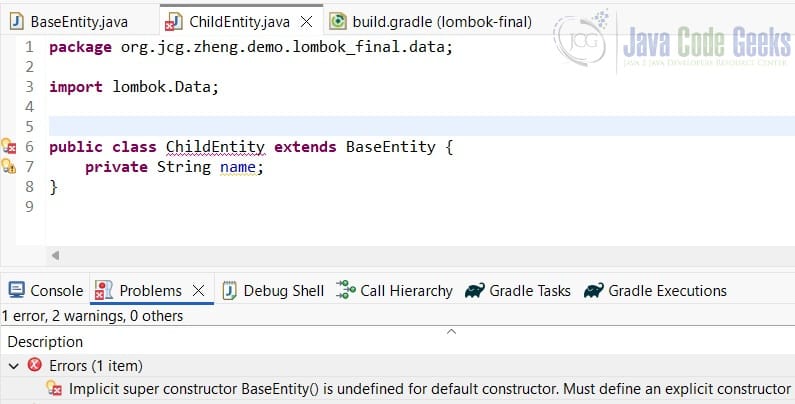
Run the gradlew build, then you can see the compiler error.
gradlew build Output
Execution failed for task ':compileJava'.
> Compilation failed; see the compiler output below.
  C:\MaryZheng\workspace\lombok-final\src\main\java\org\jcg\zheng\demo\lombok_final\entity\ChildEntity.java:6: error: constructor BaseEntity in class BaseEntity cannot be applied to given types;
  @Data
  ^
    required: String
    found:    no arguments
    reason: actual and formal argument lists differ in length
Based on the compile error, there are two ways to fix:
- Add the no-arguments constructor to the
BaseEntityvia@NoArgsConstructor(force=true). - Add an explicit no-arguments constructor in the
ChildEntity- Replace
@Datawith@Getter,@Setter, and the explicit default constructor. - Add an explicit default constructor.
- Replace
4. Add an Explicit No-Arguments Constructor in the Child Class
If it makes sense for your base class, you can define a no-arguments constructor and make the final field non-final(if possible).
4.1 BaseClass
In this step, I will create a BaseClass.java class that has a final field and annotates @Data.
BaseClass.java
package org.jcg.zheng.demo.lombok_final.dto;

import lombok.Data;

@Data
public class BaseClass {
	private final String id;
}
4.2 Child with @Data and Explicit No-Arguments Constructor
In this step, I will create a Child.java class that extends BaseClass.
Child.java
package org.jcg.zheng.demo.lombok_final.dto;

import lombok.Data;

@Data
public class Child extends BaseClass {
	private String name;

	public Child() {
		super("TODO");
	}
}
- Line 5: keep
@Dataannotation. - Line 9: explicit no-arguments constructor.
4.3 Child2 with @Getter, @Setter and Explicit No-Arguments Constructor
In this step, I will create a Child2.java class that extends BaseClass.
Child2.java
package org.jcg.zheng.demo.lombok_final.dto;

import lombok.Getter;
import lombok.Setter;

@Getter
@Setter
public class Child2 extends BaseClass {
	private String name;

	public Child2() {
		super("CreatdBy");
	}

}
- Line 6, 7: replace
@Datawith@Getterand@Setter - Line 11: explicit no-arguments constructor.
5. Add a No-arguments Constructor to the Base Entity
5.1 Update Base Entity with @NoArgsConstructor(force = true)
In this step, I will update the BaseEntity.java class defined at step 3.1 with @NoArgsConstructor(force = true).
BaseEntity.java
package org.jcg.zheng.demo.lombok_final.entity;

import jakarta.persistence.Id;
import jakarta.persistence.MappedSuperclass;
import lombok.Data;
import lombok.NoArgsConstructor;

@Data
@MappedSuperclass
@NoArgsConstructor(force = true)
public class BaseEntity {
	@Id
	private Long id;
	private final String createdBy;
}
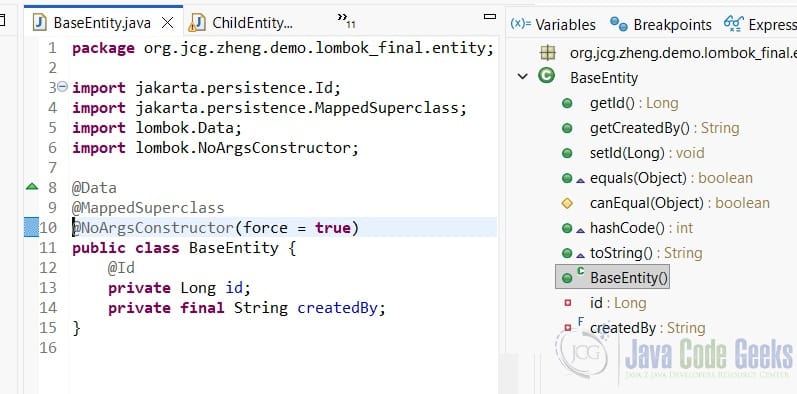
- Line 10:
@NoArgsConstructor(force=true)force the@Datagenerates the no-arguments constructorBaseEntity()as Figure 3.
6. JPA Notes
In JPA, every @Entity and @MappedSuperClass must have a public or protected no-argument constructor so JPA provider can instantiate that entity via reflection. Here are the best practices when dealing with JPA entity and Lombok annoations
- Annotating with @
NoArgsConstructor
| Use Case | What to Do | Why |
| JPA base class with final fields | @NoArgsConstructor(force=true) | allow reflection instantiation |
| JPA child entity | @NoArgsConstructor | JPA requires no-arguments constructor |
JPA @Id assigned manually | can be | can set in its own method |
JPA @Id auto-generated | cannot be final | JPA will assign it |
6.1 ChildEntity
In this step, I will update a ChildEntity.java defined at step 3.2 with @Entity and @Data.
ChildEntity.java
package org.jcg.zheng.demo.lombok_final.entity;

import jakarta.persistence.Entity;
import lombok.Data;

@Data
@Entity
public class ChildEntity extends BaseEntity {
	private String name;
}
7. Demonstrate
7.1 Gradle Build
In this step, I will run gradlew build command and capture the output and confirm no compile errors.
Gradle Build Output
C:\MaryZheng\workspace\lombok-final>gradlew build

> Task :compileJava
C:\MaryZheng\workspace\lombok-final\src\main\java\org\jcg\zheng\demo\lombok_final\entity\ChildEntity.java:6: warning: Generating equals/hashCode implementation but without a call to superclass, even though this class does not extend java.lang.Object. If this is intentional, add '@EqualsAndHashCode(callSuper=false)' to your type.
@Data
^
C:\MaryZheng\workspace\lombok-final\src\main\java\org\jcg\zheng\demo\lombok_final\dto\Child.java:5: warning: Generating equals/hashCode implementation but without a call to superclass, even though this class does not extend java.lang.Object. If this is intentional, add '@EqualsAndHashCode(callSuper=false)' to your type.
@Data
^
2 warnings
Java HotSpot(TM) 64-Bit Server VM warning: Sharing is only supported for boot loader classes because bootstrap classpath has been appended
2025-10-19T16:23:42.547-05:00  INFO 10480 --- [lombok-final] [ionShutdownHook] j.LocalContainerEntityManagerFactoryBean : Closing JPA EntityManagerFactory for persistence unit 'default'
2025-10-19T16:23:42.551-05:00  INFO 10480 --- [lombok-final] [ionShutdownHook] com.zaxxer.hikari.HikariDataSource       : HikariPool-1 - Shutdown initiated...
2025-10-19T16:23:42.553-05:00  INFO 10480 --- [lombok-final] [ionShutdownHook] com.zaxxer.hikari.HikariDataSource       : HikariPool-1 - Shutdown completed.

[Incubating] Problems report is available at: file:///C:/MaryZheng/workspace/lombok-final/build/reports/problems/problems-report.html

BUILD SUCCESSFUL in 8s
7 actionable tasks: 6 executed, 1 up-to-date
C:\MaryZheng\workspace\lombok-final>
- Line 18: compile succesfully.
8. Conclusion
In this example, I demonstrated Lombok @Data with final fields with inheritance can cause compile error due to missing default constructor. I also demonstrated that we can fix it by either adding the no-arguments constructor to the base class or adding an explicit no-arguments constructor to the child class. For a JPA entity, as it requires a no-arguments constructor, so adding the no-arguments constructor is the right choice.
| Concept | What Java Does | Why it Matters |
| No constructor in child class | Java compiler adds default constructor. | it implicitly calls super() |
Base class has no super() | BaseEntity(String) constructor exists | Compilation fails |
Lombok’s @Data | generates required-arguments constructor | Must satisfy constructor chaining rule by either adding super(id) in child class or adding no-arguments constructor in the base class. |
9. Download
This was an example of a Gradle project which handled @Data with final fields’ missing default constructor during inheritance.
You can download the full source code of this example here: Lombok @Data and Final Fields Default Constructor Error Example



