
MyBatis is a popular Java persistence framework that enables us to interact with databases using SQL queries. One of the essential aspects of working with any ORM or persistence framework is logging SQL queries for debugging and performance tuning. In this article, we will explore how to log SQL queries to the console in MyBatis.
1. Introduction to MyBatis Logging
MyBatis supports integration with various logging frameworks such as SLF4J, Log4j2, and java.util.logging. By configuring MyBatis to use one of these logging frameworks, we can capture and output SQL queries executed by the framework.
2. Configuring MyBatis for Logging
To enable SQL query logging in MyBatis, First, ensure that you have a logging framework dependency in the pom.xml file of the project if you are using Maven. SLF4J with Logback is a common choice.
Add Framework Dependencies
        <dependency>
            <groupId>org.mybatis</groupId>
            <artifactId>mybatis</artifactId>
            <version>3.5.6</version>
        </dependency>
        <dependency>
            <groupId>com.h2database</groupId>
            <artifactId>h2</artifactId>
            <version>2.1.210</version>
        </dependency>
        <dependency>
            <groupId>ch.qos.logback</groupId>
            <artifactId>logback-classic</artifactId>
            <version>1.4.14</version>
        </dependency>
Configure Logback
Next, configure Logback to log SQL queries to the console. Create or modify the logback.xml file in your src/main/resources directory:
<?xml version="1.0" encoding="UTF-8"?>
<!DOCTYPE configuration>
<configuration>
    <appender name="STDOUT" class="ch.qos.logback.core.ConsoleAppender">
        <encoder>
            <pattern>%d{yyyy-MM-dd HH:mm:ss} - %msg%n</pattern>
        </encoder>
    </appender>

    <logger name="org.mybatis" level="TRACE" additivity="false">
        <appender-ref ref="STDOUT" />
    </logger>

    <root level="INFO">
        <appender-ref ref="STDOUT" />
    </root>
</configuration>
This configuration will log all MyBatis-related messages at the DEBUG level to the console.
3. Configure MyBatis to Use SLF4J
MyBatis detects the logging framework you are using based on the dependencies in your classpath. Since SLF4J is in the classpath, MyBatis will automatically use it. To ensure MyBatis is configured correctly, check your mybatis-config.xml for the following property:
<?xml version="1.0" encoding="UTF-8" ?>
<!DOCTYPE configuration
  PUBLIC "-//mybatis.org//DTD Config 3.0//EN"
  "http://mybatis.org/dtd/mybatis-3-config.dtd">
<configuration>
    <settings>
        <setting name="logImpl" value="STDOUT_LOGGING"/>
    </settings>
</configuration>
name="logImpl": Thenameattribute specifies the name of the setting being configured. In this case,logImplstands for “log implementation.”value="STDOUT_LOGGING": Thevalueattribute specifies the value to be assigned to thelogImplsetting.STDOUT_LOGGINGis a predefined value in MyBatis that tells the framework to log SQL queries directly to the standard output, usually the console.
3.1 Configuring Logging for Specific Mapper Methods
To enable detailed logging for a specific mapper method in MyBatis, we can configure a logger for that method in our logback.xml. Here’s an example configuration:
<logger name="com.jcg.mybatislogging.mapper.UserMapper.findAll" level="TRACE" additivity="false">
    <appender-ref ref="STDOUT" />
</logger>
In this configuration:
- The
<logger>tag is used to define a logger for a specific category, typically a class or package. name="com.jcg.mybatislogging.mapper.UserMapper.findAll": This specifies the name of the logger. In this case, it is targeting thefindAllmethod within theUserMapperinterface located in thecom.jcg.mybatislogging.mapperpackage. This means that the logging configuration applies specifically to this method.level="TRACE": Thelevelattribute sets the logging level for this logger. TheTRACElevel is the most detailed logging level, which logs all events including fine-grained informational events useful for debugging. Setting this toTRACEmeans we will see very detailed logging output for this specific method.additivity="false": Theadditivityattribute controls whether log messages are passed to parent loggers. When set tofalse, the log messages are not passed to the parent logger, meaning they will only be handled by this logger and its appenders.- If set to
true, log messages would also be sent to the parent logger’s appenders, potentially resulting in duplicate log messages.
- If set to
<appender-ref ref="STDOUT" />: The<appender-ref>tag references an appender namedSTDOUT. This means that log messages for this logger will be sent to theSTDOUTappender, which typically outputs log messages to the console.
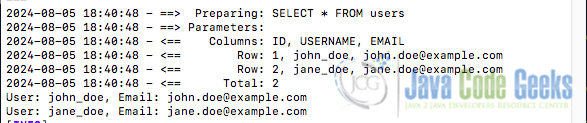
Below is what the console log output might look like when running the above provided MyBatis logging example:
3.2 Set Up SQL Query Logging in MyBatis with Spring Boot
If you are using Spring Boot, MyBatis can be configured via application properties. MyBatis uses SLF4J for logging. To enable SQL logging, we need to set the logging level for MyBatis to DEBUG in our application.properties or application.yml file. Here’s an example to enable SQL logging for a specific MyBatis mapper in a Spring Boot application:
logging.level.com.jcg.mapper.UserMapper=DEBUG
4. Conclusion
In this article, we explored how to configure MyBatis to log SQL queries to the console. We began by setting up the logging framework dependencies and configuring Logback for logging output. We then walked through configuring MyBatis to use SLF4J for logging specific mapper interfaces and entire packages. By following these steps, we can monitor and debug SQL queries in our MyBatis applications, enhancing our ability to optimize and troubleshoot database interactions.
5. Download the Source Code
This article covered how to log SQL queries in MyBatis for a Java application.
You can download the full source code of this example here: Java SQL MyBatis log sql queries






