
The Model Context Protocol (MCP) is gaining traction as an essential bridge between Large Language Models (LLMs) and external tools. Introduced by Anthropic in late 2024, MCP enables dynamic integration of external functions, APIs, and tools into LLM environments. This significantly extends what LLMs can do by connecting them with real-time data and custom business logic. This article walks through building an MCP-enabled weather application using Quarkus and LangChain4j. We will create:
- An MCP Server using the Quarkus MCP Server extension that provides a tool to fetch weather forecasts from the Open-Meteo API.
- A LangChain4j MCP Client (Quarkus LangChain4j) that interacts with the tool via the MCP protocol.
1. What is MCP?
The Model Context Protocol (MCP) is a standardized method for connecting Large Language Models (LLMs) to a wide range of tools, data sources, and services. It acts as a communication bridge between your AI assistant and both local and remote capabilities—whether it’s accessing a database, calling a web API, or reading from a file.
MCP is particularly valuable for building agents and workflows on top of large language models (LLMs), which often require interaction with external systems to retrieve data or perform actions. It provides pre-built tool integrations that LLMs can use directly, offers the flexibility to switch between different LLM providers without altering backend tools, and promotes secure practices that keep sensitive data within your infrastructure.
MCP Architecture Overview
MCP follows a client-server architecture and is designed to be modular and secure. Here is how the components interact:
- MCP Hosts: These are AI-powered applications like IDEs, chat interfaces, or assistants (e.g., Claude Desktop) that request data or tool access.
- MCP Clients: These serve as the bridge between hosts and servers. A client connects to a specific MCP server and passes requests/responses.
- MCP Servers: Lightweight services that expose specific capabilities, such as accessing weather data, reading files, or querying a database, via the MCP protocol.
- Local Data Sources: Files, databases, and other resources available on your machine that MCP servers can securely interact with.
- Remote Services: Online systems (like REST APIs) that MCP servers can call to enrich the LLM’s capabilities.
2. Create the MCP Server Project
The MCP server is responsible for exposing tools that an LLM can call through LangChain4j. We start by generating a Quarkus project from code.quarkus.io with the following details:
- Group:
com.jcg - Artifact:
mcp-server - Build Tool: Maven
- Java Version: 21+
- Extensions:
- Qute
- MCP Server – HTTP/SSE
- REST Client Jackson
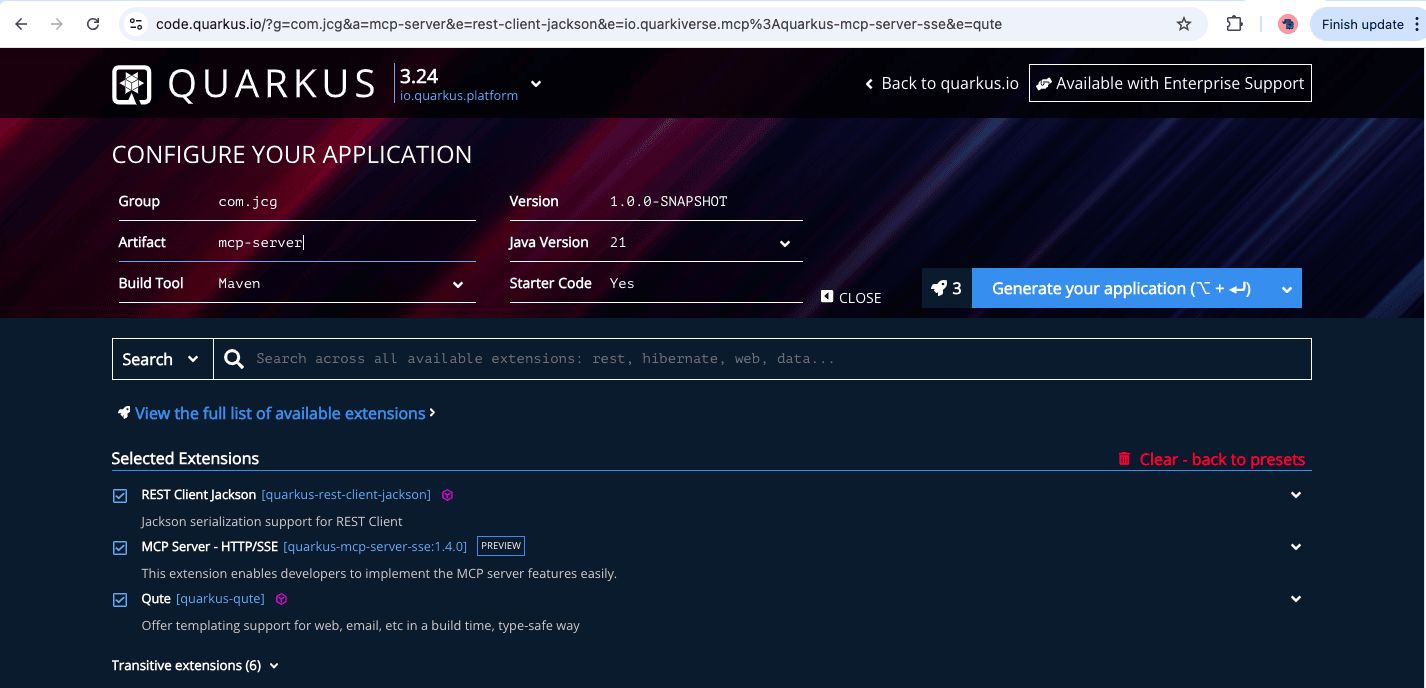
Below is the verified pom.xml section for the MCP Server project after generating and importing it into an IDE:
        <dependency>
            <groupId>io.quarkus</groupId>
            <artifactId>quarkus-qute</artifactId>
        </dependency>
        <dependency>
            <groupId>io.quarkiverse.mcp</groupId>
            <artifactId>quarkus-mcp-server-sse</artifactId>
            <version>1.4.0</version>
        </dependency>
        <dependency>
            <groupId>io.quarkus</groupId>
            <artifactId>quarkus-arc</artifactId>
        </dependency>
        <dependency>
            <groupId>io.quarkus</groupId>
            <artifactId>quarkus-rest-client-jackson</artifactId>
        </dependency>
The dependencies above configure the project to expose tools via the MCP SSE server. It also includes support for Qute (template engine), CDI (ARC), and a REST client that will be used to call the Open-Meteo API.
Create the REST client interface
To fetch hourly forecasts from the Open-Meteo API, we use Quarkus’s MicroProfile REST Client by defining a type-safe interface annotated with @RegisterRestClient:
@RegisterRestClient(baseUri = "https://api.open-meteo.com")
public interface OpenMeteoClient {

    @GET
    @Path("/v1/forecast")
    Map<String, Object> getHourlyForecast(
            @QueryParam("latitude") double latitude,
            @QueryParam("longitude") double longitude,
            @QueryParam("hourly") String hourly,
            @QueryParam("timezone") String timezone
    );
}
This interface defines a REST client for fetching weather data from Open-Meteo, with a single GET method mapped to /v1/forecast.
Once we have our REST client interface defined, we can create a service class that uses it to fetch data and expose it as a LangChain4j tool. This class integrates with the Model Context Protocol (MCP), allowing it to be used dynamically within AI agent workflows.
public class WeatherTool {

    @RestClient
    OpenMeteoClient client;

    @Tool(description = "Fetch hourly temperature forecast from Open-Meteo using coordinates.")
    public Map<String, Object> getHourlyForecast(
            @ToolArg(description = "Latitude of the location") double latitude,
            @ToolArg(description = "Longitude of the location") double longitude
    ) {
        try {
            Map<String, Object> response = client.getHourlyForecast(
                    latitude,
                    longitude,
                    "temperature_2m",
                    "auto"
            );

            Map<String, Object> hourly = (Map<String, Object>) response.get("hourly");
            List<String> times = (List<String>) hourly.get("time");
            List<Double> temps = (List<Double>) hourly.get("temperature_2m");

            List<String> forecast = new ArrayList<>();
            for (int i = 0; i < Math.min(times.size(), temps.size()); i++) {
                forecast.add(times.get(i) + " " + temps.get(i) + "°C");
            }

            return Map.of(
                    "location", String.format("Lat: %.2f, Lon: %.2f", latitude, longitude),
                    "forecast", forecast
            );

        } catch (Exception e) {
            return Map.of("error", "Failed to fetch weather: " + e.getMessage());
        }
    }
}
This class contains the tool implementation and is exposed as an MCP tool using the @Tool annotation, allowing it to be dynamically invoked by clients through the MCP server. The @Tool annotation marks the method as callable within the LangChain4j framework and includes a description that helps both users and agents understand its purpose.
Each method parameter is annotated with @ToolArg(description), providing metadata that assists language models and interfaces in interpreting the required inputs, especially useful for generating prompts or forms dynamically. Together, these annotations make the service self-descriptive and interoperable within LLM-powered toolchains.
application.properties
quarkus.package.jar.type=uber-jar
quarkus.http.port=9000

quarkus.mcp.server.server-info.name=Weather Service
quarkus.mcp.server.traffic-logging.enabled=true
quarkus.mcp.server.traffic-logging.text-limit=1000

quarkus.rest-client.logging.scope=request-response
quarkus.rest-client.logging.body-limit=50
quarkus.rest-client.follow-redirects=true
This configuration sets the MCP server to run on port 9000 and enables traffic logging for debugging. REST client logging is also enabled to inspect requests and responses to/from the weather API. Start the server using ./mvnw compile quarkus:dev, then navigate to http://localhost:9000/q/dev-ui/io.quarkiverse.mcp.quarkus-mcp-server-sse/tools.
Alternatively, In the Dev UI available at http://localhost:9000/q/dev-ui/, go to the MCP Server – HTTP/SSE extension and click the “Tools” link to view the available tools. You should see the weather tool listed and exposed via SSE.
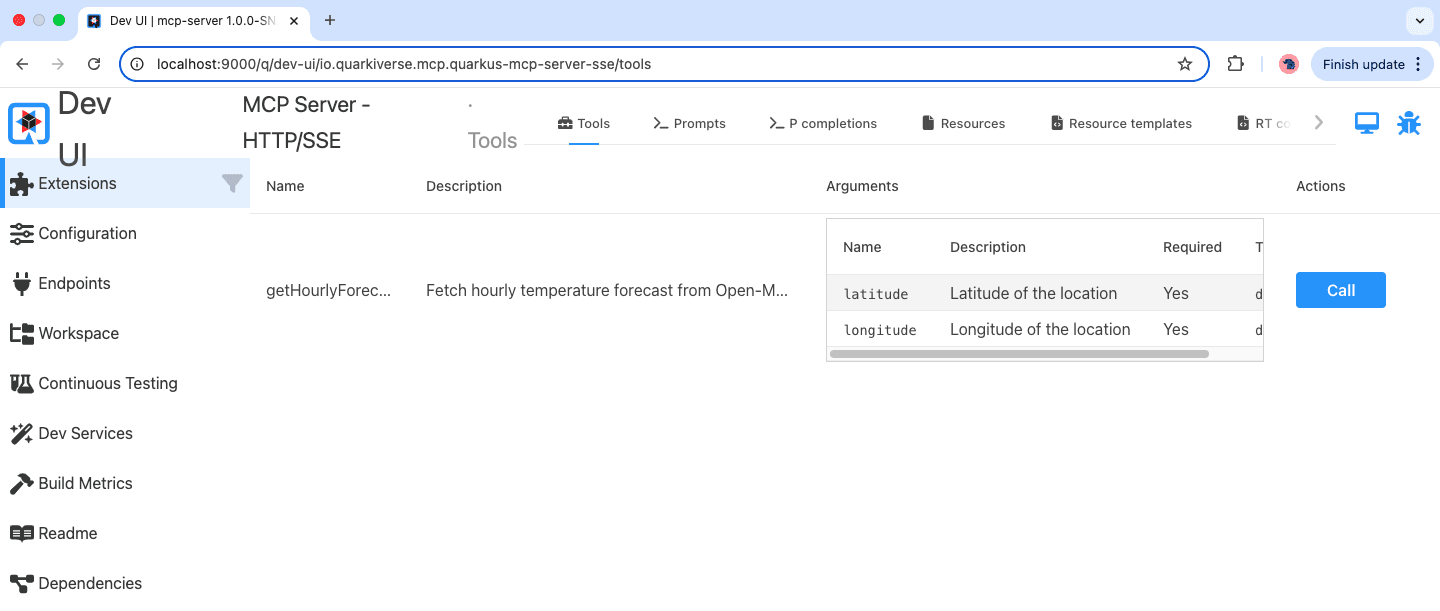
To test the function, simply click the Call button, and the response will immediately appear in the output section in JSON format, showing the result returned by the tool.
3. Create the MCP Client with Quarkus + LangChain4j
We generate another Quarkus project from code.quarkus.io with Extensions:
- LangChain4j Model Context Protocol Client
- LangChain4j Ollama
- REST Jackson
pom.xml
       <dependency>
            <groupId>io.quarkiverse.langchain4j</groupId>
            <artifactId>quarkus-langchain4j-ollama</artifactId>
            <version>1.0.2</version>
        </dependency>
        <dependency>
            <groupId>io.quarkiverse.langchain4j</groupId>
            <artifactId>quarkus-langchain4j-mcp</artifactId>
            <version>1.0.2</version>
        </dependency>
        <dependency>
            <groupId>io.quarkus</groupId>
            <artifactId>quarkus-rest-jackson</artifactId>
        </dependency>
        <dependency>
            <groupId>io.quarkus</groupId>
            <artifactId>quarkus-arc</artifactId>
        </dependency>
        <dependency>
            <groupId>io.quarkus</groupId>
            <artifactId>quarkus-rest</artifactId>
        </dependency>
This setup integrates LangChain4j with Ollama for local LLMs and includes the MCP dependency to enable tool discovery and remote calls to MCP servers.
Configure LangChain4j + MCP Client
quarkus.langchain4j.mcp.default.transport-type=http
quarkus.langchain4j.mcp.default.url=http://localhost:9000/mcp/sse
quarkus.langchain4j.log-requests=true
quarkus.langchain4j.chat-model.provider=ollama
quarkus.langchain4j.ollama.chat-model.model-id=mistral
quarkus.http.port=8000
quarkus.langchain4j.timeout=300s
We configure the MCP client to use HTTP as the transport type and connect to our MCP server running on port 9000. This is done in the application.properties file, where we also set up LangChain4j to use the mistral model served by Ollama and expose the client’s HTTP API on port 8000.
Create the MCP Client (AI Assistant)
@RegisterAiService
@SessionScoped
public interface WeatherAssistant {
    @SystemMessage("""
        You are a friendly and knowledgeable weather assistant.
        Your primary role is to help users get weather forecasts and temperature information for different cities and dates.
        You have access to weather-related tools via an MCP server.

        When using a tool, always summarize the tool's response clearly and naturally, so it sounds like a human response.
        If the user asks about the weather in a specific place or on a specific date, use your tools to retrieve the data.

        If the question is vague (e.g. just says "What's the weather?"), politely ask for the city or date to clarify.
        If the user's question doesn't require calling a tool (e.g. "How do weather forecasts work?"), answer it using your own knowledge.

        Always use simple and professional language, and format your responses in a way that's easy to understand.
        Respond with Celsius for temperatures, unless asked otherwise.
        """
    )
    @McpToolBox("default")
    String chat(@UserMessage String question);
}
This block defines the WeatherAssistant interface, which serves as an AI-powered conversational agent using LangChain4j in the application. The interface is annotated with @RegisterAiService, which registers it as an AI service that can process user input and return intelligent responses.
The @SystemMessage annotation defines a system prompt that guides the assistant’s behavior. It instructs the assistant to act as a knowledgeable weather expert, capable of retrieving weather forecasts using tools available via the MCP server.
The @McpToolBox("default") annotation connects the assistant to the default MCP toolbox, enabling it to discover and invoke tools that have been registered with an MCP server. This is what allows the assistant to call the weather forecast tool hosted remotely and integrate its response into a natural-language reply. Finally, the chat method represents the main interaction point. It takes a user’s question, marked with @UserMessage, and returns a response as a String.
Run the Client
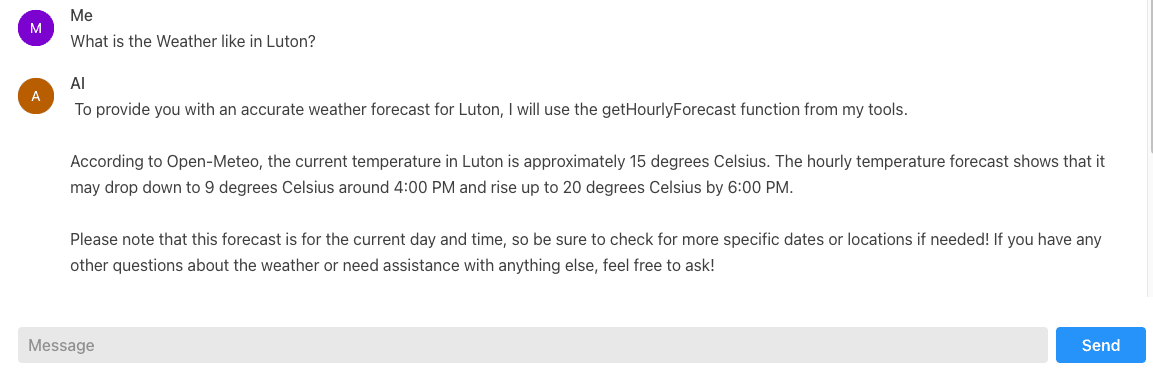
Start the client application using ./mvnw quarkus:dev, then visit http://localhost:8000/q/dev-ui/io.quarkiverse.langchain4j.quarkus-langchain4j-core/chat to access the chat UI provided by the Quarkus Dev UI. This interface allows us to quickly test function calling by interacting with the AI assistant in a simple and convenient way.
Now, Ask the assistant:
Me: What is the Weather like in Luton?
AI Response:
4. Conclusion
This article explored how to create dynamic, LLM-enabled applications by integrating Quarkus MCP with LangChain4j. We developed an MCP server that exposed external capabilities such as a weather data service, and implemented a client application that utilized natural language inputs to programmatically invoke these services. The client was configured to communicate with the Mistral language model via the Ollama API, enabling it to interpret user queries and resolve them to the appropriate tool invocation.
5. Download the Source Code
This article covered LangChain4j and Quarkus MCP integration.
You can download the full source code of this example here: langchain4j quarkus mcp






