
1. What is Kanban?
Kanban is a visual workflow management system developed by Toyota that tracks work from start to finish visually. “Kanban” is the pronunciation of its Japanese word “看板”(see board). Kanban Board is a visual tool that gives an overview of the current work status and simplifies team communication. It helps to optimize and continuously improve any business process. Visualizing work on a kanban board will boost productivity and eliminate chaos from your workplace. The Kanban board is usually split into columns, and each column represents an important step in the workflow. Its goals are to make work visible, limit overload, and keep tasks flowing smoothly. This developer’s guide to Kanban will guide you to work together with others and improve yourself. Here is a simple Kanban board with a four-step workflow:
| Backlog | To Do | In Progress | Done |
|---|
| Future tasks | Ready to start | Currently being worked on | Completed tasks |
2. Kanban Principles
Kanban boards work by mapping work items to sticky notes placed into columns on a board. The columns represent the value stream – a sequence of steps that the product must go through from start to finish. Work items are written down on cards and placed into their respective columns. The horizontal rows, known as swimlanes, are used to organize teams working on the same board. A limit is placed on the capacity of some columns to ensure smooth flow of work, and team members pull cards and move them through columns from left to right as work progresses. Here are the principles of the Kanban process.
- Visualize the work – all tasks are visible to everyone.
- Limit Work-in-Progress (WIP) items – Finish before starting a new item.
- Manage Flow – Keep work moving without bottlenecks.
- Make policy explicit – Define how tasks move through stages.
- Improve continuously – keep tweaking the process for better speed and quality.
3. Steps to Start Kanban
Here are the main steps to start the Kanban process:
- Define the workflow.
- Add the tasks in JIRA.
- Set Work-in-progress limits.
- Track Daily – move items as work progresses.
- Review regularly – set up meetings to check flow and spot blockers.
3.1 Define Kanban Workflow
The most important step of Kanban is to visualize the workflow steps. The team should document the workflow and inspect it regularly for improvement. The document should include the guidelines on how to move the item from left to right. Here is an example of workflow steps for software development:
Open –> Gathering requirements –> Pre-refinement –> Ready for Refinement –> Ready to Develop –> Development –> Ready for Code review –> Code review –> Merge –> Merge Done –> Ready for QA –> QA –> UAT –> Ready for Release –> Completed ( Done or Cancelled)
Here is the outline of each step and tips for a beginner developer.
| Steps | Description | Tips for Developers |
| Open | New work items/stories. Once the priority is defined, move it to the next swimlane – Gathering requirements. | NA |
| Gathering requirements | Requirements details, such as Acceptance criteria and mock screen, are gathered. Once these data are there, then it can move to the next swimlane – Pre-refinement. | NA |
| Pre-refinement | Meet with Business Analyst (BA), tech leader, and application development manager to refine with more details. Should we split into more stories? Any dependency internally and externally? Once questions are answered, move it to the next step. | NA |
| Refinement | Meet with developers, testers, and BAs to discuss use cases and estimate the story’s point. Move to the “Ready to Develop” if there are no outstanding issues. | Ask questions about the requirement to fully understand what is asked in the story. Review the story beforehand and prepare questions. Consider the edge case and how to verify before and after. |
| Ready to Develop | Pick up a story from top to bottom, right to left. Don’t pick blocked stories. Assign it to yourself. | Developers should pick up the story from top to bottom and right to left. This way, the most urgent and almost done item is finished first. |
| Development | Work on it based on the team’s “Definition of Done“. Unassign it and create a GitHub Pull Request, and move it to the next “Ready for Code Review” step. | Developers should create a feature branch for the story. Developers should NOT pick more than one story at the development lane. The code should pass the code coverage, sonar report, dev test results should attach to the story. |
| Ready to Code Review | Anyone except the original developer can review the code. Assign it and move to the “Code Review” step. | |
| Code Review | The Feature branch is up to date. The acceptance criteria are met. Local runs fine. No exception in the server log. If there are Database changes, then apply the dev database accordingly. Once done, unassign and move to the “Ready to Merge“, otherwise, reject it back to the “Development” with the rejection reason. | When reviewing a story, follow the team’s definition of done. Add comments for the code review results. |
| Ready to Merge/Merge | Test locally with the feature branch. Verify CI build passed. | |
| Ready to Deploy/Merge Done | Send a notification via the team channel before building the release artifacts. Run any SQL in UAT, Unassign it. | Can set up a trigger when 5 stories are ready to deploy, this way, business values can be delivered. |
| Ready for QA | Once stories are deployed to UAT, move to “Ready for QA” for regression and story testing. | NA, usually done by lead developers. |
| QA | QA tests the stories based on the acceptance criteria. Reject it back to “Development” if AC is not met. | NA |
| UAT | Once business users accept the story, move it to the “Ready to release” step. | NA |
| Ready for Release | The items in “Ready to release” are scheduled based on the business change process. | NA, usually done by the release team. |
| Done | After the release, the item is moved to “Done“. | NA |
3.2 Add Tasks to Kanban Board
Once the workflow is done, add the work items to the board. For software development, the work item might be presented as a JIRA story and added during the pre-refinement and refinement meetings. The most urgent work should be placed at the top of the swimlane. New tasks are added to the Kanban board.
- Developers should pick the working tasks from the top to the bottom, so the most urgent ones get work first.
- Developers should pick the working tasks from right to left, so the completed tasks can be delivered to the business as soon as possible.
- Developers should move the working tasks from lane to lane based on the definition of done.
Please note, we don’t need to show all steps in the Kanban board. We can tailor the board to show the steps that every team member is more interested in.
3.3 Track Daily
All team member attends a daily stand-up meeting to report the work item status. In the daily meeting, if there are enough “Done” stories, then a release should be scheduled according to the change management process. A blocker is reported. If there are too many items in any column, then the team should discuss and address it as soon as possible.
3.4 Review Kanban Regularly
Set up retrospective meetings to review the process. Identify any bottleneck for improvement. Developers should discuss how to improve.
4. Kanban Tips
Here are some tips for a beginner when working with a Kanban process.
- Start small – don’t overcomplicate the board.
- Be realistic – WIP limits prevent burnout.
- Make it visible – The board should be accessible to the entire team.
- Adapt columns – adapt as you learn.
- Use metrics – track lead time from start to finish to see improvements.
5. Scrum vs Kanban
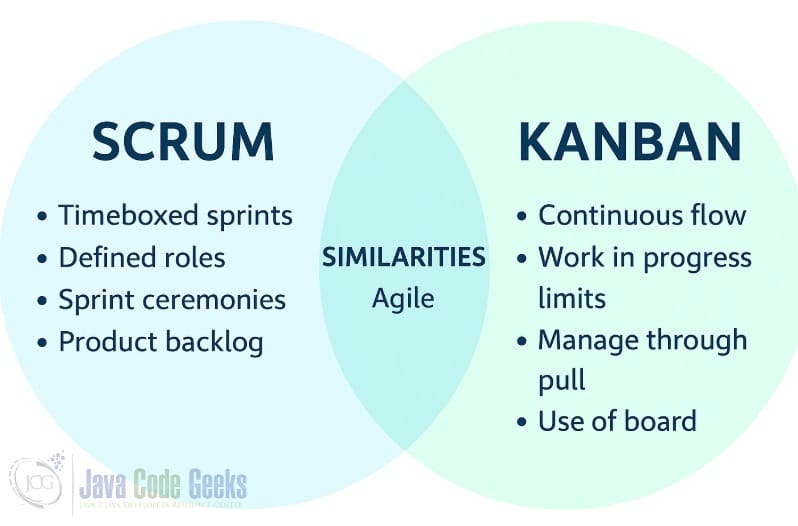
Both Scrum and Kanban implement Agile principles: delivering value quickly, responding to change, and improving continuously. Here are common grounds:
- Both prioritize what’s most important first.
- Work is broken down into small, manageable chunks rather than big bang releases.
- In both, work items are represented as cards that move across columns. Scrum uses a task board for sprint work. Kanban uses a Kanban board for continuous flow.
- Everyone can see what’s being worked on, what’s next, and what’s done.
- Makes bottlenecks, blockers, and workload visible.
- Work is managed together as a team rather than assigned top-down.
- Regular communication is key – daily stand-ups in Scrum, and often informal updates in Kanban.
- Scrum has retrospectives each sprint, and Kanban has ongoing improvement through analyzing flow metrics and adapting policies.
- Both aim to prevent multitasking overload. Scrum limits WIP indirectly by fixing the scope for a sprint. Kanban sets explicit WIP limits per column.
Scrum is more structured and timeboxed, and Kanban is more flexible and flow-based. Here are the main differences between them.
| Different Point | Scrum | Kanban |
| Work Length | Work is planned in fixed-length sprints. | Work is continuous – no set sprint cycles. |
| Work Items | The team commits to delivering a set of tasks for each sprint | No fixed commitment period. Deliver as capacity allows. |
| Flexible | Scope changes are not allowed during a sprint. | Changes are allowed anytime. |
| Roles | Scrum Master, Product Owner, Development Team. | No formal roles required. |
| Events | There are 4 timeboxed meetings: Sprint Planning, Daily Stand-up, Sprint Review, and Sprint Retrospective. | Meetings are optional, often ad-hoc for problem-solving or review. |
| Board | The board is reset every sprint – only tasks for that sprint appear. | The board is continuous – tasks flow through columns indefinitely. |
6. Conclusion
The developer’s guide to Kanban outlined the Kanban process and how to start one for software development. Team members pull the tasks from the Kanban board and work from top to bottom and right to left. The completed tasks are released based on the change management process. Here are tips for a beginner developer in a Kanban process:
- Only work on one task at any single time.
- Pick up the task from right to left so the task is completed as soon as possible.
- Communicate early when blocked.
- When asking questions, keep the tone blameless and constructive.
- Inspect the work based on the
Definition of Done.





