
In Java web apps, you’ll often expose server-side data (e.g., a Map<K,V>) to a JSP for display. Let us delve into understanding how a JSP loops through a map effectively.
1. What is JSP?
JavaServer Pages (JSP) is a server-side templating technology. A JSP is compiled to a servlet and executed on the server. It can access Java objects placed in scopes (request, session, application, page) and render dynamic HTML. Modern best practice is to keep Java logic (data fetching/creation) in servlets/services and use JSP for view rendering. There are two common ways to iterate over a map in JSP:
- Scriptlets: Embed Java code directly inside the JSP using
<% ... %>. Works everywhere, but is considered outdated. - JSTL + EL: Use the JSP Standard Tag Library (
<c:forEach>) and Expression Language (${...}). Cleaner and recommended.
2. Using JSP Scriptlets
In this example, we create a Map<String,Integer> right in the JSP (map-scriptlet.jsp) and loop through it with Java code. This is useful to understand the mechanics, but in production, you should prefer JSTL/EL.
<%@ page import="java.util.*" %>
<!DOCTYPE html>
<html>
	<head>
		<meta charset="utf-8">
		<title>Scriptlet Map Loop</title>
	</head>
	<body>
		<h3>Students and Scores (Scriptlets)</h3>

		<%
		// Build a LinkedHashMap to preserve insertion order
		Map<String, Integer> scores = new LinkedHashMap<>();
		scores.put("Alice", 86);
		scores.put("Bob", 92);
		scores.put("Chandra", 78);
		scores.put("Devi", 95);
		%>

		<table>
			<thead><tr><th>#</th><th>Name</th><th>Score</th></tr></thead>
			<tbody>
				<%
				int i = 1;
				for (Map.Entry<String, Integer> e : scores.entrySet()) {
				%>
				<tr>
					<td><%= i++ %></td>
					<td><%= e.getKey() %></td>
					<td><%= e.getValue() %></td>
				</tr>
				<% } %>
			</tbody>
		</table>

		<!-- Alternative: iterate just keys or values -->
		<h4>Names only</h4>
		<ul>
			<%
			for (String name : scores.keySet()) {
			%>
			<li><%= name %></li>
			<%
			}
			%>
		</ul>
	</body>
</html>
2.1 Code Explanation
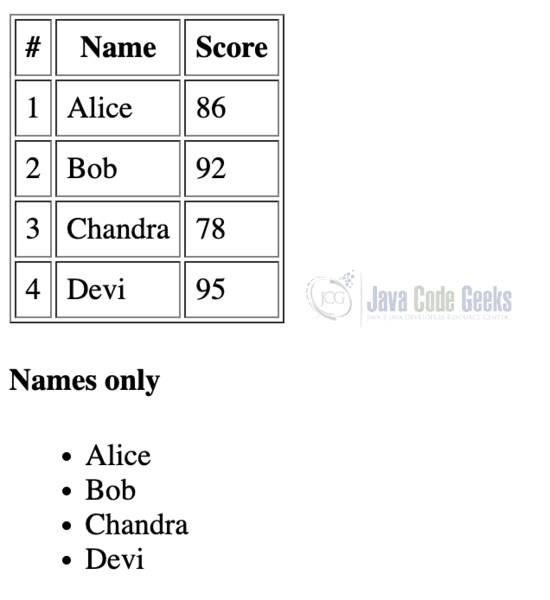
This JSP code demonstrates how to loop through a Map using scriptlets to dynamically generate an HTML table and list. It first imports java.util.* and creates a LinkedHashMap named scores to store student names as keys and their scores as values, preserving the insertion order. Inside the <table>, a for loop iterates over scores.entrySet() and uses <%= %> expressions to print a serial number, student name, and score in each row. After the table, another loop iterates over scores.keySet() to display only the student names inside an unordered list (<ul>). This code highlights how JSP scriptlets can mix Java logic with HTML for dynamic web content.
2.2 Code Run and Output
To run this JSP scriptlet example, create a file named map-scriptlet.jsp in your web application’s directory (e.g., webapp/ or WebContent/), ensure your project is deployed on a servlet container like Apache Tomcat, and access it via a URL such as http://localhost:8080/<project-name>/map-scriptlet.jsp. When loaded, the JSP executes the embedded Java code to create a LinkedHashMap of student names and scores, dynamically generating an HTML table with serial numbers, names, and scores, followed by a separate unordered list showing only the student names.
3. Using JSTL and EL
In a standard MVC architecture, the servlet or controller stores the map in the request scope, while the JSP leverages JSTL for iteration, keeping Java logic separate from the view layer for cleaner and more maintainable code. Before proceeding further, make sure the following dependencies are included in your project:
<dependency>
  <groupId>jakarta.servlet.jsp.jstl</groupId>
  <artifactId>jakarta.servlet.jsp.jstl-api</artifactId>
  <version>latest__jar__version</version>
</dependency>
<dependency>
  <groupId>org.glassfish.web</groupId>
  <artifactId>jakarta.servlet.jsp.jstl</artifactId>
  <version>latest__jar__version</version>
</dependency>
3.1 Code Example
The following example demonstrates how to create a servlet that prepares data for a JSP page.
3.1.1 Creating a Servlet Class
// ScoresServlet.java

package com.example.web;

import jakarta.servlet.ServletException;
import jakarta.servlet.annotation.WebServlet;
import jakarta.servlet.http.*;
import java.io.IOException;
import java.util.*;

@WebServlet("/scores")
public class ScoresServlet extends HttpServlet {
  @Override
  protected void doGet(HttpServletRequest request, HttpServletResponse response)
      throws ServletException, IOException {
    Map<String, Integer> scores = new LinkedHashMap<>();
    scores.put("Alice", 86);
    scores.put("Bob", 92);
    scores.put("Chandra", 78);
    scores.put("Devi", 95);

    // Expose to JSP
    request.setAttribute("scores", scores);

    request.getRequestDispatcher("/WEB-INF/views/scores.jsp")
        .forward(request, response);
  }
}
3.1.1.1 Code Explanation
This Java servlet, mapped to the URL pattern /scores using the @WebServlet annotation, extends HttpServlet and overrides the doGet method to handle HTTP GET requests. Inside the method, it creates a LinkedHashMap named scores to store student names and their corresponding scores while maintaining insertion order. The map is then added as a request attribute using request.setAttribute("scores", scores), making it accessible to the JSP page. Finally, the servlet forwards the request and response to /WEB-INF/views/scores.jsp using a RequestDispatcher to render the data dynamically on the web page.
Note: Ensure JSTL is on your classpath (e.g., for Maven, add jakarta.servlet.jsp.jstl or the appropriate JSTL artifact matching your servlet/JSP version).
3.1.2 Creating the JSP
The following JSP example (/WEB-INF/views/scores.jsp) demonstrates how to display a Map of student names and scores using JSTL and Expression Language (EL) instead of scriptlets.
<%@ page contentType="text/html; charset=UTF-8" %>
<%@ taglib prefix="c" uri="http://java.sun.com/jsp/jstl/core" %>
<!DOCTYPE html>
<html>
    <head>
    <meta charset="utf-8">
        <title>Scores (JSTL/EL)</title>
        <style>table{border-collapse:collapse}td,th{border:1px solid #999;padding:.35rem .5rem}</style>
    </head>
    <body>
        <h3>Students and Scores (JSTL + EL)</h3>

        <table>
            <thead><tr><th>#</th><th>Name</th><th>Score</th></tr></thead>
            <tbody>
                <c:forEach var="entry" items="${scores}" varStatus="s">
                    <tr>
                        <td>${s.index + 1}</td>
                        <td>${entry.key}</td>
                        <td>${entry.value}</td>
                    </tr>
                </c:forEach>
            </tbody>
        </table>

        <h4>Keys only</h4>
        <ul>
            <c:forEach var="name" items="${scores.keySet()}">
                <li>${name}</li>
            </c:forEach>
        </ul>

        <h4>Values only</h4>
        <ul>
            <c:forEach var="val" items="${scores.values()}">
                <li>${val}</li>
            </c:forEach>
        </ul>

        <!-- Bonus: the status object exposes index, count, first, last -->
        <!-- Example: show total rows using ${s.count} on the last iteration -->
        <c:forEach var="e" items="${scores}" varStatus="st">
            <c:if test="${st.last}">
                <p>Total records: ${st.count}</p>
            </c:if>
        </c:forEach>

    </body>
</html>
3.1.2.1 Code Explanation
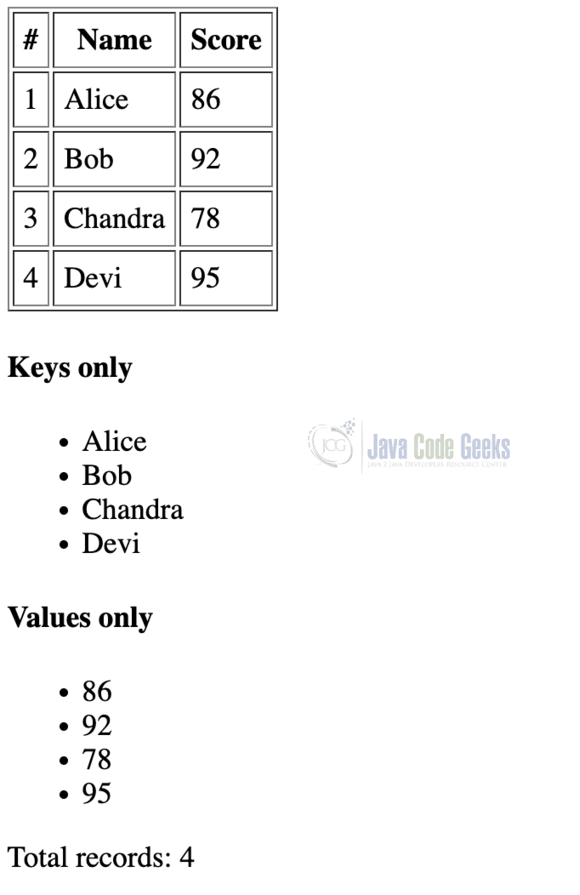
It begins by including the JSTL core tag library with the @taglib directive, allowing the use of <c:forEach> for iteration. The table is dynamically populated by looping through ${scores}, where entry.key and entry.value output each student’s name and score, while varStatus="s" provides the current index to display serial numbers. Additional loops show only the keys (names) and values (scores) separately in unordered lists, and a final loop with a status check ${st.last} displays the total number of records. This approach eliminates scriptlets, making the JSP cleaner and easier to maintain.
3.1.3 Code Run and Output
To run and demo this servlet and JSP example, set up a Java web project using a servlet container like Apache Tomcat (version 10+ for Jakarta packages), and place the servlet class under src/main/java/com/example/web/ and the JSP file inside WEB-INF/views/, and ensure the JSTL library is added either via Maven dependencies or by placing the JAR files in WEB-INF/lib/. Start Tomcat, deploy the project, and access the application by visiting http://localhost:8080/<project-name>/scores in a browser to see the dynamically generated table, lists of names and scores, and the total record count displayed using JSTL and EL.
4. Conclusion
You can iterate over a Map in JSP either with scriptlets or (preferably) with JSTL + EL. Scriptlets demonstrate the underlying Java logic but mix code and markup. JSTL keeps your JSPs clean, readable, and more maintainable—especially in MVC apps where servlets/controllers prepare data.
- Quick demo or legacy page: Scriptlets will work.
- Production code: Use JSTL/EL and pass data from a servlet/controller to the JSP.





