
Using the Scanner class is a common way to read user input in Java. However, if you are trying to read multiple integers from a single line of input, you might encounter issues like only retrieving the first integer. In this article, we will explore how to read and process multiple integers from one line of input using several approaches, including Scanner, BufferedReader, and Java Streams.
1. Problem Statement
Imagine we are developing a program where a user needs to input multiple integers in a single line, separated by spaces. For example:
Enter multiple integers: 5 12 8 3
The program should correctly retrieve these integers as 5, 12, 8, and 3 for further processing. However, if not handled correctly, only the first integer might be read, or errors may occur.
2. Using Scanner
The Scanner class is a versatile tool in Java for handling user input. It can be used to read multiple integers from a single line of input, either by repeatedly reading integers until the input ends or by reading the entire line and parsing it. Below are two approaches to solving this problem using Scanner.
2.1 Using a Loop with scanner.hasNext()
This method continuously reads integers from the input stream until no more input is available.
import java.util.ArrayList;
import java.util.List;
import java.util.Scanner;

public class ReadMultipleIntegersScannerLoop {

    public static void main(String[] args) {
        // Create a Scanner object to read input
        Scanner scanner = new Scanner(System.in);

        System.out.println("Enter multiple integers (end input with a non-integer or EOF):");

        // Create a list to store the integers
        List<Integer> inputs = new ArrayList<>();

        // Read integers until no more input is available
        while (scanner.hasNext()) {
            if (scanner.hasNextInt()) {
                inputs.add(scanner.nextInt());
            } else {
                // Exit loop if input is not an integer
                break;
            }
        }

        System.out.println("You entered: " + inputs);

        scanner.close();
    }
}
This method uses scanner.hasNext() to check if there is more input available, ensuring the program continuously reads input from the user. Before reading, scanner.hasNextInt() verifies that the next input is an integer, avoiding errors. Each valid integer is added to a list using inputs.add(scanner.nextInt()).
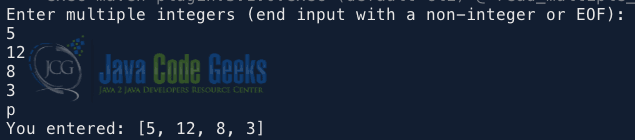
The loop exits when a non-integer is entered. Finally, the program prints the entered integers as a list:
2.2 Reading a Line and Parsing Using Streams
This method reads the entire line as a string, splits it into individual numbers, and parses each number into an integer.
import java.util.Arrays;
import java.util.Scanner;

public class ReadMultipleIntegersScannerStream {

    public static void main(String[] args) {
        // Create a Scanner object to read input
        Scanner scanner = new Scanner(System.in);
        System.out.println("Enter multiple integers separated by spaces:");

        // Read the entire input line
        String inputs = scanner.nextLine();

        // Split the input and parse integers into an array
        int[] parsedNumbers = Arrays.stream(inputs.split(" "))
                .mapToInt(Integer::parseInt)
                .toArray();

        System.out.print("You entered: ");
        System.out.print(Arrays.toString(parsedNumbers));

        scanner.close();
    }
}
In this example, scanner.nextLine() reads the entire line of input as a string, while inputs.split(" ") splits the string into an array of substrings using spaces as delimiters. The method Arrays.stream(...).mapToInt(Integer::parseInt).toArray() converts the array of strings into a stream, maps each string to its integer equivalent using Integer.parseInt, and collects the resulting integers into an array.
3. Using BufferedReader
The BufferedReader class is a robust way to read input, especially when performance is a concern or when handling large inputs. This solution involves using BufferedReader to read the input as a string, trimming spaces, splitting it into substrings, converting each to an integer with Integer.parseInt(), and storing them in an array or list.
import java.io.BufferedReader;
import java.io.IOException;
import java.io.InputStreamReader;
import java.util.Arrays;

public class ReadMultipleIntegersBufferedReader {

    public static void main(String[] args) throws IOException {
        // Create a BufferedReader object to read input
        BufferedReader br = new BufferedReader(new InputStreamReader(System.in));
        System.out.println("Enter multiple integers separated by spaces:");

        // Read the entire input line
        String lines = br.readLine();

        // Split the input string into an array of substrings
        String[] strs = lines.trim().split("\\s+");

        // Create an array to store the integers
        int[] a = new int[strs.length];

        // Convert each substring into an integer and store in the array
        for (int i = 0; i < strs.length; i++) {
            a[i] = Integer.parseInt(strs[i]);
        }

        System.out.print("You entered: ");
        System.out.print(Arrays.toString(a));
    }
}
In this example, BufferedReader efficiently reads input from the console by wrapping around InputStreamReader, which converts bytes into characters. The br.readLine() method reads the entire input line as a single string. The lines.trim().split("\\s+") step removes any leading or trailing spaces from the string and then splits it into an array of substrings wherever one or more spaces occur. Each substring, representing an integer, is parsed using Integer.parseInt() and stored in an integer array.
4. Conclusion
In this article, we explored different ways to read multiple integers from a single line in Java, including using the Scanner class with a loop and streams, and the BufferedReader for efficient input handling.
5. Download the Source Code
This article explored how to read multiple integers from a single line of input in Java.
You can download the full source code of this example here: Java read multiple integers one line



