
Writing Javadoc comments in Java is an essential practice for creating clear and readable documentation. Since Javadocs serve as the official reference for our code, presenting information in a well-structured way helps other developers quickly understand classes, methods, and fields. One common formatting challenge is separating paragraphs so that the output documentation is easy to read.
Javadoc supports simple HTML-like tags to handle this formatting. In this article, we’ll explore how to properly separate paragraphs in Javadocs and improve the overall quality of our documentation.
1. How Paragraphs Influence Readability
Documentation, like any form of writing, benefits from visual organization. Imagine opening a Javadoc page where all the details of a class are jammed into a single block of text. Even if the information is technically correct, the lack of structure makes it hard to scan and understand.
Paragraph separation helps in several ways:
- Improves readability: Each paragraph introduces a new idea, making the content easier to follow.
- Encourages clarity: Breaking text into paragraphs forces you to structure your thoughts.
- Enhances navigation: When users skim Javadocs, clearly separated paragraphs help them quickly find what they are looking for.
- Supports professional documentation standards: Good formatting makes your project appear more polished and easier to maintain.
2. Basic Paragraph Separation with <p>
By default, Javadoc merges all lines of text in a comment into a single block unless you explicitly separate them. To create proper paragraphs, you should use the HTML <p> tag.
Here’s a simple example:
 /**
     * This method demonstrates how to separate paragraphs in Javadocs.
     *
     * <p>
     * The first paragraph introduces the purpose of the method. It is usually
     * short and concise, summarizing what the method is about.
     *
     * <p>
     * The second paragraph can go into more detail, such as describing usage
     * scenarios, performance considerations, or any exceptions that might be
     * thrown.
     *
     * @return a simple string result
     */
    public String exampleMethod() {
        return "Hello Javadoc!";
    }
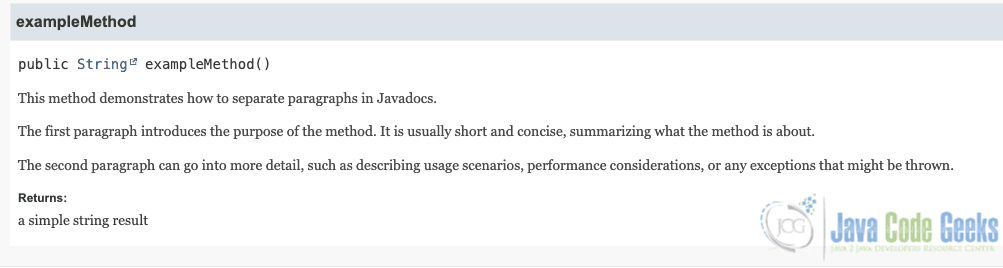
In the generated Javadoc, the text after each <p> tag will appear as a new paragraph with proper spacing. This is the most reliable and widely accepted way to separate paragraphs. It works consistently across different JDK versions and documentation viewers.
Generated Javadoc Output
3. Why Blank Lines Don’t Work
We may assume that adding a blank line inside a Javadoc comment will create a new paragraph. This is logical because blank lines separate paragraphs in plain text or Markdown. However, Javadoc does not interpret blank lines this way.
    /**
     * This is the first line.
     *
     * Even with a blank line, this text is treated as part of the same
     * paragraph in the generated documentation.
     *
     * @return a sample string
     */
    public String exampleMethod() {
        return "Hello Javadoc!";
    }
}
When you generate the documentation, you will notice that the blank line is ignored, and the entire comment appears as a single paragraph. This is why relying on blank lines for formatting is not recommended. Instead, always use <p> tags for clarity and consistency.

4. Combining Paragraphs with Other Formatting
Paragraphs in Javadocs can be combined with other formatting options to create richer documentation. Since Javadoc supports a subset of HTML, you can use elements like <ul>, <ol>, and <pre> in addition to <p>.
    /**
     * Demonstrates using paragraphs alongside lists.
     *
     * <p>
     * Here are the key points:
     * <ul>
     * <li>The method accepts no parameters.</li>
     * <li>It always returns the same string.</li>
     * <li>It is mainly for demonstration purposes.</li>
     * </ul>
     *
     * <p>
     * You can also add a final paragraph for any additional notes or
     * recommendations.
     */
    public String formattedExample() {
        return "Formatted Javadoc Example";
    }
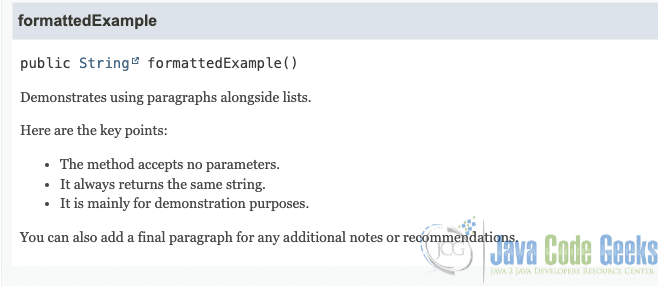
The combination of <p> for paragraphs and lists or code blocks for structured content makes your Javadocs more readable and professional.
5. Conclusion
Separating paragraphs in Javadocs is simple but essential for creating clear, readable documentation. By using the <p> tag, you ensure that your documentation is properly structured and professional-looking. While blank lines won’t affect Javadoc output, consistent use of <p> along with other formatting options such as lists and code blocks will greatly improve your documentation’s quality.
This article explored the use of Javadoc paragraphs.



