
Hibernate ORM with Panache is a modern, simplified way to use Hibernate in Java applications. Built into the Quarkus framework, it allows us to interact with databases using less boilerplate code, providing a clean and expressive API on top of standard JPA. In this article, we will build a simple CRUD application using Hibernate ORM with Panache.
1. Project Setup
First, we need to create a Quarkus project with the appropriate extensions for Hibernate ORM with Panache and an H2 database. We will use Maven as our build tool.
You can create a Quarkus application using Hibernate ORM with Panache by using the online project generator available at code.quarkus.io. Simply select the following extensions: Hibernate ORM with Panache, JDBC Driver – H2, and RESTEasy Classic JSON-B, then generate your application to get started.
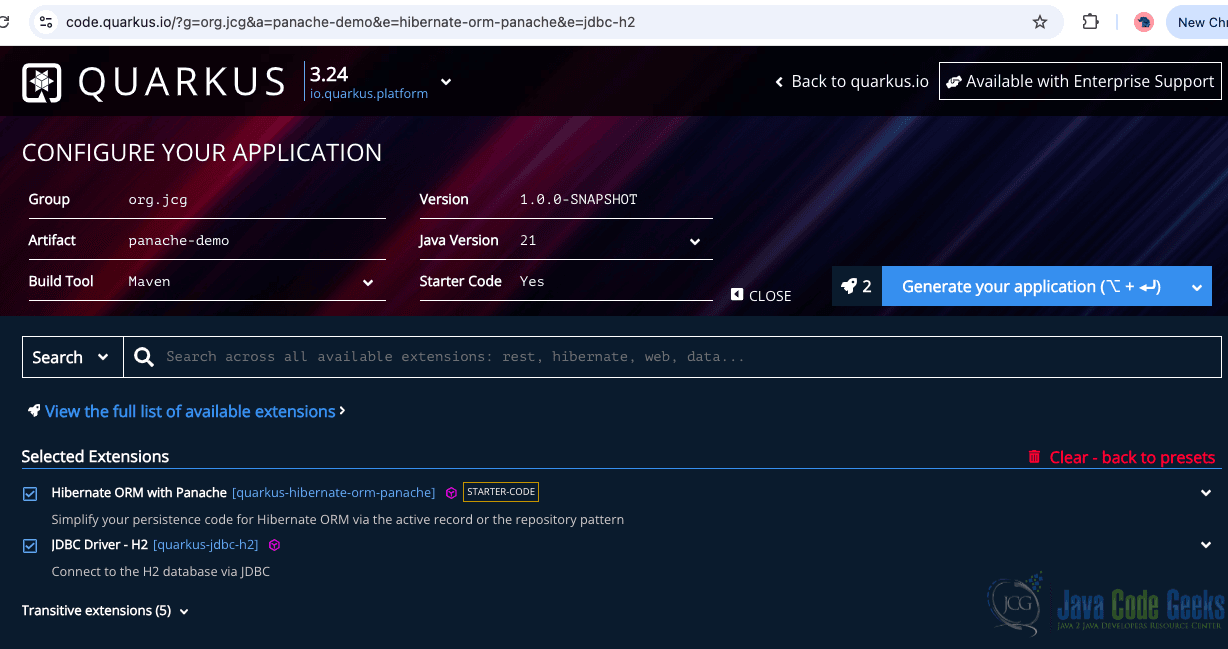
Alternatively, you can use the Quarkus Maven plugin to generate the project from the command line:
mvn io.quarkus:quarkus-maven-plugin:3.24.1:create \
    -DprojectGroupId=com.jcg \
    -DprojectArtifactId=panache-demo \
    -DclassName="com.jcg.PersonResource" \
    -Dpath="/" \
    -Dextensions="resteasy-jsonb,hibernate-orm-panache,jdbc-h2"
This command scaffolds a Quarkus project with the necessary dependencies for REST API development, ORM with Panache, and an in-memory H2 database, which makes it easy to run and test without needing an external DB.
Maven Configuration (pom.xml)
Verify your pom.xml has the correct dependencies for REST, Hibernate ORM with Panache, and H2.
        <dependency>
            <groupId>io.quarkus</groupId>
            <artifactId>quarkus-hibernate-orm-panache</artifactId>
        </dependency>
        <dependency>
            <groupId>io.quarkus</groupId>
            <artifactId>quarkus-jdbc-h2</artifactId>
        </dependency>
        <dependency>
            <groupId>io.quarkus</groupId>
            <artifactId>quarkus-resteasy-jsonb</artifactId>
        </dependency>
        <dependency>
            <groupId>io.quarkus</groupId>
            <artifactId>quarkus-arc</artifactId>
        </dependency>
        <dependency>
            <groupId>io.quarkus</groupId>
            <artifactId>quarkus-hibernate-orm</artifactId>
        </dependency>
        <dependency>
            <groupId>io.quarkus</groupId>
            <artifactId>quarkus-resteasy</artifactId>
        </dependency>
Application Configuration (application.properties)
Next, configure H2 and Hibernate settings in src/main/resources/application.properties.
quarkus.datasource.db-kind=h2
quarkus.datasource.jdbc.url=jdbc:h2:mem:default;DB_CLOSE_DELAY=-1
quarkus.datasource.username=sa
quarkus.datasource.password=sa

quarkus.hibernate-orm.database.generation=drop-and-create
quarkus.hibernate-orm.log.sql=true
This configuration sets the H2 database to run in-memory, with drop-and-create to recreate the schema on each start. SQL logging is enabled for visibility into Hibernate’s actions.
2. Creating the Entity
Let’s define a simple Person entity that extends PanacheEntity, which provides an ID and several convenient static methods.
@Entity
public class Person extends PanacheEntity {

    public String name;
    public int age;

    public Person() {
    }

    public Person(String name, int age) {
        this.name = name;
        this.age = age;
    }

}
The Person class maps to a database table. Extending PanacheEntity auto-generates a primary key and adds useful ORM utilities like persist, findById, and listAll.
Creating the Repository (Optional)
Although Panache entities support static access methods, you can optionally define a repository for better abstraction.
@ApplicationScoped
public class PersonRepository implements PanacheRepository<Person> {

    // Custom queries can go here
}
This optional class provides repository-style access to the Person entity. It allows custom methods and can be injected into services or resources for cleaner architecture.
3. Creating the REST Resource
Now, let’s expose the Person entity through a RESTful API using Quarkus RESTEasy.
@Path("/people")
@Produces(MediaType.APPLICATION_JSON)
@Consumes(MediaType.APPLICATION_JSON)
public class PersonResource {

    @GET
    public List getAll() {
        return Person.listAll();
    }

    @POST
    @Transactional
    public void addPerson(Person person) {
        person.persist();
    }

    @GET
    @Path("/{id}")
    public Person getById(@PathParam("id") Long id) {
        return Person.findById(id);
    }

    @DELETE
    @Path("/{id}")
    @Transactional
    public void deleteById(@PathParam("id") Long id) {
        Person.deleteById(id);
    }
}
This REST resource class provides HTTP endpoints for interacting with the Person entity using standard CRUD operations. The @Path("/people") annotation defines the base URI path for all the methods in this class. The @GET method without a sub-path returns a list of all people in the database by calling Person.listAll(), which is a static Panache utility method that retrieves all rows from the corresponding table.
The @POST method is annotated with @Transactional, which is essential when performing operations that modify the database state, like persisting new entities. Here, person.persist() saves the incoming Person object to the database.
The @GET method with a path parameter /people/{id} uses Person.findById(id) to retrieve a single person record by its ID, automatically mapped from the URL. The @DELETE method also uses a path parameter and removes the record by calling Person.deleteById(id), another Panache utility method that simplifies deletion by ID.
By using Panache’s active record pattern, this resource avoids the need for a separate service or DAO layer for simple use cases.
4. Running the Application
To start the app in development mode with live reload enabled, run:
./mvnw quarkus:dev
This starts the Quarkus app with live-reload capabilities, making it ideal for iterative development. Since we use H2, no external DB setup is needed.
5. Testing the API
You can test your REST endpoints using tools like curl or Postman. Here are example commands to test the application:
Create New Persons
curl -X POST -H "Content-Type: application/json" \
  -d '{"name": "Grace Hopper", "age": 85}' \
  http://localhost:8080/people

curl -X POST -H "Content-Type: application/json" \
  -d '{"name": "Alan Turing", "age": 41}' \
  http://localhost:8080/people
Get All People
curl http://localhost:8080/people
Sample Output:
[
  {
    "id": 1,
    "age": 85,
    "name": "Grace Hopper"
  },
  {
    "id": 2,
    "age": 41,
    "name": "Alan Turing"
  }
]
Get Person by ID
curl http://localhost:8080/people/1
Delete Person by ID
curl -X DELETE http://localhost:8080/people/1
These commands test your API by creating, retrieving, and deleting Person records. They demonstrate how easily REST endpoints interact with the Panache entity.
6. Conclusion
In this article, we explored how to build a CRUD REST API using Hibernate ORM with Panache in Quarkus, powered by the H2 in-memory database. Panache significantly reduces the effort required to manage entities and queries while offering a modern and fluent API. H2 makes it easy to develop and test without installing a full database engine. This setup is ideal for rapid prototyping.
7. Download the Source Code
You can download the full source code of this example here: java hibernate panache



