
1. Introduction
In this example. I will create a simple Java project that demonstrates how to fix the JsonMappingException problem: Can not deserialize instance of java.util.HashMap out of START_ARRAY token. The com.fasterxml.jackson.databind.JsonMappingException is a checked exception used to signal fatal problems when mapping content and provides the relevant path of references to help in troubleshooting.
2. Setup
In this step, I will create a gradle project along with the jackson-databind and Junit5 libraries.
build.gradle
plugins {
	id 'java'
	id 'org.springframework.boot' version '3.4.1'
	id 'io.spring.dependency-management' version '1.1.7'
}

group = 'org.zheng.demo'
version = '0.0.1-SNAPSHOT'

java {
	toolchain {
		languageVersion = JavaLanguageVersion.of(17)
	}
}

configurations {
	compileOnly {
		extendsFrom annotationProcessor
	}
}

repositories {
	mavenCentral()
}

dependencies {
	implementation 'org.springframework.boot:spring-boot-starter'
	implementation 'com.fasterxml.jackson.core:jackson-databind'
	testImplementation 'org.springframework.boot:spring-boot-starter-test'
	testRuntimeOnly 'org.junit.platform:junit-platform-launcher'
}

tasks.named('test') {
	useJUnitPlatform()
}
3. JsonMappingException Root Cause
JSON (JavaScript Object Notation) is a lightweight, text-based string that supports two primary data structures: Objects and Arrays.
- JSON object
- is enclosed in curly braces (
{}). - is an unordered collection of key-value pairs. Each key-value pair is separated by a comma (
,) without the trailing comma. The key is a string and must be wrapped in double quotes (" "). Each key is followed by a colon(:) and then its corresponding value. A value in JSON can be a string (enclosed in double quotes" "), a number (either an integer or a floating-point number), a boolean (trueorfalse), anullvalue (null), a JSON object (nested objects), or a JSON array (nested arrays).
- is enclosed in curly braces (
- JSON array
- Arrays are enclosed in square brackets (
[]). - is an ordered list of values.
- Each value in the array is separated by a comma (
,).
- Arrays are enclosed in square brackets (
The java.util.HashMap is a Java object that is used for storing key-value pairs. Therefore, the JsonMappingException is thrown when parsing the JSON array string as a HashMap object.
4. Jackson ObjectMapper Configuration
In this step, I will create a JacksonConfiguration.java to configure an ObjectMapper spring bean.
JacksonConfiguration.java
package org.zheng.demo;

import org.springframework.context.annotation.Bean;
import org.springframework.context.annotation.Configuration;

import com.fasterxml.jackson.databind.ObjectMapper;

@Configuration
public class JacksonConfiguration {

	@Bean
	public ObjectMapper objectMapper() {
		return new ObjectMapper();
	}

}
5. MapperService to Fix the JsonMappingException
In this step, I will create a MapperService.java with two methods.
readAsHashMap: reads a JSON Object string as aHashMapobject.readAsMaps: reads a JSON Array string as aListofMapobjects.
MapperService.java
package org.zheng.demo.data;

import java.util.HashMap;
import java.util.List;
import java.util.Map;

import org.springframework.stereotype.Service;

import com.fasterxml.jackson.core.JsonProcessingException;
import com.fasterxml.jackson.core.type.TypeReference;
import com.fasterxml.jackson.databind.ObjectMapper;

@Service
public class MapperService {

	private final ObjectMapper ob;

	public MapperService(ObjectMapper obmapper) {
		this.ob = obmapper;
	}

	@SuppressWarnings("unchecked")
	public HashMap<String, Object> readAsHashMap(final String jsonObjectString) throws JsonProcessingException {
		return ob.readValue(jsonObjectString, HashMap.class);
	}

	public List<Map<String, Object>> readAsMaps(final String jsonArrayString) throws JsonProcessingException {
		return ob.readValue(jsonArrayString, new TypeReference<List<Map<String, Object>>>() {
		});
	}
}
5.1 Fix the JsonMappingException Tests
I will also create a MapperServiceTest.java that shows JsonMappingException is thrown when mapping a JSON array string to a HashMap object.
MapperServiceTest.java
package org.zheng.demo.data;

import static org.junit.jupiter.api.Assertions.assertEquals;
import static org.junit.jupiter.api.Assertions.assertNull;
import static org.junit.jupiter.api.Assertions.assertThrows;
import static org.junit.jupiter.api.Assertions.assertTrue;

import java.util.HashMap;
import java.util.List;
import java.util.Map;

import org.junit.jupiter.api.Test;
import org.springframework.beans.factory.annotation.Autowired;
import org.springframework.boot.test.context.SpringBootTest;

import com.fasterxml.jackson.core.JsonParseException;
import com.fasterxml.jackson.core.JsonProcessingException;
import com.fasterxml.jackson.databind.JsonMappingException;

@SpringBootTest
class MapperServiceTest {

	private static final String UNEXPECTED_CHARACTER = "Unexpected character";

	@Autowired
	private MapperService testClass;

	private final String invalidJsonKeyNotEnclosed = """
			{
			   stringKey: "valueString"
			}
			 """;

	private final String invalidJsonTraillingComma = """
			{
			   stringKey: "valueString",
			}
			 """;

	private final String validListMapJson = """
				[
			    {
			        "stringKey": "valueString"
			    },
			    {
			        "anotherStringKey": "val2"
			    }
			]
			 """;

	private final String validMapJson = """
					{
			    "stringKey": "valueString",
			    "anotherStringKey": "val2",
			    "numberKey": 133,
			    "booleanKey": true
			}
				 """;

	@Test
	void test_readAsHashMap_for_validMapJson() {
		try {
			HashMap<String, Object> readData = testClass.readAsHashMap(validMapJson);
			assertEquals("valueString", readData.get("stringKey"));
			assertEquals("val2", readData.get("anotherStringKey"));
			assertEquals(133, (Integer) readData.get("numberKey"));
			assertTrue((Boolean) readData.get("booleanKey"));
			assertNull(readData.get("badKey"));
		} catch (JsonProcessingException e) {
			e.printStackTrace();
		}

	}

	@Test
	void test_readAsHashMap_throw_JsonParseException_for_invalidJsonKeyNotEnclosed() {
		JsonParseException exception = assertThrows(JsonParseException.class, () -> {
			testClass.readAsHashMap(invalidJsonKeyNotEnclosed);
		});
		assertTrue(exception.getMessage().contains(UNEXPECTED_CHARACTER));
	}

	@Test
	void test_readAsHashMap_throw_JsonParseException_for_invalidJsonTraillingComma() {
		JsonParseException exception = assertThrows(JsonParseException.class, () -> {
			testClass.readAsHashMap(invalidJsonTraillingComma);
		});
		assertTrue(exception.getMessage().contains(UNEXPECTED_CHARACTER));
	}

	@Test
	void test_readAsHashMap_throw_JsonMappingException_for_validListMapJson() {
		JsonMappingException exception = assertThrows(JsonMappingException.class, () -> {
			testClass.readAsHashMap(validListMapJson);
		});
		assertTrue(exception.getMessage().contains("JsonToken.START_ARRAY"));
	}

	@Test
	void test_readAsMaps_for_validListMapJson() {
		try {
			List<Map<String, Object>> readData = testClass.readAsMaps(validListMapJson);
			assertEquals("valueString", readData.get(0).get("stringKey"));
			assertEquals("val2", readData.get(1).get("anotherStringKey"));
			assertNull(readData.get(0).get("badKey"));
		} catch (JsonProcessingException e) {
			e.printStackTrace();
		}
	}

}
- Line 30: create an invalid JSON string as its key is not enclosed with double quotes.
- Line 36: create an invalid JSON string as it has a trailing comma.
- Line 41: create a valid JSON Array string as it starts with [].
- Line 52: create a valid JSON Object string as it starts with {}.
- Line 61:
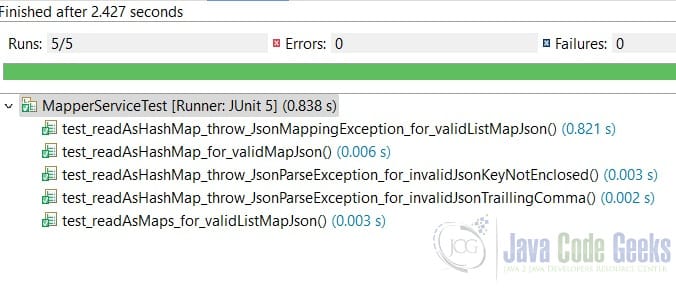
test_readAsHashMap_for_validMapJsonverifies reading a valid JSON map string to aHashMapis passed. - Line 76:
test_readAsHashMap_throw_JsonParseException_for_invalidJsonKeyNotEnclosedverifies aJsonParseExceptionis thrown when the JSON key is not enclosed with double quotes. - Line 84:
test_readAsHashMap_throw_JsonParseException_for_invalidJsonTraillingCommaverifies aJsonParseExceptionis thrown when the JSON is included a trailing comma. - Line 92:
test_readAsHashMap_throw_JsonMappingException_for_validListMapJsonconfirms thatJsonMappingExceptionis thrown when parsing a JSON array into aHashMapobject. - Line 100:
test_readAsMaps_for_validListMapJsonverified that JSON Array of maps string can be mapped to aListofMapobjects.
Ran the unit tests and captured the test results:
6. Conclusion
In this example, I demonstrated how to fix the JsonMappingException via JUnit tests by mapping the JSON array string to a list of HashMap objects. I also explained why the JsonMappingException is thrown when parsing a JSON array as a HashMap object.
7. Download
This was an example of a gradle project which showed JsonMappingException is thrown when parsing JSON array as a HashMap and its solution.
You can download the full source code of this example here: Fix the JsonMappingException – HashMap vs START_ARRAY token



