
1. Introduction
The “can not find driver exception” with “com.mysql.jdbc.driver" means that the Spring Boot application can not load the old MySQL driver class-com.mysql.jdbc.Driver-from its classpath. It’s usually caused by upgrading a Spring Boot application to a high version with a mismatching spring.datasource.driver-class-name. In this example, I will explain the root cause and how to correct the issue.
2. Cause of Can not Find Driver Exception
Spring Boot Java Database Connectivity (JDBC) support provides a simplified and opinionated way to configure and use JDBC in a Spring-based application. It automatically configures a DataSource based on properties in application.properties or application.yml.
In older Spring Boot 1.x, the spring.datasource.driver-class-name property is set explicitly. With Spring Boot 2+, if spring.datasource.driver-class-name is not configured, then Spring Boot auto-detects it using the JDBC URL. It defaults the drive class name based on the MySQL Connector/J version. If the MySQL Connector/J version is older than 8, then the driver class is com.mysql.jdbc.Driver, else the driver class name is com.mysql.cj.jdbc.Driver .
| MySQL Connector/J Version | Default Driver Class Default |
| < 8.0 | com.mysql.jdbc.Driver |
| >= 8.0 | com.mysql.cj.jdbc.Driver |
When Spring Boot application upgrades to a higher version, if the spring.datasource.driver-class-name is configured explicitly in the configuration file, then its value must match the value based on the MySQL Connector/J version outlined in Table 1. If the driver class is set as “com.mysql.jdbc.Driver” but the MySQLConnector/J version is 8 or higher, then the application will throw “java.lang.IllegalStateException: Cannot load driver class: com.mysql.jdbc.Driver” exception. To correct it, you can either update the driver class to “com.mysql.cj.jdbc.Driver" or remove it from the configuration file.
3. Setup
In this step, I will create a Spring Boot MySQL application vis Spring Inilitizer.
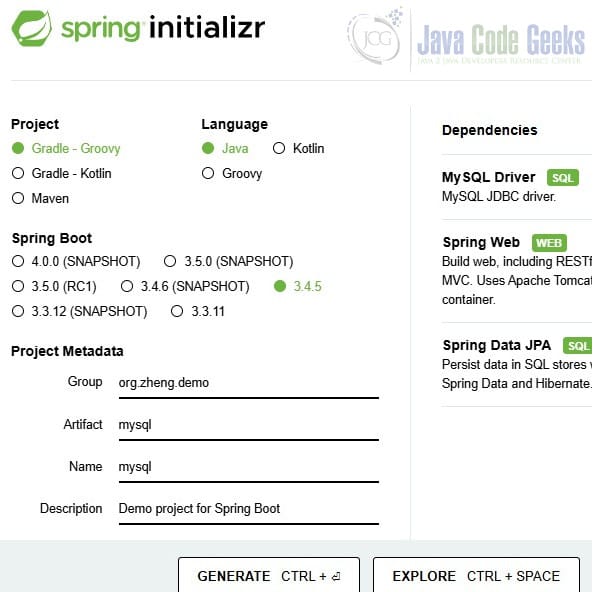
3.1 Generated Build File
Here is the generated build.gradle file.
build.gradle
plugins {
	id 'java'
	id 'org.springframework.boot' version '3.4.5'
	id 'io.spring.dependency-management' version '1.1.7'
}

group = 'org.zheng.demo'
version = '0.0.1-SNAPSHOT'

java {
	toolchain {
		languageVersion = JavaLanguageVersion.of(17)
	}
}

repositories {
	mavenCentral()
}

dependencies {
	implementation 'org.springframework.boot:spring-boot-starter-web'
	implementation 'org.springframework.boot:spring-boot-starter-data-jpa'
	runtimeOnly 'com.mysql:mysql-connector-j'
	testImplementation 'org.springframework.boot:spring-boot-starter-test'
	testRuntimeOnly 'org.junit.platform:junit-platform-launcher'
}

tasks.named('test') {
	useJUnitPlatform()
}
- Line 23:
mysql-connector-jversion will be determined by Spring Boot BOM (Bill of Materials). I will use the “gradlew dependencies” command in step 3.2 to find out the exact version used.
3.2 Check the MySQL Connector/J Version
In this step, I will use the “gradlew dependencies” command to find out the version of MySQL connector/j: 9.1.0.
gradlew dependencies command output portion with mysql-connector-j version
+--- com.mysql:mysql-connector-j -> 9.1.0
4. Application Properties
4.1 Correct application.properties
In this step, I will add the MySQL database connection properties. We can leave out the spring.datasource.driver-class-name as Spring boot 3 defaults to com.mysql.cj.jdbc.Driver.
correct application.properties
spring.datasource.url=jdbc:mysql://localhost:3306/mydb
spring.datasource.username=root
spring.datasource.password=secret
# spring.datasource.driver-class-name=com.mysql.cj.jdbc.Driver ← Optional
4.2 Out-of-Date application.properties
In this step, I will edit the MySQL database connection properties with an older driver class name, this will throw an exception with the error message: “Cannot load driver class: com.mysql.jdbc.Driver”.
wrong application.properties
spring.datasource.url=jdbc:mysql://localhost:3306/mydb
spring.datasource.username=root
spring.datasource.password=secret
spring.datasource.driver-class-name=com.mysql.jdbc.Driver
5. Conclusion
In this example, I explained the cause of the Cannot load driver class: com.mysql.jdbc.Driver exception in Spring Boot application. Ensuring compatibility between dependencies and configuration is key when working with JDBC in Spring Boot. Just remember that com.mysql.jdbc.Driver is the older JDBC Driver for MySQL, Correct spring.datasource.driver-class solves the “Cannot Load Driver Class: com.mysql.jdbc.driver” problem.






