
1. Introduction
Custom field name with @JsonProperty is very useful when mapping Java fields to JavaScript Object Notation (JSON) properties and vice versa. JSON is commonly used in web applications to transmit data and the clients and servers can be written in different programming languages with different naming conventions. For example, JSON adapts the “snake_case” for the property name while Java uses the “camelCase” format for the field name. The @JsonProperty annotation from the Jackson library maps Java fields to JSON properties that meet both naming conventions. In this example, I will demonstrate custom field name with @JsonProperty annotation usage from the Jackson library.
2. Setup
In this step, I will create a Maven project which depends on Jackson, Junit, and Lombok. The Lombok is included to reduce the boilerplate code.
pom.xml
<project xmlns="http://maven.apache.org/POM/4.0.0"
	xmlns:xsi="http://www.w3.org/2001/XMLSchema-instance"
	xsi:schemaLocation="http://maven.apache.org/POM/4.0.0 https://maven.apache.org/xsd/maven-4.0.0.xsd">
	<modelVersion>4.0.0</modelVersion>
	<groupId>org.zheng.demo</groupId>
	<artifactId>jackson-jsonproperty</artifactId>
	<version>0.0.1-SNAPSHOT</version>
	<dependencies>

		<!--
		https://mvnrepository.com/artifact/com.fasterxml.jackson.core/jackson-databind -->
		<dependency>
			<groupId>com.fasterxml.jackson.core</groupId>
			<artifactId>jackson-databind</artifactId>
			<version>2.17.1</version>
		</dependency>

		<!--
		https://mvnrepository.com/artifact/com.fasterxml.jackson.core/jackson-annotations -->
		<dependency>
			<groupId>com.fasterxml.jackson.core</groupId>
			<artifactId>jackson-annotations</artifactId>
			<version>2.17.1</version>
		</dependency>

		<dependency>
			<groupId>org.junit.jupiter</groupId>
			<artifactId>junit-jupiter-api</artifactId>
			<version>5.10.2</version>
			<scope>test</scope>
		</dependency>

		<!-- https://mvnrepository.com/artifact/org.projectlombok/lombok -->
		<dependency>
			<groupId>org.projectlombok</groupId>
			<artifactId>lombok</artifactId>
			<version>1.18.32</version>
			<scope>provided</scope>
		</dependency>

	</dependencies>
</project>
3. Custom Field Name with @JsonProperty
In this step, I will create three POJO classes which annotate a custom field name with jsonproperty annotation at the field, getter, and constructor positions.
Customer.java:@JsonPropertyis placed at thedataTypefield.Order.java:@JsonPropertyis placed at thegetName()method.Person.java@JsonPropertyis placed at thePersonconstructor.
3.1. Custom Field Name with @JsonProperty at Field
In this step, I will create a Customer.java class which annotates the @JsonProperty in the dataType field and maps the dataType field to JSON type property. Note: cannot name the field name as type directly as it is a reserved keyword in Java.
Customer.java
package org.zheng.demo.data;

import java.io.Serializable;
import java.util.ArrayList;
import java.util.List;

import com.fasterxml.jackson.annotation.JsonIgnoreProperties;
import com.fasterxml.jackson.annotation.JsonProperty;

import lombok.Data;
import lombok.NoArgsConstructor;
import lombok.NonNull;
import lombok.RequiredArgsConstructor;

@Data
@NoArgsConstructor
@RequiredArgsConstructor
@JsonIgnoreProperties(ignoreUnknown = true)
public class Customer implements Serializable {
	private static final long serialVersionUID = -1319171342148919329L;

	@JsonProperty("type")
	private String dataType;

	@NonNull
	private String email;

	private int id;

	private List<Order> orders;

	private Person person;

	public void addOrder(Order order) {
		if (this.orders == null) {
			this.orders = new ArrayList<>();
		}
		this.orders.add(order);
	}

}
- Line 22: maps the Java
dataTypefield to the JSONtypeproperty. - Line 25: marks the
emailfield as@NonNullvalue.
3.2 Custom Field Name with @JsonProperty at Getter
In this step, I will create an Order.java class which annotates the @JsonProperty at the getProductName method. The JSON property “product_name” maps to the Java “productName” field.
Order.java
package org.zheng.demo.data;

import java.util.Objects;

import com.fasterxml.jackson.annotation.JsonIgnoreProperties;
import com.fasterxml.jackson.annotation.JsonProperty;

@JsonIgnoreProperties(ignoreUnknown = true)
public class Order {

	private String productName;

	private int quantity;

	public Order() {
		super();
	}

	public Order(String productName, int quantity) {
		super();
		this.productName = productName;
		this.quantity = quantity;
	}

	@Override
	public boolean equals(Object obj) {
		if (this == obj)
			return true;
		if (obj == null)
			return false;
		if (getClass() != obj.getClass())
			return false;
		Order other = (Order) obj;
		return Objects.equals(productName, other.productName) && quantity == other.quantity;
	}

	@JsonProperty("product_name")
	public String getProductName() {
		return productName;
	}

	public int getQuantity() {
		return quantity;
	}

	@Override
	public int hashCode() {
		return Objects.hash(productName, quantity);
	}

	public void setProductName(String productName) {
		this.productName = productName;
	}

	public void setQuantity(int quantity) {
		this.quantity = quantity;
	}

}
- Line 37: maps the Java “
productName” field to “product_name” JSON property.
3.3 Custom Field Name with @JsonProperty at Constructor
In this step, I will create a Person.java class that annotates the @JsonProperty at the Person constructor. It also marks the product_name as required.
Person.java
package org.zheng.demo.data;

import com.fasterxml.jackson.annotation.JsonCreator;
import com.fasterxml.jackson.annotation.JsonProperty;

import lombok.Data;
import lombok.NoArgsConstructor;

@Data
@NoArgsConstructor
public class Person {
	private int age;
    @JsonProperty("person_name")
	private String name;

	@JsonCreator
	public Person(@JsonProperty(value = "person_name", required = true) String name, @JsonProperty("age") int age) {
		this.name = name;
		this.age = age;
	}

}
- Line 13: annotates the field to “
person_name“. - Line 16: marks the constructor used for the deserialization process.
- Line 17: maps the JSON
person_nameproperty to Java name field and marks it as a required field.
4. Test Person
In this step, I will create a Junit TestPerson.java which has the following three tests:
test_happy_path– it serialized and deserialized data as expected.test_required_throw_exception_if_not_there– when the requiredperson_nameproperty is missing, then throwsMismatchedInputException.test_required_with_null_is_ok– when the requiredperson_nameproperty has anullvalue, then it maps tonull. Note: therequired=trueis different from@NonNullannotation.
TestPerson.java
package org.zheng.demo;

import static org.junit.jupiter.api.Assertions.assertEquals;
import static org.junit.jupiter.api.Assertions.assertNull;
import static org.junit.jupiter.api.Assertions.assertThrows;
import static org.junit.jupiter.api.Assertions.assertTrue;

import org.junit.jupiter.api.Test;
import org.zheng.demo.data.Person;

import com.fasterxml.jackson.core.JsonProcessingException;
import com.fasterxml.jackson.databind.ObjectMapper;
import com.fasterxml.jackson.databind.exc.MismatchedInputException;

class TestPerson {

	private ObjectMapper ob = new ObjectMapper();

	@Test
	void test_happy_path() {
		// name and age have value
		String json = "{\"person_name\":\"John Doe\",\"age\":30}";
		try {
			Person pers = ob.readValue(json, Person.class);
			assertEquals("John Doe", pers.getName());
			assertEquals(30, pers.getAge());
		} catch (JsonProcessingException e) {
			e.printStackTrace();
		}

	}

	@Test
	void test_required_throw_exception_if_not_there() {
		// name is not there,
		String jsonWOName = "{\"name1\":\"John Doe\",\"age\":30}";
		MismatchedInputException expectedException = assertThrows(MismatchedInputException.class, () -> ob.readValue(jsonWOName, Person.class));
		assertTrue(expectedException.getMessage().contains("Missing required creator property 'person_name'") );

	}

	@Test
	void test_required_with_null_is_ok() {
		// has name but the value is null
		String jsonNullName = "{\"person_name\":null,\"age\":30}";
		try {
			Person pers2 = ob.readValue(jsonNullName, Person.class);
			assertNull(pers2.getName());
			assertEquals(30, pers2.getAge());
		} catch (JsonProcessingException e) {
			e.printStackTrace();
		}
	}

}
- Line 22: the
person_namemaps to a non-null value. - line 36: throw an exception if JSON does not have required
person_name. - line 45: the
person_namemaps anullvalue.
5. Test Order
5.1 Order.json
In this step, I will create an Order.json file and will be used in step 5.2.
Order.json
 {  "quantity" : 10,
    "product_name" : "test"
 }
- the
product_nameis mapped toproductName.
5.2 TestOrder.java
In this step, I will create a Junit TestOrder.java which has the following two tests:
test_ignore_unknown– the unknown JSON properties are ignored.test_JsonProperty_getter_happypath– JSON properties are mapped to POJO fields as expected with the@JsonPropertyset at thegetNamemethod.
TestOrder.java
package org.zheng.demo;

import static org.junit.jupiter.api.Assertions.assertEquals;
import static org.junit.jupiter.api.Assertions.assertNull;

import java.io.File;
import java.io.IOException;

import org.junit.jupiter.api.Test;
import org.zheng.demo.data.Order;

import com.fasterxml.jackson.core.JsonProcessingException;
import com.fasterxml.jackson.databind.ObjectMapper;

class TestOrder {

	private ObjectMapper ob = new ObjectMapper();

	@Test
	void test_ignore_unknown() {
		// name and age have value
		String json = "{\"productName\":\"PC\",\"quantity\":3}";
		try {
			Order order = ob.readValue(json, Order.class);
			assertNull(order.getProductName());
			assertEquals(3, order.getQuantity());
		} catch (JsonProcessingException e) {
			e.printStackTrace();
		}
	}

	@Test
	void test_JsonProperty_getter_happypath() {
		File file = new File("src/test/resources/order.json");

		try {
			Order order = ob.readValue(file, Order.class);
			assertEquals("test", order.getProductName());
			assertEquals(10, order.getQuantity());
		} catch (IOException e) {
			// TODO Auto-generated catch block
			e.printStackTrace();
		}
	}

}
- Line 22: the JSON has “
productName” which is unknown since@JsonPropertymaps to “product_name“. - Line 25: the deserialized
orderobject has anullvalue in theproductNamefield.
6. Test Customer
In this step, I will create a Junit TestCustomer.java which has the following seven tests:
test_customer_full_happyPath– read thecustomer_full.jsonand map to Java POJO as expected.test_customer_no_email_throw_JsonMappingException– throwJsonMappingExceptionwhen@NonNullemail is not there.test_customer_no_person_is_ok– although thepersonclass requires aperson_name, but thecustomerclass does not require aperson, so acustomer‘spersonis mapped tonull.test_customer_null_email_throw_JsonMappingException– because theemailfield is defined as non-null, so an exception is thrown when theob.readValue()method is called.test_customer_person_no_name_throw_MismatchedInputException– When a customer JSON contains apersonto thecustomer, butperson_nameis missing, then an exception is thrown as theperson_nameis required.test_customer_wo_email_personName_throws_MismatchedInputException– when non-null email is missing and requiredperson_nameis missing, then missingperson_nameexception is thrown.test_JsonProperty_field– verify that the@emailfield annotated at field level works as expected.
TestCustomer.java
package org.zheng.demo;

import static org.junit.jupiter.api.Assertions.assertEquals;
import static org.junit.jupiter.api.Assertions.assertNull;
import static org.junit.jupiter.api.Assertions.assertThrows;
import static org.junit.jupiter.api.Assertions.assertTrue;

import java.io.File;
import java.io.IOException;

import org.junit.jupiter.api.Test;
import org.zheng.demo.data.Customer;
import org.zheng.demo.data.Order;

import com.fasterxml.jackson.core.JsonProcessingException;
import com.fasterxml.jackson.databind.JsonMappingException;
import com.fasterxml.jackson.databind.ObjectMapper;
import com.fasterxml.jackson.databind.exc.MismatchedInputException;

class TestCustomer {

	private ObjectMapper ob = new ObjectMapper();

	@Test
	void test_customer_full_happyPath() {
		File file = new File("src/test/resources/customer_full.json");

		try {
			Customer readCust = ob.readValue(file, Customer.class);
			assertEquals("Mary", readCust.getPerson().getName());
			assertEquals(50, readCust.getPerson().getAge());
			assertEquals("test@test.com", readCust.getEmail());
			assertEquals("major", readCust.getDataType());
			assertEquals(2, readCust.getId());
			assertEquals(2, readCust.getOrders().size());
		} catch (JsonProcessingException e) {
			e.printStackTrace();
		} catch (IOException e) {
			e.printStackTrace();
		}
	}

	@Test
	void test_customer_no_email_throw_JsonMappingException() {
		File file = new File("src/test/resources/customer_no_email.json");

		JsonMappingException expectedException = assertThrows(JsonMappingException.class, () -> {
			ob.readValue(file, Customer.class);
		});

		assertTrue(expectedException.getMessage().contains("email is marked non-null but is null"));

	}

	@Test
	void test_customer_no_person_is_ok() {
		File file = new File("src/test/resources/customer_no_person.json");

		try {
			Customer cust = ob.readValue(file, Customer.class);
			assertNull(cust.getPerson());
		} catch (IOException e) {
			e.printStackTrace();
		}
	}

	@Test
	void test_customer_null_email_throw_JsonMappingException() {
		File file = new File("src/test/resources/customer_null_email.json");

		JsonMappingException expectedException = assertThrows(JsonMappingException.class, () -> {
			ob.readValue(file, Customer.class);
		});

		assertTrue(expectedException.getMessage().contains("email is marked non-null but is null"));

	}

	@Test
	void test_customer_person_no_name_throw_MismatchedInputException() {
		File file = new File("src/test/resources/customer_person_no_name.json");
		MismatchedInputException expectedException = assertThrows(MismatchedInputException.class,
				() -> ob.readValue(file, Customer.class));
		assertTrue(expectedException.getMessage().contains("Missing required creator property 'person_name' "));

	}

	@Test
	void test_customer_wo_email_personName_throws_MismatchedInputException() {
		File file = new File("src/test/resources/customer_no_email_no_personName.json");

		MismatchedInputException expectedException = assertThrows(MismatchedInputException.class,
				() -> ob.readValue(file, Customer.class));

		assertTrue(expectedException.getMessage().contains("Missing required creator property 'person_name' (index 0)"));

	}

	@Test
	void test_JsonProperty_field() {
		Customer customer = new Customer("test@test.com");
		customer.setDataType("major");
		customer.setId(2);

		Order order = new Order("test", 10);
		customer.addOrder(order);
		Order order2 = new Order("PS", 20);
		customer.addOrder(order2);

		try {
			String jsonStr = ob.writerWithDefaultPrettyPrinter().writeValueAsString(customer);
			System.out.println(jsonStr);

			Customer readCust = ob.readValue(jsonStr, Customer.class);

			assertTrue(customer.equals(readCust));
			assertEquals("major", readCust.getDataType());
			assertEquals("test@test.com", readCust.getEmail());
			assertEquals(2, readCust.getId());
			assertEquals(2, readCust.getOrders().size());
			assertEquals("test", readCust.getOrders().get(0).getProductName());
			assertEquals(10, readCust.getOrders().get(0).getQuantity());
		} catch (JsonProcessingException e) {
			e.printStackTrace();
		}
	}

}
- Line 26: see
customer_full.jsonat step 6.1. - Line 45: see
customer_no_email.jsonat step 6.2. - Line 57: see
customer_no_person.jsonat step 6.4. - Line 69: see
customer_null_email.jsonat step 6.5. - Line 81: see
customer_person_no_name.jsonat step 6.6. - Line 90: see
customer_no_email_no_personName.jsonat step 6.3.
6.1 customer_full.json
In this step, I will create a customer_full.json file which contains all the necessary data properties. The file is used at the test_customer_full_happyPath method.
customer_full.json
{
  "id" : 2,
  "person" : {
  	"person_name":"Mary",
  	"age":50},
  "orders" : [ {
    "quantity" : 10,
    "product_name" : "test"
  }, {
    "quantity" : 20,
    "product_name" : "PS"
  } ],
  "type" : "major",
  "email" : "test@test.com"
}
- Line 4: the
person_nameproperty maps toPerson.name. - Line 8,11: the
product_nameproperty maps toOrder.productName. - Line 13: the
typeproperty maps toCustomer.dataType.
6.2 customer_no_email.json
In this step, I will create a customer_no_email.json file that contains a customer JSON without the required email property. It’s used at test_customer_no_email_throw_JsonMappingException.
customer_no_email.json
{
  "id" : 2,
  "person" : null,
  "orders" : [ {
    "quantity" : 10,
    "product_name" : "test"
  }, {
    "quantity" : 20,
    "product_name" : "PS"
  } ],
  "type" : "major",
  "email" : null
}
- Line 12: when the
emailproperty isnull, it will throw aJsonMappingExceptionas it is@NonNullat step 3.1.
6.3 customer_no_email_no_personName.json
In this step, I will create a customer_no_email_no_personName.json file that contains a customer JSON without the required email property and person_name.
customer_no_email_no_personName.json
{
  "id" : 2,
  "person" : {
  	"name":"Mary",
  	"age":50},
  "orders" : [ {
    "quantity" : 10,
    "product_name" : "test"
  }, {
    "quantity" : 20,
    "product_name" : "PS"
  } ],
  "type" : "major"
}
- Line 4: the
perons.nameshould beperson_namebased on the@JsonPropertyat step 3.3.
6.4 customer_no_person.json
In this step, I will create a customer_no_person.json file that contains a customer JSON without a person.
customer_no_person.json
{
  "id" : 2,
  "orders" : [ {
    "quantity" : 10,
    "product_name" : "test"
  }, {
    "quantity" : 20,
    "product_name" : "PS"
  } ],
  "type" : "major",
  "email" : "test@test.com"
}
- It should map to a
customerobject without any issue as seen intest_customer_no_person_is_ok.
6.5 customer_null_email.json
In this step, I will create a customer_null_email.json file that contains a custom JSON with null email property.
customer_null_email.json
{
  "id" : 2,
  "person" : null,
  "orders" : [ {
    "quantity" : 10,
    "product_name" : "test"
  }, {
    "quantity" : 20,
    "product_name" : "PS"
  } ],
  "type" : "major",
  "email" : null
}
- Line 12: it throws a
JsonMappingExceptionas the@NonNull emailisnull.
6.6 customer_person_no_name.json
In this step, I will create a customer_person_no_name.json file that contains a JSON for the customer without the person’s name property.
customer_person_no_name.json
{
    "id": 2,
    "person": {
        "name": "test",
        "age": 30
    },
    "orders": [
        {
            "quantity": 10,
            "product_name": "test"
        },
        {
            "quantity": 20,
            "product_name": "PS"
        }
    ],
    "type": "major",
    "email": "test@test.com"
}- Line 4: it throws
MismatchedInputExceptionas thePerson's nameshould beperson_nameas defined at step 3.3.
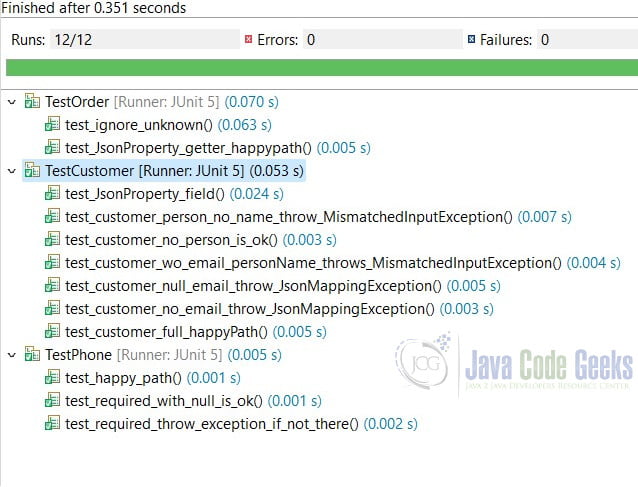
Run the Junit tests and all passed.
7. Conclusion
As you see in this example, I demonstrated how to serialize and deserialize via Jackson custom field name with @JsonProperty annotation. We can annotate Java POJO fields with the @JsonProperty annotation at the field, getter, or constructor to map the Java fields to JSON properties.
Please note that there are two Jackson library versions: version 2 is provided by fasterxml and version 1 is provided by codehaus. Make sure that @JsonProperty is imported from the correct package if the project contains both versions of Jackson libraries.
8. Download
This was an example of a Maven project which demonstrated how to customize field name with the @JsonpPoperty annotation.
You can download the full source code of this example here: Custom field name with @JsonProperty



