
1. Introduction
The Client URL (cURL) is a tool for transferring data from or to a server using URLs. It supports many protocols including HTTP. It is perfect for testing APIs manually or in shell scripts. However, when calling an API from the Java backend, a microservice, or a desktop Java app, we’ll need to convert cURL requests to Java HTTP requests. In this example, I will demonstrate cURL HTTP request conversion with the following libraries:
- Java native HttpClient
- Apache HttpClient
- OkHttp
- Spring WebClient
2. CURL Command for HTTP Requests
The cURL command syntax is curl [options] [URL]. In this step, I will show cURL requests for both Get and Post requests.
2.1 CURL HTTP Get Request
The following HTTP Get cURL command and its response will be converted to Java HTTP Client with various libraries in this example.
HTTP Get cURL Command Example
curl  -X GET \
  'https://api.restful-api.dev/objects/7' \
  --header 'Content-Type: application/json'
-X: specify request method – GET.--header: add the HTTP header withContent-Type=application/json.
Here is the corresponding response.
cURL Command Response
{
  "id": "7",
  "name": "Apple MacBook Pro 16",
  "data": {
    "year": 2019,
    "price": 1849.99,
    "CPU model": "Intel Core i9",
    "Hard disk size": "1 TB"
  }
}
2.2 CURL HTTP Post Request
The following HTTP Post cURL command and its response will be converted to Java HTTP Client with various libraries in this example.
HTTP Post cURL Command Example
curl  -X POST \
  'https://api.restful-api.dev/objects/' \
  --header 'Content-Type: application/json' \
  --data-raw '{
  "id": "77",
  "name": "Apple MacBook Pro 16",
  "data": {
    "year": 2019,
    "price": 1849.99,
    "CPU model": "Intel Core i9",
    "Hard disk size": "1 TB"
  }
}'-X: specify request method – POST.--header: add the HTTP header withContent-Type=application/json.--data-raw: add the JSON payload.
3. Projects Set up
In this step, I will create two projects in Eclipse IDE.
- The
HttpClientDemoproject is a simple Java project that converts the cURL request to HTTP request via Java built-inHttpClientclass. - The
curlDemoproject is a Gradle Spring boot project that converts cURL requests to HTTP requests via ApacheCloseableHttpClient,OkHttpClient, and SpringWebClientclasses.
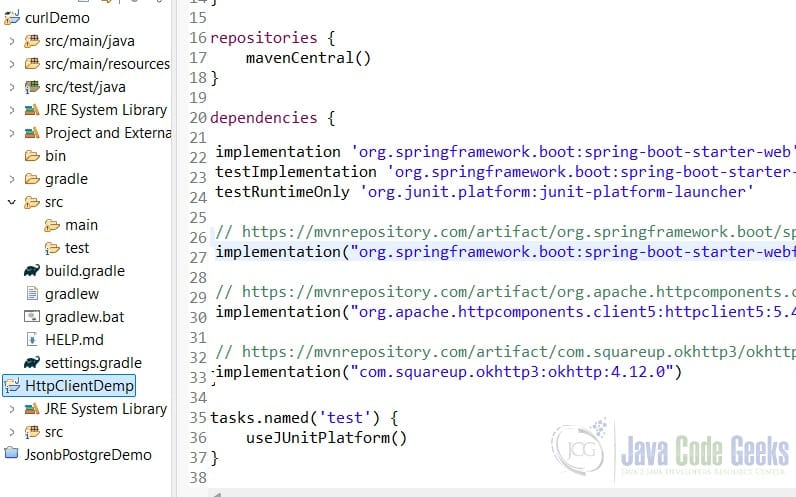
3.1 Setup a Spring Boot Project
In this step, I will create a gradle project with Apache HttpClient5, OkHttp3, and Spring WebClient via Spring Initializr. Here is the project’s build.gradle file.
build.gradle
plugins {
	id 'java'
	id 'org.springframework.boot' version '3.4.4'
	id 'io.spring.dependency-management' version '1.1.7'
}

group = 'org.zheng.demo'
version = '0.0.1-SNAPSHOT'

java {
	toolchain {
		languageVersion = JavaLanguageVersion.of(17)
	}
}

repositories {
	mavenCentral()
}

dependencies {
	implementation 'org.springframework.boot:spring-boot-starter-web'
	testImplementation 'org.springframework.boot:spring-boot-starter-test'
	testRuntimeOnly 'org.junit.platform:junit-platform-launcher'

	// https://mvnrepository.com/artifact/org.springframework.boot/spring-boot-starter-webflux
	implementation("org.springframework.boot:spring-boot-starter-webflux:3.4.4")

	// https://mvnrepository.com/artifact/org.apache.httpcomponents.client5/httpclient5
	implementation("org.apache.httpcomponents.client5:httpclient5:5.4.3")

	// https://mvnrepository.com/artifact/com.squareup.okhttp3/okhttp
	implementation("com.squareup.okhttp3:okhttp:4.12.0")
}

tasks.named('test') {
	useJUnitPlatform()
}
- Line 26:
spring-boot-starter-webfluxincludesWebClient. - Line 29:
httpclient5includesCloseableHttpClient. - Line 32:
okhttp3includesOkHttpClient.
3.2 Application Constants
In this step, I will create a DemoConstants.java that defines the common constants.
DemoConstants.java
package org.zheng.demo.curlDemo.http;

public class DemoConstants {

	public static final String API_URI = "https://api.restful-api.dev/objects";
	public static final String APPLICATION_JSON = "application/json";
	public static final String CONTENT_TYPE = "content-type";
	public static final String OBJ_ID_PATH = "/7";

	public static final String JSON_PAYLOAD = """
			{
			  "id": "77",
			  "name": "Apple MacBook Pro 16",
			  "data": {
			    "year": 2019,
			    "price": 1849.99,
			    "CPU model": "Intel Core i9",
			    "Hard disk size": "1 TB"
			  }
			}
			   """;

}
4. CURL HTTP Request Conversion via Java HttpClient
In this step, I will create a JavaHttpClientDemo.java that uses native HttpClient for HTTP get and post requests.
JavaHttpClientDemo.java
package org.zheng.demo.curl;

import java.net.URI;
import java.net.http.HttpClient;
import java.net.http.HttpRequest;
import java.net.http.HttpRequest.BodyPublishers;
import java.net.http.HttpResponse;

public class JavaHttpClientDemo {

	private static final String API_URI = "https://api.restful-api.dev/objects";
	private static final String APPLICATION_JSON = "application/json";
	private static final String CONTENT_TYPE = "content-type";

	public static void main(String[] args) {
		HttpClient httpClient = HttpClient.newHttpClient();

		getDemo(httpClient);
		postDemo(httpClient);
	}

	private static void postDemo(HttpClient httpClient) {
		String json = """
				{
				  "id": "77",
				  "name": "Apple MacBook Pro 16",
				  "data": {
				    "year": 2019,
				    "price": 1849.99,
				    "CPU model": "Intel Core i9",
				    "Hard disk size": "1 TB"
				  }
				}
				   """;

		HttpRequest postRequest = HttpRequest.newBuilder().uri(URI.create(API_URI))
				.header(CONTENT_TYPE, APPLICATION_JSON).POST(BodyPublishers.ofString(json)).build();

		try {
			HttpResponse<String> postResponse = httpClient.send(postRequest, HttpResponse.BodyHandlers.ofString());
			System.out.println(postResponse);
			System.out.println(postResponse.body());
		} catch (Exception e) {
			// TODO Auto-generated catch block
			e.printStackTrace();

		}
	}

	private static void getDemo(HttpClient httpClient) {
		HttpRequest getRequest = HttpRequest.newBuilder(URI.create(API_URI + "/7"))
				.headers(CONTENT_TYPE, APPLICATION_JSON).GET().build();

		try {
			HttpResponse<String> getResponse = httpClient.send(getRequest, HttpResponse.BodyHandlers.ofString());
			System.out.println(getResponse);
			System.out.println(getResponse.body());
		} catch (Exception e) {
			e.printStackTrace();
		}
	}
}
- Line 16: creates a
HttpClientinstance fromjava.net.http.HttpClient. - Line 36: creates the
postRequestvariable. - Line 40: creates the
postResponsevariable from thehttpClient.sendmethod. - Line 51: creates the
getRequestvariable. - Line 55: creates the
getResponsevariable from thehttpClient.sendmethod.
Run the main program and capture the console log. The response should match the curl command response in step 2.
JavaHttpClientDemo Output
(GET https://api.restful-api.dev/objects/7) 200
{"id":"7","name":"Apple MacBook Pro 16","data":{"year":2019,"price":1849.99,"CPU model":"Intel Core i9","Hard disk size":"1 TB"}}
(POST https://api.restful-api.dev/objects) 200
{"id":"ff808181932badb601962a3ac6d865da","name":"Apple MacBook Pro 16","createdAt":"2025-04-12T13:40:17.241+00:00","data":{"year":2019,"price":1849.99,"CPU model":"Intel Core i9","Hard disk size":"1 TB"}}
5. CURL HTTP Request Conversion via Apache HttpClient
In this step, I will create a ApacheHttpClientDemo.java that uses Apache CloseableHttpClient.
ApacheHttpClientDemo.java
package org.zheng.demo.curlDemo.http;

import org.apache.hc.client5.http.classic.methods.HttpGet;
import org.apache.hc.client5.http.classic.methods.HttpPost;
import org.apache.hc.client5.http.impl.classic.CloseableHttpClient;
import org.apache.hc.client5.http.impl.classic.HttpClients;
import org.apache.hc.client5.http.protocol.HttpClientContext;
import org.apache.hc.core5.http.ClassicHttpResponse;
import org.apache.hc.core5.http.io.entity.EntityUtils;
import org.apache.hc.core5.http.io.entity.StringEntity;
import org.apache.hc.core5.http.protocol.HttpContext;

public class ApacheHttpClientDemo {

	public static void main(String[] args) {
		getDemo();
		postDemo();
	}

	private static void getDemo() {
		try (CloseableHttpClient httpClient = HttpClients.createDefault()) {
			HttpGet getRequest = new HttpGet(DemoConstants.API_URI + "/7");
			HttpContext context = HttpClientContext.create();

			try (ClassicHttpResponse response = httpClient.executeOpen(null, getRequest, context)) {
				String responseBody = EntityUtils.toString(response.getEntity());
				System.out.println("Get Response body: " + responseBody);
			}
		} catch (Exception e) {
			e.printStackTrace();
		}
	}

	private static void postDemo() {
		try (CloseableHttpClient httpClient = HttpClients.createDefault()) {
			HttpPost postRequest = new HttpPost(DemoConstants.API_URI);
			postRequest.setHeader(DemoConstants.CONTENT_TYPE, DemoConstants.APPLICATION_JSON);

			HttpContext context = HttpClientContext.create();
			// Set request body
			StringEntity entity = new StringEntity(DemoConstants.JSON_PAYLOAD);
			postRequest.setEntity(entity);

			try (ClassicHttpResponse response = httpClient.executeOpen(null, postRequest, context)) {
				String responseBody = EntityUtils.toString(response.getEntity());
				System.out.println("Post Response body: " + responseBody);
			}

		} catch (Exception e) {
			e.printStackTrace();
		}
	}

}
- Line 21, 35: creates
org.apache.hc.client5.http.impl.classic.CloseableHttpClientvariables with thetry-with-resourcesclauses. - Line 22: creates
org.apache.hc.client5.http.classic.methods.HttpGetvariable. - Line 25, 44: creates
ClassicHttpResponsefrom theexecuteOpenmethod and wrapped it with thetry-with-resourcesclauses. - Line 36: creates the
HttpPostvariable.
Run the main program and capture the console log. The response should match the cURL command response in step 2.
ApacheHttpClientDemo Output
Get Response body: {"id":"7","name":"Apple MacBook Pro 16","data":{"year":2019,"price":1849.99,"CPU model":"Intel Core i9","Hard disk size":"1 TB"}}
Post Response body: {"id":"ff808181932badb60196261520de62b3","name":"Apple MacBook Pro 16","createdAt":"2025-04-11T18:20:41.054+00:00","data":{"year":2019,"price":1849.99,"CPU model":"Intel Core i9","Hard disk size":"1 TB"}}
6. CURL HTTP Request Conversion via OkHttpClient
In this step, I will create an OkHttpClientDemo.java that uses OkHttpClient.
OkHttpClientDemo.java
package org.zheng.demo.curlDemo.http;

import java.io.IOException;

import okhttp3.MediaType;
import okhttp3.OkHttpClient;
import okhttp3.Request;
import okhttp3.RequestBody;
import okhttp3.Response;

public class OkHttpClientDemo {
	public static void main(String[] args) throws IOException {
		OkHttpClient client = new OkHttpClient.Builder().connectTimeout(10, TimeUnit.SECONDS)
				.readTimeout(15, TimeUnit.SECONDS)
				.writeTimeout(10, TimeUnit.SECONDS).build();

		getDemo(client);
		postDemo(client);

	}

	private static void postDemo(OkHttpClient client) throws IOException {
		RequestBody body = RequestBody.create(DemoConstants.JSON_PAYLOAD,
				MediaType.get("application/json; charset=utf-8"));

		Request postRequest = new Request.Builder().url(DemoConstants.API_URI)
				.addHeader(DemoConstants.CONTENT_TYPE, DemoConstants.APPLICATION_JSON).post(body).build();

		printResponse(client, postRequest);

	}

	private static void getDemo(OkHttpClient client) throws IOException {
		Request getRequest = new Request.Builder().url(DemoConstants.API_URI + DemoConstants.OBJ_ID_PATH)
				.addHeader(DemoConstants.CONTENT_TYPE, DemoConstants.APPLICATION_JSON).get().build();

		printResponse(client, getRequest);
	}

	private static void printResponse(OkHttpClient client, Request request) throws IOException {
		try (Response response = client.newCall(request).execute()) {
			System.out.println("Response body: " + response.body().string());
		}
	}
}
- Line 13: creates the
okhttp3.OkHttpClientvariable along with thetimeoutconfigurations. - Line 24: creates the
postRequestvariable. - Line 32: creates the
getRequestvariable. - Line 39: execute the
newCallmethod to get closeableokhttp3.Response
Run the main program and capture the console log. The response should match the cURL command response in step 2.
OkHttpClientDemo Output
Response body: {"id":"7","name":"Apple MacBook Pro 16","data":{"year":2019,"price":1849.99,"CPU model":"Intel Core i9","Hard disk size":"1 TB"}}
Response body: {"id":"ff808181932badb601962a3708fb65d7","name":"Apple MacBook Pro 16","createdAt":"2025-04-12T13:36:12.027+00:00","data":{"year":2019,"price":1849.99,"CPU model":"Intel Core i9","Hard disk size":"1 TB"}}
7. CURL HTTP Request Conversion via WebClient
In this step, I will create a WebClientDemo.java that uses WebClient.
WebClientDemo.java
package org.zheng.demo.curlDemo.http;

import org.springframework.http.MediaType;
import org.springframework.web.reactive.function.client.WebClient;

public class WebClientDemo {

	public static void main(String[] args) {
		WebClient client = WebClient.builder().baseUrl(DemoConstants.API_URI).build();

		String postResponse = client.post().contentType(MediaType.APPLICATION_JSON)
				.bodyValue(DemoConstants.JSON_PAYLOAD).retrieve().bodyToMono(String.class).block();

		System.out.println("Post Response: " + postResponse);

		String getResponse = client.get().uri(DemoConstants.OBJ_ID_PATH).retrieve().bodyToMono(String.class).block();

		System.out.println("Get Response: " + getResponse);

	}
}
- Line 9: creates the
org.springframework.web.reactive.function.client.WebClientvariable. - Line 11: creates the
postResponsevariable. - Line 13: creates the
getResponsevariable.
Run the main program and capture the console log. The response should match the cURL command response in step 2.
WebClientDemo Output
Post Response: {"id":"ff808181932badb601962619bf3962c2","name":"Apple MacBook Pro 16","createdAt":"2025-04-11T18:25:43.737+00:00","data":{"year":2019,"price":1849.99,"CPU model":"Intel Core i9","Hard disk size":"1 TB"}}
Get Response: {"id":"7","name":"Apple MacBook Pro 16","data":{"year":2019,"price":1849.99,"CPU model":"Intel Core i9","Hard disk size":"1 TB"}}
8. Conclusion
In this example, I demonstrated both HTTP Get and Post cURL requests and converted them to Java HTTP Requests with Java built-in HttpClient, Apache HttpClient5, OkHttpClient, and Spring WebClient.
| Java Built-in HttpClient | Apache HttpClient5 | OkHttpClient | Spring WebClient | |
| External Dependencies | None | External | External | Spring |
| Ease of Use | Clean | Flexible | Clean | Very clean |
| Ideal Use Case | Simple Java apps | Enterprise apps | Mobile, APIs | Spring Boot apps |
9. Download
They were two examples of Java and Gradle projects which include HttpClients from different libraries..
You can download the full source code of this example here: Converting cURL Request to HTTP Request Example



